
In an increasingly cashless society, digital payment platforms like Cash App have become indispensable tools for managing personal finances. For millions, Cash App serves as a primary hub for sending, spending, and even investing money. However, a common question often arises, particularly for those transitioning from traditional banking or dealing predominantly in physical currency: “Where can I put cash on my Cash App Card?”
While digital transactions are Cash App’s forte, the need to convert physical cash into a usable digital balance is a persistent one. This guide will meticulously explore the various avenues available for depositing cash onto your Cash App balance, effectively bridging the gap between your physical wallet and your digital one. We’ll delve into direct methods, indirect strategies, and essential best practices, ensuring you can seamlessly integrate your cash flow with your Cash App Card for spending, saving, or investing.
Understanding Cash App and Its Core Functionality
Before diving into the specifics of cash deposits, it’s crucial to grasp the fundamental nature of Cash App and how its primary features operate. This understanding will illuminate why certain deposit methods are available and why others, common in traditional banking, are not.
What is Cash App?
Cash App, developed by Square (now Block, Inc.), is a popular mobile payment service that allows users to send and receive money, often referred to as “cashtag” payments. Beyond peer-to-peer transactions, it has evolved into a comprehensive financial tool, enabling users to invest in stocks and Bitcoin, file taxes, and even receive direct deposits from employers. It’s designed to be a quick, simple, and often fee-free alternative to traditional banking services for many everyday financial needs. Its user-friendly interface and rapid transaction speeds have contributed significantly to its widespread adoption.
The Role of the Cash App Card
Central to the Cash App ecosystem for many users is the Cash App Card. This is a customizable, free Visa debit card directly linked to your Cash App balance. Unlike a credit card, it draws funds directly from the money you hold in your Cash App account. The Cash App Card empowers users to spend their digital balance anywhere Visa debit cards are accepted, both online and in physical stores. It also allows for ATM withdrawals, providing access to your digital funds in physical cash form when needed. Essentially, it transforms your Cash App balance from a purely digital figure into a versatile spending instrument.
The Challenge of Cash Deposits
The core challenge for Cash App users looking to deposit physical cash stems from the platform’s digital-first design. Unlike traditional banks with physical branches and ATMs designed for cash handling, Cash App does not have its own network of tellers or proprietary cash-deposit ATMs. This means that direct, over-the-counter deposits at a Cash App “branch” are not possible. Instead, users must rely on partnerships with third-party retailers or leverage indirect methods that involve converting cash into a digital form elsewhere before moving it to Cash App. Understanding this distinction is key to navigating the various deposit options effectively.
Direct Methods for Adding Cash to Your Cash App Card
While Cash App lacks its own physical infrastructure for cash handling, it has established partnerships that enable direct cash deposits through participating retail locations. This is the most straightforward way to convert physical currency into your Cash App balance.
Using Retail Stores (Paper Money Deposits)
The most popular and direct method for depositing physical cash onto your Cash App Card is through participating retail stores. Cash App has partnered with various major retailers across the United States to facilitate this process, offering a convenient way to digitize your paper money.
How it Works:
- Generate a Deposit Barcode: Open your Cash App, tap the “Banking” tab (the house icon) on the home screen.
- Select “Paper Money” (or “Deposit Cash”).
- Tap “Show Barcode” to generate a unique barcode. This barcode is tied to your Cash App account and serves as an identifier for the deposit.
- Visit a Participating Retailer: Take your phone with the barcode to a cashier at a participating store.
- Present Barcode and Cash: Inform the cashier you wish to add cash to your Cash App. They will scan the barcode on your phone.
- Hand over the cash amount you wish to deposit. The cashier will process the transaction.
- Confirm Deposit: Once the transaction is complete, the funds should instantly appear in your Cash App balance. You’ll also receive a confirmation notification within the app.
Common Participating Retailers:
Cash App has an expanding network of retail partners. Some of the most common locations where you can deposit paper money include:
- Walmart
- Walgreens
- 7-Eleven
- CVS
- Dollar General
- Family Dollar
- Rite Aid
It’s always a good practice to check the “Paper Money” section within your Cash App to see the most current list of nearby participating locations.
Fees and Limits:
- Fees: A nominal fee is typically charged by the retailer for this service, usually around $1.00 to $5.00 per transaction, though this can vary by retailer and the amount deposited. These fees are deducted from the total cash you deposit.
- Limits: There are daily, weekly, and monthly limits on how much cash you can deposit using this method. These limits are subject to change and may vary based on your account verification status. For example, a common daily limit might be $500, with weekly limits around $1,000 and monthly limits around $4,000. Always check your in-app limits before attempting a large deposit.
Pros and Cons:
- Pros: Highly convenient for those who frequently handle cash, widely available due to the extensive retail network, and instant deposit of funds.
- Cons: Involves a transaction fee, limits on deposit amounts, and requires visiting a physical store during business hours.
ATMs and Cash App
It’s crucial to clarify a common misconception regarding ATMs and Cash App: you cannot directly deposit cash into your Cash App balance via an ATM. Traditional ATMs are typically tied to specific banks or credit unions, and Cash App does not operate its own ATM network for deposits.
While you cannot deposit cash to your Cash App balance at an ATM, you can use your Cash App Card at ATMs to withdraw cash from your Cash App balance. This functionality is vital for accessing your digital funds in physical form when needed. Standard ATM fees from the ATM operator may apply, and Cash App also charges a small fee for out-of-network ATM withdrawals (typically $2.50) if you don’t have eligible direct deposits to waive them.
If you wish to convert physical cash into your Cash App balance using an ATM, it would be an indirect two-step process: first, deposit the cash into a linked traditional bank account via that bank’s ATM, and then transfer the funds digitally from your linked bank account to Cash App. This isn’t a direct Cash App deposit but leverages existing banking infrastructure.
Indirect and Alternative Ways to Fund Your Cash App Balance
Beyond direct retail cash deposits, several other methods allow you to add money to your Cash App balance, indirectly accommodating your need to manage funds that might have originated as cash. These methods primarily involve digital transfers from other financial accounts or receiving money from others.
Linking a Bank Account or Debit Card
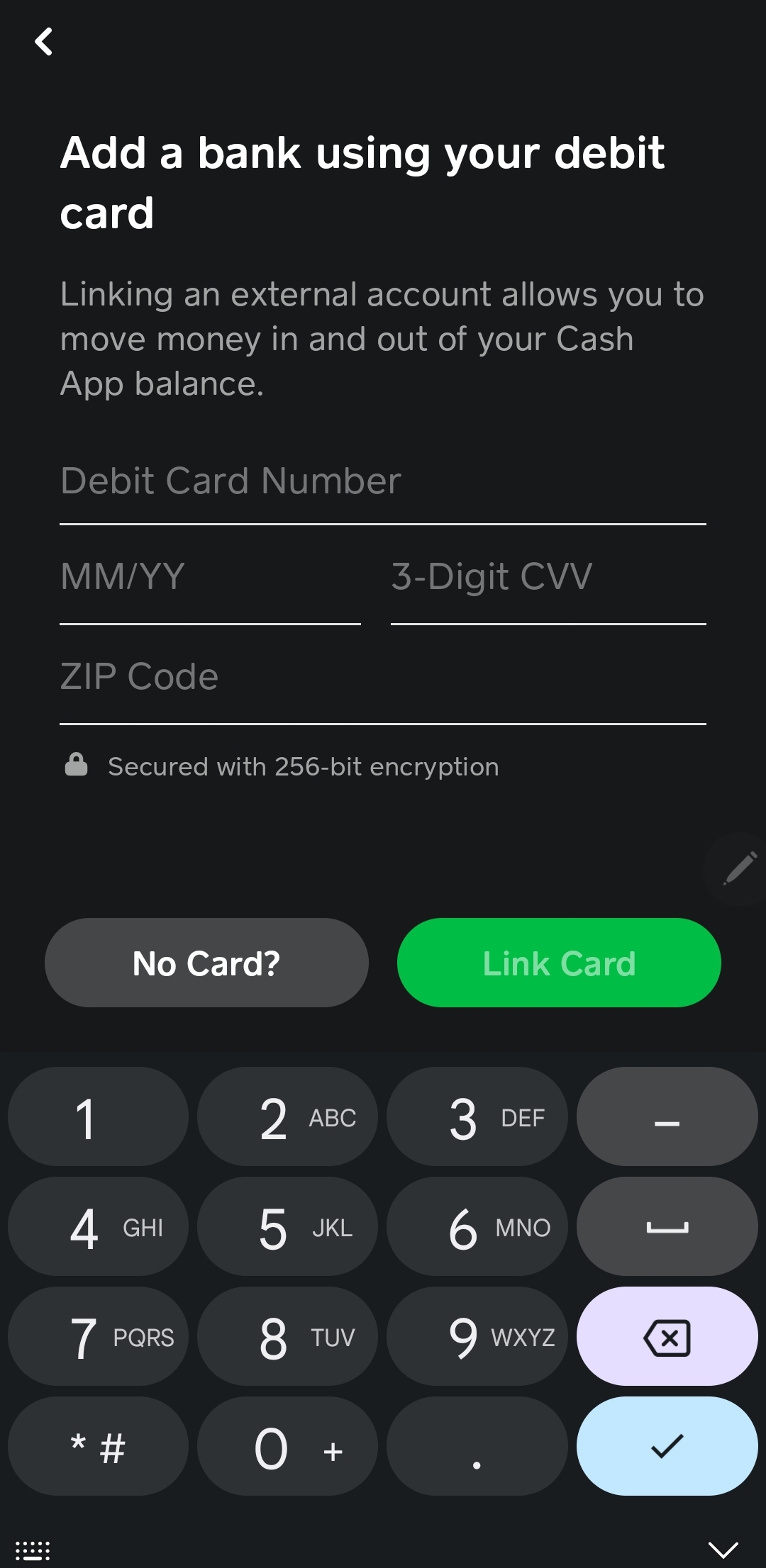
This is by far the most common and versatile method for adding funds to your Cash App balance. If your cash is already in a traditional bank account or you have a debit card linked to one, transferring it to Cash App is seamless.
How it Works:
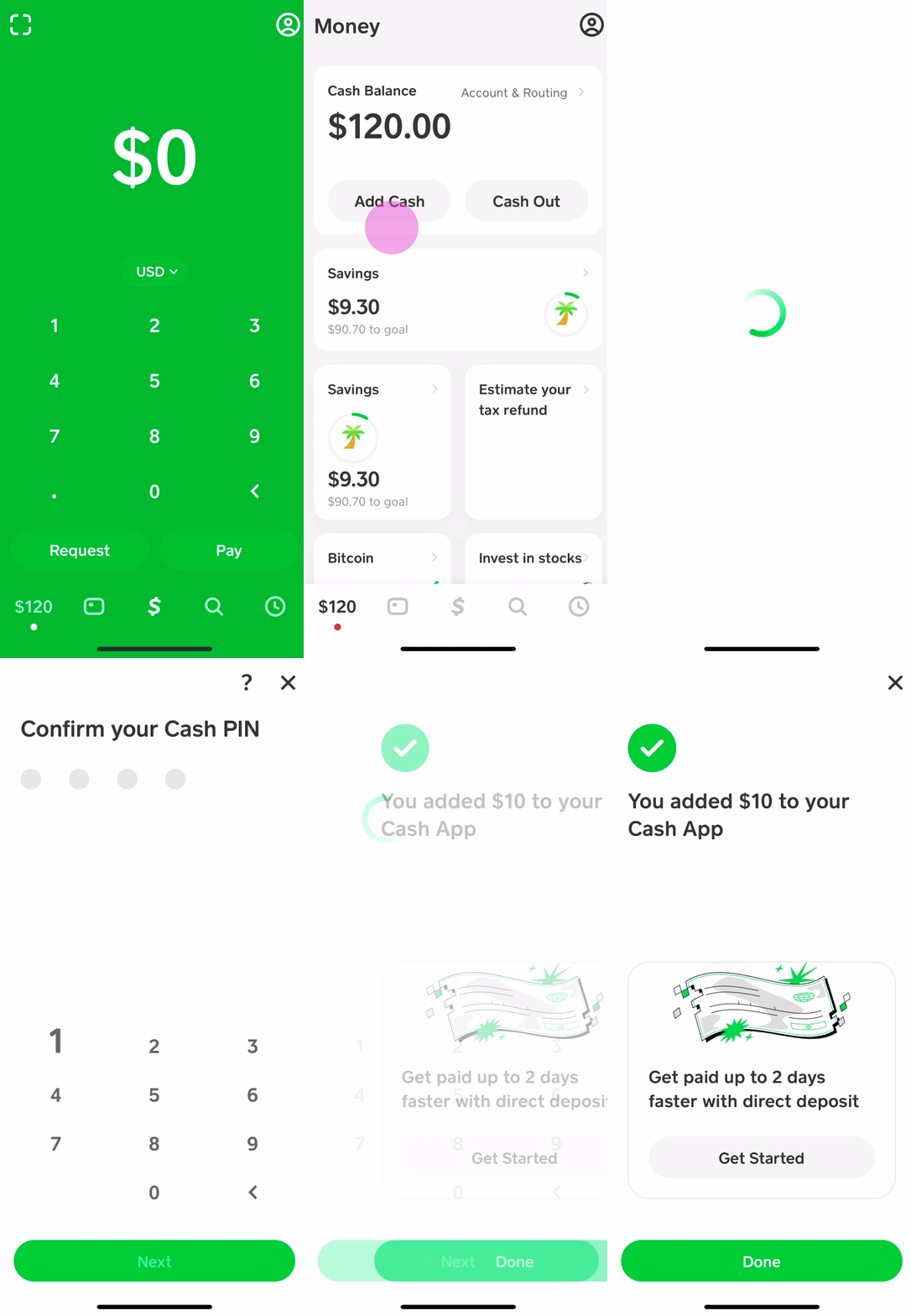
- Link Your Account: In Cash App, tap the “Banking” tab, then select “Link Bank” or “Add Debit Card.” You’ll typically be prompted to enter your bank’s login credentials (for bank account linking) or your debit card number, expiry date, and CVV.
- Add Cash: Once linked, tap the “Add Cash” button on the Banking tab.
- Enter the desired amount and tap “Add.” The funds will be transferred from your linked bank account or debit card directly to your Cash App balance.
Considerations:
- Speed: Transfers from a linked debit card are usually instant, though some banks may have limits. Transfers from a linked bank account can sometimes take 1-3 business days if not expedited.
- Fees: Most standard transfers from a linked bank account or debit card are free. Instant transfers from a linked debit card might incur a small fee (typically 0.5% – 1.75%) if you need the funds immediately, but standard transfers are free.
Receiving Funds from Other Cash App Users
Cash App’s primary function is peer-to-peer payments. If someone owes you money, they can send it directly to your Cash App account. This is a common way for users to receive funds, which then become part of their Cash App balance, ready for use with the Cash App Card.
How it Works:
- Share Your Cashtag or Phone Number/Email: Provide the sender with your unique $Cashtag, phone number, or email address linked to your Cash App account.
- Sender Initiates Payment: The sender opens their Cash App, taps the “$” icon, enters the amount, searches for your Cashtag/contact, and taps “Pay.”
- Receive Funds: The funds will appear almost instantly in your Cash App balance.
Considerations:
- No Fees: Typically, there are no fees for sending or receiving standard peer-to-peer payments.
- Versatility: Excellent for splitting bills, receiving money from friends or family, or even getting paid for small tasks.
Direct Deposit for Paychecks/Benefits
For regular income, setting up direct deposit to your Cash App account is an incredibly efficient way to fund your balance. This bypasses the need to handle physical cash entirely, as your paycheck or government benefits go straight into your digital wallet.
How it Works:
- Access Account & Routing Numbers: In Cash App, tap the “Banking” tab (the house icon).
- Locate “Direct Deposit” and tap “Get Account Number.” Cash App will provide you with a unique routing number and account number.
- Provide to Payer: Give these details to your employer’s payroll department or the relevant benefits provider. They will then route your future payments directly to your Cash App account.
Benefits:
- Early Access: Cash App often offers early access to direct deposit funds, sometimes up to two days before traditional banks.
- Convenience: Fully automates the process of funding your account with regular income.
- No Fees: Setting up and receiving direct deposits is free.
Selling Goods or Services
If you operate a small business, offer freelance services, or sell items casually, you can use Cash App to receive payments from customers. This converts income generated from sales directly into your Cash App balance.
How it Works:
- Accept Payments: Provide your $Cashtag or generate a payment request to your customers.
- Funds Received: Once a customer sends payment, the funds are added to your Cash App balance.
Considerations:
- Business Use: While standard peer-to-peer transactions are free, Cash App may classify certain regular, high-volume payments as business transactions, which might incur a small fee (typically 2.75%) for the seller.
- Tax Implications: Remember to keep track of income received through Cash App for tax purposes, especially if it’s related to business activities.
Best Practices and Important Considerations
Utilizing Cash App for cash deposits and overall financial management comes with its own set of best practices and crucial considerations. Adhering to these will ensure a smoother, more secure, and cost-effective experience.
Understanding Fees and Limits
Being aware of the financial implications and operational boundaries of Cash App is vital.
- Retail Deposit Fees: As mentioned, expect a small fee (typically $1-$5) for each paper money deposit at a retail location. These fees are set by the retailer and are in addition to the amount you deposit.
- Instant Transfer Fees: While standard transfers from linked bank accounts are free, if you need funds moved instantly from your linked debit card to your Cash App balance, a fee (usually 0.5% to 1.75% of the transaction) will apply. Consider if the urgency justifies the cost.
- ATM Withdrawal Fees: While Cash App provides free ATM withdrawals if you receive $300 or more in direct deposits each month, otherwise, it charges a $2.50 fee for out-of-network ATMs, in addition to any fees levied by the ATM operator.
- Deposit Limits: Cash App imposes limits on how much money you can add to your account, both through cash deposits and digital transfers. These limits can be daily, weekly, or monthly. Unverified accounts typically have lower limits. Always check your current limits within the app, especially before attempting a large transaction, to avoid disappointment.
Security and Fraud Prevention
Protecting your Cash App account and funds should be a top priority.
- Strong, Unique Passwords: Use a complex password that isn’t easily guessed and is unique to your Cash App account.
- Enable Two-Factor Authentication (2FA): This adds an extra layer of security, requiring a code from your phone in addition to your password to log in or authorize transactions.
- Be Wary of Scams: Cash App is a frequent target for scammers. Never share your login credentials, PIN, or verification codes with anyone. Be suspicious of unsolicited requests for money or offers that seem too good to be true, especially those claiming to be from “Cash App support.” Cash App will never ask you for your PIN or to send money to “verify” your account.
- Public Wi-Fi Caution: Avoid accessing your Cash App account or conducting financial transactions over unsecured public Wi-Fi networks, as these can be vulnerable to eavesdropping.
- Monitor Transactions: Regularly review your transaction history within the app to spot any unauthorized activity immediately.
What to Do If You Encounter Issues
Despite best practices, issues can sometimes arise. Knowing how to seek help is important.
- In-App Support: The most effective way to get support is directly through the Cash App. Tap the profile icon on your home screen, scroll down, and select “Support” or “Cash App Support.” You can then browse articles or initiate a chat with a support representative.
- Reporting Scams/Fraud: If you suspect fraudulent activity or believe you’ve been scammed, use the in-app support to report it immediately. Time is often critical in these situations.
- Checking Transaction Status: If a deposit or transfer doesn’t appear as expected, first double-check your transaction history and ensure the funds weren’t reversed or are simply pending. If the issue persists, contact support.
- Keep Records: For cash deposits at retailers, always keep the physical receipt provided by the cashier until the funds are confirmed in your Cash App balance. This serves as proof of deposit if there’s a discrepancy.
Conclusion
The question “where can I put cash on my Cash App Card?” reveals a common need in our evolving financial landscape. While Cash App is a digitally native platform, it offers robust solutions for bridging the gap between physical cash and your digital balance. The most direct and convenient method remains depositing paper money at participating retail stores like Walmart, Walgreens, and 7-Eleven, leveraging a simple barcode system. However, for those seeking alternatives, linking a traditional bank account or debit card provides seamless digital transfers, while receiving peer-to-peer payments or setting up direct deposit for your income offers a completely digital pathway to fund your account.
By understanding these diverse options, along with the associated fees, limits, and crucial security measures, Cash App users can confidently manage their funds, ensuring their physical cash is never a barrier to utilizing the full potential of their Cash App Card. This flexibility underscores Cash App’s commitment to empowering users with accessible and versatile financial tools, regardless of how their money initially enters their hands.
aViewFromTheCave is a participant in the Amazon Services LLC Associates Program, an affiliate advertising program designed to provide a means for sites to earn advertising fees by advertising and linking to Amazon.com. Amazon, the Amazon logo, AmazonSupply, and the AmazonSupply logo are trademarks of Amazon.com, Inc. or its affiliates. As an Amazon Associate we earn affiliate commissions from qualifying purchases.