
Cash App has become an indispensable financial tool for millions, offering a seamless way to send, receive, and manage money. A common question for both new and existing users revolves around the various methods available to deposit funds into their Cash App balance. Understanding these avenues is crucial for effective personal finance management, ensuring you can quickly and reliably fund your account when needed. From linking traditional bank accounts to utilizing physical cash at retail locations, Cash App provides several flexible options designed to cater to diverse financial habits.
Understanding Cash App’s Deposit Mechanisms
Cash App is designed to integrate fluidly with both digital banking and physical cash transactions, providing multiple pathways to fund your account. Each method offers distinct advantages in terms of speed, convenience, and accessibility. Familiarizing yourself with these options is the first step towards leveraging Cash App effectively as part of your personal finance strategy.
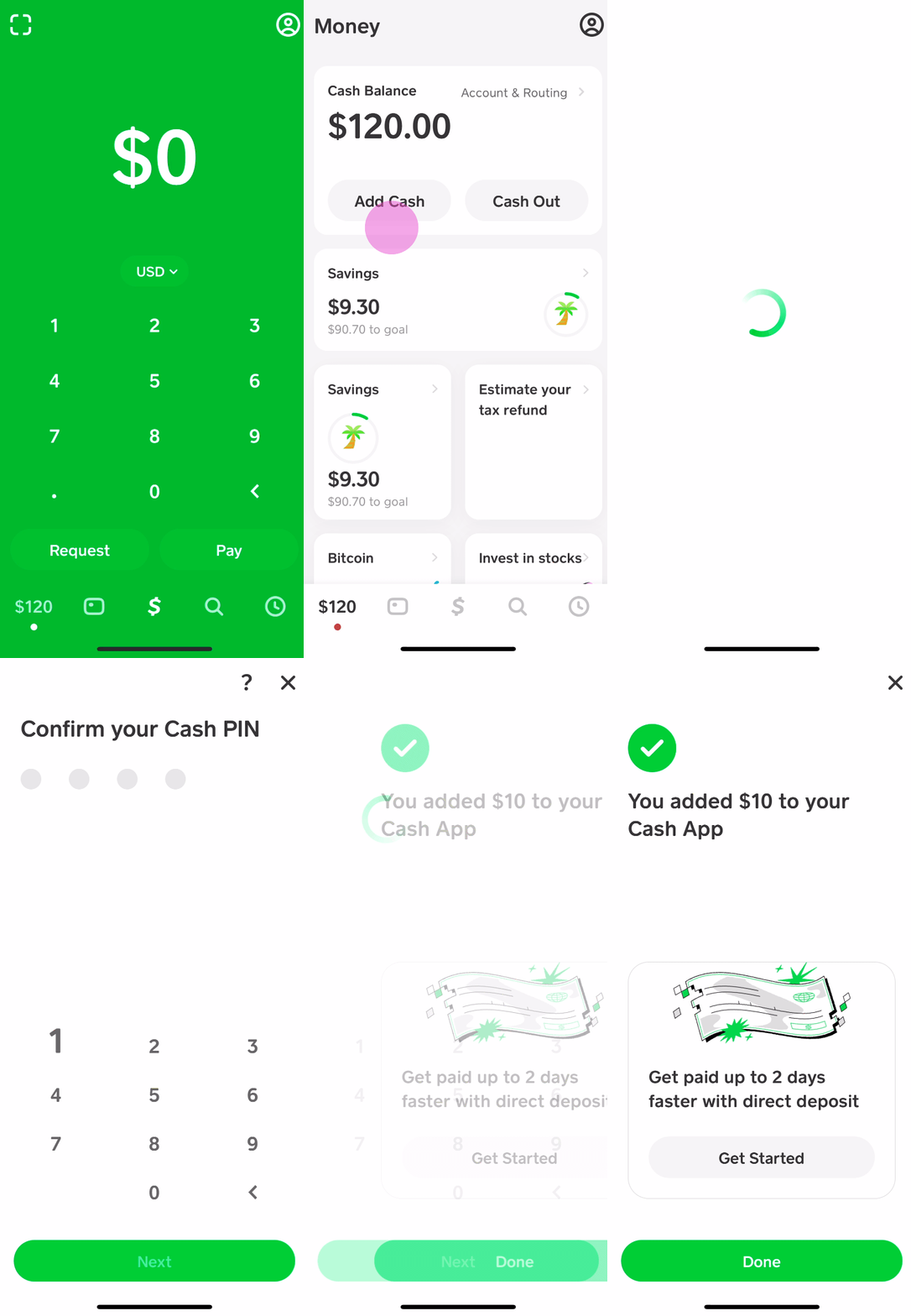
Direct Deposit from Your Bank Account
The most common and often preferred method for adding funds to Cash App involves linking an external bank account or debit card. This method leverages the existing infrastructure of traditional banking to transfer money digitally.
-
Debit Card Transfers: You can link a debit card from almost any major bank directly to your Cash App account. Once linked, you can initiate instant transfers from your linked bank account (via the debit card) to your Cash App balance. While many transfers are instant, some banks or transaction types might incur a small fee for instant deposits, with standard deposits usually being free but taking 1-3 business days.
-
Bank Account Linking: Beyond debit cards, you can directly link your bank account using your account and routing numbers. This is particularly useful for larger transfers or setting up recurring additions without relying on a debit card. This method typically follows standard Automated Clearing House (ACH) transfer timelines, which can take a few business days.
Adding Cash at Retail Locations
For individuals who prefer to deal in physical cash or need to deposit money without a linked bank account, Cash App offers a convenient solution through participating retail partners. This service allows you to convert physical currency into your digital Cash App balance.
-
How it Works: You can visit select retail stores, often including pharmacies, convenience stores, and general merchandise outlets, that partner with Cash App. At the register, you inform the cashier you wish to add cash to your Cash App. You will typically generate a unique barcode within the Cash App on your phone, which the cashier scans. You then hand over the cash, and it is digitally added to your Cash App balance, usually instantly.
-
Benefits: This method is ideal for those who get paid in cash, prefer managing physical money, or need to fund their account quickly without a bank transfer. It extends Cash App’s utility to a broader demographic, including the unbanked or underbanked.
Receiving Money from Others
While not a “deposit” in the traditional sense of adding your own funds, receiving money from other Cash App users is a primary way to accumulate a balance. This peer-to-peer (P2P) transfer functionality is a cornerstone of the app’s appeal.
-
Seamless Transfers: Other Cash App users can send money directly to your $Cashtag or phone number/email associated with your account. These funds typically appear in your Cash App balance almost instantly.
-
Utility: This method is perfect for splitting bills, receiving payments from friends or family, or even getting paid for goods and services if you use Cash App for business transactions.
Step-by-Step Guide to Adding Cash at Stores
Adding physical cash to your Cash App account at a retail location is a straightforward process, but knowing the exact steps can ensure a smooth transaction. This method is particularly useful when you need to fund your account immediately without relying on a bank transfer.
Finding Participating Retailers
Before heading out, it’s wise to confirm which stores in your vicinity offer Cash App cash deposits. Not all retailers are partners.
-
Open Cash App: Launch the Cash App on your smartphone.
-
Navigate to Banking Tab: Tap the “Banking” tab (the house icon) on the home screen.
-
Select “Deposit Cash”: Look for the “Deposit Cash” option.
-
Locate Nearby Stores: Cash App will typically use your location services to display a map or list of nearby participating retail locations. Common partners often include Walgreens, Dollar General, Walmart, CVS, and others. Always check the app for the most up-to-date list.
The Deposit Process
Once you’ve identified a participating store, the actual deposit is quick and easy.
-
Inform the Cashier: At the checkout counter, tell the cashier you want to “add cash to your Cash App.” Some cashiers may be more familiar with “Green Dot” deposits, as Cash App often partners with Green Dot for these services.
-
Generate Barcode: In the Cash App, after selecting “Deposit Cash,” you’ll see an option to “Show Barcode.” Tap this to display a unique barcode on your screen.
-
Cashier Scans Barcode: Present your phone with the barcode to the cashier. They will scan it using their point-of-sale system.
-
Hand Over Cash: Give the cashier the exact amount of cash you wish to deposit. Most retailers cannot provide change for Cash App deposits, so ensure you have the precise amount.
-
Confirm Deposit: The cashier will process the transaction. You should receive a notification on your Cash App almost immediately confirming the deposit. The funds will then be available in your Cash App balance. Always keep your receipt from the store as proof of the transaction.
Fees and Limits to Consider
While highly convenient, there are typically some important details regarding fees and limits for cash deposits:
-
Fees: Many retail locations charge a small fee for this service, often around $1.00 to $4.00 per transaction. This fee is typically deducted from the amount you deposit or added to the transaction total. It’s crucial to confirm any fees with the store or check the Cash App’s terms of service.
-
Deposit Limits: Cash App imposes limits on how much cash you can deposit within a certain timeframe. These limits can vary but often include daily, weekly, and monthly caps (e.g., $500 per deposit, $1,000 per day, $4,000 per week). These limits are in place for security and regulatory compliance. Always check your app for your specific limits, as they can sometimes be adjusted based on account verification status.
Linking External Bank Accounts and Debit Cards
Integrating your traditional bank accounts and debit cards with Cash App forms the backbone of its functionality for many users. This linkage facilitates seamless digital transfers, providing a robust pathway for funding your Cash App balance from your existing financial ecosystem.
Why Link an Account?
Linking an external bank account or debit card offers several strategic advantages for managing your money with Cash App:
-
Convenience: Easily transfer funds from your primary bank account to your Cash App balance without leaving the app. This is ideal for quick top-ups before making a purchase or sending money to a friend.
-
Flexibility: Use your linked debit card to make instant deposits, or connect your bank account directly for standard transfers, offering choices based on urgency and fee preferences.
-
Full Functionality: Many advanced features of Cash App, such as direct deposit of paychecks or recurring transfers, rely on a securely linked external account.
-
Security: Cash App employs encryption and security measures to protect your financial information, making linked accounts a safe option for managing your funds.

How to Link Your Bank or Debit Card
The process for linking your financial institutions is designed to be user-friendly and secure.
-
Open Cash App: Navigate to the “Banking” tab (the house icon) on the main screen.
-
Add Bank/Card:
-
For Debit Card: Tap “Link Bank” or the linked card icon, then choose “Link Debit Card.” You’ll be prompted to enter your debit card number, expiration date, CVV, and ZIP code.
-
For Bank Account (via account/routing numbers): Tap “Link Bank” and look for an option to link manually or connect using your bank’s online credentials. If linking manually, you will enter your bank’s routing number and your account number. Cash App may perform small verification deposits and withdrawals to confirm ownership.
-
-
Verification: Follow any on-screen prompts for verification. This often involves securely logging into your bank through Cash App’s integration partner (like Plaid) or verifying micro-deposits sent to your account.
-
Confirm: Once verified, your bank account or debit card will appear as a linked payment method in your Cash App profile.
Instant vs. Standard Deposits
When transferring money from a linked bank account via a debit card, you typically have two options:
-
Instant Deposit: Funds are available in your Cash App balance immediately. While incredibly convenient, Cash App usually charges a small fee (e.g., 0.5% – 1.75%) for instant deposits. This fee is clearly displayed before you confirm the transaction.
-
Standard Deposit: Funds are transferred to your Cash App balance within 1-3 business days. This option is generally free of charge. It’s suitable for non-urgent top-ups or larger transfers where the immediate availability of funds isn’t critical.
Choosing between instant and standard deposits depends on your immediate needs and willingness to pay a small convenience fee.
Advanced Deposit Strategies and Best Practices
Maximizing the utility of Cash App for your personal finance involves more than just knowing how to deposit money; it’s about employing smart strategies to manage your funds efficiently, securely, and cost-effectively.
Using Direct Deposit for Paychecks
One of Cash App’s most powerful features is its ability to accept direct deposits, transforming it into a viable alternative or supplement to a traditional bank account for receiving income.
-
How it Works: Cash App provides you with unique routing and account numbers, similar to a traditional bank account. You can provide these details to your employer, government agencies (for benefits), or other payers to have funds deposited directly into your Cash App balance.
-
Benefits:
-
Faster Access: Often, funds become available in your Cash App balance up to two days earlier than traditional banks.
-
Convenience: Your paycheck goes directly into your app, ready for use, sending, or spending with your Cash Card.
-
Budgeting: It can serve as a dedicated account for certain income streams, helping you manage specific budget categories within the app.
-
-
Setup: Access your Cash App profile, go to the “Banking” or “Direct Deposit” section, and you’ll find your account and routing numbers. You can also print or email a pre-filled direct deposit form to your employer.
Managing Deposit Limits Effectively
All financial platforms, including Cash App, implement deposit limits for security and regulatory compliance. Being aware of these limits is essential for seamless money management.
-
Understanding Your Limits: Cash App typically has daily, weekly, and monthly limits for various deposit methods (e.g., cash deposits at retailers, transfers from linked debit cards). These limits can sometimes be increased by fully verifying your identity within the app (providing your full name, date of birth, and the last four digits of your SSN).
-
Planning Ahead: If you anticipate needing to deposit a large sum, check your current limits in the app. You might need to spread out deposits over several days or weeks, or consider alternative methods for very large transactions if Cash App’s limits don’t meet your needs.
-
Verification for Higher Limits: Fully verifying your identity often unlocks higher deposit and withdrawal limits, providing greater flexibility for your financial transactions. This is a best practice for any serious Cash App user.
Security Considerations for Deposits
While Cash App is designed with security in mind, users play a critical role in protecting their funds, especially during the deposit process.
-
Protect Your Barcode: When depositing cash at a retailer, ensure your barcode is only scanned by the official cashier and remains private. Do not share it with unauthorized individuals.
-
Secure Linked Accounts: Only link bank accounts and debit cards that you own and control. Regularly review your linked accounts in the Cash App settings.
-
Monitor Transactions: Regularly check your Cash App activity feed for any unauthorized transactions or suspicious deposit patterns. Report any discrepancies immediately.
-
Strong Passwords and PINs: Use a strong, unique PIN or enable fingerprint/Face ID authentication for your Cash App to prevent unauthorized access to your funds and deposit capabilities.
-
Beware of Scams: Be cautious of requests to deposit money for unknown parties or promises of unrealistic returns. Scammers often exploit peer-to-peer apps. Only deposit money for transactions you trust.
Troubleshooting Common Deposit Issues
Even with the best planning, occasional issues can arise when depositing money into your Cash App account. Understanding common problems and their solutions can save you time and frustration.
Transaction Declines
A declined transaction is one of the most common issues. This can happen for several reasons:
-
Insufficient Funds: The most straightforward reason is often that your linked bank account or debit card does not have enough funds to cover the deposit amount. Always check your bank balance before initiating a transfer.
-
Incorrect Information: If you’ve recently updated your debit card (e.g., new expiration date) or bank account details, ensure they are updated in Cash App. Incorrect card numbers, CVV, or expiration dates will lead to declines.
-
Bank Restrictions: Your bank might flag large or frequent transfers to Cash App as suspicious activity for security reasons. Contact your bank to confirm the transaction and lift any temporary holds.
-
Cash App Limits: You might have exceeded your daily, weekly, or monthly deposit limits for the chosen method. Check your limits within the app.
-
Retailer Issues (for cash deposits): The retailer’s system might be down, the cashier might be unfamiliar with the process, or there could be a specific store policy preventing the deposit. Try another participating location if possible.
Delays in Funds Availability
While many deposits are instant, sometimes funds can take longer to appear in your account.
-
Standard Transfers: If you chose a standard (free) bank transfer, expect it to take 1-3 business days. Weekends and holidays do not count as business days.
-
Bank Processing Times: Even “instant” transfers can sometimes experience brief delays due to bank processing or network issues, though this is rare.
-
Verification Pending: For first-time large deposits or new account linkages, Cash App or your bank might hold funds temporarily while verifying the transaction for security.
-
Direct Deposit Timing: While direct deposits can arrive “up to two days early,” this is not guaranteed and depends on when your employer’s payroll system initiates the transfer. If a holiday falls on a payday, it can also affect timing.
Missing Deposits
A truly “missing” deposit where funds left your source but didn’t appear in Cash App requires more detailed investigation.
-
Check Transaction History: First, thoroughly review your Cash App activity feed and your bank statement to confirm the transaction status. Look for a successful debit from your bank and a corresponding credit in Cash App.
-
Receipt Confirmation: If it was a cash deposit, ensure you have the receipt from the retailer as proof of the transaction.
-
Contact Support: If you’ve confirmed the funds left your source but are not in Cash App after the expected processing time, contact Cash App support directly. Be ready to provide transaction details, dates, amounts, and any relevant screenshots or receipts.
-
Bank Investigation: For bank transfers, you might also need to contact your bank to initiate a trace on the funds if Cash App support requires it.
By understanding these deposit methods and best practices, users can confidently manage their funds within Cash App, leveraging its capabilities to streamline their personal finances.
aViewFromTheCave is a participant in the Amazon Services LLC Associates Program, an affiliate advertising program designed to provide a means for sites to earn advertising fees by advertising and linking to Amazon.com. Amazon, the Amazon logo, AmazonSupply, and the AmazonSupply logo are trademarks of Amazon.com, Inc. or its affiliates. As an Amazon Associate we earn affiliate commissions from qualifying purchases.