
In the landscape of modern instant messaging, Meta’s Messenger stands as one of the most sophisticated communication protocols in the world. For the average user, the subtle shift from a hollow blue circle to a filled one might seem like a minor aesthetic detail. However, these icons represent complex technical handshakes occurring between client-side applications and centralized servers. Understanding the distinction between “Sent” and “Delivered” is not just about social etiquette; it is a window into how distributed systems manage data, ensure low latency, and navigate the intricacies of global network connectivity.

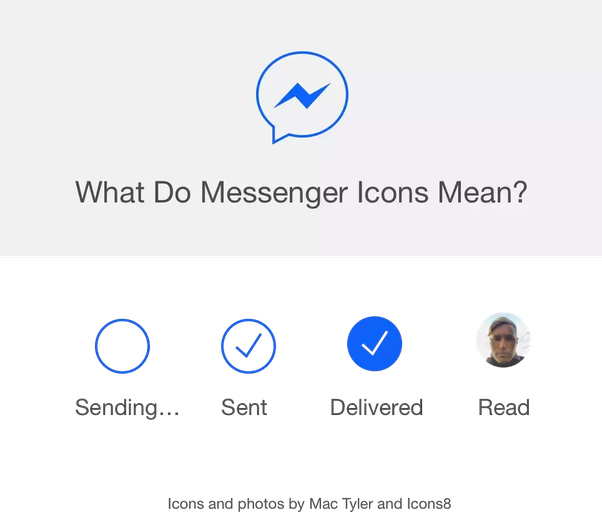
The architecture of Messenger is designed to provide real-time feedback loops. These status indicators—Sending, Sent, Delivered, and Read—are the user-facing manifestations of a multi-stage delivery pipeline. Each stage confirms that a specific set of technical requirements has been met, from the local device’s radio transmission to the recipient’s hardware acknowledgment.
The Technical Lifecycle of a Message: From Local Cache to Cloud
To understand the difference between these two states, one must first look at the journey of a data packet. When you tap the send button, the message begins a journey through several layers of the Open Systems Interconnection (OSI) model, specifically focusing on the Application, Transport, and Network layers.
The “Sent” Status: Server-Side Acknowledgment
The “Sent” status is represented by a blue circle with a white checkmark. From a technical standpoint, this indicates that the message has successfully left your device and has been received and indexed by Meta’s servers.
When you hit send, the Messenger app attempts to establish or utilize an existing WebSocket connection to the server. If the connection is stable, the message is uploaded. Once the server confirms receipt—meaning the data is now stored in Meta’s distributed database (often utilizing technologies like HBase or similar NoSQL structures for high-speed ingestion)—it sends an acknowledgment (ACK) back to the sender’s device.
At this point, the sender’s UI updates to “Sent.” This stage confirms that your hardware, your local ISP/cellular provider, and the Messenger gateway are all functioning correctly. However, it does not account for the recipient’s status. The message is essentially sitting in a “digital post office,” waiting for the recipient to come online and claim it.
The “Delivered” Status: Client-Side Acknowledgment
The “Delivered” status is indicated by a filled blue circle with a white checkmark. This is a more advanced stage of the pipeline. It signifies that the message has not only reached the server but has also been successfully pushed to the recipient’s device.
For a message to be marked as delivered, the recipient’s device must be active or have a background process capable of receiving push notifications. The server initiates a “push” to the recipient’s device via Apple Push Notification service (APNs) for iOS or Firebase Cloud Messaging (FCM) for Android. Once the recipient’s app receives the data packet, it sends a receipt confirmation back to the server. The server then relays this confirmation to the sender.
It is important to note that “Delivered” does not mean the person has looked at their phone. It simply means the bits and bytes have arrived at the destination hardware and are sitting in the app’s local memory or the system’s notification tray.
The “Read” Status: The Final Interaction
The final stage occurs when the recipient opens the specific conversation thread. The app triggers a “read receipt” event, which replaces the delivery icon with a small version of the recipient’s profile picture. This is a client-side trigger that confirms the application was in the foreground and the specific message was rendered on the screen.
Why a Message Stays “Sent” But Not “Delivered”
One of the most common points of confusion for users is when a message remains in the “Sent” state for an extended period. This discrepancy is rarely a software “bug” and is almost always a result of technical barriers between the server and the recipient’s device.
Network Connectivity and Hardware States
The most frequent cause for a message failing to reach “Delivered” status is the recipient’s network environment. If the recipient’s phone is in Airplane Mode, turned off, or in an area with zero cellular/Wi-Fi reception, the server cannot establish a handshake with the device.
Modern smartphones also employ aggressive power management systems. If a device is in a “Deep Sleep” or “Low Power Mode,” the operating system may throttle background data. In these instances, the Messenger app might not be allowed to wake up and acknowledge the message receipt until the user manually wakes the device or plugs it into a power source.

App Backgrounding and Operating System Restrictions
Operating systems like iOS and Android have evolved to prioritize battery life over instant connectivity. If a user has “Background App Refresh” disabled for Messenger, the app cannot communicate with the server unless it is actively open on the screen.
Furthermore, if the recipient has logged out of the Messenger app but still has the Facebook app installed, or if they are using an outdated version of the software, the delivery confirmation logic may fail. The server may have the message ready, but the client-side software is not responding to the “ping” required to flip the status from Sent to Delivered.
Software Filtering: Ignored and Restricted Accounts
From a software design perspective, Messenger includes features that intentionally manipulate delivery receipts to protect user privacy. If a user “Restricts” another person or moves their conversation to “Message Requests,” the delivery behavior changes.
In these scenarios, the sender might see the message as “Sent” because it has reached the server. However, Meta may withhold the “Delivered” status to prevent the sender from knowing if the recipient is active or has seen the message in their filtered inbox. This is a deliberate design choice to mitigate harassment and allow users to manage their digital boundaries without social pressure.
The Impact of End-to-End Encryption (E2EE)
As Meta transitions Messenger toward default End-to-End Encryption (E2EE), the technical definition of “Sent” and “Delivered” becomes even more rigorous. In a standard (non-E2EE) chat, the server acts as an intermediary that can “read” the metadata of the delivery. In an E2EE environment, the message is encrypted with a public key on the sender’s device and can only be decrypted with a private key on the recipient’s device.
Signal Protocol Integration
Messenger’s E2EE utilizes a version of the Signal Protocol. When a message is “Sent” in an encrypted chat, the server stores a blob of encrypted data. It cannot verify the contents, but it still manages the delivery receipt. The “Delivered” icon in an E2EE chat is a cryptographic confirmation that the recipient’s device has downloaded the encrypted packet and has the necessary keys to attempt decryption.
This adds a layer of complexity because if a recipient changes devices (and thus their hardware-based encryption keys), the “Delivered” status might lag as the system renegotiates the “Identity Key” for that specific session. This is why you may sometimes see a “Waiting for this message” prompt in encrypted chats, which directly affects the transition from Sent to Delivered.
Troubleshooting and Technical Discrepancies
For power users and those relying on Messenger for business or critical communication, understanding how to troubleshoot these statuses is essential.
Cache and Sync Issues
Sometimes, a message may have been delivered or even read, but the sender’s UI still shows it as “Sent.” This is typically a synchronization error between the local client cache and the server’s state. Clearing the app cache or force-closing the application forces the client to re-poll the server for the most recent message metadata, which usually corrects the icon.
Cross-Platform Latency
Messenger operates across web browsers, desktop applications (Windows/macOS), and mobile apps. Each of these platforms uses slightly different methods for maintaining active connections. For instance, the web version (Messenger.com) relies on “Long Polling” or WebSockets within the browser’s sandbox. If you send a message from a desktop, but the recipient is only using a mobile device with poor push notification settings, the delay between “Sent” and “Delivered” may be more pronounced due to the bridge between the different notification architectures.
The Evolution of Messaging Protocols
The distinction between “Sent” and “Delivered” is a hallmark of the “Store-and-Forward” messaging model. As we look toward the future of communication, such as the adoption of RCS (Rich Communication Services) and the interop requirements mandated by the EU’s Digital Markets Act (DMA), these status indicators will become standardized across different apps.
The goal of these technical indicators is to reduce “information asymmetry.” By providing granular data on the status of a message, software developers empower users to understand the reliability of their digital tools. Whether it is a server-side ACK or a client-side push confirmation, the journey from a hollow circle to a filled one is a testament to the incredible speed and complexity of the modern global data grid. Knowing the difference allows users to distinguish between a technical failure, a network dead zone, or a simple delay in human response.
aViewFromTheCave is a participant in the Amazon Services LLC Associates Program, an affiliate advertising program designed to provide a means for sites to earn advertising fees by advertising and linking to Amazon.com. Amazon, the Amazon logo, AmazonSupply, and the AmazonSupply logo are trademarks of Amazon.com, Inc. or its affiliates. As an Amazon Associate we earn affiliate commissions from qualifying purchases.