
In the dynamic landscape of digital productivity, Microsoft Word has stood as the quintessential word processing software for decades. Its evolution mirrors the broader trajectory of technology – from standalone desktop applications to integrated cloud services powered by artificial intelligence. For users seeking to leverage the most advanced features and maintain peak efficiency, understanding the “newest version” of Word isn’t as simple as checking a single release date. It involves discerning between different licensing models and the continuous innovation cycles that define modern software development. This article delves into the contemporary state of Microsoft Word, guiding you through its latest iterations and what they mean for your productivity workflow.

Understanding Microsoft Word’s Evolution: From Perpetual to Perpetual Motion
The concept of a “newest version” for software like Word has undergone a significant transformation. Historically, users would purchase a specific version, like “Word 2003” or “Word 2010,” and that software would remain static until a new numbered release was bought. Today, while perpetual licenses still exist, the primary model for accessing the latest features is through a subscription service.
The Perpetual License Model: Office 2021
Microsoft still offers traditional, one-time purchase versions of its Office suite, including Word. The most recent of these is Office 2021. This model is straightforward: you buy the software once, and it’s yours forever, installed directly on your computer. However, it’s crucial to understand that Office 2021, while the latest perpetual license, does not receive ongoing feature updates. It will only receive security updates and bug fixes for its supported lifecycle. Its feature set is locked to what was available at its release.
The Subscription Model: Microsoft 365
For the vast majority of users, and especially those seeking the absolute newest features and capabilities, Microsoft 365 represents the current frontier. Microsoft 365 is a subscription service that includes the full suite of Office applications (Word, Excel, PowerPoint, Outlook, etc.), alongside cloud services like OneDrive, Teams, and additional premium features. The key differentiator here is that Microsoft 365 is a continually updated service. This means that “the newest version of Word” under a Microsoft 365 subscription is whatever the current, most up-to-date build is at any given moment, complete with the latest features, security patches, and performance enhancements automatically pushed to users.
Cloud Integration and Cross-Platform Accessibility
A significant aspect of Microsoft 365, and thus the newest Word experience, is its deep integration with the cloud. Documents are seamlessly stored and synced with OneDrive, enabling access from any device – be it a desktop, laptop, tablet, or smartphone – through the full desktop apps, web browser versions, or dedicated mobile apps. This pervasive accessibility ensures that productivity is no longer tethered to a single machine or location, a stark contrast to the earlier, purely desktop-centric Word versions.
Microsoft 365: The Continually Evolving Word
For those seeking the cutting edge, Microsoft 365 is unequivocally where the “newest version” resides. This ecosystem provides a dynamic and ever-improving Word experience, prioritizing collaboration, intelligence, and accessibility.
Benefits of a Microsoft 365 Subscription
Beyond just having the latest software, a Microsoft 365 subscription brings a host of advantages. These include 1 TB of OneDrive cloud storage per user (for up to 6 users in a Family plan), advanced security features in Outlook and OneDrive, and access to premium features in all Office apps. For Word specifically, this translates into advanced editing tools, richer template libraries, and more sophisticated research capabilities. The value proposition extends beyond the individual application, fostering an integrated environment designed for modern workflows.
AI-Powered Features for Enhanced Productivity
One of the most exciting aspects of Word within Microsoft 365 is the continuous integration of Artificial Intelligence. These intelligent features are designed to streamline document creation, enhance writing quality, and simplify complex tasks:
Microsoft Editor
More than just a spell checker, Microsoft Editor is an AI-powered writing assistant that works across Word, Outlook, and your browser. It offers sophisticated suggestions for grammar, spelling, punctuation, clarity, conciseness, formality, inclusivity, and even vocabulary. It can help refine your prose, making your writing more professional and impactful. This feature is constantly being refined, learning and adapting to provide more intelligent feedback.
Dictate and Transcribe
Word’s Dictate feature allows you to use your voice to type, a massive boon for accessibility and speed. Building on this, the Transcribe feature takes audio recordings (from your device or uploaded files) and converts them into written text directly within Word, even separating speakers. This is invaluable for transcribing meetings, interviews, or lectures, saving countless hours of manual transcription. These AI-driven tools significantly reduce the effort required for initial document creation and content generation.
Translator
For a globally connected world, Word’s built-in Translator allows you to translate entire documents or selected text into various languages directly within the application, maintaining the original formatting. This capability leverages Microsoft’s extensive AI translation services, making cross-lingual communication and document sharing far more accessible.
Regular Updates and New Features
Unlike the static Office 2021, Microsoft 365 subscribers benefit from monthly (or semi-annual, depending on channel) feature updates. This means that new tools, improved interfaces, and enhanced functionalities are regularly rolled out, ensuring users always have access to the latest innovations without needing to purchase a new version. This continuous delivery model ensures that Word remains a cutting-edge tool, adapting to evolving user needs and technological advancements.
Office 2021: The Latest Perpetual License Option
While Microsoft 365 represents the future of Office, Office 2021 holds a vital place for specific user segments. It is the latest iteration of the traditional, one-time purchase model for those who prefer to own their software outright.
Who is Office 2021 For?
Office 2021 is primarily targeted at users who:
-
Prefer a one-time purchase: Those who dislike subscription models and prefer to pay once for a software license.
-
Have specific IT or regulatory requirements: Some organizations might prefer fixed software versions for easier compliance or IT management, avoiding continuous feature updates.
-
Have limited internet access: While an internet connection is needed for initial activation, Office 2021 does not require ongoing internet access for feature updates or cloud services (as it doesn’t receive the former and doesn’t rely on the latter as heavily as Microsoft 365).
-
Don’t need advanced cloud features or AI: Users whose needs are met by the core functionalities of Word and don’t require the collaborative cloud features, AI assistance, or vast cloud storage of Microsoft 365.
Key Features Compared to Microsoft 365
Office 2021 includes many of the improvements that were integrated into Microsoft 365 up until its release date. This includes co-authoring capabilities (with cloud storage), new ink tools, updated media stock content, and an improved accessibility checker. However, it notably lacks the dynamic, AI-powered features like Microsoft Editor’s advanced suggestions, Dictate, Transcribe, and the constant stream of new functionalities. It also doesn’t include the 1 TB OneDrive storage, premium app templates, or advanced security features that come with a Microsoft 365 subscription.
One-Time Purchase vs. Subscription: A Value Proposition
The choice between Office 2021 and Microsoft 365 boils down to a value proposition. Office 2021 offers a fixed cost and a static feature set. Microsoft 365 offers a recurring cost but provides continuous innovation, cloud services, and premium features that continuously enhance the user experience. Over several years, the cumulative cost of Microsoft 365 might exceed the initial purchase of Office 2021, but it delivers a significantly richer, more current, and adaptable software experience.
Navigating Your Word Version and Upgrade Paths
Knowing which version of Word you’re running and understanding how to upgrade is essential for staying productive and secure.
How to Check Your Current Version
To check your Word version:
-
Open any Word document.
-
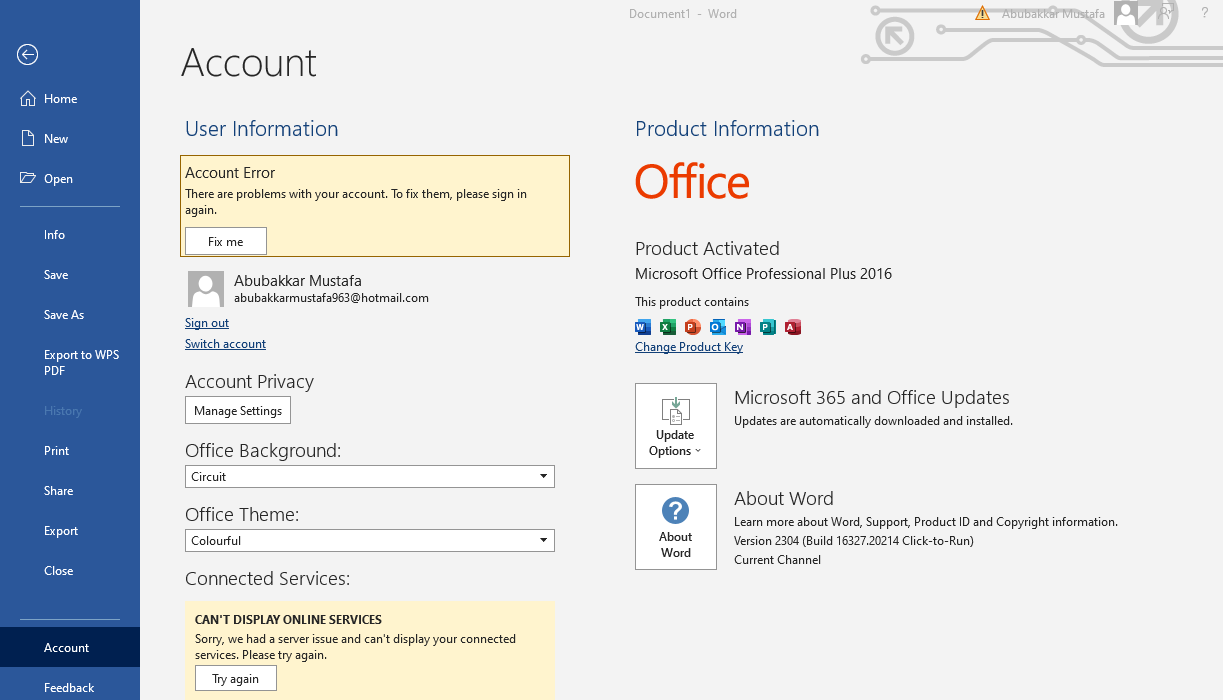
Go to File > Account (or Office Account).
-
Under “Product Information,” you’ll see your version and whether it’s part of “Microsoft 365” or a specific “Office 20xx” release. You’ll also see the specific build number and update channel.
This information is crucial for troubleshooting, ensuring compatibility, and determining if you’re benefiting from the latest updates.
Upgrading Options: Microsoft 365 vs. Office 2021
If you’re on an older perpetual license (e.g., Office 2016 or 2019), you have two primary upgrade paths to access the newest features:
-
Subscribe to Microsoft 365: This is the recommended path for most users. It provides immediate access to the latest version of Word and the entire Office suite, along with cloud services and continuous feature updates. You simply choose a personal or family plan and install the software.
-
Purchase Office 2021: If a subscription doesn’t fit your needs, you can buy a standalone copy of Office Home & Business 2021 or Office Professional 2021. Remember, this is a one-time purchase with a fixed feature set.
Considerations for Businesses and Individuals
For individuals, Microsoft 365 Personal or Family generally offers the best value, providing the most up-to-date features and ample cloud storage. For small businesses, Microsoft 365 Business Basic, Standard, or Premium plans offer not only the latest Word but also powerful collaboration tools like Teams, enhanced security, and business-grade email services. Larger enterprises typically leverage volume licensing agreements for Microsoft 365 Enterprise, ensuring tailored deployment and management of the latest productivity tools across their organization.
The Future of Word and Document Creation
The trajectory of Word is clear: it’s moving towards an increasingly intelligent, collaborative, and cloud-first future. The “newest version” will always be the one that is most deeply integrated with these principles, leveraging emerging technologies to empower users.
The Rise of Web-Based Word and Collaborative Tools
The web version of Word (Word for the web) is continually improving, offering robust functionality directly in a browser. This, combined with real-time co-authoring capabilities across desktop, web, and mobile, signifies a shift towards truly collaborative document creation, where multiple users can work on the same document simultaneously, regardless of their location or device. This is a core strength of the Microsoft 365 ecosystem.
Integration with Other Microsoft Services
Word is not an isolated application but an integral part of a broader productivity suite. Its future will see even deeper integration with tools like Microsoft Teams (for meeting notes and collaborative document editing), Loop (for dynamic, component-based content that syncs across apps), and Power Automate (for automating document-related workflows). This interconnectedness enhances efficiency and creates a seamless experience across the Microsoft ecosystem.

The Role of AI in Document Productivity
Artificial Intelligence will continue to play an increasingly central role in Word. Beyond current features like Editor and Dictate, we can anticipate AI being used for more advanced content generation (e.g., summarizing documents, drafting initial outlines, generating meeting minutes), sophisticated data extraction and analysis within documents, and personalized writing assistance that adapts to individual styles and contexts. The newest version of Word will always be the one that best harnesses AI to make document creation faster, smarter, and more effective.
In conclusion, while Office 2021 is the latest perpetual license, the true “newest version” of Word, offering continuous innovation and cutting-edge features, is found within a Microsoft 365 subscription. This service model ensures users are always at the forefront of document technology, equipped with the tools to meet the demands of modern productivity.
aViewFromTheCave is a participant in the Amazon Services LLC Associates Program, an affiliate advertising program designed to provide a means for sites to earn advertising fees by advertising and linking to Amazon.com. Amazon, the Amazon logo, AmazonSupply, and the AmazonSupply logo are trademarks of Amazon.com, Inc. or its affiliates. As an Amazon Associate we earn affiliate commissions from qualifying purchases.