
In the rapidly evolving landscape of mobile and desktop computing, gaming has transitioned from a solitary pastime into a deeply interconnected social experience. For users within the Apple ecosystem, the backbone of this transformation is Game Center. Often misunderstood as a mere settings menu or a vestigial feature from earlier versions of iOS, Game Center is, in fact, a robust social gaming network that bridges the gap between hardware, software, and community.
Whether you are a casual player on an iPhone or a dedicated gamer on a Mac, Game Center provides the infrastructure for achievements, leaderboards, and multiplayer matchmaking. This article explores the technical evolution, core functionalities, and the strategic importance of Game Center in the modern tech landscape.
The Evolution of Game Center: From App to Integrated Service
To understand what Game Center is today, one must look at its technical lineage. Introduced by Steve Jobs at the 2010 iOS 4 keynote, Game Center was initially modeled after services like Xbox Live and PlayStation Network. It was designed to provide a centralized hub for the burgeoning mobile gaming market on the iPhone.
The Standalone Era (iOS 4 to iOS 9)
In its infancy, Game Center was a standalone application characterized by Apple’s “skeuomorphic” design—the famous green felt tabletop aesthetic that mimicked a physical casino or poker room. During this era, users launched the app to view their friends list, compare trophies (achievements), and find new games. It served as a destination, a digital clubhouse where players managed their gaming identity.
The Transition to a System-Level Service
With the release of iOS 10 in 2016, Apple made a significant architectural decision: they removed the standalone Game Center app. This move signaled a shift from a “destination-based” service to an “integrated” service. Today, Game Center lives within the operating system’s settings and is surfaced directly within third-party games. This integration allows for a more seamless user experience, as players no longer need to switch between apps to check their progress or accept a challenge. By moving the service into the system framework, Apple ensured that Game Center features could be called upon by any app using the GameKit API without interrupting the gameplay flow.
Core Features and Functionality
Game Center is more than just a list of high scores; it is a suite of tools that enhances the interactivity of thousands of apps. From a technical standpoint, these features are powered by Apple’s servers and synchronized across all devices linked to a user’s Apple ID.
Achievements and Global Leaderboards
One of the primary drivers of engagement in modern gaming is the “completionist” mindset. Game Center facilitates this through a standardized achievement system. Developers can program specific milestones—such as completing a level or finding a hidden item—which then trigger a system-level notification. These achievements are tied to the user’s profile and contribute to their overall gaming reputation.
Leaderboards take this a step further by providing a competitive framework. Game Center supports multiple types of leaderboards, including classic “all-time” high scores and “recent” or “recurring” rankings. Because these leaderboards are managed by Apple, they offer a level of security against “score spoofing,” ensuring that the competition remains fair and representative of actual skill.
Real-time and Asynchronous Multiplayer
The technical prowess of Game Center is perhaps most visible in its multiplayer capabilities. It supports two distinct modes:
- Real-time Multiplayer: This allows players to connect instantly for fast-paced action, such as racing games or shooters. Game Center handles the matchmaking process, finding opponents of similar skill levels or connecting friends through an invite system.
- Asynchronous Multiplayer: Also known as “turn-based” gaming, this is ideal for games like chess or word puzzles. Game Center stores the current state of the game on its servers, notifying the next player when it is their turn. This allows games to be played over days or weeks without requiring both users to be online simultaneously.
The Activity Feed and Social Discovery
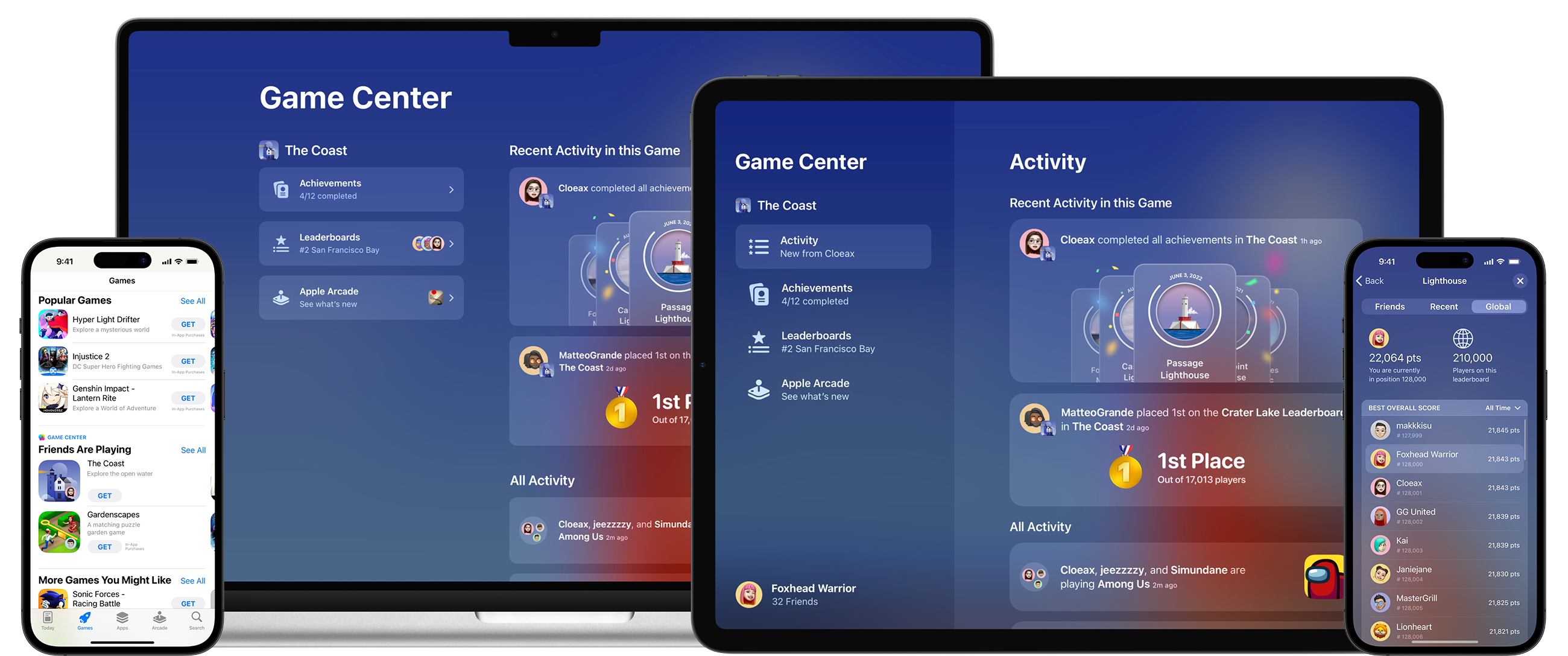
In recent updates to iOS and macOS, Apple has reintroduced a social layer to Game Center through the “Activity” feed. This feature allows users to see what their friends are playing, what achievements they have recently unlocked, and what their high scores are. This “social discovery” mechanism is a powerful tool for developers, as it encourages “viral” growth—if a user sees three of their friends are playing a specific title, they are much more likely to download it themselves.
The Technical Infrastructure: How Game Center Works

For the tech-savvy user or aspiring developer, the “how” is just as important as the “what.” Game Center operates on a sophisticated backend that prioritizes data integrity and cross-platform compatibility.
The Role of GameKit for Developers
GameKit is the dedicated framework provided by Apple that allows developers to integrate Game Center features into their software with minimal friction. Instead of building a custom server to handle leaderboards or friend lists—a costly and time-consuming endeavor—developers simply hook into the GameKit API. This ensures that the user interface remains consistent across different games, providing a sense of familiarity for the player.
iCloud Synchronization and Cross-Device Play
A defining characteristic of the Apple ecosystem is the “continuity” experience. Because Game Center is linked to an Apple ID and backed by iCloud, game progress is synchronized across every Apple device. A user can start a session on their iPhone during a commute, continue it on an iPad at home, and attempt a high-score run on their Mac or Apple TV in the evening. This synchronization includes not just scores, but also saved game states, provided the developer has implemented iCloud “CloudKit” alongside GameKit.
Security and Parental Controls
As a platform used by millions of minors, Apple has baked significant security and privacy features into Game Center. Users can choose to remain anonymous by using a “Nickname” rather than their real name. Furthermore, Game Center is deeply integrated with Apple’s “Screen Time” and “Family Sharing” features. Parents can restrict multiplayer gaming, prevent their children from adding friends, or disable the service entirely. From a digital security perspective, this centralized control is far safer than having children create separate accounts on dozens of different third-party gaming servers.
Game Center and the Rise of Apple Arcade
The relevance of Game Center has seen a resurgence with the launch of Apple Arcade, the company’s premium gaming subscription service. Apple Arcade titles are required to have no ads and no in-app purchases, placing a renewed focus on “pure” gameplay mechanics—achievements and leaderboards become the primary metrics of success.
Enhancing the Subscription Gaming Experience
In Apple Arcade, Game Center acts as the glue that holds the catalog together. Since all Arcade games are “premium” experiences, the integration of Game Center feels more organic. It provides a unified dashboard for subscribers to track their progress across over 200 titles. The “Dashboard” can be accessed within any Arcade game by tapping the Game Center icon, allowing users to view their profile without ever leaving the game world.
Unified Identity Across Apple Devices
Apple Arcade has pushed Game Center to become a more robust “gaming profile.” With the introduction of customizable avatars (including Memoji integration), the service has moved closer to being a social network for gamers. This unified identity is crucial for Apple as it competes with platforms like Steam or Epic Games Store, offering a consistent “persona” that follows the user from their phone to their desktop.
How to Set Up and Optimize Your Game Center Experience
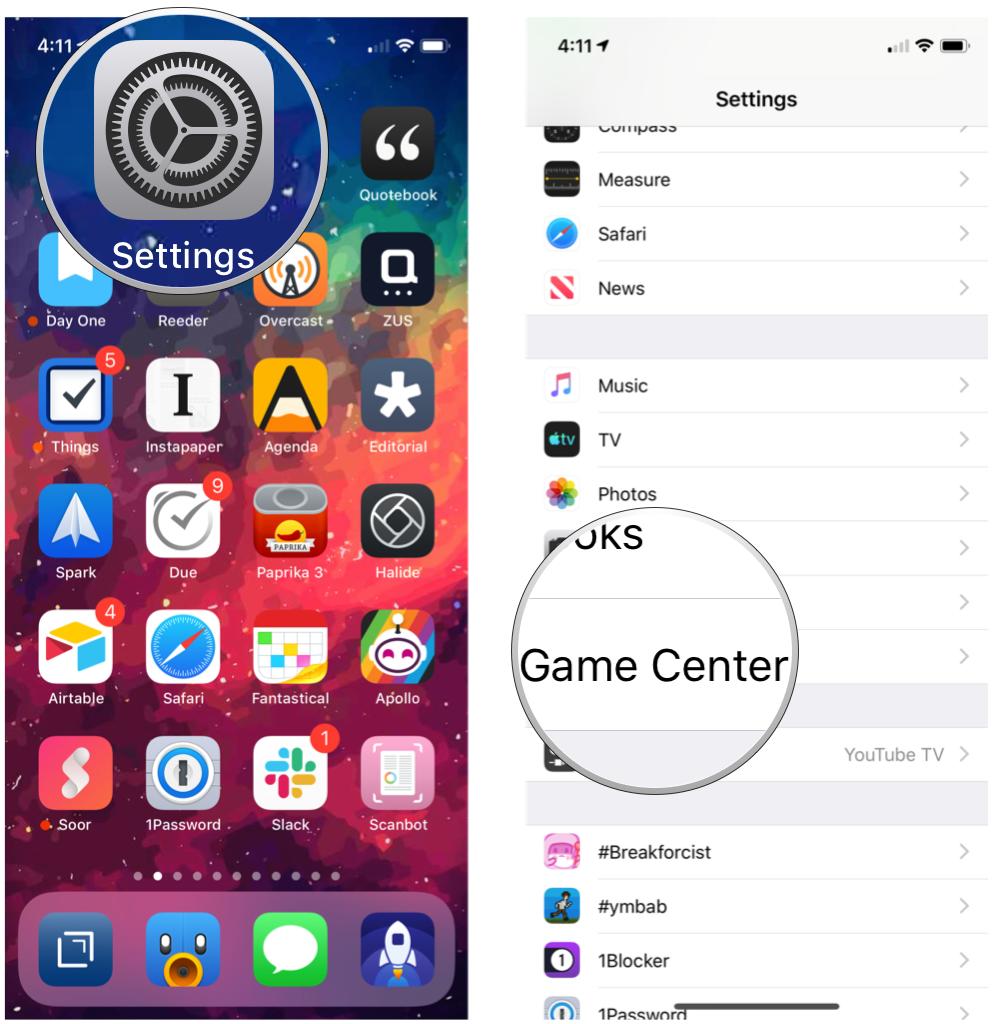
To get the most out of this technology, users should ensure their profile is correctly configured. Since there is no longer a dedicated app, management happens within the System Settings.
Customizing Your Profile and Nickname
On an iPhone or iPad, navigating to Settings > Game Center allows users to toggle the service on or off. Here, you can select a unique Nickname—this is the name other players will see on leaderboards. You can also customize your profile picture, choosing between a standard photo or a personalized Memoji. These small customizations are the first step in building a digital presence within the Apple gaming community.
Managing Privacy and Friend Requests
Privacy is a cornerstone of Apple’s brand, and Game Center reflects this. Within the settings, users can define who can see their activity. Options include “Everyone,” “Friends Only,” or “Only You.” For those who value privacy, disabling “Nearby Players” prevents the device from using Bluetooth and Wi-Fi to discover other gamers in physical proximity. Managing your “Friends” list is equally straightforward; users can send requests via iMessage, making the process of building a gaming circle as simple as sending a text.
Conclusion
Game Center is a testament to Apple’s philosophy of “it just works.” By fading into the background of the operating system, it provides a powerful, invisible layer of functionality that enriches the gaming experience. For developers, it provides the tools (GameKit) to create competitive and social environments without the overhead of maintaining servers. For players, it offers a secure, synchronized, and social way to enjoy their favorite titles across the entire Apple hardware spectrum.
As we look toward the future—including the potential for gaming in spatial computing with visionOS—Game Center is poised to remain the fundamental framework for how we play, compete, and connect in the digital age. It is not just a high-score list; it is the social heart of the Apple ecosystem.
aViewFromTheCave is a participant in the Amazon Services LLC Associates Program, an affiliate advertising program designed to provide a means for sites to earn advertising fees by advertising and linking to Amazon.com. Amazon, the Amazon logo, AmazonSupply, and the AmazonSupply logo are trademarks of Amazon.com, Inc. or its affiliates. As an Amazon Associate we earn affiliate commissions from qualifying purchases.