
In the intricate landscape of digital security, understanding and effectively monitoring system logs is paramount for maintaining robust defenses and ensuring compliance. Among the myriad of events recorded by Windows operating systems, specific Event IDs stand out as critical indicators of activity within the environment. Event ID 4662 is one such highly significant entry, a cornerstone for auditing object access and a vital component in any organization’s security monitoring strategy. At its core, Event ID 4662 signals that an operation has been performed on an object, providing detailed forensic data about who accessed what, when, and how. This event is a lynchpin for tracking interactions with sensitive resources, making it indispensable for threat detection, incident response, and regulatory compliance.
Understanding Windows Security Event IDs
The Windows Event Log is a foundational component of the operating system, serving as a repository for various system, application, and security messages. These logs are not merely verbose records; they are a critical source of intelligence, documenting everything from successful user logins to application crashes and, most importantly for security professionals, changes to system configurations and access attempts.
Event IDs are unique numerical identifiers assigned to specific events, categorizing them and making them searchable and understandable. While System and Application logs primarily track hardware issues, driver failures, and software operations, the Security log is the direct conduit for auditing security-related activities. Within the Security log, Event IDs cover a spectrum of actions, including account logon/logoff, user account management, policy changes, and object access. The ability to parse and interpret these event IDs allows security teams to reconstruct sequences of events, identify anomalous behavior, and respond to potential threats. Event ID 4662 falls squarely within this security audit category, specifically reporting on access to various system objects.
The Significance of Event ID 4662: Auditing Object Access
Event ID 4662 is officially titled “An operation was performed on an object.” This seemingly simple description belies its profound importance. It’s generated whenever a user or process successfully interacts with an audited object on the system. The term “object” in this context is broad, encompassing not only files and folders but also registry keys, printers, services, scheduled tasks, and even Active Directory objects. Essentially, if it’s a resource within the Windows ecosystem that can have permissions applied to it, it can be an audited object.
The primary significance of Event ID 4662 lies in its capability to provide granular visibility into resource utilization and potential unauthorized access. For organizations subject to stringent regulatory compliance frameworks such as GDPR, HIPAA, PCI DSS, or ISO 27001, proving who accessed sensitive data and when is a non-negotiable requirement. Event ID 4662 serves as definitive evidence for demonstrating adherence to data protection and access control policies. Beyond compliance, its utility extends to:
- Insider Threat Detection: Identifying employees accessing confidential files outside of their normal job functions.
- Malware Analysis: Tracing the actions of malicious software attempting to modify system configurations or exfiltrate data.
- Data Breach Investigations: Reconstructing the timeline of events leading up to and during a data breach by showing which data stores were accessed.
- Policy Enforcement: Verifying that security policies regarding data access are being correctly applied and adhered to.
Without Event ID 4662, organizations would operate with a significant blind spot regarding critical resource interactions, leaving them vulnerable to undetected breaches and non-compliance.
How Event ID 4662 is Generated and What It Tracks
While Event ID 4662 is crucial, it’s important to understand that it is not universally enabled for all objects by default. Generating meaningful 4662 events requires specific configuration within the Windows auditing framework.
Configuration Prerequisites
To enable Event ID 4662, administrators must configure “Audit object access” within Group Policy, typically via the Group Policy Management Editor (GPMC) for domain-joined machines or the Local Security Policy for standalone systems. The specific subcategory to enable is often “File System,” “Registry,” “Kernel Object,” or “Removable Storage,” depending on the types of objects to be monitored.
However, simply enabling the audit policy is not enough. For the operating system to generate 4662 events on specific objects, a System Access Control List (SACL) must be applied to those objects. A SACL defines which access attempts (successes, failures, or both) by which users or groups should be logged. For instance, to audit all successful attempts to read or write to a specific folder, an administrator would add a SACL entry to that folder’s security properties. This granular control allows organizations to focus auditing on genuinely sensitive resources, preventing an overwhelming volume of logs from non-critical objects.
Common Object Types Monitored
Once configured, Event ID 4662 can track a wide array of interactions across different object types:
- Files and Folders: This is perhaps the most common and critical application. Events can log when a file is opened, read, written to, deleted, or has its permissions changed. This is vital for tracking access to intellectual property, customer data, and financial records.
- Registry Keys: Monitoring access to specific registry keys can reveal attempts to modify system configurations, install malware, or alter application settings. Critical keys often include those related to startup programs, security configurations, and user preferences.
- Printers: Auditing printer access can track who printed sensitive documents, useful for preventing data leakage and ensuring compliance in environments handling confidential information.
- Services: Monitoring the starting, stopping, or modification of system services can flag unauthorized changes that might indicate a compromise or disruption attempt.
- Shares: Access to network shares is a prime target for attackers. Event ID 4662 can show who accessed shared folders and what actions they performed.
- Scheduled Tasks: Changes to or execution of scheduled tasks can be indicators of persistence mechanisms used by attackers.
- Active Directory Objects: For domain controllers, Event ID 4662 is crucial for auditing access to Active Directory objects, such as user accounts, groups, and organizational units, which directly impacts identity management and privilege escalation detection.
By meticulously configuring SACLs and audit policies, organizations can leverage Event ID 4662 to build a comprehensive audit trail of critical object access throughout their IT infrastructure.
Interpreting Event ID 4662 Details for Security
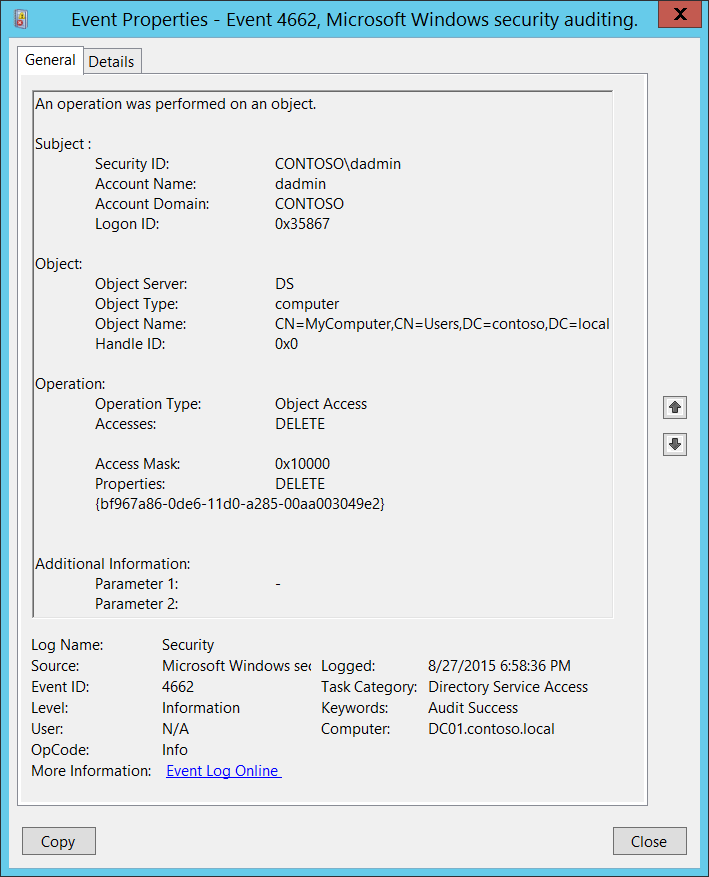
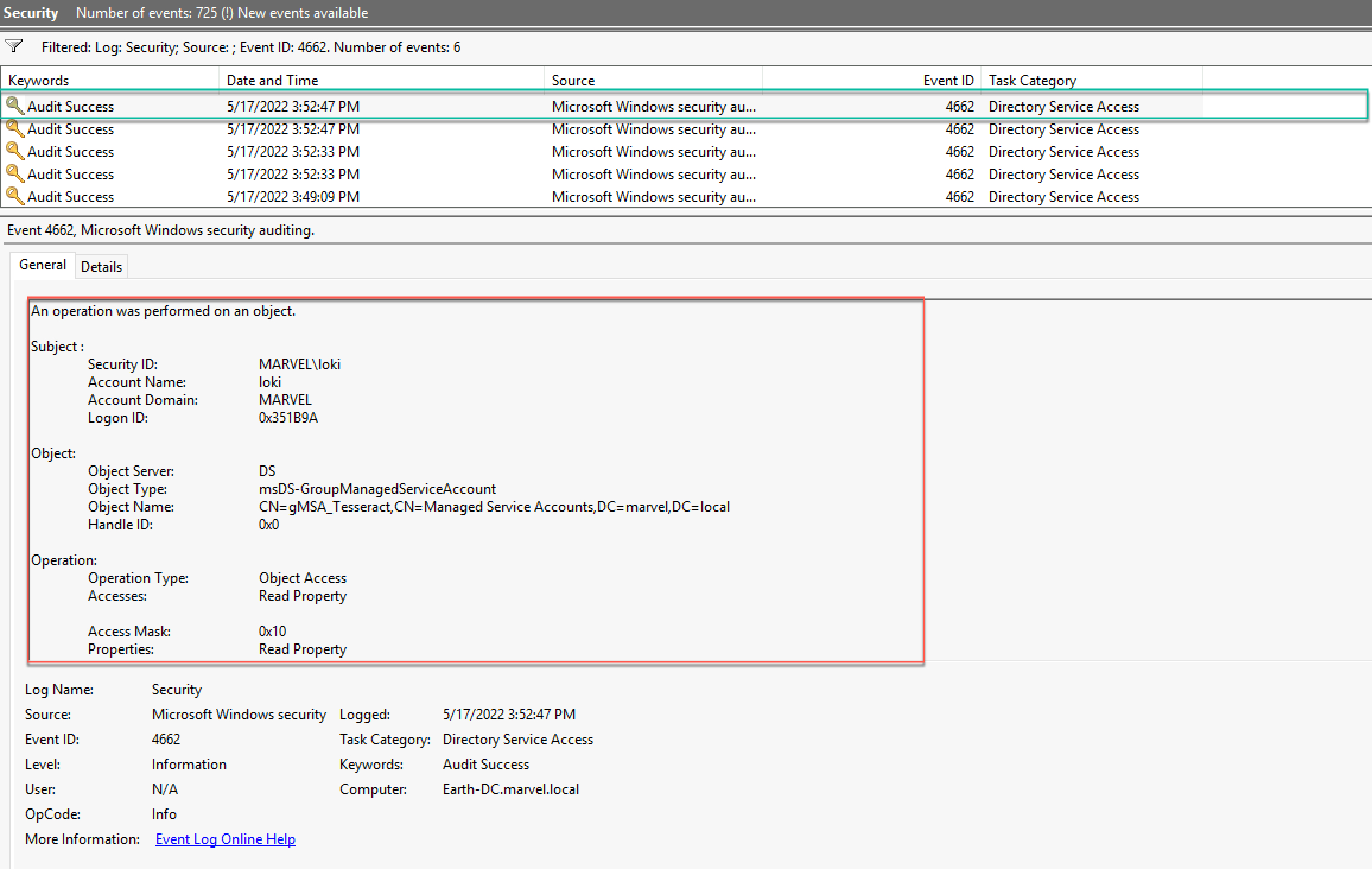
The true power of Event ID 4662 lies in the rich detail contained within each log entry. Simply knowing “an operation was performed” is insufficient; security professionals need to understand the specifics.
Key Fields within the Event Log

Each Event ID 4662 entry includes several critical fields that, when combined, paint a comprehensive picture of the event:
- Subject: This section identifies who performed the action.
Security ID: The SID (Security Identifier) of the account.Account Name: The user or service account name (e.g.,DOMAINUserName,LOCAL SERVICE).Account Domain: The domain of the account.Logon ID: A hexadecimal value identifying the logon session, useful for correlating with other logon events (e.g., Event ID 4624 for successful logon).
- Object: Details about the resource that was accessed.
Object Type: What kind of object it is (e.g.,File,Key,Service,Printer).Object Name: The full path or name of the object (e.g.,C:SensitiveDataReport.docx,REGISTRYMACHINESOFTWAREMicrosoftWindowsCurrentVersionRun).Handle ID: A unique identifier for the object’s handle, useful for correlating with process information.Resource Attributes: Additional attributes for certain object types.
- Process Information: Information about the process that initiated the action.
Process ID: The Process ID (PID) of the executable.Process Name: The name of the executable (e.g.,notepad.exe,powershell.exe).
- Access Request Information: This is perhaps the most crucial section, detailing what was done.
Accesses: A list of the specific permissions requested or used (e.g.,ReadData,WriteData,Delete,SYNCHRONIZE,READ_CONTROL,FILE_EXECUTE). These are often represented by descriptive strings or hexadecimal access mask values.Access Mask: The raw hexadecimal representation of the requested access rights, which can be decoded to understand granular permissions.
By examining these fields, an analyst can determine precisely who, what, where, and how an object was accessed.
Identifying Malicious Activity
Interpreting Event ID 4662 logs effectively for security purposes involves looking for anomalies and patterns that deviate from normal behavior.
- Unusual Access Patterns: An account accessing files or registry keys it normally doesn’t, or accessing them at unusual times (e.g., outside business hours). For example, a marketing user accessing sensitive HR payroll files.
- Privilege Escalation Attempts: A non-administrative account attempting to modify critical system files or registry keys, especially those that could grant higher privileges.
- Data Exfiltration Indicators: High volume of
ReadDataaccess to sensitive documents from an unusual source, potentially indicating data being copied or stolen. - Manipulation of Logs: Attempts to delete or modify security logs (though 4662 itself would log access to the log files, not the logs themselves being deleted).
- Changes to Critical Configuration: Unexplained
WriteDataorDeleteaccess to configuration files, services, or scheduled tasks, which could indicate a backdoor or persistence mechanism. - Suspicious Process Access: A known malicious process (
Process Name) accessing a critical system object. - Unauthorized Software Deployment: New entries in
Runkeys within the registry (monitored by 4662 on registry objects) can indicate unauthorized software installation.
Effective analysis often requires correlating Event ID 4662 with other event IDs, such as 4624 (successful logon), 4625 (failed logon), or 4673 (sensitive privilege use), to build a complete narrative of an attack or suspicious activity.
Leveraging Event ID 4662 for Proactive Security and Compliance
The sheer volume of Event ID 4662 entries generated in a busy environment can be daunting. Therefore, simply logging them is not enough; they must be actively leveraged.
Continuous Monitoring and SIEM Integration
For real-time threat detection and incident response, Event ID 4662 logs are typically ingested into a Security Information and Event Management (SIEM) system. SIEMs collect logs from various sources, normalize them, and apply rules and machine learning algorithms to identify suspicious activities automatically. They can correlate 4662 events with other log data, generate alerts for predefined thresholds (e.g., an unusual number of accesses to a specific server), and provide dashboards for an overarching security posture view. This continuous monitoring capability transforms raw log data into actionable security intelligence.
Forensic Investigations
In the aftermath of a security incident or suspected breach, Event ID 4662 logs become invaluable for forensic investigations. They allow security analysts to:
- Determine Scope: Identify which systems and data were accessed, helping to understand the full impact of an incident.
- Establish Timeline: Reconstruct the sequence of events leading up to the breach, including initial access, lateral movement, and data exfiltration attempts.
- Identify Attacker Techniques: Pinpoint specific tools or methods used by adversaries to access or modify objects.
- Attribute Actions: Link specific actions to user accounts or processes, aiding in accountability and remediation.
Compliance Audits and Reporting
For organizations operating under strict regulatory regimes, Event ID 4662 provides direct evidence for compliance. It enables them to generate reports demonstrating:
- Access Control Verification: Proof that only authorized personnel accessed specific data types (e.g., patient health information, credit card data).
- Change Management Audits: Records of modifications to critical system configurations or data sets.
- Accountability: Clear audit trails linking user actions to specific resources.
These reports are essential for demonstrating due diligence during external audits and avoiding hefty non-compliance penalties.
Best Practices
To maximize the value of Event ID 4662, organizations should adopt several best practices:
- Targeted Auditing: Avoid enabling auditing for every object; focus on critical systems, sensitive data, and high-value targets to reduce log volume and noise.
- Regular Review of Audit Policies: Periodically review and update audit policies and SACLs to ensure they align with current security requirements and organizational changes.
- Leverage Centralized Log Management: Utilize a SIEM or centralized log aggregator to collect, store, and analyze 4662 events efficiently.
- Set Up Alerts: Configure alerts for high-risk activities (e.g., deletion of critical files, access to highly sensitive data by unauthorized users) to enable rapid response.
- Secure Log Storage: Ensure that audit logs are protected from tampering and unauthorized deletion, as they are crucial evidence.
In summary, Event ID 4662 is far more than just another number in the Windows Event Log. It is a powerful security primitive that, when properly configured and continuously monitored, offers unparalleled visibility into object access. It empowers organizations to detect threats, respond to incidents, and meet stringent compliance mandates, making it an indispensable tool in the modern digital security arsenal.
aViewFromTheCave is a participant in the Amazon Services LLC Associates Program, an affiliate advertising program designed to provide a means for sites to earn advertising fees by advertising and linking to Amazon.com. Amazon, the Amazon logo, AmazonSupply, and the AmazonSupply logo are trademarks of Amazon.com, Inc. or its affiliates. As an Amazon Associate we earn affiliate commissions from qualifying purchases.