
In the rapidly evolving landscape of software development, the ability to organize complex tasks into manageable, logical structures is the difference between a successful release and a chaotic failure. Jira, the flagship project management tool developed by Atlassian, has become the industry standard for technical teams seeking to implement Agile methodologies. At the heart of Jira’s organizational power lies a concept known as the “Epic.” While simple in theory, mastering the use of Epics is essential for any high-performing engineering or product team.
An Epic in Jira is a large body of work that can be broken down into smaller, more granular tasks called “User Stories” or “Issues.” In the context of the Agile hierarchy, if a User Story is a single step, an Epic is the entire journey toward a specific milestone. This article explores the technical nuances of Jira Epics, their role in software development lifecycles, and how they bridge the gap between high-level strategy and daily execution.

The Architecture of Agile: Defining the Epic in Jira
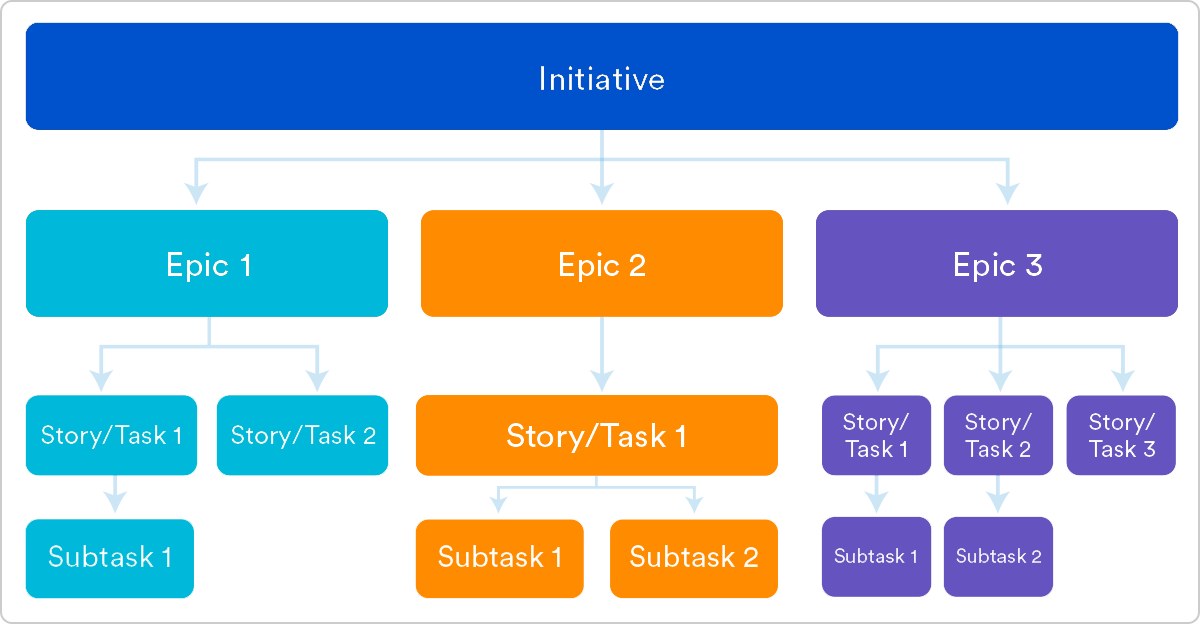
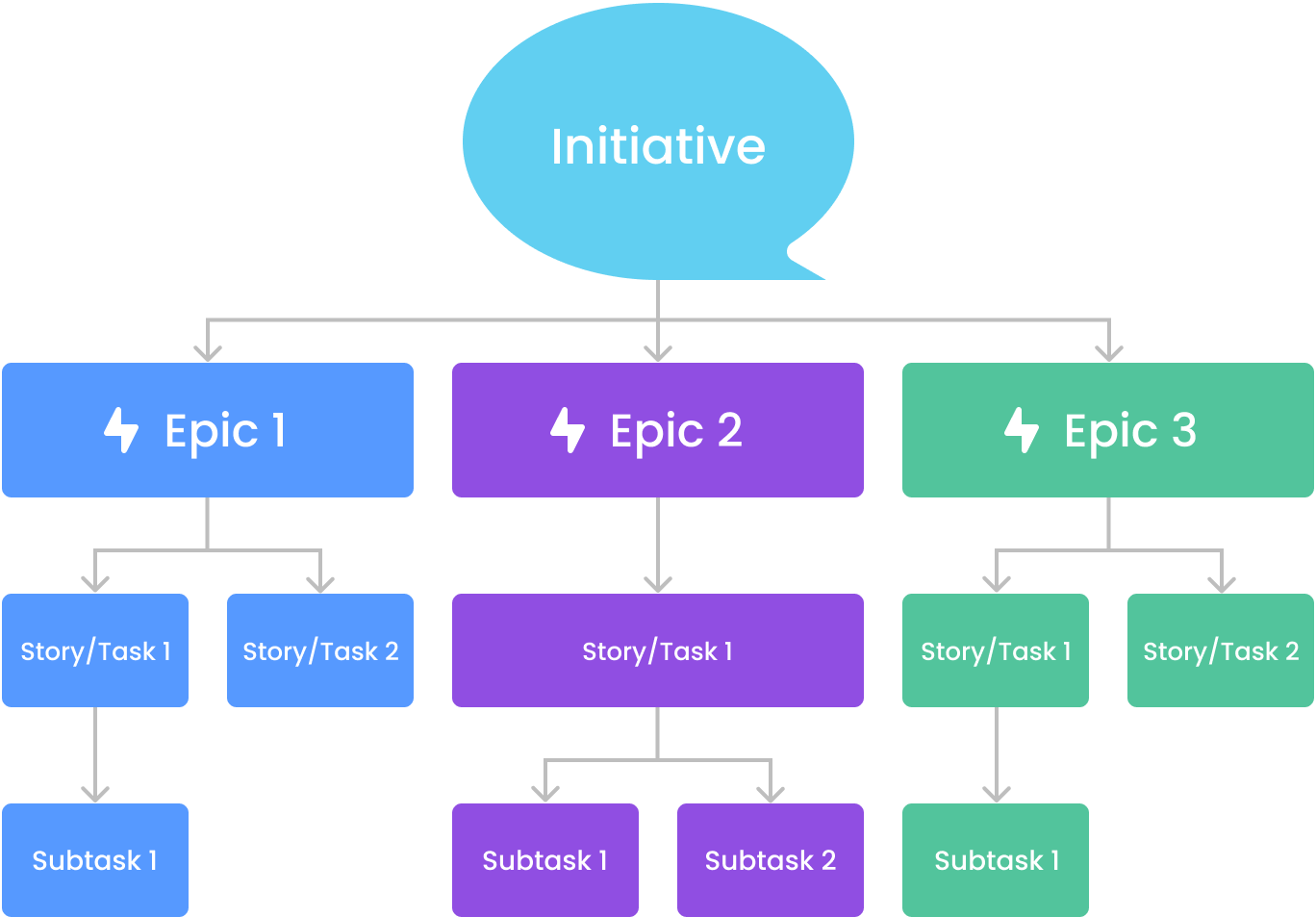
To understand what an Epic is, one must first understand where it sits within the broader Agile framework. Jira is designed to mirror the “Hierarchy of Work,” which typically consists of Themes, Epics, User Stories, and Sub-tasks. Within this stack, the Epic serves as the primary organizational unit for features or initiatives that are too large to be completed in a single sprint.
Where Epics Sit in the Hierarchy
At the highest level of an organization, “Themes” represent broad strategic objectives (e.g., “Improve Platform Security”). Underneath a Theme, we find Epics. An Epic represents a specific deliverable or project phase that contributes to that Theme (e.g., “Implement Multi-Factor Authentication”).
Below the Epic, we find “User Stories” or “Bugs.” These are the functional units of work that developers actually tackle during a two-week sprint. By linking these smaller issues to an Epic, Jira allows managers to track the progress of a large-scale project without getting lost in the technical minutiae of individual code commits.
The Anatomy of a Jira Epic
Technically, an Epic is a specific “Issue Type” in Jira. Unlike a standard task, an Epic has unique properties:
- Epic Name: A short, identifiable label used for filtering and visualization on the roadmap.
- Epic Link: The relational field that connects standard issues to the parent Epic.
- Start and End Dates: Essential for generating roadmap visualizations and Gantt-style charts.
- Epic Status: While standard issues move through “To Do” or “Done,” an Epic tracks the aggregate status of all its child issues.
Strategic Planning: When and How to Create Epics
One of the most common mistakes in technical project management is failing to distinguish between an Epic and a complex User Story. If a task can be completed within a single sprint (usually 1–2 weeks), it is not an Epic. If it requires multiple sprints and involves different skill sets—such as backend development, UI/UX design, and QA testing—it is almost certainly an Epic.
Identifying Epic-Sized Tasks
In a DevOps environment, Epics are often used to define significant feature sets or architectural overhauls. For example, “Migrating to Microservices” is a classic Epic. It is a clear goal, but it is too massive to assign to a single developer for a single week.
When planning your roadmap, look for “work clusters.” If you notice ten different user stories all related to the same functional area of your app, you should group them under a single Epic. This provides a “single source of truth” for stakeholders who want to know the status of that specific feature without scrolling through a backlog of 500 items.
Best Practices for Naming and Categorizing
Naming conventions are vital for maintaining a clean Jira instance. Technical leads should avoid vague titles like “Phase 2” or “Updates.” Instead, use descriptive, goal-oriented names such as “API Rate Limiting Implementation” or “Customer Dashboard Redesign.”
Furthermore, assigning “Labels” and “Components” to Epics can enhance searchability. For instance, tagging an Epic with “Mobile-iOS” and “Security” allows a CTO to quickly filter the roadmap to see all security-related initiatives currently in development for the mobile platform.
Managing the Lifecycle and Progress Tracking
The true power of an Epic in Jira is not just in its ability to categorize work, but in its ability to provide data-driven insights. Jira’s reporting engine uses the data within Epics to generate visualizations that help teams predict delivery dates and identify bottlenecks.
Tracking with the Epic Burndown Chart
The Epic Burndown Chart is one of the most valuable tools for a Scrum Master. It tracks the amount of work remaining in an Epic against the time available. By looking at the “burndown” rate, the team can see if they are on track to finish the Epic by the deadline. If the chart shows that new stories are being added to the Epic faster than they are being completed—a phenomenon known as “Scope Creep”—the project manager can intervene before the project goes over budget or misses its release window.
Visualizing Workflow in Backlogs and Roadmaps
In Jira Software, the “Roadmap” view is powered entirely by Epics. This view allows teams to map out their long-term strategy on a timeline. By dragging and dropping Epics across the calendar, teams can manage dependencies. For example, if “Database Optimization” must be finished before “New Search Functionality” can begin, the roadmap makes this technical dependency visually clear. This level of transparency is crucial for aligning the engineering team with the product and marketing departments.
Collaborative Advantages of Epic-Level Organization
While Jira is often viewed as a “developer tool,” Epics serve as the primary communication bridge between technical and non-technical stakeholders. Developers care about the “Issue,” but CEOs and Product Owners care about the “Epic.”
Cross-Functional Alignment
When a marketing team wants to know when they can start advertising a new feature, they don’t need to know that “Bug-402” was fixed. They need to see the progress percentage of the “Holiday Promotion Feature” Epic. By utilizing the Epic’s “Progress Bar”—which calculates the percentage of completed story points or issues—Jira provides real-time status updates to everyone in the organization without the need for manual status meetings.
Scaling Agile for Enterprise Teams
For larger organizations using the Scaled Agile Framework (SAFe), Epics are the bread and butter of “Program Increments.” In these environments, multiple teams might contribute to a single Epic. Jira’s ability to link issues from different projects to the same Epic allows for massive cross-team collaboration. This ensures that even if the Android team and the Backend team are working in different Jira projects, their work is unified under the overarching goal defined by the Epic.
Optimizing the Technical Workflow: Common Pitfalls and Solutions
Even seasoned tech teams can struggle with “Epic Bloat.” This occurs when an Epic stays open for six months or a year, becoming a “catch-all” for every minor tweak related to a feature. To maintain technical agility, it is important to follow strict “Definition of Done” criteria for your Epics.
Avoiding “Forever Epics”
An Epic should have a definitive end. If an Epic represents a permanent area of the software (e.g., “Ongoing Maintenance”), it is being used incorrectly. In such cases, use “Components” or “Categories” instead. A healthy Epic should generally span 3 to 5 sprints. If it exceeds this, it is likely too broad and should be split into two or more smaller Epics to maintain momentum and provide more frequent “wins” for the development team.
Leveraging Automation for Epics
The modern Jira administrator uses “Automation for Jira” to reduce manual overhead. You can set up rules such as: “When all User Stories linked to an Epic are moved to ‘Done’, automatically transition the Epic to ‘Completed’.” Or, “If a high-priority bug is linked to an Epic, send a Slack notification to the Epic owner.” These technical automations ensure that the status of the high-level project always reflects the reality of the codebase.
The Future of Jira Epics: AI and Advanced Analytics
As Atlassian integrates “Atlassian Intelligence” (AI) into Jira, the role of the Epic is becoming even more dynamic. AI can now suggest the creation of an Epic by analyzing a cluster of similar tickets in the backlog. It can also generate summaries of Epic progress, highlighting potential risks—such as a developer being overloaded or a dependency being blocked—before they manifest as delays.
In the future of tech project management, Epics will likely evolve from static containers into “smart objects” that provide predictive analytics. By analyzing historical velocity, Jira will be able to tell a team, with a high degree of statistical certainty, exactly which week an Epic will be completed.
Conclusion: The Strategic Importance of the Epic
In the context of Jira and the broader tech industry, an Epic is far more than a simple folder or a label. It is a strategic tool that allows software teams to dream big while executing with precision. By grouping granular tasks into meaningful Epics, organizations can maintain a clear vision of their roadmap, communicate effectively across departments, and leverage data to improve their development velocity.
Whether you are a startup building your first MVP or a global enterprise managing thousands of developers, the Epic remains the most effective way to organize the complexity of modern software engineering. Mastery of the Epic is, quite literally, mastery of the project itself.
aViewFromTheCave is a participant in the Amazon Services LLC Associates Program, an affiliate advertising program designed to provide a means for sites to earn advertising fees by advertising and linking to Amazon.com. Amazon, the Amazon logo, AmazonSupply, and the AmazonSupply logo are trademarks of Amazon.com, Inc. or its affiliates. As an Amazon Associate we earn affiliate commissions from qualifying purchases.