
In the dynamic and often treacherous landscape of the modern internet, safeguarding web applications and their users has evolved from a best practice into an absolute imperative. As cyber threats grow in sophistication and volume, traditional server-side security measures, while foundational, often fall short of addressing the complete spectrum of risks. Client-side vulnerabilities, particularly those stemming from the execution of malicious code within a user’s browser, pose a significant and persistent challenge. This is precisely where Content Security Policy (CSP) emerges as a critical, browser-enforced security layer, offering a powerful, declarative defense against a wide array of attacks.
The Mounting Imperative for Robust Web Security
The internet’s inherent openness and the rich interactive experiences it offers come with an undeniable dark side: a fertile ground for malicious actors. Web applications, from simple blogs to complex e-commerce platforms and SaaS solutions, are constantly under siege. While firewalls, intrusion detection systems, and secure server configurations form the initial line of defense, a significant portion of attacks specifically target the client side—the user’s browser.
Among these, Cross-Site Scripting (XSS) stands out as one of the most prevalent and damaging web vulnerabilities. XSS attacks occur when an attacker injects malicious scripts (typically JavaScript) into a legitimate web page viewed by other users. These scripts can then bypass same-origin policy, steal cookies, deface websites, redirect users to phishing sites, or even deface the UI, leading to significant data breaches, reputational damage, and financial losses. Beyond XSS, threats like data injection, clickjacking, and mixed content issues (loading insecure resources on a secure page) further underscore the need for a comprehensive client-side security strategy. CSP doesn’t aim to fix application flaws but rather to provide a critical safety net, enforcing rules that restrict the types and sources of content that a browser is allowed to load and execute, thereby mitigating the impact of such vulnerabilities even if they exist.
Demystifying Content Security Policy: A Declarative Defense
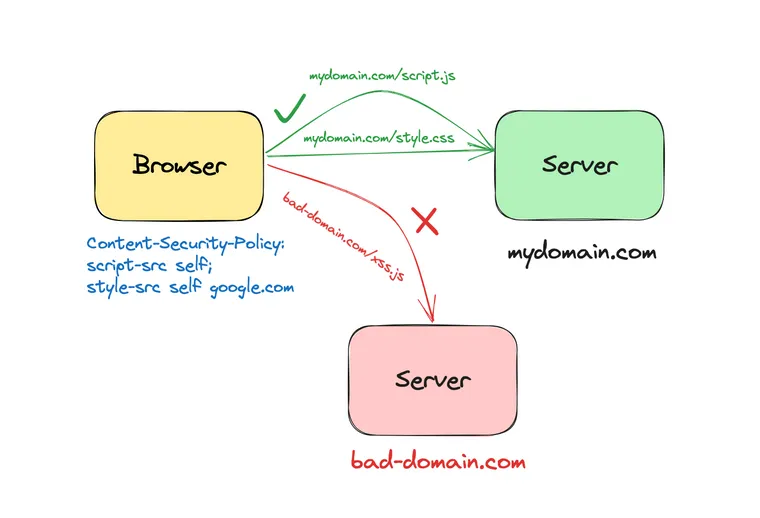
At its core, Content Security Policy is a security standard that empowers website administrators to precisely define the approved sources of content that a web browser should permit on a given page. It’s not a patch for insecure code, but rather a robust, browser-level whitelist that dictates which dynamic resources—scripts, stylesheets, images, fonts, media, forms, and other connection types—are legitimate and allowed to interact with the user’s browser.
The Foundational Concept
Think of CSP as a highly customizable security guard positioned at the entrance of a web page. Instead of relying solely on a web application firewall that inspects incoming requests, CSP operates within the user’s browser, enforcing rules before content loads or scripts execute. It shifts a significant portion of the security enforcement from the server to the client, providing a crucial layer of defense against client-side code injection attacks. By whitelisting trusted content sources, CSP effectively prevents the execution of arbitrary, potentially malicious code, even if an attacker manages to inject it into the page’s HTML.
How CSP Operates within the HTTP Flow
The mechanism by which CSP is delivered and enforced is fundamental to its effectiveness. CSP policies are communicated to the browser via an HTTP response header, typically named Content-Security-Policy.
When a user’s browser requests a web page:
- The web server responds with the HTML content, and crucially, includes the
Content-Security-Policyheader in the HTTP response. - Before rendering the page or executing any scripts, the browser parses this CSP header.
- As the browser subsequently attempts to load various resources (e.g., a JavaScript file, an image, an external stylesheet, or even inline script blocks), it consults the established CSP.
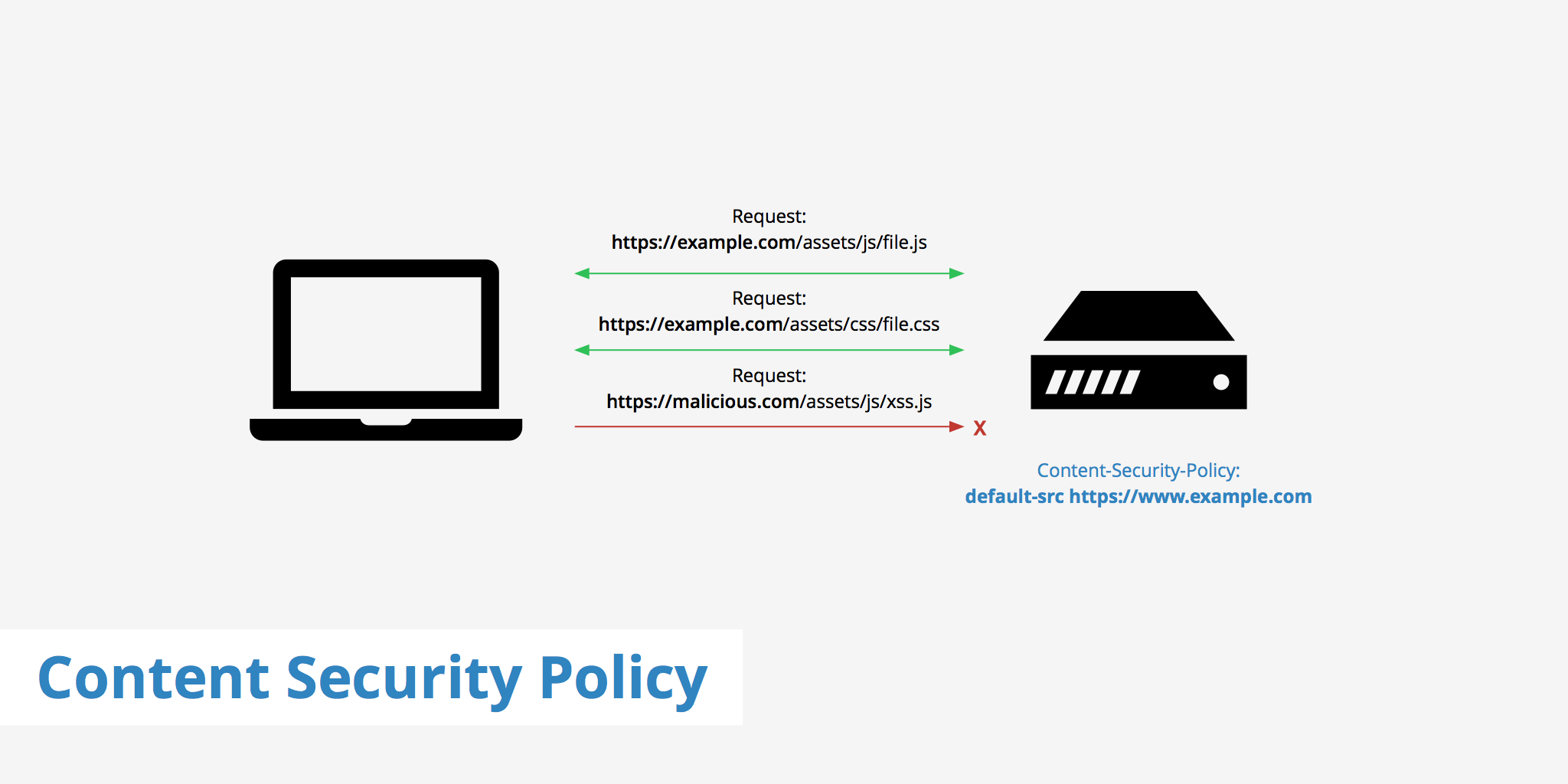
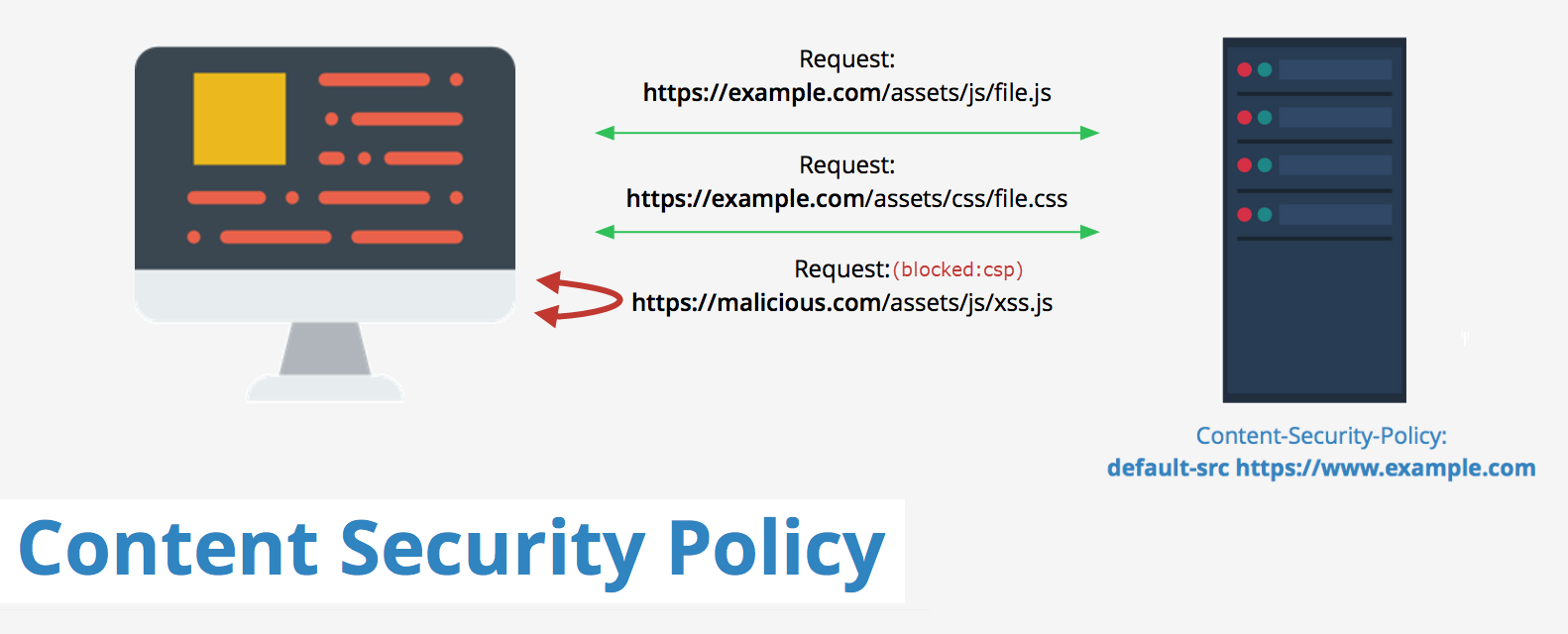
- If a resource’s source URL or execution method (e.g., inline script) violates any of the directives specified in the policy, the browser blocks its loading or execution. Critically, it does not simply issue a warning; it actively prevents the unauthorized content from running.
- Optionally, the browser can also send a violation report to a specified URI (configured via the
report-uriorreport-todirectives). These reports are invaluable for monitoring policy effectiveness and debugging during the implementation phase.
Essential CSP Directives for Granular Control
CSP’s power lies in its granularity, achieved through a comprehensive set of directives. Each directive controls a specific type of resource or behavior.
default-src: This is the fallback directive for most resource types. If a specific directive (e.g.,script-src) isn’t defined,default-src‘s value is used. A common and secure starting point isdefault-src 'self', which permits resources only from the origin of the document itself.script-src: Governs the sources from which JavaScript code can be loaded and executed. It’s pivotal in XSS prevention. To combat inline scripts andeval()(which are often targets for XSS), CSP offers secure alternatives like nonces ('nonce-random_string') and hashes ('sha256-base64_hash') for explicitly whitelisting specific inline script blocks.style-src: Controls the sources for CSS stylesheets. Similar toscript-src, it’s crucial to manage inline styles to prevent style-based injection attacks.img-src,font-src,media-src: Define allowed origins for images, web fonts, and audio/video elements, respectively.connect-src: Restricts the URLs that can be loaded using programmatic interfaces like XMLHttpRequest (AJAX), WebSockets, or EventSource. This is vital for preventing malicious scripts from exfiltrating sensitive user data to unauthorized external servers.object-src: Governs sources for plugins like Flash or Java applets. In the modern web, this is often set to'none'as these technologies are largely deprecated.frame-srcandframe-ancestors:frame-srccontrols which URLs can be embedded as child frames (e.g., in an<iframe>).frame-ancestorsis even more critical, preventing the current page from being embedded in frames from unauthorized origins, effectively combating clickjacking attacks where an attacker overlays a legitimate site with a transparent, malicious frame.form-action: Specifies valid endpoints for HTML form submissions, preventing form-based phishing attacks where an attacker redirects form data to a malicious server.upgrade-insecure-requests: A powerful directive for websites transitioning to or maintaining full HTTPS. It instructs the browser to automatically rewrite all HTTP resource requests to HTTPS, mitigating mixed content warnings without manual intervention.base-uri: Restricts the URLs that can be used in a page’s<base>element, preventing attackers from injecting a malicious base URL that could redirect all relative paths to an attacker-controlled site.require-sri-for: Enforces Subresource Integrity (SRI) for specified resource types (e.g.,script,style), ensuring that third-party scripts and stylesheets haven’t been tampered with before they are loaded.
A Phased Approach to CSP Implementation
Implementing CSP effectively, especially for complex, existing applications, requires a strategic, phased approach to avoid breaking legitimate functionality.
Stage 1: The Reporting-Only Mode
The initial and arguably most critical step is to deploy CSP in a “reporting-only” mode. This is achieved by using the Content-Security-Policy-Report-Only HTTP header instead of Content-Security-Policy.
In this mode:
- The browser only reports violations; it does not block any content.
- Violation reports are sent to the URL specified by the
report-uri(or newerreport-to) directive within the policy. - This phase is indispensable for discovery. It allows developers to deploy a strict policy, observe all violations generated by the live application (including legitimate third-party scripts, inline styles, or dynamic content), and incrementally refine the policy without impacting user experience. This iterative process of deploy, monitor logs, and refine continues until a minimal set of expected violations remains.
Stage 2: Incremental Enforcement
Once the reporting phase yields a stable policy that accounts for all legitimate application behavior, the transition to enforcement can begin.
- The
Content-Security-Policy-Report-Onlyheader is replaced withContent-Security-Policy. - It’s often wise to start with a highly restrictive policy (e.g.,
default-src 'self') and gradually add trusted domains and specific directives as needed, rather than attempting to enumerate everything from the start. - Continued monitoring via
report-uriis essential even in enforcement mode, as new features, third-party integrations, or code changes can introduce new violations.
Key Considerations for Effective Deployment
- Prioritize
'self': Always begin withdefault-src 'self'andscript-src 'self'to establish a baseline of trust for your own application’s resources. - Minimize
'unsafe-inline'and'unsafe-eval': These directives significantly weaken CSP’s protection. Strive to eliminate them by externalizing scripts/styles or by using nonces/hashes for necessary inline content. Nonces must be cryptographically strong, randomly generated for each request, and non-reusable. - Leverage
report-uri/report-to: These are not optional. Tools like Report URI or Sentry can aggregate and analyze these reports, turning raw data into actionable insights for policy refinement. - Test Extensively: CSP interacts with the browser’s rendering engine. Thorough testing across various browsers, versions, and devices is crucial to ensure functionality remains intact.
- Automate: For large, dynamic applications, manual CSP management becomes cumbersome. Integrate CSP generation into your build pipeline or use server-side logic to dynamically generate nonces for inline elements.
- Review Third-Party Integrations: Every analytics script, ad network, social media widget, or external library must be explicitly accounted for and whitelisted in your CSP.
The Transformative Security Impact of CSP
Implementing a well-crafted Content Security Policy delivers a multitude of tangible security benefits, significantly strengthening a web application’s resilience against common attack vectors.
Fortifying Against Cross-Site Scripting (XSS)
CSP’s most profound impact is in mitigating XSS. By rigidly controlling the sources from which scripts can be loaded (script-src) and preventing the execution of arbitrary inline scripts or eval() calls (unless specifically whitelisted with nonces/hashes), CSP dramatically reduces the attack surface for XSS. Even if an attacker successfully injects a script into the page, CSP acts as a powerful “second line of defense,” preventing that script from executing and causing harm.
Blocking Data Exfiltration
Directives like connect-src and form-action play a critical role in preventing data exfiltration. A malicious script, even if it briefly runs, cannot send stolen cookies, session tokens, or other sensitive user data to an attacker-controlled server if that server’s domain is not explicitly whitelisted in connect-src. Similarly, form-action ensures form submissions only go to legitimate endpoints.
Mitigating Clickjacking and UI Redressing
The frame-ancestors directive is a robust defense against clickjacking. By declaring which domains are allowed to embed your page in an <iframe>, it prevents attackers from creating deceptive overlays that trick users into clicking malicious elements on a seemingly legitimate site.
Enforcing HTTPS and Preventing Mixed Content
upgrade-insecure-requests is an invaluable tool for sites aiming for or maintaining full HTTPS. It automatically rewrites HTTP requests for images, scripts, and other resources to HTTPS, eliminating common mixed content warnings and ensuring a consistent secure context for the user. This improves both security and user trust signals (e.g., the browser’s “secure” padlock icon).
Enhancing User Trust and Regulatory Compliance
A visible commitment to robust client-side security, exemplified by a well-implemented CSP, builds user trust. Furthermore, demonstrating proactive security measures through CSP can assist organizations in meeting various data protection and privacy regulations, such as GDPR or CCPA, by reducing the risk of client-side data breaches.
A Layered Security Posture
It’s crucial to understand that CSP is not a panacea. It’s a vital component of a comprehensive, defense-in-depth security strategy. It complements other HTTP security headers like HTTP Strict Transport Security (HSTS), X-Frame-Options (XFO), and X-Content-Type-Options (XCTO), along with secure coding practices, server-side validations, and regular security audits.
CSP: An Evolving Standard for a Dynamic Web
The web is a constantly evolving ecosystem, and security standards must evolve with it. CSP is not a static solution; its directives and capabilities continue to expand (e.g., CSP Level 3 introducing trusted-types for even finer-grained control over DOM manipulation). For modern web applications—including Single-Page Applications (SPAs), Progressive Web Apps (PWAs), and micro-frontends—where complex client-side logic is dominant, CSP’s role is more critical than ever.
Implementing and maintaining CSP requires ongoing vigilance, continuous monitoring, and adaptation to new features, third-party integrations, and emerging threats. It demands a commitment to secure development practices and a proactive stance on digital security. Ultimately, Content Security Policy stands as an indispensable tool for protecting web applications and their users, forming a foundational pillar in the contemporary digital security landscape.
aViewFromTheCave is a participant in the Amazon Services LLC Associates Program, an affiliate advertising program designed to provide a means for sites to earn advertising fees by advertising and linking to Amazon.com. Amazon, the Amazon logo, AmazonSupply, and the AmazonSupply logo are trademarks of Amazon.com, Inc. or its affiliates. As an Amazon Associate we earn affiliate commissions from qualifying purchases.