
In an increasingly complex and digitally saturated world, the ability to manage information, tasks, and future obligations effectively is paramount. Forgetfulness is no longer a minor inconvenience; it can be a significant impediment to progress, efficiency, and professional reputation. This is where a “tickler system” emerges as an indispensable tool, a simple yet powerful methodology designed to ensure that the right information arrives at the right time. While its origins are rooted in physical office organization, the tickler system has found a renewed and profoundly impactful life within the digital realm, transforming how individuals and organizations leverage technology for proactive productivity.

At its core, a tickler system is a reminder system organized by date. It’s a method for storing information or tasks that need to be addressed on a specific future date, effectively “tickling” your memory when the time comes. This intelligent deferral of attention is a cornerstone of effective time management, allowing users to focus on current priorities without the mental burden of remembering future commitments. In the context of modern technology, a tickler system is no longer confined to a set of physical folders but manifests across a spectrum of digital tools – from sophisticated project management software and AI-driven assistants to simple calendar applications and email filters. Understanding and implementing a digital tickler system is not just about staying organized; it’s about optimizing mental bandwidth, streamlining workflows, and building a robust framework for consistent, future-proof productivity.
The Core Concept: How a Tickler System Works
The fundamental principle behind a tickler system is elegantly simple: information or a task item is filed according to the date it needs attention, not the date it was created or received. This proactive approach ensures that reminders surface precisely when they are most relevant, preventing items from being forgotten or prematurely acted upon.
The Principle of Temporal Organization
Imagine a system where every future action, every pending document, or every piece of information requiring follow-up is placed in a queue, patiently waiting for its designated day. This is the essence of temporal organization. Instead of creating a single, overwhelming to-do list, a tickler system breaks down future obligations into manageable, date-specific compartments. When a particular day arrives, the contents of that day’s “file” (physical or digital) are revealed, presenting only the tasks and information pertinent to that moment.
This methodology serves several critical psychological and practical functions:
-
Reduces Cognitive Load: By offloading the burden of remembering future tasks onto the system, individuals free up mental energy to focus on immediate work, enhancing concentration and creativity.
-
Prevents Missed Deadlines: With automated or system-driven reminders, the risk of overlooking critical deadlines, follow-ups, or appointments is significantly minimized.
-
Enables Proactive Planning: It facilitates a forward-looking approach to work, allowing for the timely preparation for future events rather than last-minute scrambling.
From Physical Files to Digital Horizons
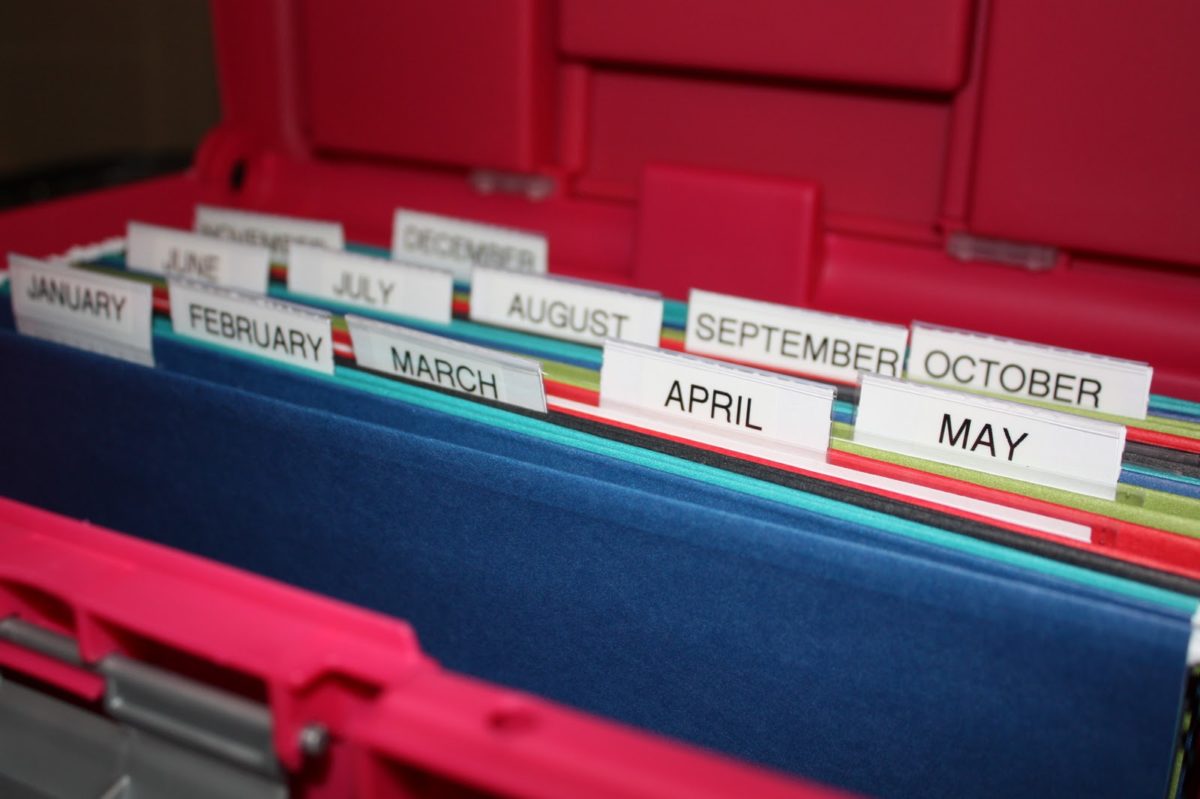
Historically, a tickler system consisted of a set of 43 folders: 12 folders for the months of the year and 31 folders for the days of the current month. Items were placed into the relevant day or month folder, and each morning, the day’s folder was reviewed. This physical system, while effective, was labor-intensive and limited by physical constraints.
The digital revolution, however, has transformed the tickler system from a niche office tool into a universally accessible productivity strategy. Modern technology has digitized and automated its core functions, making it more flexible, scalable, and powerful. Today, the “folders” are virtual, the “filing” is often automated, and the “retrieval” can be pushed directly to your devices, seamlessly integrating into daily workflows and communication channels. This evolution has democratized the tickler concept, making sophisticated organizational techniques available to anyone with a smartphone, computer, or access to cloud-based productivity suites.
Key Benefits in a Digital Age
In a world defined by information overload and constant digital distractions, the benefits of a digitally implemented tickler system are profound:
-
Enhanced Focus: By pushing non-immediate tasks out of sight and out of mind until their due date, digital ticklers allow for deep work on current priorities.
-
Improved Reliability: Automated reminders from software are far more consistent than human memory, drastically reducing the chances of missed deadlines.
-
Mobility and Accessibility: Digital ticklers are accessible from anywhere, on any device, ensuring you’re always aware of what’s coming up, whether you’re in the office or on the go.
-
Integration Capabilities: They can integrate with other digital tools like email, calendars, project management software, and CRM systems, creating a holistic productivity ecosystem.
-
Scalability: From personal task management to large-scale team project coordination, digital tickler systems can scale to meet diverse organizational needs.
Digital Ticklers: Tools and Technologies
The versatility of the digital landscape means there isn’t a single “tickler app” but rather a spectrum of tools and features that embody the tickler system’s principles. These range from dedicated applications to embedded functionalities within broader software suites, all designed to ensure information and tasks surface at the opportune moment.
Dedicated Tickler Software & Apps
While not always explicitly branded as “tickler” apps, many productivity and reminder applications function precisely as digital tickler systems. These tools allow users to schedule reminders, create recurring tasks, and attach notes or files to future dates. Examples include:
-
Reminder Apps: Apple Reminders, Google Keep, Microsoft To Do, Todoist. These apps allow for simple task entry, due dates, and notifications across devices.
-
Note-Taking Applications: Evernote, OneNote, Notion, Obsidian. Many of these offer robust tagging, linking, and reminder functionalities that can be configured to act as a tickler system. You can create notes for future dates, set reminders, and link them to relevant projects or contacts.
-
Project Management Software: Asana, Trello, Jira, Monday.com. These platforms inherently function as sophisticated tickler systems for teams. Tasks are assigned due dates, collaborators are notified, and automated workflows can be triggered on specific timelines, ensuring project milestones are met. Their ability to track progress, assign ownership, and provide overview dashboards makes them ideal for complex, multi-stage tickler processes.
Leveraging Calendar and Email Systems
For many, their existing calendar and email applications are the most intuitive and readily available digital tickler tools. They are often already central to daily digital life, making integration seamless.
-
Calendar Applications (Google Calendar, Outlook Calendar, Apple Calendar): These are perhaps the most straightforward digital tickler systems. You can create appointments or all-day events as reminders, attach notes, links, or documents, and set multiple notifications. For example, scheduling a “Review Q3 Report” event for September 1st with a reminder a week prior perfectly mimics a tickler file. Recurring events handle routine check-ins or maintenance tasks effortlessly.
-
Email Management Systems (Gmail, Outlook, Spark): Modern email clients offer features that directly support tickler functionality.
-
Snooze/Later: The ability to “snooze” an email until a later date or time removes it from your inbox until it’s relevant again, effectively filing it into a future “tickler” slot.
-
Follow-Up Reminders: Many email clients allow you to set reminders for emails you’ve sent, ensuring you follow up if you don’t receive a reply by a certain date.
-
Scheduled Sends: Composing an email and scheduling it to be sent on a future date ensures timely communication without needing to remember it on that specific day.
-
AI-Powered Ticklers and Smart Reminders
The advent of Artificial Intelligence and machine learning is pushing the boundaries of what a tickler system can do. These intelligent systems move beyond simple date-based reminders to offer proactive and context-aware assistance.
-
Predictive Reminders: AI can analyze your habits, schedule, and task history to predict when you might need a reminder, even if you haven’t explicitly set one. For instance, if you consistently review sales reports every Friday, an AI assistant might proactively remind you to do so, or even compile relevant data.
-
Natural Language Processing (NLP): Modern smart assistants (Siri, Google Assistant, Alexa) and sophisticated note-taking apps can understand and process natural language commands to set complex reminders. Saying “Remind me next Tuesday morning to call Sarah about the Q4 budget” immediately creates a tickler entry.
-
Contextual Awareness: Future tickler systems will increasingly leverage location data, device usage, and even biometric information to trigger reminders. Imagine a system that reminds you to “review the proposal” only when you arrive at the office, or “buy milk” when your smart fridge detects low stock and you’re near a grocery store.
-
Automated Workflows: AI can integrate tickler functionalities into broader automation platforms. For example, an AI could trigger a sequence of actions—like sending an email, updating a CRM record, and creating a follow-up task—all based on a single tickler event.
Implementing a Digital Tickler System: Best Practices
Adopting a digital tickler system is more than just downloading an app; it requires a strategic approach to integrate it effectively into your workflow.
Defining Your Tickler Triggers
The first step is to identify what types of information or tasks should enter your tickler system. Not everything needs to be “tickled.” Focus on:
-
Future Actions: Tasks that cannot or should not be completed immediately but have a definite future due date (e.g., “Send Q1 report on March 31st”).
-
Follow-Ups: Items requiring a response or a check-in after a certain period (e.g., “Follow up on client proposal if no response by next Friday”).
-
Information Retrieval: Documents or data that will be needed for a specific future event (e.g., “Review meeting agenda a day before the board meeting”).
-
Recurring Tasks: Regular maintenance, reporting, or review cycles (e.g., “Monthly server backup,” “Weekly team check-in”).
-
Delegated Tasks: Items that require checking on the progress of others (e.g., “Check status of IT support ticket by end of day”).
Choosing the Right Digital Tool for Your Workflow
The best tool is the one you will consistently use. Consider:
-
Simplicity vs. Complexity: For personal reminders, a simple app or calendar might suffice. For team projects or complex workflows, a dedicated project management tool or a robust note-taking app with advanced features might be necessary.
-
Integration: How well does the tool integrate with your existing tech stack (email, calendar, CRM, communication platforms)? Seamless integration minimizes friction.
-
Cross-Device Sync: Ensure the tool works consistently across all your devices (laptop, tablet, phone) so you never miss a reminder.
-
Customization: Can you categorize, tag, prioritize, and attach relevant information to your tickler entries?
Regular Review and Maintenance
A tickler system is not a set-it-and-forget-it solution. It requires daily engagement to remain effective.
-
Daily Morning Ritual: Make it a habit to check your daily tickler entries first thing in the morning. This sets your agenda and ensures you’re aware of the day’s priorities.
-
Process, Defer, or Re-tickle: For each item that surfaces:
-
Process: Complete the task or address the information immediately.
-
Defer: If a task cannot be completed today, move it to a new future date. Be realistic about when you can actually address it.
-
Re-tickle: If a task is still not actionable but has a definite future action date, place it back into a future tickler slot.
-
-
Weekly Review: Dedicate time each week (e.g., Friday afternoon or Monday morning) to review upcoming tickler items for the next week or month. This allows for proactive planning and adjustment.
-
Clear Out the Clutter: Regularly delete or archive completed tasks to prevent your system from becoming overwhelmed and losing its effectiveness.
Real-World Applications Across Industries (Tech Focus)
The digital tickler system is an invaluable asset across various tech-centric fields, enhancing operational efficiency and strategic foresight.
Enhancing Project Management and Development Cycles
In software development and IT project management, tickler systems are fundamental.
-
Agile Sprints: Ticklers can manage sprint backlog items, reminding teams of upcoming feature deployments, bug fixes, or stakeholder reviews tied to specific dates.
-
Release Management: Scheduling reminders for code freezes, testing phases, documentation updates, and go-live dates ensures smooth product releases.
-
Dependency Tracking: Setting ticklers to check the status of external dependencies or tasks assigned to other teams ensures bottlenecks are identified and addressed proactively.
-
Resource Allocation: Reminders for when specific resources (human or technical) will become available or are needed can optimize project timelines.
Streamlining IT Support and Maintenance Tasks
For IT departments, a tickler system is critical for operational stability.
-
Scheduled Maintenance: Automated reminders for server patches, software updates, hardware checks, and data backups prevent critical failures.
-
License Renewals: Tracking software license expiry dates and reminding IT teams to renew them avoids service interruptions and compliance issues.
-
Incident Follow-Ups: After resolving an IT incident, setting a tickler to follow up with the user a few days later ensures the solution is stable and improves user satisfaction.
-
Security Audits: Regular security audit scheduling and reminders ensure systems remain robust against emerging threats.
Improving Digital Marketing Campaigns and Content Scheduling
In the fast-paced world of digital marketing, staying on schedule is paramount.
-
Content Calendars: Ticklers manage the publication schedule for blog posts, social media updates, newsletters, and video releases, ensuring consistent content delivery.
-
Campaign Launches: Reminders for pre-launch checks, ad scheduling, landing page optimization, and post-launch performance reviews.
-
SEO Monitoring: Scheduling recurring ticklers to review keyword rankings, backlink profiles, and website analytics ensures continuous SEO improvement.
-
Social Media Engagement: Reminders to respond to comments, engage with followers, or post at optimal times to maintain community presence.
-
A/B Testing Cycles: Setting ticklers for when to review A/B test results and implement winning variations.
Overcoming Challenges and Maximizing Efficiency
While powerful, a digital tickler system isn’t without potential pitfalls. Understanding these challenges and adopting strategies to overcome them is key to maximizing its effectiveness.
Avoiding Over-Tickling: The Balance of Reminders
One common mistake is to “tickle” too many items, leading to reminder fatigue. If your system constantly bombards you with notifications, it loses its impact.
-
Prioritize ruthlessly: Only put truly actionable or critical items into your tickler system. Non-urgent information can be filed elsewhere.
-
Batch reminders: Instead of 10 individual reminders for minor tasks, consider grouping them under a single “Review Pending Minor Tasks” tickler for a specific time slot.
-
Adjust notification settings: Configure your apps to deliver reminders in a way that is effective for you – a single daily digest for less critical items, immediate alerts for high-priority tasks.
Integration with Existing Tech Stacks
The true power of a digital tickler system comes from its seamless integration into your broader technological ecosystem.
-
Centralize where possible: Aim to use tools that can consolidate reminders from multiple sources (e.g., a project management tool that pulls in calendar events and email flags).
-
Automate connections: Use tools like Zapier or IFTTT to create automated connections between different applications. For example, a new entry in a CRM might automatically create a follow-up tickler in your task manager.
-
Consistent tagging/labeling: Use consistent tags or labels across different applications (e.g., “#followup,” “#review,” “#due”) to make it easier to search and manage tickler items.
The Future of Proactive Productivity
The evolution of the tickler system is far from over. As AI and machine learning become more sophisticated, we can anticipate even more intuitive and proactive systems.
-
Predictive Task Generation: AI might analyze your project phases and automatically suggest ticklers for upcoming steps or potential blockers.
-
Adaptive Scheduling: Systems could learn your work patterns and automatically adjust reminder timings for optimal engagement, taking into account your focus times or meeting schedules.
-
Voice-Activated Ticklers: Even more seamless integration with voice assistants for hands-free reminder creation and management.
-
Augmented Reality Overlays: Imagine a future where ticklers appear as contextual overlays when you’re interacting with specific physical or digital objects.
The core principle of ensuring the right information reaches you at the right time will remain, but the methods will become increasingly intelligent, personalized, and invisible, further reducing cognitive load and maximizing human potential.

Conclusion
The tickler system, in its modern digital incarnation, stands as a testament to the enduring power of simple organizational principles amplified by technology. From its humble origins as a set of physical folders, it has evolved into a sophisticated array of digital tools and methodologies that underpin proactive productivity in our fast-paced world. By intelligently deferring attention and surfacing critical information precisely when it’s needed, a digital tickler system liberates mental resources, prevents missed deadlines, and fosters a systematic approach to managing future obligations.
Whether through dedicated apps, integrated calendar and email features, or the cutting-edge capabilities of AI, embracing the tickler concept is no longer just a best practice—it’s a foundational strategy for anyone looking to navigate the complexities of modern work with efficiency, foresight, and peace of mind. Implementing and consistently maintaining a digital tickler system is an investment in your future productivity, transforming how you engage with tasks and information, and ultimately, empowering you to achieve more with less mental clutter.
aViewFromTheCave is a participant in the Amazon Services LLC Associates Program, an affiliate advertising program designed to provide a means for sites to earn advertising fees by advertising and linking to Amazon.com. Amazon, the Amazon logo, AmazonSupply, and the AmazonSupply logo are trademarks of Amazon.com, Inc. or its affiliates. As an Amazon Associate we earn affiliate commissions from qualifying purchases.