
In the contemporary digital landscape, the mobile device has evolved from a simple communication tool into a centralized hub for our entire digital identity. Among the various platforms that occupy our screen time, YouTube remains a dominant force, serving as a primary source of entertainment, education, and social interaction. However, as users become more conscious of their digital footprint and the importance of data privacy, the need to manage or entirely remove specific online presences has grown significantly. Deleting a YouTube account—or more accurately, a YouTube channel—via a mobile device is a multi-layered technical process that requires a clear understanding of how Google’s ecosystem is integrated.
Managing these settings on a phone presents unique challenges compared to a desktop environment, primarily due to the streamlined nature of mobile applications. This guide provides an in-depth technical walkthrough of the process, exploring the distinction between Google accounts and YouTube channels, the protocols for data preservation, and the security implications of account termination.
Navigating the Intersection of Google and YouTube Services
To successfully delete a YouTube account on a phone, one must first grasp the technical architecture governing the relationship between a YouTube channel and a Google Account. Since Google acquired YouTube in 2006, the two services have become inextricably linked through a Single Sign-On (SSO) framework. This means that while you can have multiple YouTube channels under one Google Account, you cannot have a YouTube channel without an underlying Google identity.
The Distinction Between Channel and Account
When users search for “how to delete a YouTube account,” they are often referring to the deletion of their YouTube channel—the public-facing persona that holds uploaded videos, playlists, and comments. It is crucial to distinguish this from deleting the entire Google Account. Deleting the Google Account would result in the loss of access to Gmail, Google Drive, Google Photos, and all other synchronized services. For most users, the goal is “Channel Deletion,” which removes the video-sharing component while leaving the broader digital identity intact.
The Role of Brand Accounts
In many cases, users may have created “Brand Accounts.” These are sub-accounts that allow multiple people to manage a channel without sharing personal login credentials. From a technical standpoint, deleting a Brand Account on a mobile device involves a different set of permissions within the Google “Manage your Account” interface. Identifying whether your channel is a personal channel or a Brand Account is the first step in determining the correct workflow for deletion.
Step-by-Step Instructions for Mobile Platforms
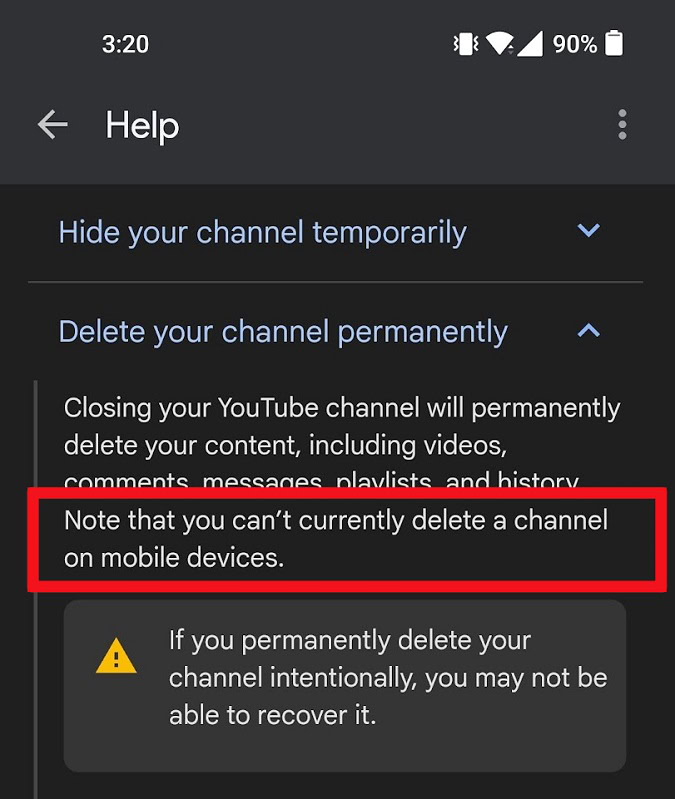
The process of deleting a YouTube channel on a mobile device is not handled directly within the primary YouTube app’s settings in a single tap. Instead, the app serves as a gateway to the broader Google Account management suite, which is rendered via a secure mobile web interface.
Accessing the Data & Privacy Suite
-
Open the YouTube App: Ensure you are logged into the specific account you wish to delete. Tap on your profile icon located in the bottom right (or top right, depending on the OS version).
-
Google Account Settings: Tap on “Google Account” or “Manage your Google Account.” This action triggers a transition from the YouTube app environment to the Google Account management interface.
-
Navigate to Data & Privacy: Within the top navigation bar of the Google Account screen, select the “Data & privacy” tab. This section contains the administrative tools for managing your digital history and service-specific data.
Executing the Service Removal
Once inside the Data & Privacy menu, the process involves locating the specific “Delete a Google service” tool.
-
Find “Download or delete your data”: Scroll down until you see the section labeled “Data from apps and services you use.”
-
Select “Delete a Google service”: You may be prompted to re-authenticate your identity using your phone’s biometric data (FaceID, fingerprint) or your account password. This is a critical security layer designed to prevent unauthorized account closures.
-
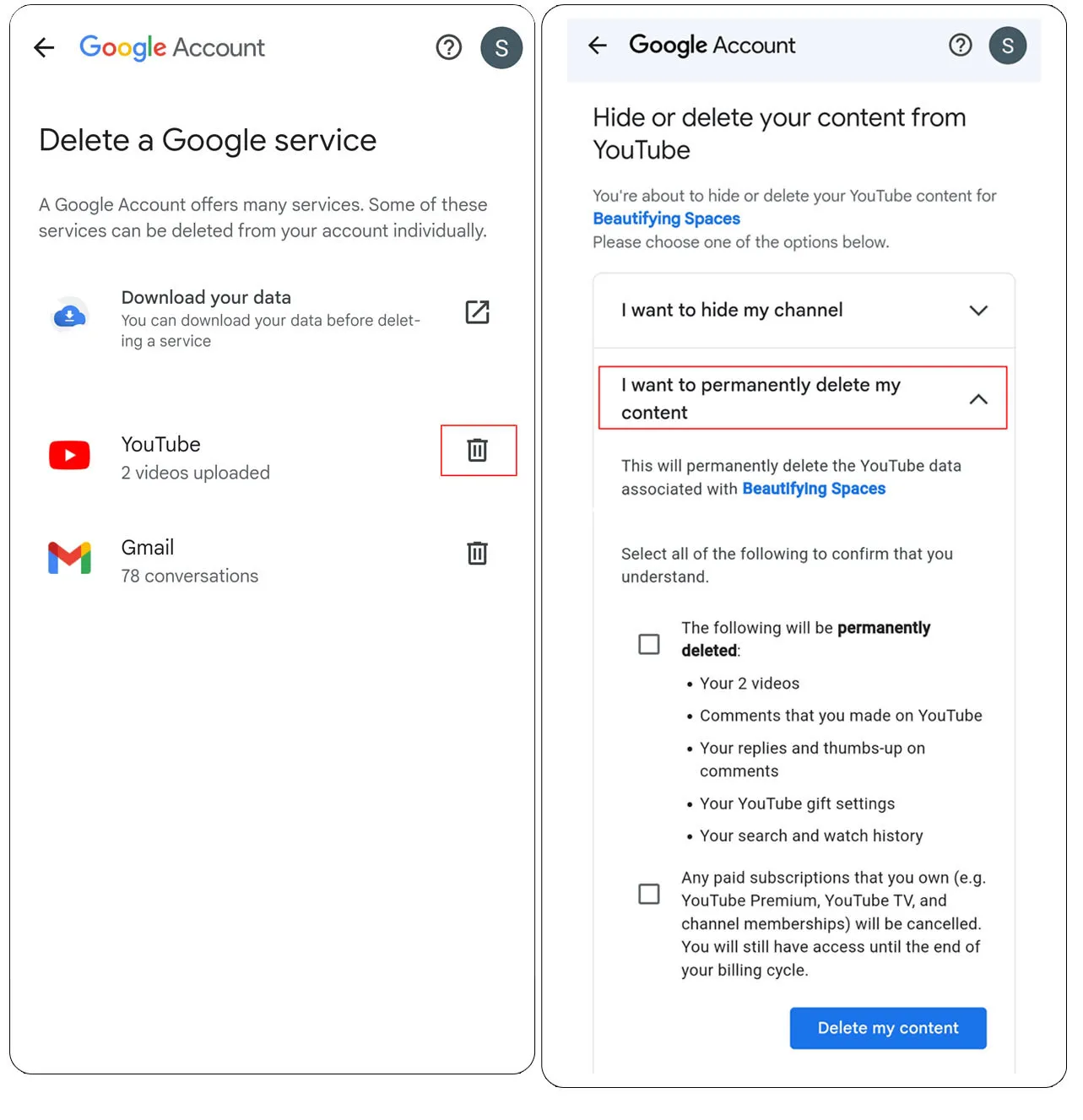
Locate YouTube: A list of active Google services will appear. Tap the trash can icon next to the YouTube entry.
-
Confirm Choice: You will typically be given two options: “I want to hide my channel” and “I want to permanently delete my content.” To proceed with a full deletion, select the permanent option.
-
Final Verification: Google requires you to check several boxes acknowledging that all comments, messages, search history, and subscriptions will be permanently erased. You will likely have to type in your email address one last time to confirm the action.
The Browser-Based Alternative
For users who find the app interface cumbersome, using a mobile browser (Chrome or Safari) set to “Desktop Mode” is a reliable alternative. By navigating to studio.youtube.com, users can access the advanced settings of YouTube Studio. Under Settings > Channel > Advanced Settings, there is a direct link to “Remove YouTube Content.” This method provides a more granular view of the account’s status and is often preferred by power users who want to ensure no metadata is left behind.
Data Preservation and Digital Security Protocols

Before initiating the deletion sequence, it is imperative to address the technical implications of data loss. Once a channel is deleted, the action is irreversible. The metadata associated with the account—including engagement metrics, watch time history, and community interactions—is purged from YouTube’s active servers.
Utilizing Google Takeout
For users who wish to keep a record of their uploaded content or comments before deletion, Google Takeout is the essential tool. This service allows users to export a copy of their data from Google services. On a mobile device, you can access Takeout through the same “Data & privacy” menu. You can filter the export to include only YouTube data, which will be packaged into a .zip or .tgz file containing your original video files, JSON files for your comments, and HTML files for your subscriptions. This ensures that your creative history is preserved in a local storage environment or a different cloud service.
Security Implications of Dormant Accounts
From a digital security perspective, deleting an unused YouTube account is often a recommended practice. Dormant accounts are frequent targets for credential stuffing attacks and unauthorized takeovers. If an old account is linked to an outdated recovery email or a weak password, it represents a vulnerability. By removing the channel and its associated data, you reduce your “attack surface”—the total number of points where an unauthorized user can extract information or impersonate your digital identity.
Troubleshooting Common Hurdles in Mobile Account Management
The transition from mobile app to web-based account management is not always seamless. Users often encounter technical friction points that can stall the deletion process.
Authentication Loops
One common issue is the “Authentication Loop,” where the system repeatedly asks for a password or biometric verification. This usually occurs due to cached data in the mobile browser or a conflict between multiple logged-in Google accounts on the same device. To resolve this, it is often helpful to clear the browser cache or use an Incognito/Private window to complete the deletion steps.
Delayed Deletion Updates
It is important to note that the deletion of a YouTube account is not always reflected across the global Content Delivery Network (CDN) instantaneously. While the channel will become inaccessible to the public immediately after confirmation, cached versions of thumbnails or search results may persist for several days. This is a standard technical delay as Google’s indexing servers update their records.
Secondary Channel Complications
If a user has multiple channels linked to a single email (Brand Accounts), they must be extremely careful during the selection process. The mobile UI can sometimes make it difficult to see which specific sub-identity is currently active. Always verify the channel handle and subscriber count displayed on the final confirmation screen to ensure you are not accidentally deleting your primary creative outlet.
Enhancing Digital Privacy Beyond Deletion
While deleting a YouTube account is a definitive step toward privacy, it is part of a broader strategy of digital hygiene. For those who choose to keep their accounts but want to limit their data footprint, mobile devices offer several granular controls.
Incognito Mode and History Management
The YouTube mobile app includes an “Incognito Mode” which prevents the recording of search and watch history during a session. Furthermore, within the Google Account settings, users can enable “Auto-delete” for their YouTube history, which automatically purges data older than 3, 18, or 36 months. This automated software solution balances the convenience of personalized recommendations with the necessity of data privacy.
The Future of Mobile Account Sovereignty
As mobile operating systems evolve, we are seeing a trend toward more integrated privacy dashboards. Both Android and iOS are increasingly placing account management tools at the forefront of the user experience. Understanding how to navigate these menus to manage services like YouTube is an essential skill for any modern tech user. By taking control of your YouTube presence on your phone, you are asserting your right to data sovereignty and ensuring that your digital identity aligns with your current privacy requirements.
In conclusion, deleting a YouTube account from a mobile device is a sophisticated process that bridges the gap between app-based convenience and web-based administrative power. By following the correct technical pathways, ensuring data is backed up via Google Takeout, and understanding the security benefits of reducing one’s digital footprint, users can effectively manage their presence on one of the world’s largest software platforms.
aViewFromTheCave is a participant in the Amazon Services LLC Associates Program, an affiliate advertising program designed to provide a means for sites to earn advertising fees by advertising and linking to Amazon.com. Amazon, the Amazon logo, AmazonSupply, and the AmazonSupply logo are trademarks of Amazon.com, Inc. or its affiliates. As an Amazon Associate we earn affiliate commissions from qualifying purchases.