
In an increasingly interconnected digital world, the concept of a unified digital identity has become paramount. At the forefront of this evolution stands the Google ID – an unassuming yet profoundly powerful key that unlocks a vast universe of services, tools, and personalized experiences. Far more than just an email address, a Google ID is your central nervous system within Google’s sprawling digital ecosystem, enabling everything from seamless communication to advanced data management and robust security. For anyone navigating the modern internet, understanding the intricacies of a Google ID is not just beneficial; it’s essential for maximizing productivity, safeguarding personal information, and fully harnessing the potential of the digital realm.

At its core, a Google ID is the unique identifier associated with your Google Account. This account serves as a comprehensive profile that Google uses to authenticate your access across its myriad platforms and to personalize your experience. It’s the digital equivalent of a passport, granting you entry and recognition wherever Google services are present. From the moment you create a Gmail address, you’ve established a Google ID, laying the foundation for your interactions with a suite of some of the most widely used applications and services globally. This foundational identity ties together your digital life, ensuring continuity and personalized interaction across devices and applications, all while upholding a complex architecture of security and privacy protocols designed to protect your information.
The Central Hub of Your Digital Existence
A Google ID isn’t merely a login credential; it represents the very nexus of your interaction with Google’s extensive suite of technologies. It’s the unifying element that transforms disparate applications into a cohesive and intelligent personal assistant, streamlining your digital activities and making them profoundly more intuitive. Understanding its role as a central hub reveals the depth of its integration into contemporary digital living.
More Than Just an Email Address
For many, a Google ID begins and ends with a Gmail address. While your Gmail is indeed the primary username for your Google Account, it is only one facet of a much larger identity. A Google ID encapsulates a broad spectrum of personal data, preferences, and permissions that extend far beyond your inbox. It includes your name, date of birth, recovery contact information, preferred language, and geographical location. This data, stored securely, allows Google to offer services tailored to your specific needs and context. For instance, your location data helps Google Maps provide accurate directions and local recommendations, while your language preference ensures that interfaces and search results are presented in a way that is immediately understandable to you. It’s this aggregation of information, tied to a single, unique identifier, that empowers the personalized and anticipatory experiences Google aims to deliver.
A Unified Digital Passport
Consider your Google ID as a universal digital passport that grants you access to an unparalleled array of online services, both within and outside the Google ecosystem. With a single set of credentials, you can log into Gmail, Google Drive, YouTube, Google Maps, Google Photos, and countless other Google-owned platforms. This single sign-on (SSO) capability eliminates the need for managing multiple usernames and passwords, significantly reducing friction and enhancing user convenience. Beyond Google’s own services, many third-party websites and applications offer “Sign in with Google” options. This feature leverages the security and authentication mechanisms of your Google ID to grant you access, often without the need to create a new account or remember additional credentials. This widespread adoption solidifies the Google ID’s position as a truly unified digital passport, simplifying your online life and broadening your access to the internet’s vast resources.
The Seamless Experience
The true power of a Google ID lies in the seamless experience it fosters across devices and services. When you log into your Google Account on a new smartphone, tablet, or computer, your preferences, contacts, saved passwords (if synced), calendar events, and even your browsing history (if enabled) are instantly accessible. This continuity ensures that your digital workspace and personal data are always at your fingertips, regardless of the device you are using. For example, a document started on Google Docs on your desktop can be instantly continued on your tablet, or a route searched on Google Maps on your phone can be seamlessly sent to your car’s navigation system. This seamlessness is not merely a convenience; it’s a fundamental shift in how we interact with technology, making our digital lives less fragmented and more integrated, ultimately boosting productivity and enhancing overall user satisfaction.
Navigating the Google Ecosystem with Your ID
The Google ID is the critical enabler that allows users to harness the full power of Google’s expansive ecosystem. Without it, the vast network of interdependent services would function as isolated applications, significantly diminishing their utility and the cohesive user experience that billions have come to rely upon. Your Google ID acts as the central orchestrator, personalizing and integrating services to meet your specific needs.
Essential Communication & Productivity Tools
At the heart of the Google ecosystem are its communication and productivity tools, all powered and unified by your Google ID. Gmail, the world’s most popular email service, is the most obvious example. Beyond sending and receiving messages, your Gmail account is deeply integrated with Google Contacts, ensuring your address book is always current across devices, and Google Calendar, allowing for seamless scheduling and event management directly from your inbox. Google Drive provides cloud storage for all your files, documents, photos, and videos, making them accessible from anywhere. Coupled with Google Docs, Sheets, and Slides – a powerful suite of collaborative office applications – your Google ID facilitates real-time collaboration, allowing multiple users to work on the same document simultaneously, transforming remote work and education. Google Meet enables video conferencing, instantly connecting you with colleagues, friends, and family, all managed and scheduled through your integrated Google Account.
Entertainment, Information, and Beyond
Beyond work and communication, your Google ID profoundly shapes your entertainment and information consumption. YouTube, the world’s largest video-sharing platform, personalizes your feed based on your viewing history and subscriptions, all linked to your Google ID. The Google Play Store serves as the gateway for Android users to download apps, games, movies, and books, with all purchases and downloads tied to your account for easy reinstallation and cross-device access. Google Maps provides personalized navigation, local recommendations, and real-time traffic updates, drawing on your search history and location data to offer relevant insights. Google Search itself becomes more personalized when you’re logged in, subtly tailoring results based on your past queries and interests. Even smart home devices like Google Nest integrate with your Google ID, allowing for voice control and personalized settings across your connected home environment.
Personalization and Integration
The true genius of the Google ID lies in its ability to foster deep personalization and integration across these diverse services. Your search history on Google, viewed videos on YouTube, visited locations on Google Maps, and even your app usage on Android contribute to a rich profile that Google uses to tailor experiences. This personalization can manifest as targeted advertising (which can be controlled), but more importantly, it delivers enhanced utility: relevant news feeds in Google Discover, intelligent suggestions in Gmail, recommended apps in the Play Store, and even predictive search results. This level of integration means that your Google ID isn’t just a key to access; it’s a mechanism through which Google’s various technologies learn and adapt to serve you better, making your digital journey more intuitive, efficient, and uniquely yours.
Fortifying Your Digital Frontier: Security & Privacy
While the convenience and integration offered by a Google ID are immense, they come with a significant responsibility: safeguarding your digital identity. Given that your Google ID acts as the central repository for so much of your online life, its security is paramount. Google invests heavily in robust security infrastructure, but users also play a critical role in maintaining the integrity and privacy of their accounts.
Multi-Factor Authentication: Your First Line of Defense
One of the most effective measures for securing your Google ID is Multi-Factor Authentication (MFA), often referred to as Two-Factor Authentication (2FA). This security layer requires not only your password but also a second piece of information that only you possess, such as a code sent to your phone, a prompt on a trusted device, or a physical security key. Even if a malicious actor manages to obtain your password, they cannot access your account without this second factor. Google offers several 2FA options, including Google Prompts (a simple tap on your phone), SMS codes, authenticator apps (like Google Authenticator), and hardware security keys (e.g., Titan Security Key, YubiKey). Enabling 2FA significantly reduces the risk of unauthorized access, acting as an impenetrable barrier against most common hacking attempts.
Proactive Account Monitoring and Controls
Google provides a comprehensive dashboard for managing your account security, accessible through myaccount.google.com. This portal allows you to proactively monitor and control various aspects of your digital security. You can review your recent security activity, which shows logins from new devices, suspicious activity, or password changes, enabling you to quickly identify and respond to potential threats. The “Security Checkup” is a particularly valuable tool that guides you through a personalized set of recommendations, such as reviewing devices with access to your account, managing third-party apps and services connected to your Google ID, and ensuring your recovery information (phone number, email) is up-to-date. Regularly performing these checkups helps maintain a strong security posture and ensures that you remain in control of who or what accesses your Google Account.
Understanding and Managing Your Data
Privacy is intrinsically linked to security, and your Google ID offers granular controls over your personal data. Google’s “Privacy Checkup” and “Data & privacy” section within your account settings allow you to understand what data Google collects and how it’s used. You can review and manage your Web & App Activity, Location History, and YouTube History, choosing whether these data points are saved and for how long. For instance, you can pause activity tracking or set up auto-delete options for data older than a specified period. Furthermore, you can manage ad personalization, deciding whether Google uses your activity to show you tailored ads. This level of transparency and control empowers users to make informed decisions about their digital footprint and to customize their privacy settings to align with their personal preferences, ensuring that their Google ID reflects not only their convenience but also their desired level of data privacy.
Practical Management: Mastering Your Google ID
Effective management of your Google ID is key to a seamless, secure, and personalized digital experience. Google provides a suite of tools and functionalities within your account settings that empower you to take full control, ensuring your digital identity serves you optimally. Mastering these aspects allows for proactive maintenance and responsive problem-solving.
The Google Account Dashboard
The central command center for your Google ID is the Google Account dashboard, accessible at myaccount.google.com. This intuitive interface organizes all aspects of your Google identity into easily navigable sections. Here, you can update personal info like your name, birthday, and contact details; review and manage your data and privacy settings; configure security options like 2-Step Verification and password management; and oversee payments and subscriptions tied to your account. This dashboard is designed to be your one-stop shop for everything related to your Google ID, providing transparency and control over the vast amount of data and services linked to your account. Regularly visiting and familiarizing yourself with this dashboard is a fundamental practice for any Google user.
Recovery and Accessibility
Ensuring access to your Google ID, even in unforeseen circumstances, is crucial. Google provides robust recovery options that are essential to set up and keep updated. This includes adding a recovery phone number and a recovery email address, which are used to verify your identity if you forget your password or if unusual activity is detected. Keeping this information current is vital, as it serves as your lifeline back into your account should you ever get locked out. Additionally, Google offers accessibility features within your account settings, allowing users with diverse needs to customize their experience, such as screen readers, color inversions, and caption preferences, making the Google ecosystem inclusive for everyone.
Device Management and Third-Party Access
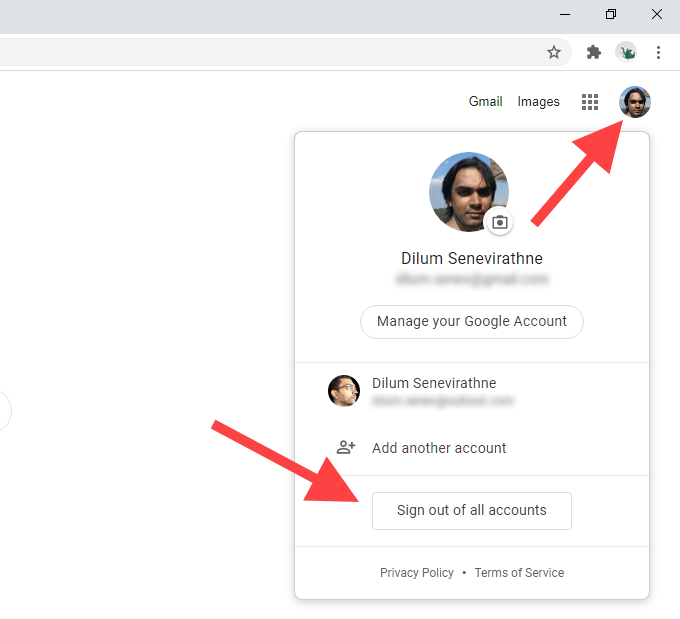
Your Google ID often extends its reach to multiple devices and numerous third-party applications. Within your account settings, you can view and manage all the devices currently signed into your Google Account. This feature allows you to review active sessions, locate a lost device, or remotely sign out from a device you no longer recognize or use. Similarly, the “Third-party apps with account access” section is critical for reviewing and revoking permissions granted to external applications. Many apps ask for permission to access parts of your Google Account (e.g., your contacts, calendar, or Google Drive). Regularly auditing this list and revoking access for apps you no longer use or trust is a crucial security practice, minimizing potential vulnerabilities and ensuring your data is only shared with trusted services.
Responsible Use and Digital Wellbeing
Beyond technical configurations, managing your Google ID also encompasses responsible digital citizenship and promoting digital wellbeing. Your Google ID can track screen time, app usage, and other digital habits, which can be reviewed and managed to encourage a healthier relationship with technology. Tools like “Digital Wellbeing” (available on Android devices) integrate with your Google Account to provide insights and controls for managing your usage patterns. This might include setting app timers, scheduling downtime, or filtering content. By actively managing your Google ID in this holistic way, users can ensure their digital identity not only provides access and convenience but also supports a balanced and secure online presence, reflecting a mindful approach to technology consumption.
In conclusion, a Google ID is much more than a simple login; it is the comprehensive digital identity that underpins and integrates nearly every aspect of Google’s expansive technological offerings. From enabling seamless communication and productivity to personalizing entertainment and ensuring robust security, its role is indispensable. Understanding its architecture, actively managing its settings, and diligently protecting its integrity are not just best practices, but fundamental requirements for anyone navigating the modern digital landscape. As technology continues to evolve, the centrality of a unified digital identity like the Google ID will only grow, making its mastery a core competency for digital empowerment.
aViewFromTheCave is a participant in the Amazon Services LLC Associates Program, an affiliate advertising program designed to provide a means for sites to earn advertising fees by advertising and linking to Amazon.com. Amazon, the Amazon logo, AmazonSupply, and the AmazonSupply logo are trademarks of Amazon.com, Inc. or its affiliates. As an Amazon Associate we earn affiliate commissions from qualifying purchases.