
Snapchat has long been a pioneer in the realm of ephemeral messaging, fundamentally changing how we perceive digital communication. Unlike traditional SMS or static social media platforms, Snapchat relies heavily on a complex visual shorthand—a system of colorful icons, arrows, and boxes that convey the status of a message without the need for text. For most users, the red, purple, and blue icons become second nature. However, the appearance of a grey box often sparks confusion. Within the technical architecture of Snapchat’s user interface (UI), the grey box is a critical indicator of delivery status, privacy permissions, and network synchronization.
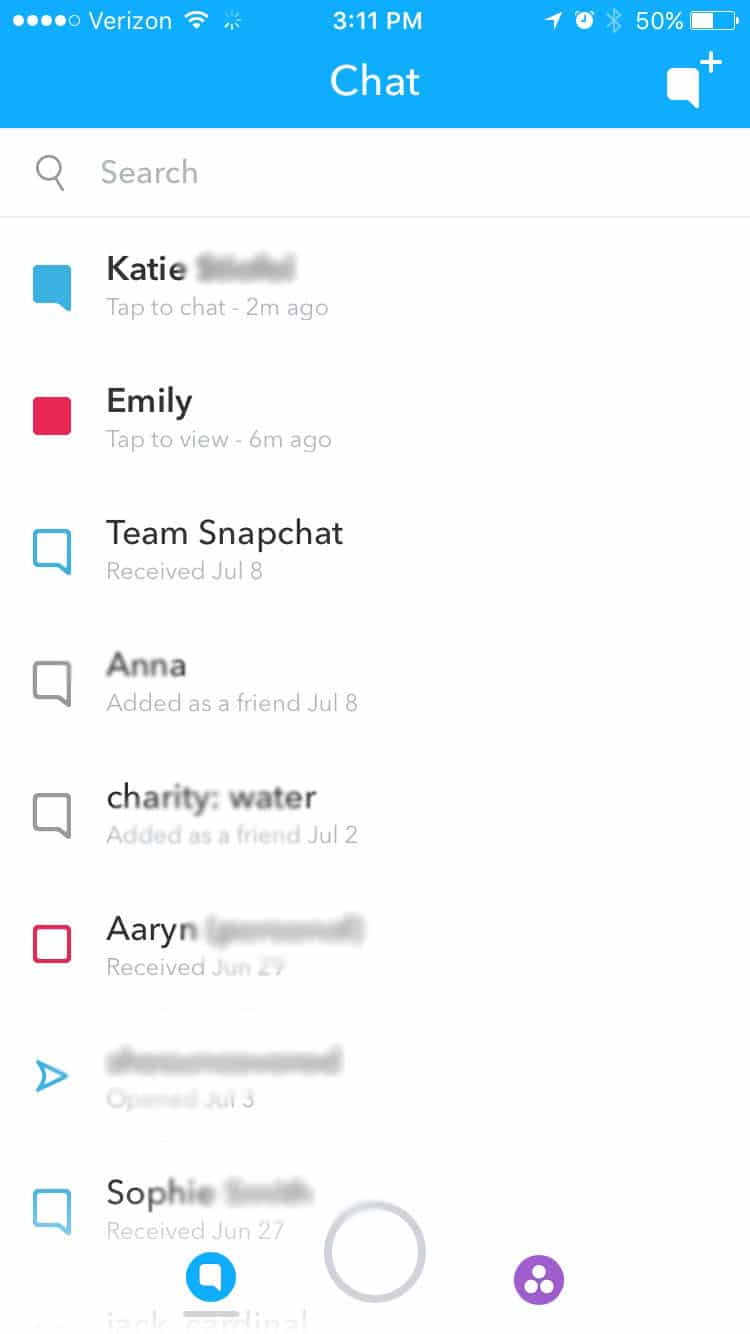
Understanding what the grey box signifies requires a look into how the app handles data transmission between users and how its internal “friendship” logic dictates visibility.
Understanding Snapchat’s Visual Language: The Iconography of Connection
Before dissecting the specific technicalities of the grey box, it is essential to understand the broader UI framework Snapchat employs. The app uses a color-coded system to differentiate between media types and delivery states. This design choice is intended to provide “glanceable” information, allowing users to manage high volumes of interaction efficiently.
The Standard Color Palette: Red, Purple, and Blue
In the standard Snapchat ecosystem, colors represent the medium of the message. A red icon indicates a Snap without audio, a purple icon represents a Snap with audio (usually a video), and a blue icon signifies a text-based Chat. When these icons are solid, the message has been sent but not yet opened. When they become hollow outlines, the recipient has viewed the content. This binary state (solid vs. hollow) is a fundamental aspect of the app’s real-time feedback loop.
The Outlier: Why the Grey Box Stands Out
The grey box is an anomaly in this vibrant system. While red, purple, and blue indicate successful transmission to a recognized contact, grey indicates a “Pending” or “Undeliverable” status. Technically, the grey box (often appearing as a grey square or a grey arrow) signifies that the data packet—your Snap or message—has reached Snapchat’s servers but cannot be “pushed” to the recipient’s device due to a lack of mutual authorization. It is the visual manifestation of a digital roadblock.
Technical Reasons Behind the Grey Box Indicator
The appearance of a grey box is rarely a glitch; rather, it is the app’s security and privacy protocols functioning as intended. From a software perspective, several conditions must be met for a message to transition from “Pending” (Grey) to “Delivered” (Colored).
Pending Status and Friend Requests
The most common technical reason for a grey box is that the recipient has not accepted your friend request. Snapchat’s API (Application Programming Interface) is designed to protect user privacy by preventing unsolicited media from appearing in a user’s primary feed. If you attempt to send a Snap to someone who hasn’t added you back, the server flags the interaction as “Pending.” The grey box acts as a placeholder, indicating that the content is held in a temporary server-side buffer until the friendship is authenticated.
Privacy Settings and Permission Protocols
Even if two users were previously friends, changes in privacy settings can trigger the grey box. Snapchat offers a “Who Can Contact Me” setting, which can be toggled between “Everyone” and “My Friends.” If a user switches their settings to “My Friends” and removes you from their list, any subsequent Snaps you send will be met with a grey box. In this scenario, your device is attempting to establish a handshake with the recipient’s device, but the recipient’s privacy permissions are rejecting the incoming data request.
Account Deactivation and Ghosting
Technically, the grey box also serves as an indicator of account status. If a user deactivates their account or if the account has been flagged and suspended by Snapchat’s Trust and Safety team, messages sent to that handle will remain in a grey “Pending” state indefinitely. Because the destination UID (Unique Identifier) is no longer active on the network, the message cannot be delivered, and the UI reflects this by refusing to transition the icon to a colored state.
The Difference Between the Grey Box and the Grey Arrow
In the technical documentation of Snapchat’s UI components, there is a distinction between the square box and the directional arrow, though both fall under the “Grey” category.
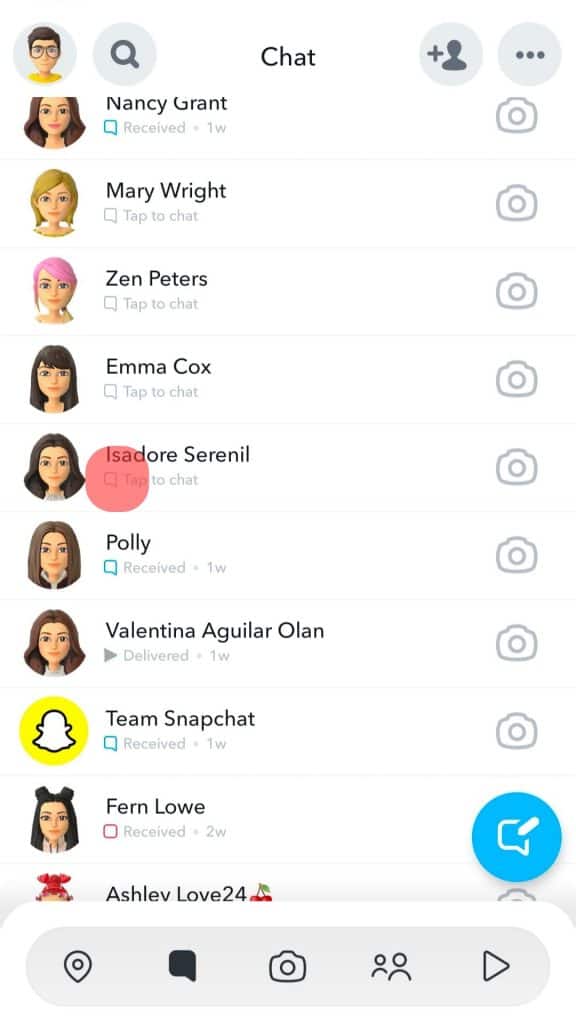
The Grey Square (Chat Indicator)
The grey square typically appears in the Chat interface. It indicates that a text message or a saved piece of media is pending. This usually happens when the chat is the first interaction with a user who has not yet authorized you as a contact. It represents a “blocked” communication stream where the data is stagnant.
The Grey Arrow (Snap Indicator)
The grey arrow signifies a Snap (photo or video) that is stuck in the “Pending” phase. From a technical standpoint, Snaps are heavier data files than text chats. When you see a grey arrow, it means the metadata of the Snap has been processed, but the actual media file is waiting for a “Clear to Send” signal from the recipient’s account permissions. If the arrow never turns blue, purple, or red, the media is eventually purged from the temporary cache after a set period (usually 30 days for unopened/pending snaps).
Troubleshooting the Grey Box: How to Resolve Delivery Issues
From a technical support perspective, seeing a grey box can be frustrating. However, there are several steps users can take to diagnose whether the issue is a social barrier (being blocked or not added) or a technical malfunction.
Verifying Friendship Status
The first step in troubleshooting is checking the “My Friends” list. If the user’s name does not appear there, or if their Snap Score is no longer visible to you, the grey box is a result of a friendship status change. Snapchat does not send notifications when a user is removed or blocked; the grey box is the primary technical indicator of this change in status.
Clearing Cache and Refreshing the App
Sometimes, a grey box can appear due to a synchronization error between the local client (your phone) and the Snapchat cloud. If you are certain you are friends with the person, the “Pending” status might be a UI lag.
- Action: Navigate to Settings > Account Actions > Clear Cache.
This process deletes temporary files that might be causing the app to display an outdated messaging state. Upon restarting the app, the client will re-fetch data from the server, potentially updating the grey box to the correct color.
Network Connectivity and Server Latency
In rare instances, high server latency or a poor internet connection can cause a delay in the “Delivered” handshake. If Snapchat’s servers are experiencing an outage (which can be verified via third-party tools like Downdetector), messages may default to a grey state because the confirmation signal hasn’t been sent back to your device. Ensuring a stable Wi-Fi or 5G connection and toggling Airplane Mode can often force the app to re-establish a connection with the Snapchat messaging gateway.
The Psychological and Technical Dynamics of Digital Indicators
The grey box is more than just a UI element; it represents the intersection of software engineering and social psychology. Tech companies like Snap Inc. spend millions of dollars researching “user friction.”
The “Pending” Anxiety
The grey box creates a specific type of user friction. Unlike an “Error: Message Not Sent” notification, the grey box implies a state of limbo. This is a deliberate design choice. By showing the message as “Pending” rather than “Failed,” Snapchat keeps the user engaged with the interface, hoping for a resolution (i.e., the friend request being accepted).
Digital Boundaries and User Agency
Technically, the grey box is a tool for user agency. It allows users to control their digital borders without the confrontation of a “Blocked” notification. By utilizing a “Pending” status, the software provides a buffer that protects the recipient’s privacy while giving the sender a clear, albeit subtle, signal that communication is currently restricted. This “soft-block” or “unfriended” indicator is a staple of modern social media architecture, balancing transparency with privacy.

Conclusion: Navigating Snapchat’s Evolving Interface
As Snapchat continues to update its software, the nuances of its iconography will likely evolve. However, the core logic of the grey box remains rooted in the platform’s commitment to authorized communication. It serves as a vital technical signal that a message has reached the threshold of the recipient’s digital space but lacks the necessary permissions to enter.
For the power user or the tech-curious, the grey box is a reminder of the complex permission layers that govern our digital interactions. It highlights the importance of mutual authentication in an age of instant connectivity. Whether it’s a result of a pending friend request, a change in privacy settings, or a simple network sync issue, understanding the technical “why” behind the grey box allows users to navigate the app with greater insight and less confusion. In the visual language of Snapchat, grey isn’t just a color—it’s a status report from the server, indicating that the ball is in the other user’s court.
aViewFromTheCave is a participant in the Amazon Services LLC Associates Program, an affiliate advertising program designed to provide a means for sites to earn advertising fees by advertising and linking to Amazon.com. Amazon, the Amazon logo, AmazonSupply, and the AmazonSupply logo are trademarks of Amazon.com, Inc. or its affiliates. As an Amazon Associate we earn affiliate commissions from qualifying purchases.