
In the ever-evolving landscape of digital connectivity, platforms like Facebook have become indispensable to our daily lives. From sharing monumental life events to simply checking in with loved ones, Facebook weaves a complex web of interactions that spans personal, professional, and everything in between. However, with this vast network comes the inherent challenge of managing diverse relationships and ensuring your shared content reaches the right audience. This is precisely where Facebook’s “Acquaintances” list, a powerful yet often overlooked feature, comes into play. It offers a nuanced approach to social media management, allowing users to fine-tune their privacy settings and curate their online experience with greater precision. For anyone navigating the complexities of their digital presence – be it for personal connection, professional networking, or even building a personal brand – understanding and utilizing the Acquaintances list is not just a convenience, but a strategic imperative in the digital age.
Unpacking the “Acquaintances” Feature: A Deep Dive into Facebook’s Privacy Tools
At its core, the Facebook “Acquaintances” list is a clever mechanism designed to help users manage the visibility of their posts without resorting to the more drastic measures of unfriending or blocking. It’s a testament to Facebook’s ongoing efforts to provide users with granular control over their digital security and content dissemination. This feature empowers individuals to segment their friend list, acknowledging that not all connections hold the same level of intimacy or deserve access to the same depth of personal information.
The Core Functionality
The Acquaintances list functions as a “Smart List” within Facebook, allowing you to categorize certain friends who you’d prefer to see fewer of your general updates. It’s a subtle but effective way to filter your audience. When you add someone to your Acquaintances list, it essentially marks them as a recipient for whom you might want to restrict certain posts. The key mechanism here is the “Friends Except Acquaintances” option when posting. If you choose this privacy setting for a particular update, anyone on your Acquaintances list will not see that post in their News Feed.
It’s crucial to understand what the Acquaintances list doesn’t do. It doesn’t unfollow them, meaning their public posts and posts visible to “Friends” will still appear in your News Feed. It doesn’t unfriend them, nor does it block them. They remain your Facebook friends, able to view your public posts, posts they’ve been tagged in, or posts shared by mutual friends. The power lies in its ability to selectively hide your personal updates from them. This differentiation is vital for users who wish to maintain a broad network but desire a higher degree of privacy for their more personal disclosures. From a technology standpoint, it’s an intelligent application of audience segmentation, giving users a dynamic tool to manage their digital footprint effectively.
Practical Application and User Control
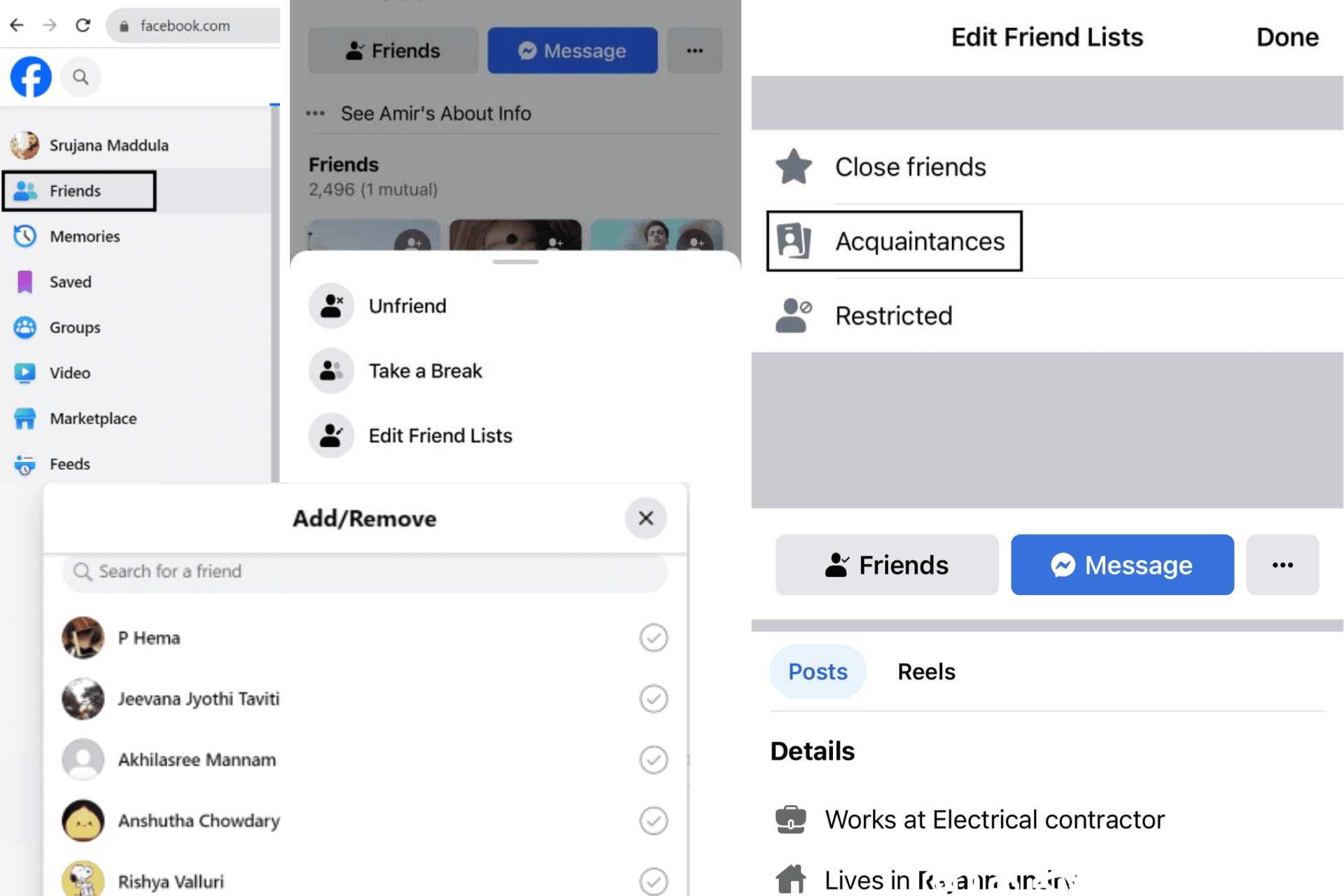
Utilizing the Acquaintances list is straightforward, making it an accessible tool for anyone looking to enhance their Facebook privacy. To add someone to this list, you simply navigate to their profile, hover over the “Friends” button, and then select “Add to another list…” and choose “Acquaintances.” The process is reversible; removing someone is just as easy.
Once your Acquaintances list is populated, the real magic happens when you create a post. Below the text box, where you typically see a globe icon for “Public” or a silhouette for “Friends,” you can click to reveal a dropdown menu. Here, you’ll find the “Friends Except Acquaintances” option. Selecting this ensures that while your regular friends will see the post, those on your Acquaintances list will not. This proactive privacy measure puts the user firmly in control, allowing them to tailor each post’s visibility to their desired audience. For those concerned with digital security and maintaining a comfortable sharing environment, mastering this feature is an essential step towards a more secure and personalized Facebook experience. It’s a powerful productivity hack for managing your social sphere, reducing anxiety about oversharing and promoting a more intentional online presence.
The Strategic Imperative: Why Segmenting Your Facebook Audience Matters
In an age where our online and offline identities frequently intertwine, the strategic segmentation of your Facebook audience moves beyond mere convenience; it becomes a fundamental aspect of managing your digital persona. The Acquaintances list serves as a sophisticated instrument in this endeavor, helping individuals navigate the often-blurred lines of their digital lives.
Safeguarding Your Digital Persona and Personal Branding
The digital realm has, for many, become an extension of their professional and personal self. What you share, and who sees it, directly impacts your personal brand and online reputation. Imagine sharing a casual, perhaps slightly irreverent, weekend post that you wouldn’t mind your close friends seeing, but would prefer not to be seen by a potential employer, a new client, or even a distant colleague. This is where the Acquaintances list becomes invaluable. It allows you to maintain a broad network for professional connections or general acquaintances without compromising the authenticity of your personal space.
By categorizing connections into a less-privileged viewing group, you prevent instances of “too much information” (TMI) from reaching those who might misinterpret it or for whom such content is simply inappropriate. This level of discernment is critical for maintaining a consistent and positive personal brand online. For individuals engaged in personal branding, whether they are thought leaders, entrepreneurs, or simply professionals seeking to build a strong online presence, the ability to control information flow is paramount. A misstep in audience management can lead to reputational damage that takes considerable effort to repair, potentially impacting career opportunities or networking efforts. This is directly relevant to the ‘Brand’ topic of the website, emphasizing how digital tools contribute to corporate and personal identity management.
Enhancing Privacy and Digital Security
Beyond branding, the Acquaintances list is a powerful tool for enhancing privacy and bolstering digital security. In a world increasingly concerned with data privacy and the potential for information misuse, limiting the reach of personal updates, photos, and life events is a prudent practice. Every piece of information shared online contributes to your digital footprint, and the wider its audience, the greater the potential for that information to be misinterpreted, misused, or even exploited.

By intentionally restricting certain posts to “Friends Except Acquaintances,” you are actively reducing the visible portion of your digital footprint to a wider, less trusted circle. This mitigates various risks, from simple social awkwardness to more serious concerns like social engineering attacks, identity theft, or unwanted attention from individuals who might have malicious intent. The ‘Tech – Digital Security’ aspect comes to the forefront here. It’s about smart privacy management, using the available software features to create a safer online environment. This controlled sharing environment allows users to be more authentic with their close circle without exposing vulnerabilities to a broader audience, fostering a sense of comfort and security in their online interactions.
Beyond Acquaintances: A Holistic Approach to Facebook Productivity and Presence
While the Acquaintances list is a potent feature, it’s most effective when integrated into a broader strategy for managing your Facebook presence. Thinking holistically about privacy settings, friend lists, and content strategy can significantly enhance productivity and ensure a more controlled digital experience.
Complementary Privacy Settings and List Management
Facebook offers a suite of privacy tools that, when used in conjunction with the Acquaintances list, provide comprehensive control. For instance, the “Close Friends” list allows you to ensure certain updates are only seen by your most trusted circle, and also receive notifications for their activity. Conversely, the “Restricted” list is a more severe option, where friends on this list can only see your public posts or posts you’ve explicitly tagged them in. Understanding the nuances of these various lists – Public, Friends, Friends Except Acquaintances, Specific Friends, Close Friends, and Restricted – enables a multi-layered approach to audience segmentation.
Beyond lists, regularly reviewing your default privacy settings for posts, checking your “Friends of Friends” settings, and auditing your overall friend list are crucial best practices. A clean, well-managed friend list, coupled with intelligent use of privacy options, contributes significantly to your digital productivity by reducing the mental load of worrying about who sees what, and allowing you to share more freely within appropriate boundaries. This constant vigilance and proactive management align perfectly with the ‘Tech – Productivity’ focus, transforming Facebook from a potential time-sink into a well-managed communication platform.
The Interplay with Professional Life and Online Income
For a growing number of individuals, Facebook is not just a personal platform but also a tool for professional networking, lead generation, community building, and even driving online income or side hustles. In this context, effective audience management becomes even more critical. Entrepreneurs, freelancers, small business owners, or anyone leveraging social media for professional growth must carefully delineate between their personal and professional personas.
The Acquaintances list plays a subtle yet significant role here. It allows professionals to maintain connections with casual acquaintances – perhaps former colleagues, distant industry contacts, or even potential future clients – without inundating them with overtly personal content. This maintains professional boundaries without severing potentially valuable connections. Imagine an investor or a business partner stumbling upon a very personal post that might appear unprofessional; the Acquaintances list helps prevent such scenarios. For those generating online income, protecting your reputation and maintaining a credible image is directly tied to your financial well-being. Using Facebook’s features, including the Acquaintances list, to separate distinct audiences for personal sharing versus professional networking is a savvy move that aligns with the ‘Money – Online Income/Side Hustles’ aspect, safeguarding opportunities and upholding professional standards. Many professionals also benefit from having distinct Facebook Pages for their business or public persona, further separating their corporate identity from their personal profile, which then allows for even greater freedom with personal content, knowing the professional brand is protected on its dedicated platform.
Navigating the Nuances: Common Misconceptions and Best Practices
Despite its utility, the Acquaintances list, like many Facebook features, can be misunderstood. Dispelling common myths and adhering to best practices ensures its effective and secure deployment.
What Acquaintances Don’t Do
It’s vital to reiterate what the Acquaintances list does not do, to prevent any false sense of security or misapplication of the feature:
- It does not unfriend them: They remain on your friend list.
- It does not prevent them from seeing public posts: Any content you set to “Public” will be visible to them, just as it would be to anyone else on Facebook, friend or not.
- It does not prevent them from seeing posts they are tagged in: If a mutual friend tags them in a photo with you, or if you tag them, they will see that post, regardless of their status on your Acquaintances list.
- It does not prevent them from seeing posts shared by mutual friends: If a mutual friend shares one of your posts (even if it was “Friends Except Acquaintances”), and that mutual friend’s privacy settings allow their friends (including your acquaintance) to see it, the acquaintance might still see your post.
- It is not a secret list: While users aren’t explicitly notified that they’ve been added to your Acquaintances list, the effect is that they simply stop seeing some of your posts. They won’t know why, but they might notice a decrease in your activity in their feed.
Understanding these limitations is key to using the feature effectively and avoiding unexpected privacy breaches. It’s a tool for managing your direct sharing, not for complete invisibility.

Proactive Digital Habits for a Safer and More Authentic Online Experience
The Acquaintances list is just one component of a robust digital security and personal branding strategy. To truly harness its power, it must be part of a larger framework of proactive digital habits:
- Regularly review your Acquaintances list: Your relationships evolve, and so should your lists. What was once a casual acquaintance might become a close friend, or vice versa. Periodically auditing and updating your lists ensures they remain accurate and effective.
- Be mindful of what you post publicly: Given the limitations of the Acquaintances list, anything you’re truly sensitive about should never be posted “Publicly” unless you are comfortable with anyone on the internet seeing it.
- Understand the default privacy settings of your posts: Facebook often remembers your last-used privacy setting. Always double-check the audience selector before hitting “Post.”
- Educate yourself on Facebook’s privacy controls: The platform frequently updates its features. Staying informed about the latest privacy tools and tutorials (relevant to the ‘Tech – Tutorials’ topic) empowers you to make informed decisions about your online presence.
- Consider the long-term impact of your online presence: Every post contributes to your digital legacy. Thoughtful consideration of your audience and content, supported by tools like the Acquaintances list, helps build and maintain a strong personal and professional reputation, directly connecting to the ‘Brand’ topic.
In conclusion, the “Acquaintances” feature on Facebook is far more than a simple list; it’s a sophisticated privacy tool that, when understood and utilized correctly, can significantly enhance your control over your digital life. In an era where our online presence profoundly impacts our personal brand, digital security, and even financial opportunities, mastering such features is no longer optional. By strategically segmenting your audience, you can navigate the complexities of social media with greater confidence, maintain stronger personal boundaries, and cultivate an online experience that is both authentic and secure. Embrace the power of these tools to curate your digital narrative on your own terms.
aViewFromTheCave is a participant in the Amazon Services LLC Associates Program, an affiliate advertising program designed to provide a means for sites to earn advertising fees by advertising and linking to Amazon.com. Amazon, the Amazon logo, AmazonSupply, and the AmazonSupply logo are trademarks of Amazon.com, Inc. or its affiliates. As an Amazon Associate we earn affiliate commissions from qualifying purchases.