
The digital landscape is constantly evolving, with app developers striving to enhance user experience while simultaneously addressing growing concerns around privacy and security. Snapchat, a platform known for its ephemeral messaging and playful filters, is no exception. In recent years, users have begun noticing a subtle yet significant addition to their interface: green dots. These small, vibrant indicators, appearing next to usernames or within chats, have sparked curiosity and, for some, a degree of apprehension. Understanding their meaning is crucial for navigating the platform effectively and maintaining a clear picture of your digital interactions and privacy settings. This article delves into the technical underpinnings and implications of these green dots on Snapchat, exploring their function, evolution, and what they signify for the modern app user.

The Evolving Language of Digital Indicators: A Snapchat Case Study
Digital platforms are increasingly relying on visual cues to communicate complex information to their users. These cues can range from notification badges to status indicators, each designed to convey a specific message without requiring extensive textual explanations. Snapchat’s green dots are a prime example of this trend. They are not merely decorative elements; rather, they are integral components of the app’s user interface, designed to provide real-time feedback on user activity and the security status of communications.
The introduction of such indicators often stems from a confluence of factors: user demand for greater transparency, platform efforts to combat misinformation or malicious activity, and the ongoing push for more intuitive user experiences. In the realm of technology, clarity and efficiency are paramount. When a user encounters a visual element that is unfamiliar, understanding its purpose quickly becomes a priority. For the green dots on Snapchat, their primary function is to offer a layered understanding of interactions and the underlying technical processes at play.
Decoding the Initial Green Dot: Real-Time Activity and Connection Status
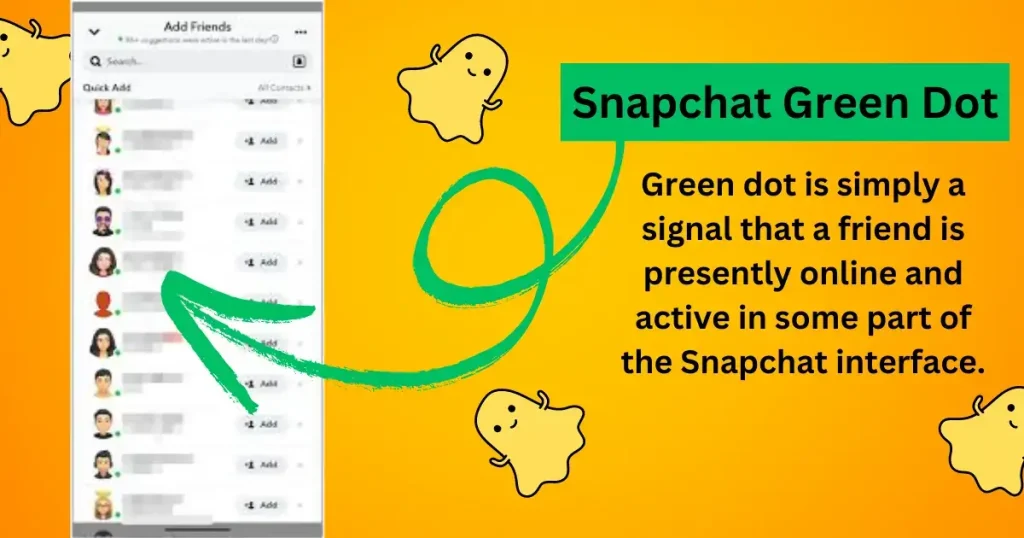
When the green dot first began appearing more prominently on Snapchat, its primary association was with real-time activity. This could manifest in several ways, most notably indicating that a friend was currently active within the Snapchat app. This “presence indicator” is a common feature across many social media and messaging platforms, allowing users to gauge the immediate availability of their contacts.
Presence and Availability in Messaging Apps
The concept of a presence indicator has a long history, dating back to early instant messaging services like AOL Instant Messenger (AIM) and MSN Messenger. These platforms used simple icons (like a green circle or a silhouette) to signify whether a user was online and available to chat. Snapchat has adopted and modernized this concept within its own unique interface.
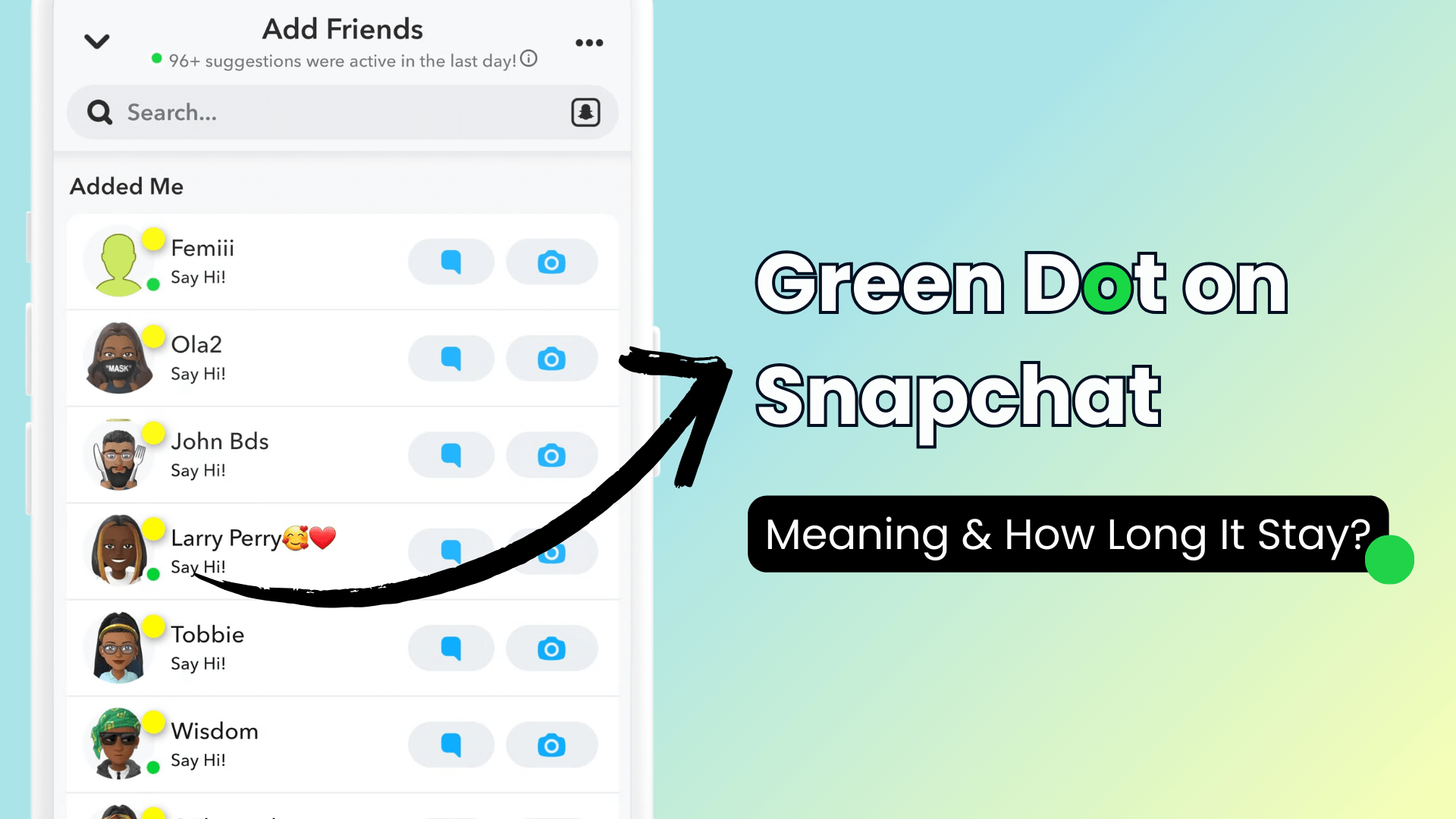
When a green dot appears next to a friend’s name on your Snapchat friend list or within a chat thread, it generally signifies that they are currently using the Snapchat app. This could mean they are actively browsing their feed, sending or receiving snaps, or engaging in a chat. The intention behind this feature is to provide a subtle hint about a friend’s immediate engagement with the platform, potentially influencing when you might choose to send them a message or expect a quick response.
Technical Implementation of Presence Indicators
Behind the scenes, these presence indicators rely on a system that constantly monitors user activity. When an app is open and actively interacting with the platform’s servers, it sends regular “heartbeat” signals. The presence of these signals is then interpreted by the server as an indication of active use. This information is then relayed to other users who have that individual added as a friend.
It’s important to note that the “active” state can sometimes be nuanced. Some platforms might define “active” as having the app open in the foreground, while others might consider any background activity that connects to the server as sufficient. For Snapchat, the green dot generally points towards more immediate engagement. This technical implementation is designed to be as lightweight as possible, minimizing battery drain and data usage while still providing valuable, albeit simple, information to the user.
The Shift Towards Security: The Green Dot as a Privacy Indicator
While the initial interpretation of the green dot was largely tied to user presence, its meaning has evolved, particularly with the introduction of more advanced privacy features on Snapchat. In more recent iterations of the app, the green dot has taken on a critical role in signifying the security and privacy of your communications. This evolution reflects a broader industry trend where transparency about data handling and security protocols is becoming increasingly important for user trust.
End-to-End Encryption and its Visual Representation
One of the most significant advancements in messaging app security has been the widespread adoption of end-to-end encryption (E2EE). This sophisticated encryption method ensures that only the sender and the intended recipient can read the messages being exchanged. Even the platform itself, in this case Snapchat, cannot access the content of these communications.
When Snapchat implements end-to-end encryption for certain types of chats or media, it often uses visual cues to inform the user. The green dot can now signify that a chat is secured with end-to-end encryption. This means that your conversations with that specific individual are protected by this advanced security protocol. This is a crucial distinction from earlier uses of the green dot, shifting its meaning from a simple status update to a fundamental indicator of your digital safety.
Understanding the Implications of E2EE on Snapchat
The presence of a green dot indicating E2EE is a powerful reassurance for users concerned about the privacy of their digital lives. It means that your personal conversations, photos, and videos shared within that secured chat are shielded from prying eyes, including potential data breaches on Snapchat’s servers or unauthorized access by third parties.
The technical implementation of E2EE involves complex cryptographic processes where messages are encrypted on the sender’s device and only decrypted on the recipient’s device. This requires robust key management systems and careful protocol design. Snapchat’s decision to visually represent this security feature through the green dot empowers users to make informed choices about their communication and to understand which of their interactions are fortified with the highest level of privacy.
Navigating Privacy Settings and the Green Dot’s Nuances
The meaning of the green dot is not always monolithic. Its interpretation can depend on the specific context within the Snapchat app and the individual user’s privacy settings. As Snapchat continues to refine its features, understanding these nuances is key to maximizing both the utility and security of the platform.
Chat Encryption Status: Friend vs. Stranger
The green dot’s association with encryption can also vary based on whether the conversation is with a known friend or a new contact. For existing friends, the green dot appearing next to their name or within a chat often confirms end-to-end encrypted communication. This provides a consistent visual confirmation of your secured conversations.
However, for new contacts or when initiating a conversation with someone you haven’t extensively interacted with, the appearance of a green dot might still primarily signify real-time activity. Snapchat’s algorithms will determine the appropriate indication based on the existing relationship, the type of communication, and the platform’s current security protocols for that interaction. It’s a dynamic system designed to provide the most relevant information at any given time.
User Control and the Visibility of Green Dots
Users have a degree of control over how their presence and activity are perceived on Snapchat, which can indirectly influence the appearance of green dots. For instance, users can often manage their privacy settings to control who can see when they are online or have the app open. This level of customization ensures that users can tailor their experience to their comfort levels.
While Snapchat doesn’t typically offer a direct toggle to “hide the green dot” for your own presence, the app does allow users to adjust settings related to visibility and who can see their Snap Map activity, for example. These settings, in turn, can affect how other users perceive your online status and might indirectly influence the context in which a green dot is displayed to them. Conversely, you can often control who can send you friend requests or view your stories, which can influence the initiation of new communication streams where the green dot’s meaning might be more ambiguous initially.
The Green Dot in the Broader Context of App Security and User Trust
The introduction and evolution of the green dot on Snapchat are symptomatic of a larger trend within the technology sector. As users become more aware of data privacy and the potential risks associated with digital communication, app developers are under increasing pressure to be transparent about their security measures. Visual indicators like the green dot are a simple yet effective way to bridge the gap between complex technical processes and the everyday user.
Building User Trust Through Transparency
In an era where data breaches and privacy concerns are frequent headlines, building and maintaining user trust is paramount for any digital platform. Snapchat’s use of the green dot to signal end-to-end encryption is a strategic move towards greater transparency. By providing a clear visual cue, the platform empowers users to feel more confident about the security of their conversations. This transparency not only enhances the user experience but also fosters a sense of responsibility on the part of the platform to uphold these security standards.
When users see a green dot indicating encryption, they are being informed that their data is being handled with a high degree of care. This can be a deciding factor for individuals choosing between different messaging apps, especially when sensitive information is being shared.
The Future of Visual Indicators in Digital Communication
The evolution of the green dot on Snapchat suggests a future where digital interfaces will become even more intuitive in communicating complex technical information. As technologies like advanced encryption, decentralized communication, and AI-driven security features become more prevalent, visual indicators will play an even more critical role. We can anticipate seeing more standardized and sophisticated visual languages emerge across various platforms to denote security levels, data usage, and real-time activity.
The green dot, in its various interpretations, serves as a microcosm of this larger technological shift. It demonstrates how a simple visual element can evolve to represent increasingly sophisticated concepts, ultimately aiming to provide users with a clearer, safer, and more informed digital experience. As users continue to navigate the complexities of the digital world, understanding these subtle yet significant indicators will be an essential skill in safeguarding their privacy and enhancing their engagement with the technologies that shape their lives.
aViewFromTheCave is a participant in the Amazon Services LLC Associates Program, an affiliate advertising program designed to provide a means for sites to earn advertising fees by advertising and linking to Amazon.com. Amazon, the Amazon logo, AmazonSupply, and the AmazonSupply logo are trademarks of Amazon.com, Inc. or its affiliates. As an Amazon Associate we earn affiliate commissions from qualifying purchases.