
In an era where our personal, professional, and financial lives are lived almost entirely online, the question of “what antivirus should I use” has evolved from a simple software choice into a critical component of personal risk management. The digital landscape is no longer just populated by annoying “pop-up” viruses; it is a sophisticated ecosystem of ransomware, phishing schemes, zero-day exploits, and identity theft.
Choosing the right antivirus (AV) requires a balance between protection, system performance, and cost. While some argue that built-in operating system protections are sufficient, others insist on multi-layered third-party suites. This guide explores the current state of digital security, breaks down the top contenders, and helps you identify the best software for your specific technological needs.
Understanding the Modern Cybersecurity Landscape
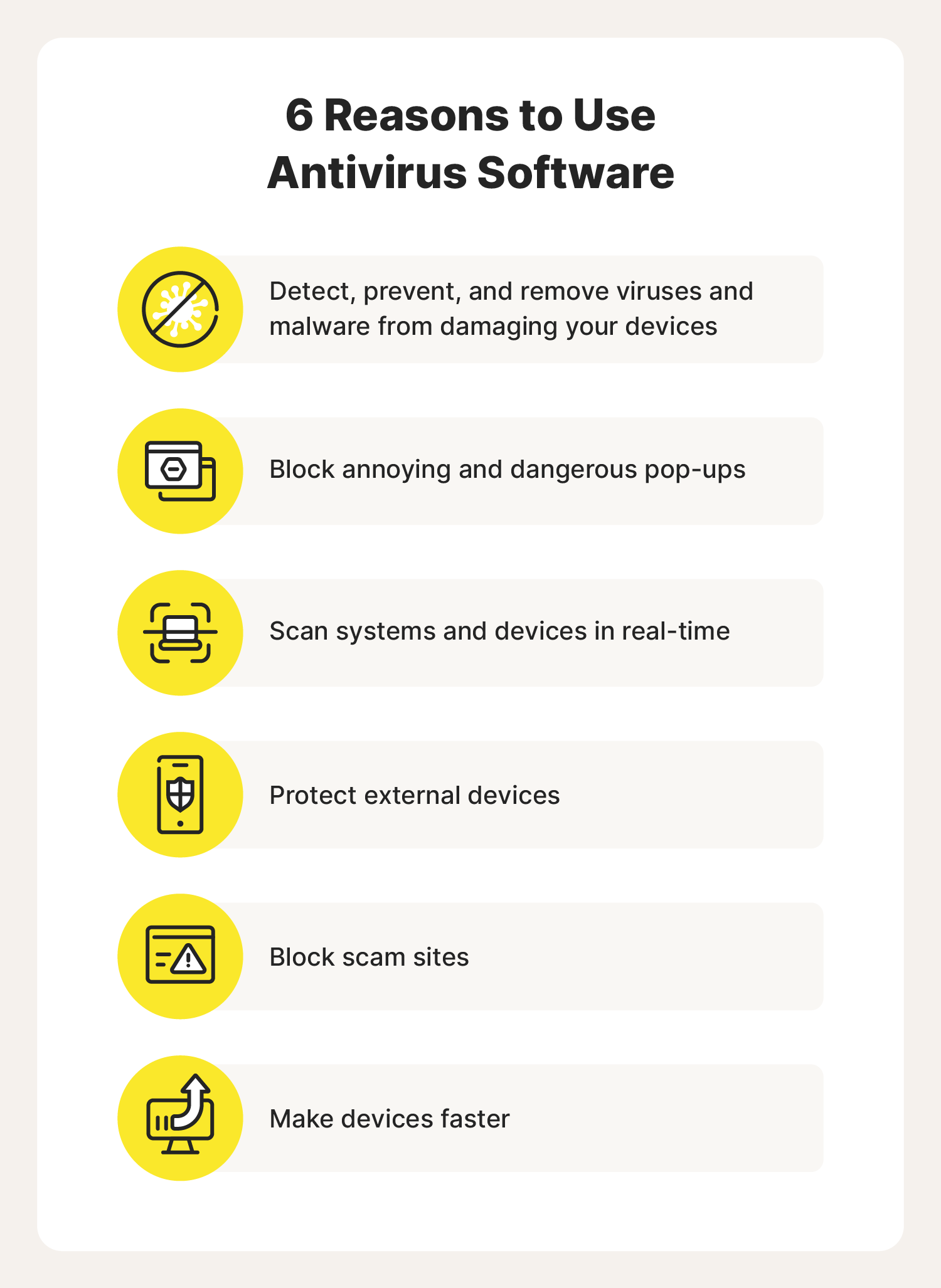
Before selecting a software package, it is essential to understand that modern “antivirus” is a bit of a misnomer. Today, these programs are more accurately described as “Endpoint Security Suites.” They do much more than just scan files for malicious code; they monitor network traffic, protect your web browser, and shield your most sensitive folders from unauthorized encryption.
The Shift from Signatures to Heuristics
In the early days of computing, antivirus software relied on “signatures”—a database of known malware “fingerprints.” If a file matched a fingerprint, it was flagged. However, modern malware changes its code constantly to avoid detection. This has led to the development of heuristic analysis and behavioral monitoring. Modern software uses AI and machine learning to identify suspicious patterns. If a program suddenly tries to encrypt all your documents, a high-quality antivirus will stop it based on its behavior, even if that specific virus has never been seen before.
Free vs. Paid: Is the Investment Worth It?
One of the most common dilemmas is whether to pay for a subscription. Free antivirus tools, such as the built-in Windows Defender or free versions of Avast and Bitdefender, offer excellent core protection against known threats. However, paid versions typically include essential “quality of life” and advanced security features. These often include dedicated ransomware protection, integrated Virtual Private Networks (VPNs), password managers, and advanced firewalls that are more robust than the standard Windows or macOS offerings.
Key Features to Prioritize in Your Selection
When evaluating which antivirus to install, you should look beyond the marketing jargon. The best software provides a silent but powerful shield that doesn’t interfere with your daily workflow. Here are the pillars of a top-tier security suite.
Real-Time Threat Detection and Remediation
The most vital component is real-time protection. The software should constantly monitor your system in the background without causing significant “lag” or latency. It should scan downloads before they are opened and monitor active processes for malicious intent. Furthermore, the remediation—the ability of the software to actually remove the threat without damaging your operating system—is what separates the leaders from the laggards.
Multi-Layered Ransomware Protection
Ransomware remains the single greatest threat to personal data. This type of malware locks your files and demands payment for their release. A high-quality antivirus should have a dedicated “folder shield” or “data protector” feature. This ensures that only trusted applications (like Microsoft Word or Photoshop) can modify files in your “Documents” or “Photos” folders, effectively neutralizing ransomware even if it manages to bypass the initial scan.
Web and Phishing Protection
Most infections today occur through the browser. Whether it is a malicious link in a “spoofed” email or a compromised website, your antivirus must have a strong web extension or network filter. This feature intercepts malicious URLs before the page even loads, protecting you from phishing sites designed to steal your banking credentials or social media logins.
Top Recommendations for Different User Profiles
There is no “one-size-fits-all” answer to “what antivirus should I use.” The best choice depends on your operating system, your technical proficiency, and how you use your devices.
Best for the Average Windows User: Bitdefender Total Security
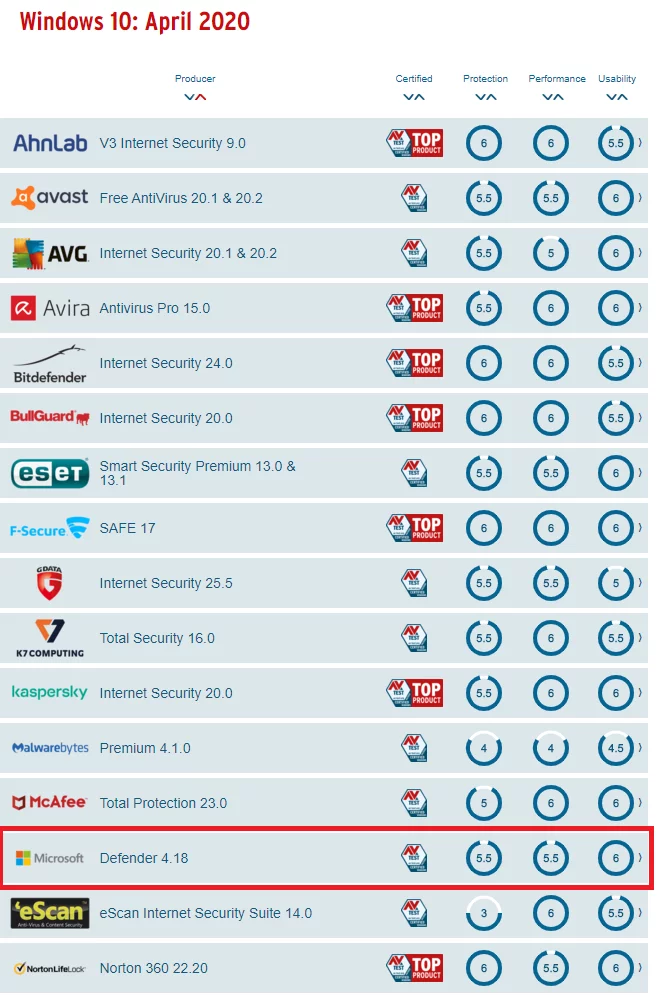
For the vast majority of users, Bitdefender offers the most balanced package. It consistently ranks at the top of independent laboratory tests (such as AV-Test and AV-Comparatives) for both protection and performance.
- Pros: Minimal impact on system speed, excellent anti-phishing tools, and a very intuitive “Autopilot” mode that makes security decisions for you.
- Cons: The full suite can be slightly expensive if not caught on a promotion.
Best for Power Users and Gamers: Kaspersky or ESET
Power users often complain that antivirus software slows down their hardware or interrupts their work with unnecessary notifications.
- Kaspersky: Despite geopolitical debates, its engine remains arguably the most efficient in the world. It detects threats that others miss while using very few system resources.
- ESET NOD32: Known for its “Gamer Mode,” ESET is highly customizable. It provides deep-level system scanning and a legendary light footprint, making it the favorite for those who build their own high-performance PCs.
Best for macOS Users: Intego or Malwarebytes
The myth that “Macs don’t get viruses” is dangerous. While macOS is historically more secure due to its Unix-based architecture and Apple’s “walled garden” approach, Mac-specific malware is on the rise.
- Intego: Unlike many competitors who port their Windows software to Mac, Intego was built specifically for the Mac environment. It understands the nuances of macOS vulnerabilities.
- Malwarebytes: If you prefer a “less is more” approach, Malwarebytes is excellent for Mac. It focuses heavily on removing “Potentially Unwanted Programs” (PUPs) and adware, which are more common on Mac than traditional viruses.
Best Built-in Solution: Microsoft Defender
If you are tech-savvy, practice “safe clicking,” and don’t want to spend money, Microsoft Defender (built into Windows 10 and 11) is surprisingly capable. It has improved drastically over the last five years. However, it lacks the advanced phishing protection and privacy features (like a VPN) found in paid suites.
Privacy, Performance, and the “Bloatware” Problem
A significant concern in the tech community is the “bloat” associated with modern antivirus programs. Many companies attempt to bundle unnecessary tools—such as “system speed-up” utilities, driver updaters, and browser bars—that can actually slow down your computer or compromise your privacy.
The Impact on System Resources
Every antivirus uses some amount of RAM and CPU cycles. When choosing a software, look for “performance impact” scores in independent reviews. A “heavy” antivirus can make an older laptop feel sluggish, especially during full system scans. Modern suites often include a “performance profile” that delays scans while you are watching a movie or playing a game to ensure a smooth experience.
Data Privacy Concerns
Ironically, the software meant to protect you can sometimes be the one collecting your data. Some free antivirus providers have been caught selling user browsing history to third-party advertisers. When selecting a software, read the privacy policy. Stick to reputable brands that have a clear business model (selling software) rather than those that treat your data as the product. Paid suites are generally more trustworthy in this regard, as their revenue comes directly from your subscription.
Beyond the Software: A Holistic Approach to Digital Security
No antivirus is 100% effective. The “Human Element” remains the weakest link in any security chain. To truly be secure, your choice of software must be supplemented by healthy digital habits.
Multi-Factor Authentication (MFA)
Even the best antivirus won’t help if you give your password away on a fake login page. Multi-factor authentication—using an app like Google Authenticator or a physical security key—is the single most effective way to prevent unauthorized account access. Your antivirus should be viewed as your second line of defense; MFA is your first.
Keeping Software Updated
Malware often exploits vulnerabilities in outdated software (like an old version of Zoom or Chrome). Most modern antivirus suites include a “Vulnerability Scanner” that checks if your apps are up to date. Ensuring your operating system and applications are patched is just as important as having a virus scanner running.
The Importance of Backups
The ultimate fail-safe against any digital threat is a robust backup strategy. Even if a brand-new “zero-day” virus bypasses your antivirus and encrypts your files, they lose their leverage if you have an offline backup. Use the “3-2-1 rule”: three copies of your data, on two different media types, with one copy stored off-site (or in the cloud).
Final Verdict: Which One Should You Choose?
Selecting the right antivirus in 2024 comes down to your personal risk profile.
If you want “set it and forget it” security and are willing to pay a small annual fee, Bitdefender is the industry gold standard. It offers a comprehensive suite that protects against every modern threat with almost no user intervention required.
If you are a budget-conscious user who stays on mainstream websites and keeps your software updated, Microsoft Defender combined with the free version of Malwarebytes (for occasional manual scans) is a potent and free combination.
For Mac enthusiasts who want specialized protection, Intego remains the top choice for its platform-specific focus.
Ultimately, the best antivirus is the one that stays updated, provides real-time protection without annoying you into turning it off, and fits seamlessly into your digital life. Cybersecurity is a journey, not a destination; choose a tool that empowers you to explore the internet with confidence.
aViewFromTheCave is a participant in the Amazon Services LLC Associates Program, an affiliate advertising program designed to provide a means for sites to earn advertising fees by advertising and linking to Amazon.com. Amazon, the Amazon logo, AmazonSupply, and the AmazonSupply logo are trademarks of Amazon.com, Inc. or its affiliates. As an Amazon Associate we earn affiliate commissions from qualifying purchases.