
In an increasingly digitized world, streaming services have become a cornerstone of modern entertainment. Among the myriad options available, Amazon Prime Video stands out as a formidable contender, offering an extensive library of movies, TV shows, and critically acclaimed original content. Far more than just a video platform, Prime Video is often bundled with a suite of benefits under the broader Amazon Prime umbrella, making its value proposition particularly compelling for many consumers. For newcomers or those simply looking to streamline their entertainment subscriptions, understanding the precise steps to join this vibrant streaming ecosystem is crucial.
This comprehensive guide aims to demystify the subscription process for Prime Video, providing a clear, step-by-step roadmap from initial curiosity to seamless viewing. We’ll delve into the nuances of Prime Video’s various access points, explore the technical requirements, and outline how to manage your subscription for an optimal digital entertainment experience. Whether you’re considering a standalone Prime Video membership or eyeing the full benefits of Amazon Prime, this tutorial will equip you with the knowledge needed to unlock a world of on-demand content.
Understanding Prime Video’s Ecosystem
Before diving into the mechanics of subscription, it’s essential to grasp what Prime Video is and how it integrates into the larger Amazon universe. This foundational understanding will help you choose the best subscription path for your needs and ensure compatibility with your existing devices.
What is Prime Video?
Prime Video is Amazon’s premier video streaming service, offering a vast and continuously updated catalog of content. This includes blockbuster movies, popular TV series from various studios, and a rapidly expanding collection of Amazon Originals. These exclusive shows and films, such as “The Boys,” “The Marvelous Mrs. Maisel,” and “Lord of the Rings: The Rings of Power,” have garnered significant critical acclaim and are often a primary draw for subscribers. Beyond on-demand content, Prime Video also provides access to live sports, pay-per-view events, and the option to rent or purchase additional titles not included in the standard subscription. Its intuitive interface and multi-device compatibility make it a highly accessible and versatile entertainment platform.
Amazon Prime vs. Prime Video Standalone
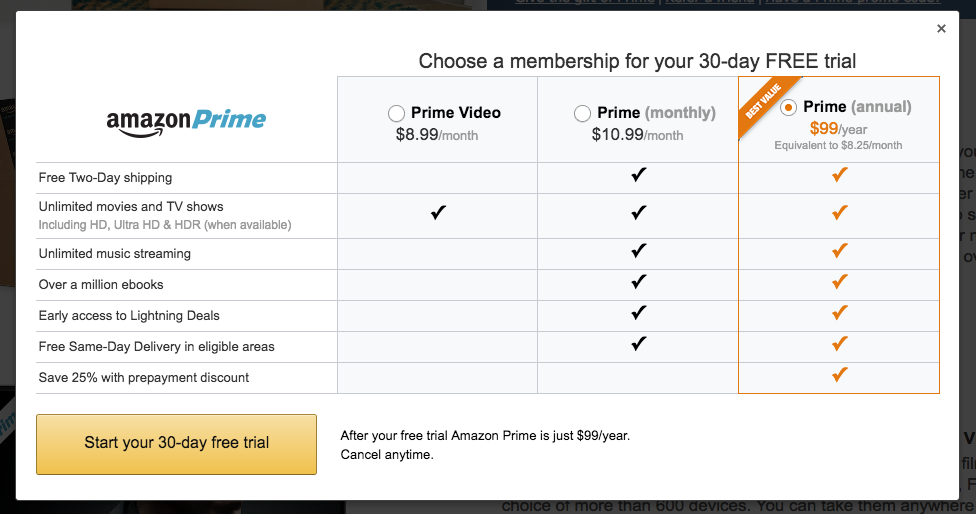
One of the most common points of confusion for prospective subscribers is the relationship between Amazon Prime and Prime Video. Essentially, Prime Video is a core component of the broader Amazon Prime membership. When you subscribe to Amazon Prime, you automatically gain access to Prime Video along with numerous other benefits, including free two-day shipping on eligible items, Amazon Music Prime, Prime Reading, and more. This bundled approach is often the most cost-effective solution for frequent Amazon shoppers.
However, recognizing that not everyone requires the full suite of Prime benefits, Amazon also offers a standalone Prime Video subscription in some regions. This option allows users to access only the video streaming service for a lower monthly fee, without the shipping perks or other Prime extras. Deciding between a full Amazon Prime membership and a Prime Video standalone subscription depends largely on your purchasing habits and whether the additional benefits justify the higher cost. For most users who regularly shop on Amazon, the full Prime membership presents superior value.
Device Compatibility
A key advantage of Prime Video is its widespread device compatibility, making it accessible on virtually any screen you own. Before subscribing, it’s wise to ensure your preferred viewing devices are supported. Prime Video is available on:
-
Smart TVs: Most modern smart TVs from brands like Samsung, LG, Sony, and Vizio have a pre-installed Prime Video app or offer it for download.
-
Streaming Media Players: Devices such as Amazon Fire TV Stick, Roku, Apple TV, Chromecast, and NVIDIA Shield seamlessly support Prime Video.
-
Mobile Devices: Dedicated apps are available for iOS (iPhone, iPad) and Android smartphones and tablets, allowing for on-the-go viewing and offline downloads.
-
Computers: You can access Prime Video directly through a web browser on Windows PCs, macOS, and Linux systems.
-
Game Consoles: Popular consoles like PlayStation (PS4, PS5) and Xbox (One, Series X/S) also feature the Prime Video app.
-
Blu-ray Players: Certain Blu-ray players from various manufacturers include the Prime Video app.
Ensuring your devices are up-to-date with the latest software versions will provide the best streaming experience. Prime Video also supports high-definition (HD), 4K Ultra HD (UHD), and High Dynamic Range (HDR) content, provided your device and internet connection meet the necessary specifications.
Step-by-Step Guide to Subscription
The process of subscribing to Prime Video is straightforward, typically requiring an Amazon account and a valid payment method. We’ll detail the two primary routes: through a full Amazon Prime membership or a standalone Prime Video subscription.
Prerequisites for Subscription
Before you begin, ensure you have the following ready:
-
An Amazon Account: If you don’t already have one, you’ll need to create a free Amazon account. This involves providing your name, email address, and creating a secure password.
-
Valid Payment Method: A credit card, debit card, or other accepted payment method (such as an Amazon gift card balance in some regions) is required for subscription fees.
-
Internet Connection: A stable and sufficiently fast internet connection is crucial for streaming. For standard definition (SD), 1-2 Mbps is generally sufficient; for HD, 3-5 Mbps; and for 4K UHD, 15-25 Mbps or higher is recommended.
Subscribing via Amazon Prime Membership
This is the most common way to access Prime Video and unlocks a host of other Amazon benefits.
-
Visit the Amazon Prime Page: Go to the main Amazon website (
amazon.comor your local Amazon domain likeamazon.co.uk,amazon.de, etc.). Look for a “Try Prime” or “Prime” link, usually located prominently near the search bar or in the navigation menu. -
Initiate Free Trial (if available): Amazon typically offers a 30-day free trial for new Prime members. Click on “Start your 30-day free trial” or a similar button.
-
Sign In or Create Account: You will be prompted to sign in with your existing Amazon account credentials. If you don’t have an account, follow the on-screen instructions to create one.
-
Enter Payment Information: Even for a free trial, Amazon requires a valid payment method on file. This ensures seamless transition to a paid membership if you choose to continue after the trial period. Enter your credit/debit card details, billing address, and any other required information. You won’t be charged until the trial ends.
-
Confirm Membership: Review the details and confirm your membership. Once confirmed, your Amazon Prime membership (including Prime Video) will be activated instantly.
-
Start Watching: You can now download the Prime Video app on your preferred device, sign in with your Amazon account, and begin streaming.
Subscribing to Prime Video Standalone
If you’re only interested in the video content and don’t need the other Prime benefits, a standalone Prime Video subscription might be available in your region.
-
Navigate to the Prime Video Website: Go directly to
primevideo.com. -
Look for “Start your free trial” or “Subscribe”: Similar to the full Prime membership, there’s often a free trial period for the standalone video service.
-
Sign In or Create Account: Use your Amazon account or create a new one.
-
Enter Payment Details: Provide your payment information as required. The monthly fee for standalone Prime Video is typically lower than a full Prime membership.
-
Confirm Subscription: Review and confirm your selection. Your standalone Prime Video subscription will activate immediately.
-
Download App and Watch: Install the Prime Video app on your devices and log in to start enjoying the content.

Free Trials and Promotional Offers
Amazon frequently offers free trials for both its full Prime membership and standalone Prime Video service. These trials usually last 7 or 30 days and provide full access to the respective services. They are an excellent way to explore the content library and decide if the service meets your expectations before committing financially. Be mindful of the trial end date; if you don’t wish to continue, remember to cancel before the trial period expires to avoid being charged. Additionally, Amazon occasionally partners with telecommunication companies or other businesses to offer extended trials or discounted subscription rates. Always check Amazon’s official website or reputable tech news sites for current promotions.
Setting Up and Managing Your Prime Video Experience
Once subscribed, setting up your viewing profiles and understanding how to manage your subscription are key steps to optimizing your Prime Video experience. This ensures personalized content recommendations and easy control over your membership.
First-Time Setup and Profile Creation
Upon your first login to the Prime Video app or website, you may be prompted to set up profiles.
-
Create Profiles: Prime Video allows you to create multiple profiles for different family members or users, similar to other streaming services. This ensures personalized recommendations, watch histories, and separate watchlists for everyone. You can typically create up to six user profiles within a single account, including a dedicated Kids Profile.
-
Kids Profile: Setting up a Kids Profile is highly recommended for families. This profile restricts content to age-appropriate titles and filters out mature content, providing a safe viewing environment for children.
-
Personalize Settings: Within each profile, you can often adjust settings like language preferences, subtitle appearance, and autoplay options.
Managing Your Subscription
Effective management of your subscription ensures you’re getting the most value and can adjust your membership as needed.
-
Access Your Membership Settings: To manage your Prime Video or Amazon Prime subscription, go to
amazon.com(or your local Amazon site), log in, and navigate to “Account & Lists” > “Your Prime Membership” or “Your Video Subscriptions.” -
Review Payment Information: Here, you can update your payment method, view your billing history, and see your next renewal date.
-
Cancel Your Subscription: If you decide Prime Video is not for you, or you need to take a break, you can easily cancel your membership from this section. Amazon typically allows you to cancel at any time, and you will retain access until the end of your current billing cycle. For free trials, canceling early ensures you won’t be charged.
-
Change Membership Type: In some cases, you might be able to switch between a full Amazon Prime membership and a standalone Prime Video subscription from these settings, if both options are available in your region.
Enhancing Your Viewing Experience
Prime Video offers several features designed to enhance your entertainment.
-
Watchlist: Add movies and shows you want to watch later to your Watchlist for easy access. This helps organize your viewing queue.
-
Parental Controls: Beyond Kids Profiles, Prime Video offers robust parental controls. You can set PINs to restrict purchases, rentals, or viewing of content based on age ratings. This provides an additional layer of security and content filtering.
-
Download for Offline Viewing: For mobile users, the Prime Video app allows you to download selected titles to watch offline without an internet connection, perfect for travel or areas with limited Wi-Fi.
-
Audio and Subtitle Options: Customize your viewing with various audio tracks (including different languages) and comprehensive subtitle options, often including closed captions for accessibility.
Troubleshooting Common Subscription Issues
While subscribing is generally smooth, you might encounter minor hiccups.
-
Payment Processing Failed: Double-check your payment information (card number, expiration date, CVV) for accuracy. Ensure your card has sufficient funds or isn’t expired. Contact your bank if issues persist.
-
Cannot Log In: Verify your Amazon account username and password. If forgotten, use the “Forgot your password?” link to reset it. Ensure you’re using the correct Amazon domain for your region.
-
Content Not Playing/Buffering: Check your internet connection speed. Try restarting your router, streaming device, or app. Ensure your device’s software is updated. If using a VPN, temporarily disable it as some streaming services block VPN usage.
-
Access Issues After Trial: Confirm your trial has ended and that your paid subscription is active. Check your payment method to ensure it processed correctly.
Maximizing Your Prime Video Benefits
Subscribing to Prime Video is just the first step. To truly unlock its value, it’s worth exploring the breadth of its content and leveraging its advanced features.
Beyond Streaming: Prime Benefits Integration
If you opted for the full Amazon Prime membership, remember that Prime Video is just one piece of a larger puzzle. Actively utilize other benefits like:
-
Prime Shipping: Enjoy fast, free delivery on millions of eligible items.
-
Amazon Music Prime: Access a curated selection of ad-free songs and podcasts.
-
Prime Reading: Borrow from a rotating library of Kindle ebooks and magazines.
-
Amazon Photos: Securely store and share unlimited full-resolution photos.
Integrating these services into your daily digital life can significantly enhance the overall value of your Prime subscription, turning it into a comprehensive digital utility.
Exploring Content: Originals, Movies, TV Shows, Live Events
Prime Video’s content library is dynamic and extensive. Take time to explore beyond the homepage recommendations:
-
Amazon Originals: Dive into their critically acclaimed original series and movies. These are often award-winning and exclusive to the platform.
-
Genre Exploration: Utilize the genre filters to discover new films and shows that align with your interests, from action and drama to documentaries and reality TV.
-
IMDb Integration: Leveraging Amazon’s ownership of IMDb, Prime Video often includes IMDb ratings and X-Ray features (see below) directly within the player, offering rich context about actors, music, and trivia for the content you’re watching.
-
Live Sports and Events: Depending on your region, Prime Video may offer exclusive access to live sports (like NFL Thursday Night Football in the US or Premier League in the UK) and other live events. Keep an eye on their schedule for these unique offerings.
Advanced Features: Offline Downloads, X-Ray, 4K UHD
Prime Video comes packed with features designed to enhance your viewing experience.
-
Offline Downloads: As mentioned, this feature is invaluable for commuters or travelers. Simply select a title, tap the download icon, and enjoy it later without an internet connection. Manage your downloaded content from the “Downloads” section in the app.
-
X-Ray: This innovative feature, powered by IMDb, provides instant access to information about actors, music, and trivia related to the scene you’re watching. Simply tap or move your mouse during playback, and a sidebar will appear with context. It’s an incredibly insightful tool for film enthusiasts.
-
4K Ultra HD & HDR: For those with compatible TVs and devices, Prime Video offers a substantial library of content in stunning 4K UHD and HDR. This delivers superior picture quality with sharper details and a wider range of colors. Ensure your internet speed is sufficient and your device settings are configured to enjoy the best possible visual fidelity.
Conclusion
Subscribing to Prime Video is a gateway to a vast and diverse world of digital entertainment, whether accessed through a standalone membership or as part of the encompassing Amazon Prime ecosystem. The process is designed to be user-friendly, requiring only a few simple steps to set up an account, provide payment information, and start streaming. With widespread device compatibility, intuitive profile management, and a suite of advanced features like offline downloads and X-Ray, Prime Video offers a robust and personalized viewing experience.
By understanding the different subscription options, leveraging free trials, and actively exploring the platform’s extensive content library, users can maximize the value of their membership. As technology continues to reshape how we consume media, services like Prime Video remain at the forefront, providing convenient, high-quality entertainment at our fingertips. This guide has aimed to empower you with the technical know-how to navigate this landscape, ensuring your entry into the Prime Video universe is as seamless and enjoyable as the content itself. Happy streaming!
aViewFromTheCave is a participant in the Amazon Services LLC Associates Program, an affiliate advertising program designed to provide a means for sites to earn advertising fees by advertising and linking to Amazon.com. Amazon, the Amazon logo, AmazonSupply, and the AmazonSupply logo are trademarks of Amazon.com, Inc. or its affiliates. As an Amazon Associate we earn affiliate commissions from qualifying purchases.