
In an increasingly digital world, the ability to transfer money swiftly, securely, and conveniently has become a cornerstone of modern financial interaction. Gone are the days of writing checks or carrying large sums of cash for everyday transactions. Enter Google Pay – a robust digital wallet and online payment system developed by Google, designed to simplify payments across various platforms, including peer-to-peer (P2P) money transfers. This guide delves deep into the technological underpinnings and user-friendly interface of Google Pay, offering a complete tutorial on how to leverage this powerful application for sending money, while emphasizing its security features and practical applications in the digital landscape.
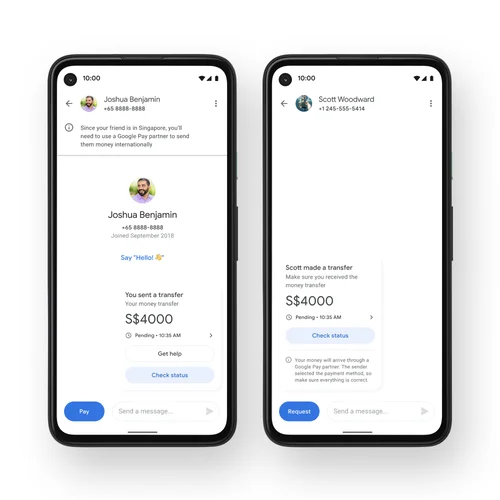
Google Pay stands out not just for its brand recognition, but more importantly for its seamless integration into the Android ecosystem and its user-centric design that makes complex financial operations feel intuitive. For anyone looking to split a dinner bill, pay back a friend, or send funds to family, Google Pay offers an efficient, often instant, solution that harnesses the power of mobile technology.
Understanding Google Pay: More Than Just a Digital Wallet
At its core, Google Pay is a digital wallet platform and online payment system developed by Google to power in-app, online, and in-person contactless purchases on mobile devices, enabling users to make payments with Android phones, tablets, or watches. However, its utility extends significantly beyond retail transactions, encompassing a sophisticated P2P payment system that rivals dedicated money transfer apps.
The Evolution of Google Pay
Google Pay has undergone several transformations since its inception. Initially launched as Android Pay in 2015, it was later merged with Google Wallet in 2018 to form what we now know as Google Pay. This consolidation aimed to create a unified payment experience under one brand, streamlining features and expanding its reach. The continuous development efforts by Google have focused on enhancing user experience, integrating new payment methods, and bolstering security protocols, making it a reliable tool for digital finance. The app is a testament to Google’s commitment to creating interconnected digital services that simplify daily life, bringing financial transactions into the fold of its expansive digital ecosystem.
Why Choose Google Pay for Peer-to-Peer Transfers?
The choice of a P2P payment service often comes down to convenience, speed, and trust. Google Pay excels in these areas due to several technological advantages:
- Integration with Google Ecosystem: For existing Google users, setting up Google Pay is incredibly straightforward. It leverages existing Google accounts and payment information, minimizing the need for redundant data entry. This deep integration means a familiar interface and consistent user experience across Google products.
- Broad Device Compatibility: While primarily associated with Android, Google Pay’s P2P features are accessible through its app on both Android and iOS devices, as well as via web browsers, ensuring wide accessibility. This cross-platform availability broadens its utility, allowing users to connect with a larger network of individuals.
- Instant Transfers (in most cases): Many Google Pay transactions, especially those involving linked debit cards or bank accounts, are processed almost instantly, meaning recipients get their money quickly. This speed is crucial in today’s fast-paced environment where immediate access to funds can be critical.
- No Transaction Fees for Standard Transfers: A significant draw for many users is the absence of fees for sending money directly from a linked bank account or debit card. This makes it an economical choice compared to some other services that might charge a percentage of the transaction.
- Robust Security: Google’s extensive security infrastructure underpins Google Pay. This includes encryption, tokenization, and multi-factor authentication, providing users with peace of mind.
Core Features Beyond Sending Money
While sending money is a primary focus, Google Pay offers a suite of other features that enhance its value as a comprehensive digital financial tool:
- Contactless Payments (NFC): Tap to pay at millions of stores worldwide with your phone or smartwatch.
- Online and In-App Purchases: Streamlined checkout processes for various websites and applications.
- Loyalty Programs and Digital Tickets: Store loyalty cards, gift cards, and event tickets directly in the app.
- Rewards and Offers: Access personalized offers and cashback rewards from participating merchants.
- Budgeting and Spending Insights: Some versions of Google Pay offer tools to track spending and manage personal finances, though this functionality can vary by region.
Getting Started: Setting Up Your Google Pay Account for Transfers
Before you can begin sending money, a few essential setup steps are required. These steps ensure your account is secure, linked to your financial institutions, and ready for transactions.
Downloading and Initial Setup
The first step is to download the Google Pay app from the Google Play Store (for Android) or the Apple App Store (for iOS). Once installed:
- Open the app: Upon opening, you’ll be prompted to sign in with your Google account. If you’re already signed into a Google service on your device, it will likely auto-populate.
- Agree to Terms of Service: Review and accept Google Pay’s terms of service and privacy policy.
- Set up Screen Lock: For security, Google Pay often requires a screen lock (PIN, pattern, fingerprint, or face recognition) to be enabled on your device.
Linking Payment Methods: Banks and Cards
To send and receive money, you need to link a payment method. Google Pay supports linking debit cards, credit cards, and bank accounts. For P2P transfers, linking a bank account or debit card is generally preferred due to the lack of fees.
- Navigate to Payment Methods: In the Google Pay app, go to the ‘Payment methods’ section.
- Add a Bank Account: Select ‘Add bank account.’ You will be prompted to choose your bank from a list or search for it. You’ll then securely log in to your bank’s online portal through Google Pay to link your account. This process often involves micro-deposits for verification or instant verification through secure third-party services.
- Add a Debit/Credit Card: Select ‘Add a card.’ You can usually scan your card with your phone’s camera or manually enter the card details (card number, expiration date, CVV). For verification, your bank might send a one-time code to your registered phone number or email.
It’s crucial to understand that Google Pay doesn’t store your actual card number on your device. Instead, it uses a process called tokenization, where a unique encrypted number (a “token”) is generated for each card, significantly enhancing security.
Verifying Your Identity for Enhanced Security
To comply with financial regulations and prevent fraud, Google Pay may require identity verification, especially for higher transaction limits or specific types of transfers. This typically involves:
- Providing Personal Information: Submitting details like your full name, address, date of birth, and the last four digits of your Social Security Number (in the U.S.) or equivalent identification in other regions.
- Uploading ID Documents: In some cases, you might be asked to upload a photo of a government-issued ID, such as a driver’s license or passport.
This verification process, while an extra step, is a standard industry practice for digital payment platforms to ensure the legitimacy of transactions and protect both users and the system from illicit activities. It underscores Google’s commitment to maintaining a secure and compliant payment environment.
Step-by-Step: Sending Money with Google Pay
Once your Google Pay account is set up and linked to your preferred payment method, sending money is a straightforward process.
Initiating a New Transfer
- Open Google Pay: Launch the Google Pay app on your device.
- Navigate to Send or Request: On the main screen, you’ll typically see options like “Send” or “New payment.” Tap on the relevant option to start a new transaction.
- Find Your Recipient: You can search for the recipient by their name, phone number, or email address. If they are in your contacts and also use Google Pay, they will appear in the suggestions. If they don’t have Google Pay, they can still receive the money by linking their bank account after being prompted.
Selecting a Recipient and Amount
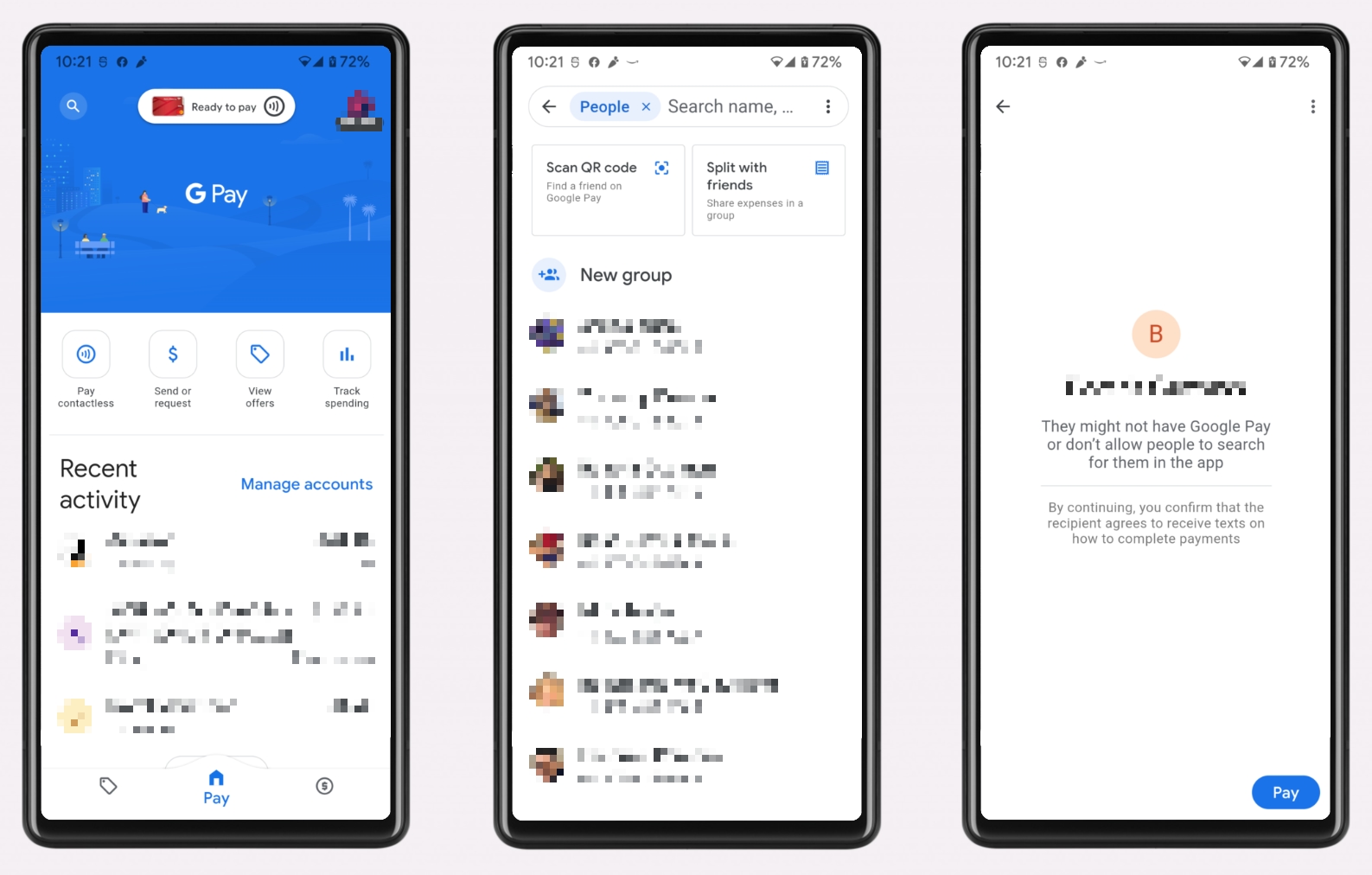
- Choose Recipient: Select the contact you wish to send money to.
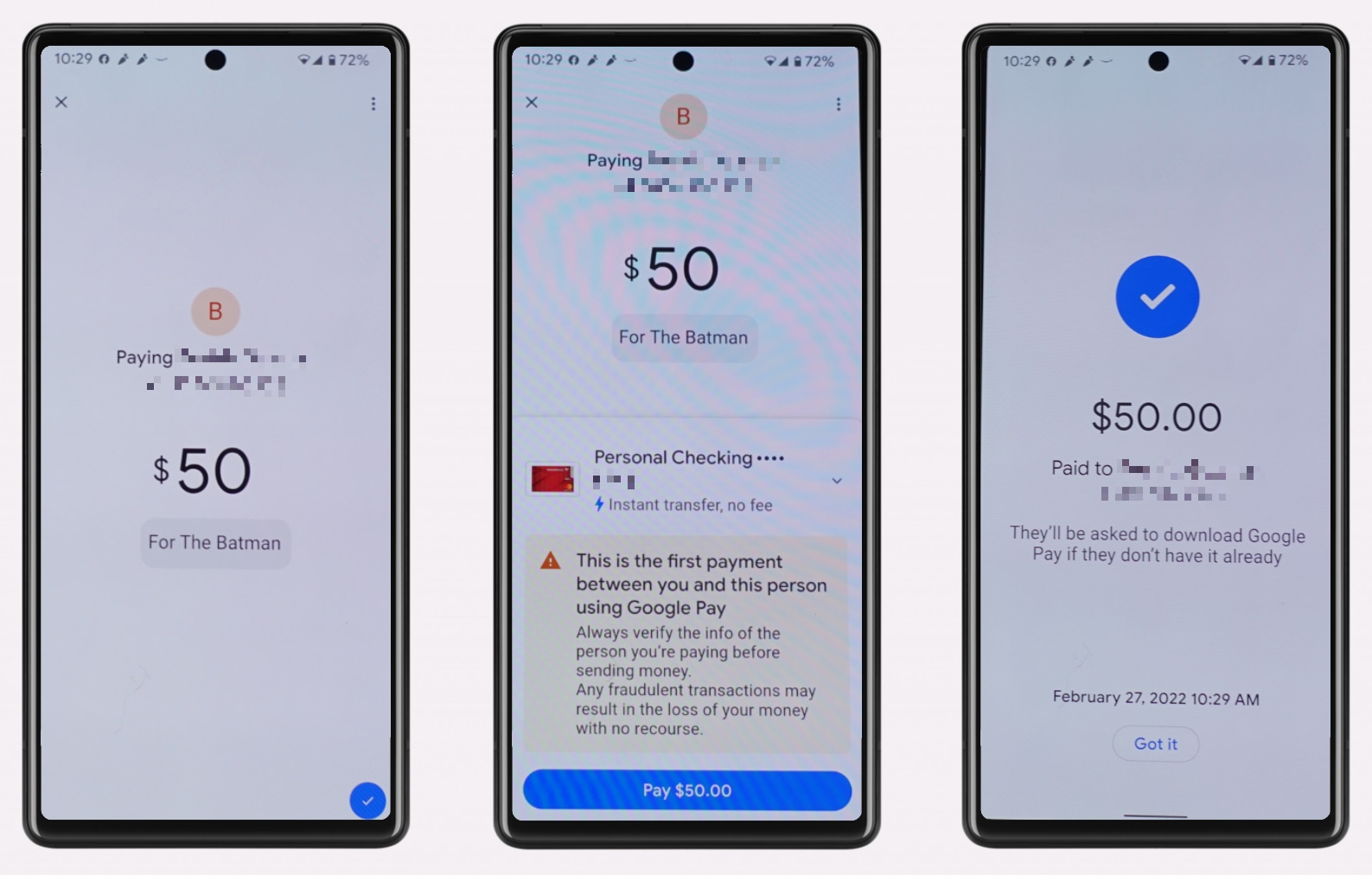
- Enter Amount: Input the exact amount of money you want to send.
- Add a Note (Optional): You can add a brief description or note for the payment, which can be helpful for tracking purposes (e.g., “Dinner last night,” “Rent contribution”).
- Select Payment Method: Choose the linked bank account or debit card you wish to use for the transaction. Remember that sending from a credit card may incur a cash advance fee from your card issuer. Google Pay itself usually doesn’t charge fees for debit card/bank account transfers.
Confirming and Completing the Transaction
- Review Details: Carefully review all the transaction details – recipient, amount, and payment method – to ensure accuracy.
- Confirm Payment: Tap the “Pay” or “Send” button. You might be prompted to authenticate the transaction using your device’s screen lock (PIN, fingerprint, face ID) for an added layer of security.
- Confirmation: Once confirmed, the money is typically sent instantly. Both you and the recipient will receive a notification of the successful transaction. The recipient will see the funds in their Google Pay balance or directly in their linked bank account, depending on their settings and the type of transfer.
Tracking Your Payments
Google Pay provides a comprehensive transaction history within the app. You can easily view past payments, their statuses, and details. This feature is invaluable for personal record-keeping, resolving disputes, and ensuring financial oversight. Each transaction typically shows the date, time, recipient, amount, and the payment method used.
Security and Best Practices for Google Pay Transactions
Google Pay is built with multiple layers of security, but users also play a vital role in protecting their funds and personal information. Understanding the underlying technology and adopting best practices can significantly enhance your digital security.
Google’s Robust Security Measures
Google employs advanced security features to protect your data and transactions:
- Encryption and Tokenization: Your actual card numbers are encrypted and replaced with unique, dynamic tokens. When you make a payment, the merchant receives this token, not your real card number, making it useless to potential fraudsters.
- Fraud Protection: Google’s fraud detection algorithms constantly monitor transactions for suspicious activity. If an unusual transaction is detected, it may be flagged for verification or blocked.
- PIN/Biometric Authentication: Every transaction often requires authentication through your device’s screen lock (PIN, fingerprint, face unlock), ensuring that even if your device is compromised, unauthorized transactions cannot occur easily.
- Remote Device Management: If your phone is lost or stolen, you can use Google’s Find My Device feature to locate, lock, or erase your phone remotely, protecting your Google Pay data.
Tips for Secure Usage
To complement Google’s security features, adopt these best practices:
- Use a Strong Screen Lock: Always secure your device with a strong PIN, pattern, or biometric authentication.
- Keep Your App Updated: Regularly update the Google Pay app to ensure you have the latest security patches and features.
- Be Wary of Phishing: Google will never ask for your password or sensitive financial information via email or unsolicited messages. Be skeptical of any communication that seems out of place.
- Review Transaction History: Periodically check your Google Pay transaction history and bank statements for any unauthorized activity.
- Avoid Public Wi-Fi for Sensitive Transactions: While Google Pay transactions are encrypted, using secure, private networks for financial activities is always a good practice.
- Set Up Alerts: Enable notifications for all Google Pay transactions so you are immediately aware of any activity.
What to Do If You Encounter an Issue
If you suspect unauthorized activity, lose your device, or encounter any other issues:
- Immediately Contact Your Bank: Report any suspicious transactions to your bank or card issuer.
- Contact Google Pay Support: Reach out to Google Pay’s customer support for assistance. They can help with account issues, transaction disputes, and security concerns.
- Change Your Google Account Password: If you believe your Google account has been compromised, change your password immediately.
Advantages and Limitations: Weighing Your Options
Google Pay, while highly effective, operates within a larger ecosystem of digital payment solutions. Understanding its advantages and limitations helps users make informed decisions.
The Convenience Factor
The primary advantage of Google Pay for sending money is its unparalleled convenience. The ability to send money with just a few taps on a smartphone, often instantly and without fees, removes significant friction from financial interactions. This convenience extends to its integration with other Google services, making it a natural choice for users already deeply embedded in Google’s digital world. The accessibility across different devices and platforms further bolsters its convenience.
Cross-Platform Compatibility and Global Reach
While Google Pay facilitates local P2P transfers efficiently, its global reach for direct money transfers can be nuanced. The ability to send money to individuals depends on their Google Pay availability in their respective regions and the local financial regulations. However, for domestic transfers, its cross-platform compatibility (Android and iOS) ensures that you can connect with a vast number of users. Google is continuously expanding its presence and features globally, aiming to make it a more universally applicable tool.
Potential Transaction Limits and Fees
While Google Pay generally offers fee-free transfers from bank accounts and debit cards, certain conditions might apply:
- Credit Card Fees: Sending money via a linked credit card will typically incur a cash advance fee from your credit card issuer, and these transactions are often treated as cash advances rather than purchases.
- Transaction Limits: Google Pay, like most financial services, imposes daily and weekly transaction limits to mitigate risk and comply with regulations. These limits can vary based on your verification status and region.
- International Transfers: For international transfers, while possible in some regions, specific fees or exchange rates might apply, and the process might differ from domestic P2P payments.
Comparative Analysis with Other P2P Services
Google Pay competes with other popular P2P payment services like PayPal, Venmo, Zelle, and Apple Pay. Each has its strengths:
- Venmo/PayPal: Highly popular, especially in the US, with social features and robust buyer/seller protection. They may have fees for instant transfers or credit card use.
- Zelle: Directly integrated into many US bank apps, offering instant transfers without a separate app, but limited to participating banks.
- Apple Pay: Apple’s counterpart, deeply integrated into the iOS ecosystem, offering similar P2P functionality via Apple Cash.
Google Pay carves its niche by offering a balance of broad compatibility, strong security, and integration within the expansive Google universe, often making it the default or preferred choice for Android users and those who value a cohesive digital experience. Its technological architecture supports a versatile and user-friendly experience that often surpasses competitors in certain aspects, particularly for users already invested in Google’s cloud and data management services.
Conclusion
Sending money with Google Pay is a testament to the power of modern technology in simplifying financial transactions. By understanding its features, mastering the setup process, and adhering to best security practices, users can confidently leverage this sophisticated application for seamless peer-to-peer transfers. Google Pay offers a compelling blend of convenience, speed, and robust security, making it an indispensable tool in the contemporary digital economy. As technology continues to evolve, Google Pay is poised to remain at the forefront of digital payments, continually refining its offerings to meet the dynamic needs of its global user base, cementing its role as a versatile and reliable platform for managing digital cash.
aViewFromTheCave is a participant in the Amazon Services LLC Associates Program, an affiliate advertising program designed to provide a means for sites to earn advertising fees by advertising and linking to Amazon.com. Amazon, the Amazon logo, AmazonSupply, and the AmazonSupply logo are trademarks of Amazon.com, Inc. or its affiliates. As an Amazon Associate we earn affiliate commissions from qualifying purchases.