
In an increasingly digital world, managing personal finances has evolved beyond traditional bank accounts. Mobile payment applications, spearheaded by innovations like Cash App, have transformed how individuals send, receive, and spend money. At the heart of this transformation for many users is the Cash App Card – a free, customizable debit card linked directly to your Cash App balance. Understanding how to effectively fund this card is not just about convenience; it’s about mastering a key tool in modern personal finance, enabling seamless transactions, budgeting, and financial flexibility.
This guide delves into the various methods available for putting money onto your Cash App Card, offering a professional and insightful look at each option. From linking traditional bank accounts to utilizing cash deposits at retail locations, we’ll explore the steps, benefits, and financial considerations associated with each method, empowering you to manage your funds with confidence and control.
Understanding the Cash App Card as a Personal Finance Tool
Before diving into the “how-to,” it’s crucial to appreciate the role of the Cash App Card within the broader landscape of personal finance. It’s more than just a piece of plastic; it’s a versatile instrument designed to simplify spending and provide access to your digital funds.
What is the Cash App Card?
The Cash App Card is a Visa debit card issued by Sutton Bank, linked directly to your Cash App balance. Unlike a credit card, it allows you to spend only the money you have available in your Cash App account. It can be used anywhere Visa debit cards are accepted, whether online, in stores, or at ATMs for cash withdrawals. Its primary purpose is to provide users with a tangible way to access and utilize the funds within their Cash App wallet, bridging the gap between digital money and real-world transactions.
Why Funding Your Card is Essential for Financial Freedom
Having funds readily available on your Cash App Card offers significant advantages in managing your personal finances. It serves as a direct conduit to your digital balance, enabling:
- Seamless Spending: Make purchases online or in physical stores without needing a traditional bank account or physical cash.
- Budgeting Assistance: By consciously loading specific amounts onto your Cash App, you can create a de facto spending budget for certain categories or periods, helping to track and control expenditures.
- Alternative Banking: For individuals who prefer or require an alternative to conventional banking, the Cash App Card, combined with features like direct deposit, can function as a primary financial hub.
- Emergency Access: It provides a quick way to access funds received via peer-to-peer transfers or direct deposit, crucial for immediate needs.
The Broader Cash App Ecosystem
The Cash App Card doesn’t exist in isolation; it’s an integral part of Cash App’s comprehensive financial ecosystem. Funds loaded onto your card are part of your overall Cash App balance, which also supports:
- Peer-to-Peer Transfers: Sending and receiving money from friends and family instantly.
- Direct Deposit: Receiving paychecks, tax refunds, or government benefits directly into your Cash App account.
- Investing: The ability to buy and sell stocks and Bitcoin, utilizing your available balance.
- Boosts: Instant discounts at specific retailers when using your Cash App Card, offering tangible savings.
Understanding these interconnected features highlights how effectively funding your card contributes to a more holistic and flexible approach to personal finance.
Direct Digital Transfers: Linking Bank Accounts and Debit Cards
The most common and often most convenient methods for funding your Cash App Card involve connecting it directly to your existing digital financial infrastructure: your bank account or a debit card. These methods leverage established financial networks to move funds quickly and securely.
Seamlessly Connecting Your Bank Account
Linking your bank account to Cash App is a foundational step for many financial activities within the app, including adding money to your balance, which then becomes available on your Cash App Card.
Step-by-Step Guide:
- Open Cash App: Launch the Cash App on your mobile device.
- Navigate to the Banking Tab: Tap the banking icon (looks like a house or bank building) on the main screen.
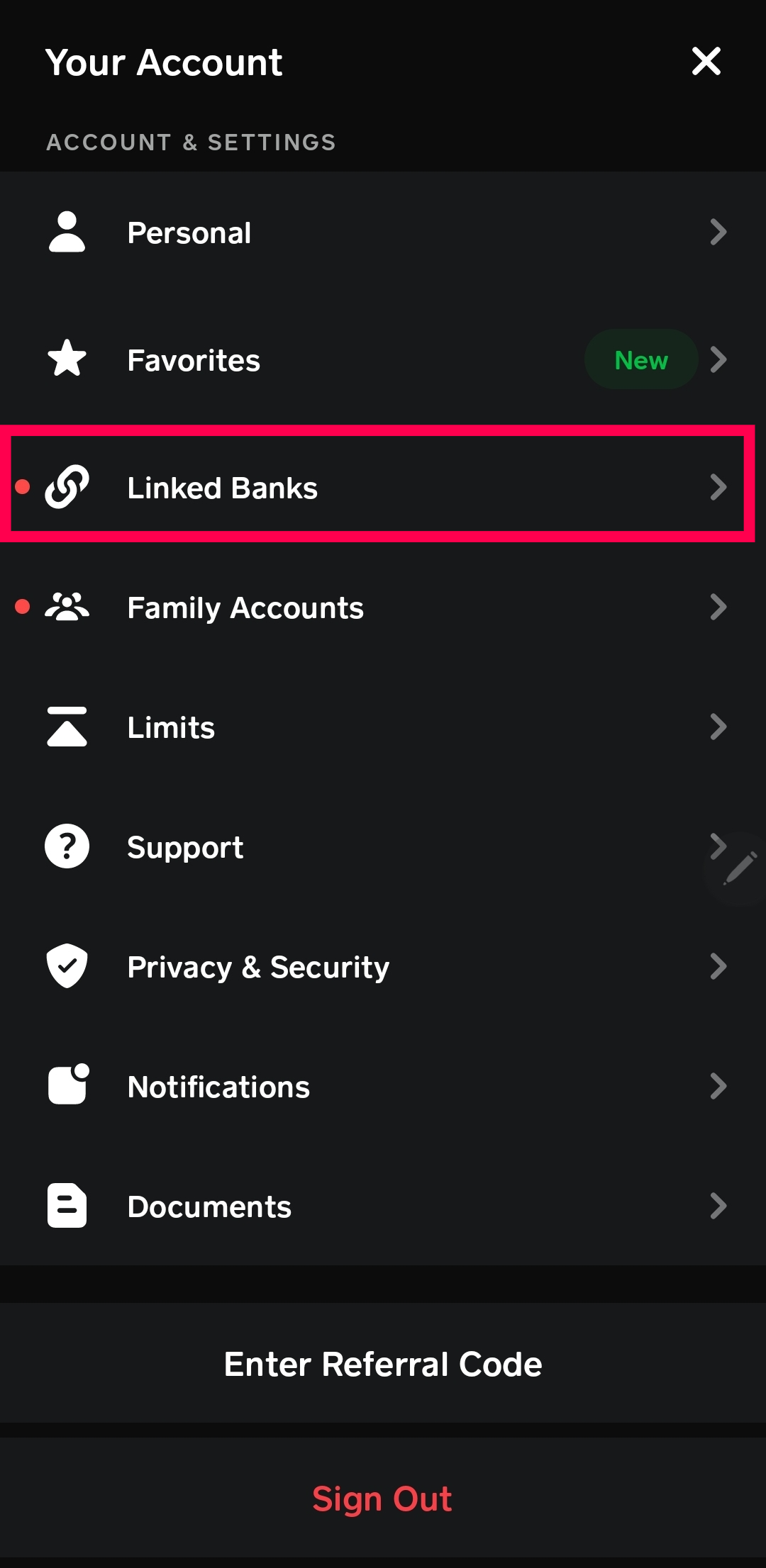
- Link Banks: Under the “Add Cash” or “Cash Out” options, you’ll see a section to “Link Bank.” Tap this.
- Follow Prompts: Cash App will guide you through a secure process, often using Plaid, a third-party service that securely connects to thousands of financial institutions. You’ll need to select your bank and then log in using your bank’s online banking credentials.
- Confirm Link: Once authenticated, your bank account will be linked.
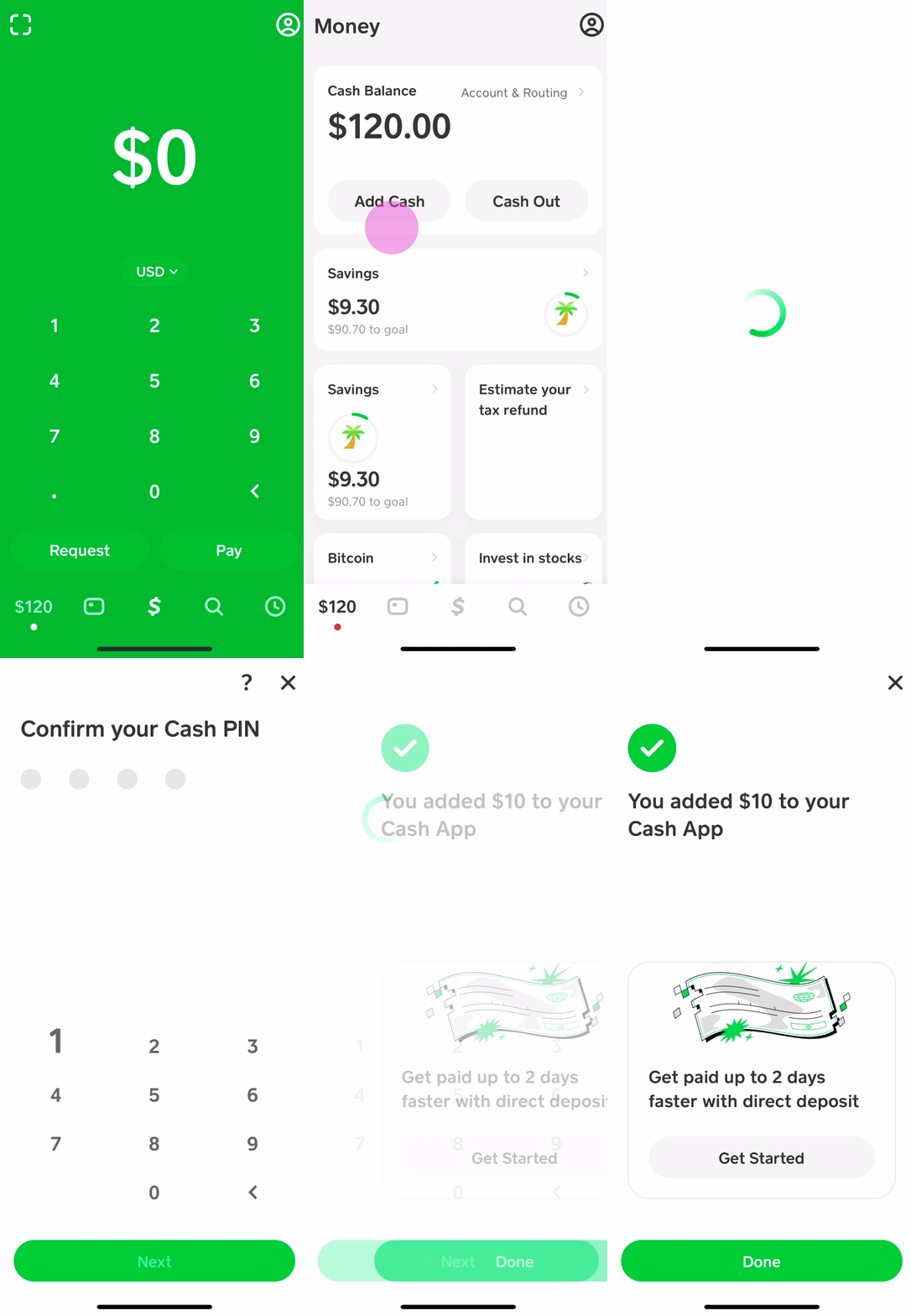
Adding Funds from a Linked Bank Account:
- Tap the Banking Tab: Again, go to the banking icon.
- Select “Add Cash”: Choose this option.
- Enter Amount: Input the desired amount you wish to add to your Cash App balance.
- Confirm: Tap “Add” and then confirm the transaction using your PIN or Touch ID/Face ID.
Financial Considerations: Transfers from a linked bank account typically involve two types:
- Standard Deposits: These are usually free but can take 1-3 business days to process. This is a cost-effective option for non-urgent transfers.
- Instant Deposits: For a fee (typically 0.5% – 1.75% of the transaction amount), you can instantly transfer funds from your bank to your Cash App balance. This convenience comes at a small cost, which is an important factor in financial planning for immediate needs.
Adding Funds via a Linked Debit Card
If you prefer not to link your full bank account, or if you need a quicker alternative, using a linked debit card is another efficient way to add funds. This method essentially treats your debit card as the source of funds, drawing from its associated bank account.
Step-by-Step Guide:
- Open Cash App: Launch the application.
- Navigate to the Banking Tab: Tap the banking icon.
- Link Card: Select “Link Debit Card” if you haven’t already. You’ll enter your debit card number, expiration date, CVV, and billing ZIP code.
- Add Cash: Once linked, tap the “Add Cash” button on the banking tab.
- Enter Amount: Input the amount you wish to add.
- Confirm: Tap “Add” and confirm the transaction.
Pros and Cons from a Financial Perspective:
- Speed: Transfers via debit card are often instantaneous, making them ideal for urgent needs.
- Convenience: For those who prefer not to share full bank login details, a debit card offers a slightly more contained method.
- Fees: Similar to instant bank transfers, adding cash via a debit card often incurs a small fee if you need the funds immediately. Be mindful of these small charges as they can accumulate.
- Security: Always ensure your debit card details are kept private and that you are using a secure network when linking or adding funds.
Cash Deposits: Bridging Physical Cash to Your Digital Balance
For those who frequently deal with physical cash and wish to convert it into a digital balance accessible via their Cash App Card, Cash App offers a convenient in-store deposit feature. This method allows you to add cash to your account at participating retailers, making it easier to manage all your funds in one place.
Finding Participating Retailers for Cash App Deposits
Cash App has partnered with several major retailers across the United States to facilitate cash deposits. This network makes it widely accessible for many users.
Common Participating Retailers:
- Walmart
- 7-Eleven
- Walgreens
- Dollar General
- Family Dollar
- Rite Aid
- CVS Pharmacy
How to Locate Them Using the In-App Map:
- Open Cash App: Launch the app.
- Navigate to the Banking Tab: Tap the banking icon.
- Select “Add Cash”: Tap this option.
- Choose “Deposit Paper Money”: This option will prompt you to find nearby locations.
- Allow Location Access: Grant Cash App permission to access your location. The app will then display a map with participating stores near you.
The Step-by-Step Process for In-Store Cash Deposits
Once you’ve located a participating retailer, the process for depositing physical cash is straightforward.

- Generate the Deposit Barcode: In the Cash App, on the “Deposit Paper Money” screen, tap “Show Barcode.” This will generate a unique barcode for your deposit.
- Present Cash and Barcode at the Register: Go to the cashier at the chosen retailer. Inform them you’d like to make a Cash App deposit. Present your phone with the barcode to be scanned.
- Hand Over Your Cash: Give the cashier the exact amount of cash you wish to deposit. Ensure the amount matches what you intend to deposit.
- Confirm and Receive Receipt: The cashier will process the transaction. You should see the funds appear in your Cash App balance almost instantly (though sometimes it can take a few minutes). Always request and keep the physical receipt from the store as proof of your deposit.
Understanding Transaction Fees: It’s critical for your financial planning to be aware of the fees associated with cash deposits. Retailers typically charge a small fee for this service, which can range from $1 to $4 per transaction. This fee is separate from Cash App and is usually deducted from the total amount you deposit. For example, if you deposit $100 and there’s a $2 fee, $98 will be added to your Cash App balance. Factor these fees into your budgeting to avoid surprises.
Best Practices for Secure and Efficient Cash Deposits
To ensure a smooth and secure cash deposit experience:
- Confirm Retailer Participation: Always verify the store is a participating location using the in-app map before heading there.
- Check Daily Limits: Cash App imposes daily and weekly limits on cash deposits (e.g., typically $500 per deposit, $1,000 per week). Be mindful of these limits.
- Exact Change (Optional but Helpful): While not always necessary, having the exact amount you wish to deposit can sometimes expedite the process.
- Keep Your Receipt: This is your primary proof of transaction. If there’s any discrepancy or delay in funds appearing, the receipt will be essential for troubleshooting with Cash App support.
- Ensure Proper Scanning: Watch the cashier to ensure the barcode is scanned correctly and the amount entered matches your intended deposit.
Advanced Funding Strategies and Financial Considerations
Beyond the standard methods, there are additional strategies and crucial financial considerations that can optimize how you put money onto your Cash App Card, helping you manage your finances more effectively.
Setting Up Direct Deposit for Regular Income
One of the most powerful features Cash App offers, especially for those looking to use it as a primary financial tool, is direct deposit. This allows you to have your paycheck, government benefits, or tax refunds sent directly to your Cash App account.
Benefits for Financial Management:
- Faster Access to Funds: Often, direct deposits arrive up to two days earlier than traditional banks, providing quicker access to your earnings.
- Convenience: Automates the process of funding your account, eliminating the need for manual transfers.
- Potential for Higher Limits: Direct deposit can sometimes unlock higher spending and withdrawal limits within Cash App.
- Centralized Funds: Consolidate your income into one accessible account, simplifying budgeting and expense tracking.
How to Find Your Cash App Routing and Account Numbers:
- Open Cash App: Launch the app.
- Navigate to the Banking Tab: Tap the banking icon.
- Select “Direct Deposit”: Tap this option.
- Find Account Details: You’ll see your unique Cash App routing number and account number. These are the details you provide to your employer’s payroll department or the issuer of government benefits.
Receiving Money from Other Cash App Users
While not a direct “funding” method in the sense of adding your own money, receiving funds from other Cash App users is a common way to build up your balance, which then becomes available on your Cash App Card. This is a core peer-to-peer function of the app.
How Peer-to-Peer Transfers Work:
- Sending Money: Another Cash App user can send money directly to your $Cashtag, phone number, or email.
- Receiving Money: The funds will appear in your Cash App balance instantly, ready for use with your Cash App Card.
- Requesting Money: You can also send a request for money to another user, and once they approve it, the funds will be added to your balance.
Security Tips: Always ensure you are receiving money from trusted individuals. Be wary of unsolicited payments or requests, as these can be part of scams. Never share your login credentials or PIN with anyone.
Understanding Funding Limits and Potential Fees
Effective financial management hinges on a clear understanding of limitations and costs. Cash App, like all financial tools, has specific parameters for funding your account.
Key Limits to Be Aware Of:
- Daily/Weekly Deposit Limits: There are limits on how much cash you can deposit in-store per transaction, per day, and per rolling seven-day period (e.g., $500 per deposit, $1,000 per rolling 7 days).
- Bank/Debit Card Transfer Limits: While typically higher than cash deposit limits, there are also maximums for how much you can add from linked bank accounts or debit cards per transaction, day, and week. These can vary based on your account verification status.
- Spending Limits: Your Cash App Card also has daily and weekly spending limits.
Potential Fees Summarized:
- Instant Transfers: A fee (typically 0.5% – 1.75%) applies when you want to instantly transfer money from your linked bank account or debit card to your Cash App balance.
- Cash Deposits: Retailers typically charge a fee ($1-$4) for in-store cash deposits.
- ATM Withdrawals: If you use your Cash App Card at an ATM, there might be Cash App fees (waived if you receive at least $300 in direct deposit per month) and ATM operator fees.
Always review the latest fee schedule within the Cash App or on their official website, as policies can change. Integrating these potential costs into your financial decisions ensures you’re making informed choices.
Maximizing Your Cash App Card for Smart Money Management
Beyond simply funding your card, the true value lies in how you leverage it for smarter personal finance. The Cash App Card can be a powerful ally in budgeting, expense tracking, and securing your funds.
Budgeting and Expense Tracking with Your Cash App Card
The digital nature of the Cash App Card makes it an excellent tool for budgeting and monitoring your spending habits.
- Transaction History: Every purchase made with your Cash App Card is recorded in your in-app transaction history. Regularly reviewing this history provides a clear overview of where your money is going.
- Pre-Loading for Categories: You can designate your Cash App balance for specific spending categories. For instance, load a set amount for “eating out” or “entertainment” each week, and once it’s gone, you know you’ve hit your budget for that category.
- Boosts for Savings: Cash App “Boosts” offer instant discounts at specific merchants when you use your Cash App Card. Actively utilizing relevant Boosts can lead to tangible savings on everyday purchases, effectively stretching your budget further.
Enhancing Security for Your Funds
As with any digital financial tool, securing your Cash App account and the funds on your card is paramount. Proactive security measures protect your money from unauthorized access.
- Enable Two-Factor Authentication (2FA): This adds an extra layer of security, requiring a code sent to your phone or email in addition to your password for login.
- Use Strong, Unique Passwords: Never reuse passwords, and ensure yours is complex.
- PIN Protection: Set up a PIN for your Cash App transactions and card use.
- Monitor Notifications: Pay attention to Cash App notifications for suspicious activity.
- Beware of Scams: Be vigilant against phishing attempts, fake customer service requests, or “money flipping” scams. Cash App will never ask for your PIN or full login details.
- Lock Your Card: If your Cash App Card is lost or stolen, immediately lock it within the app to prevent unauthorized use.
Troubleshooting Common Funding Issues
Occasionally, you might encounter issues when trying to add money to your Cash App Card. Knowing how to troubleshoot can save time and frustration.
- Check Transaction History: The first step is always to check your Cash App activity feed and your bank statement (if linking a bank/debit card). The transaction status will often reveal the problem.
- Verify Bank Link: Ensure your bank account or debit card is still correctly linked and verified. Sometimes, banks require re-authentication.
- Confirm Sufficient Funds: If pulling from a linked account, ensure there are sufficient funds in that account to cover the transfer.
- Review Limits: Double-check that you haven’t exceeded any daily or weekly funding limits for the chosen method.
- Contact Support: If you’ve exhausted all troubleshooting steps and funds are still missing or not appearing, contact Cash App support directly through the app. Provide them with relevant transaction IDs and any receipts.
Conclusion
The Cash App Card stands as a testament to the evolving landscape of personal finance, offering a flexible, accessible, and increasingly comprehensive way to manage your money in the digital age. Mastering the various methods of putting money onto your card – from direct bank transfers and debit card links to convenient in-store cash deposits and direct payroll integration – is key to unlocking its full potential.
By understanding the financial implications of each method, including potential fees and limits, and by diligently implementing security best practices, you can leverage your Cash App Card not just as a payment tool, but as an integral component of your broader financial strategy. With this comprehensive guide, you are now equipped with the knowledge to confidently fund your Cash App Card and navigate your digital financial journey with greater control and insight.
aViewFromTheCave is a participant in the Amazon Services LLC Associates Program, an affiliate advertising program designed to provide a means for sites to earn advertising fees by advertising and linking to Amazon.com. Amazon, the Amazon logo, AmazonSupply, and the AmazonSupply logo are trademarks of Amazon.com, Inc. or its affiliates. As an Amazon Associate we earn affiliate commissions from qualifying purchases.