
Managing your finances effectively is a cornerstone of personal financial health, and for many consumers, this includes navigating the specifics of credit card payments. The Amazon credit card, whether it’s the Amazon Prime Rewards Visa Signature Card issued by Chase or the Amazon Store Card issued by Synchrony Bank, offers distinct benefits, but also comes with the fundamental responsibility of timely payments. Understanding the various methods available to settle your Amazon credit card bill is not just about avoiding late fees; it’s about maintaining a healthy credit score, managing your debt, and ultimately, leveraging the card’s advantages without falling into common financial traps.

This comprehensive guide will demystify the process of paying your Amazon credit card, offering practical steps, strategic insights, and essential tips to ensure your financial dealings are smooth, efficient, and beneficial to your overall monetary well-being. From online portals to traditional mail-in options, we’ll cover every avenue, helping you choose the method that best suits your lifestyle and financial discipline.
Understanding Your Amazon Credit Card and Payment Obligations
Before diving into the mechanics of payment, it’s crucial to have a clear understanding of your specific Amazon credit card and the implications of its usage. While both cards cater to Amazon shoppers, their issuers, reward structures, and payment portals differ, making identification key to a seamless payment experience.
Card Types: Amazon Prime Rewards Visa Signature vs. Amazon Store Card
The first step in paying your Amazon credit card is knowing which one you hold.
- Amazon Prime Rewards Visa Signature Card: This is a general-purpose credit card issued by Chase Bank. It can be used anywhere Visa is accepted, offering rewards on Amazon.com, Whole Foods Market, restaurants, gas stations, and more. Payments for this card are managed through the Chase online banking portal or mobile app.
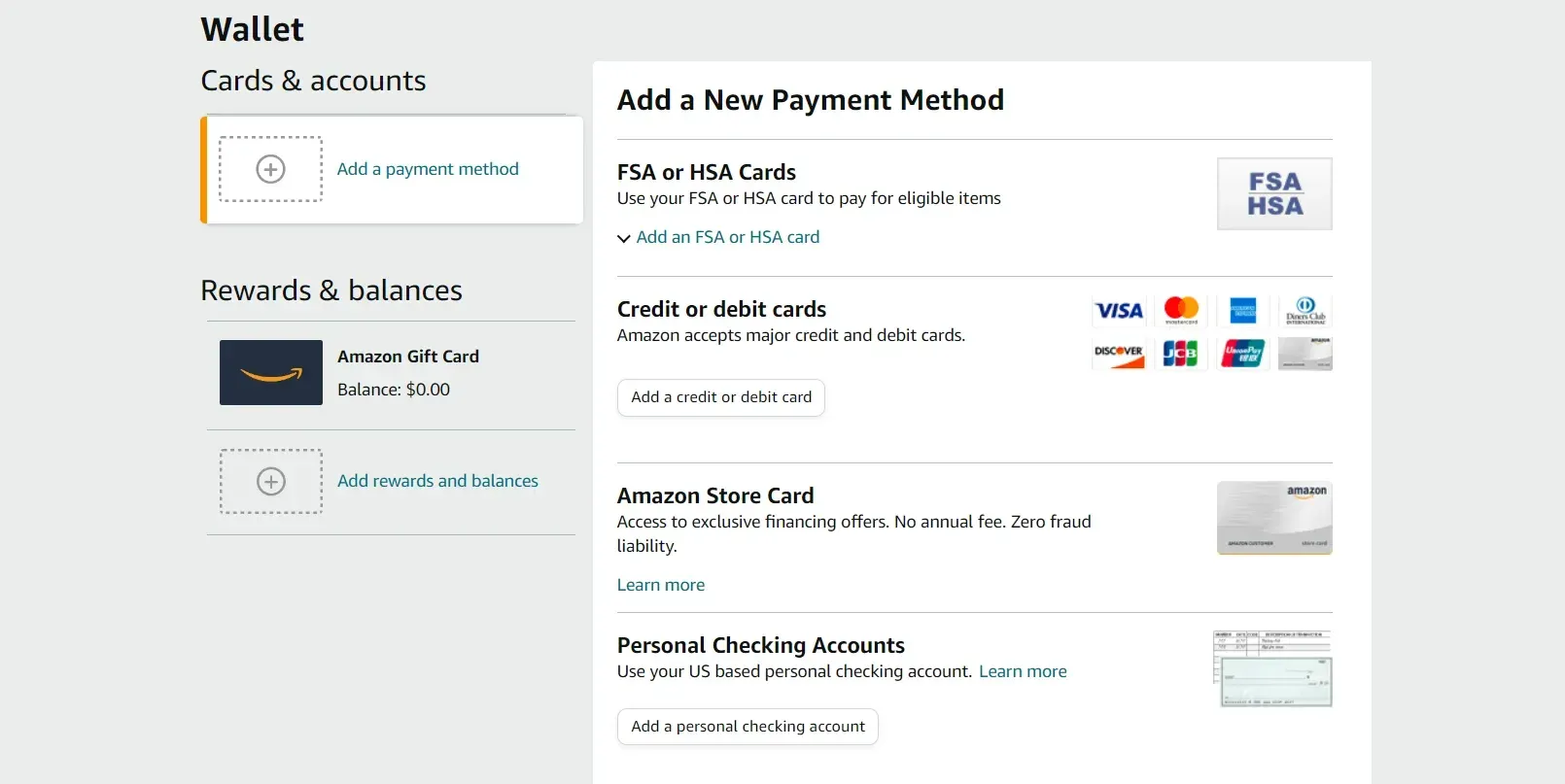
- Amazon Store Card (and Amazon Prime Store Card): This is a private-label credit card issued by Synchrony Bank. It can only be used for purchases on Amazon.com and at Amazon-affiliated stores. Its primary benefit is often special financing offers on eligible Amazon purchases. Payments for this card are managed through the Synchrony Bank online portal or mobile app.
Knowing your issuer (Chase or Synchrony) is paramount, as it directs you to the correct platform for payment and customer service.
Decoding Your Statement: Key Information to Locate
Your monthly credit card statement is more than just a bill; it’s a critical financial document. Before making a payment, ensure you can locate and understand the following key pieces of information:
- Account Number: Essential for identification, especially when paying by phone or mail.
- Current Balance: The total amount owed on your card.
- Minimum Payment Due: The smallest amount you must pay by the due date to keep your account in good standing and avoid late fees. While paying only the minimum is permissible, it’s generally not advisable as it prolongs debt and incurs more interest.
- Payment Due Date: The deadline by which your payment must be received to avoid late fees and potential interest charges.
- Statement Closing Date: The end of your billing cycle. Purchases made after this date will appear on your next statement.
- Interest Rate (APR): The annual percentage rate applied to outstanding balances. Understanding this helps you grasp the cost of carrying a balance.
Familiarizing yourself with these details empowers you to make informed payment decisions and monitor your account health effectively.
The Importance of Timely Payments
The ramifications of missing a credit card payment extend far beyond a simple late fee. Timely payments are vital for several reasons:
- Credit Score Impact: Payment history is the most significant factor in calculating your FICO credit score. A single late payment (typically 30 days past due) can cause a substantial drop in your score, impacting your ability to secure loans, mortgages, and even rental agreements in the future.
- Late Fees: Credit card issuers typically impose a fee for payments received after the due date. These fees can quickly accumulate if payments are consistently late.
- Penalty APR: Some credit card agreements include a penalty APR clause, meaning your interest rate could skyrocket if you miss a payment. This higher rate might apply to both new purchases and existing balances, making it much harder to pay off your debt.
- Loss of Promotional Offers: If you’re utilizing a 0% APR promotional period or special financing from your Amazon Store Card, a late payment could void these offers, forcing you to pay accrued interest immediately.
- Compounding Interest: When you carry a balance, interest is charged on that balance. If you only make minimum payments, or worse, miss payments, the interest can compound, leading to a much larger debt over time.
Paying on time is not just a convenience; it’s a critical component of responsible credit management that safeguards your financial future.
Multiple Avenues for Making Your Amazon Credit Card Payment
Fortunately, both Chase and Synchrony Bank offer a variety of convenient methods to pay your Amazon credit card, catering to different preferences and technological access. Choosing the right method often comes down to convenience, speed, and whether you prefer digital or traditional approaches.
Online Payments: The Most Convenient Method
Online payment portals are by far the most popular and efficient way to pay your Amazon credit card.
- For Amazon Prime Rewards Visa Signature (Chase):
- Go to the Chase website (www.chase.com).
- Log in to your online banking account. If you don’t have one, you’ll need to enroll using your card details.
- Navigate to your Amazon Prime Rewards Visa Signature account.
- Select the “Pay Card” or “Make a Payment” option.
- Enter the payment amount (minimum, statement balance, current balance, or a custom amount).
- Choose your funding account (usually a linked checking or savings account).
- Select the payment date. You can often schedule payments for a future date.
- Review and confirm your payment.
- For Amazon Store Card (Synchrony Bank):
- Go to the Synchrony Bank website for Amazon (amazon.syf.com or search for “Synchrony Amazon Login”).
- Log in to your account. Enroll if you’re a first-time user.
- Find the “Make a Payment” section.
- Input the payment amount.
- Specify the bank account from which funds will be drawn (checking or savings account number and routing number).
- Select the payment date.
- Confirm your payment details.
Online payments offer immediate confirmation, the ability to schedule payments, and easy access to past statements and account activity.
Mobile App Payments: On-the-Go Convenience
Both Chase and Synchrony Bank provide robust mobile applications that allow you to manage and pay your Amazon credit card directly from your smartphone or tablet.
- Chase Mobile App: Download the “Chase Mobile” app from your device’s app store. Log in with your Chase credentials, select your Amazon card, and follow the prompts to make a payment, similar to the online portal.
- Synchrony Bank Mobile App: Download the “Synchrony Bank” app. Log in, select your Amazon Store Card, and initiate a payment.
Mobile apps are ideal for busy individuals, offering the flexibility to pay anytime, anywhere.
Paying by Mail: The Traditional Route
While less common now, paying by mail remains a viable option for those who prefer traditional methods or lack consistent internet access.
- Locate Payment Address: The correct mailing address for payments is always listed on your monthly statement. It’s crucial to use the address specific to your card issuer (Chase or Synchrony).
- Prepare Your Payment: Write a check or money order for the desired payment amount.
- Include Payment Stub: Detach the payment stub from your statement and mail it along with your check. This ensures your payment is properly credited to your account.
- Mail Early: Allow sufficient time for your payment to be processed and received by the due date, typically 5-7 business days, to avoid late fees.
Paying by Phone: Direct Assistance
If you prefer to speak with a representative or have specific questions about your bill, paying by phone is an option.
- Customer Service Numbers:
- Chase (Amazon Prime Rewards Visa Signature): The customer service number is on the back of your card and on your statement (e.g., 1-800-432-3117).
- Synchrony Bank (Amazon Store Card): The customer service number is also on the back of your card and on your statement (e.g., 1-866-634-8379).
- Be Prepared: Have your credit card number, personal identification information, and your checking or savings account details ready when you call.
- Automated vs. Live Agent: You may have the option to make a payment through an automated system or speak with a live customer service representative.
While convenient, be aware that some issuers might charge a small fee for payments made over the phone with a live agent, though this is becoming less common.
Paying at a Bank Branch (Chase only)
If you have a Chase checking or savings account, you can often make a payment for your Amazon Prime Rewards Visa Signature card directly at a Chase bank branch.
- Visit any Chase branch during business hours.
- Bring your credit card statement or account number, and your payment (check, cash, or transfer from your Chase account).
- A teller can assist you with the payment.
This option is not available for the Amazon Store Card, as Synchrony Bank does not have physical retail branches.
Optimizing Your Payment Strategy for Financial Health
Simply paying your bill is good; paying it strategically is even better. Implementing a thoughtful payment strategy can save you money on interest, help you avoid fees, and improve your overall financial well-being.
Setting Up Autopay: Eliminating Missed Payments
Autopay is arguably the most effective tool for ensuring timely payments and avoiding late fees.
- How it Works: You authorize your card issuer to automatically deduct a specified amount (minimum payment, statement balance, or a fixed custom amount) from your linked bank account on or before your due date.
- Benefits: Guarantees on-time payments, reduces stress, and helps maintain a good credit score.
- Considerations: While convenient, always ensure your linked bank account has sufficient funds to cover the payment to avoid overdraft fees. It’s also wise to occasionally review your statements even with autopay enabled, to catch any discrepancies or unexpected charges.
Both Chase and Synchrony Bank offer autopay setup through their respective online portals and mobile apps.
Making Extra Payments: Reducing Interest and Debt Faster
Paying more than the minimum due, or even making multiple payments within a billing cycle, can significantly accelerate debt reduction and minimize interest charges.
- Pay the Full Statement Balance: This is the golden rule of credit card management. If you pay your statement balance in full by the due date, you avoid all interest charges on new purchases, effectively using the credit card as an interest-free loan for the billing cycle.
- Make Bi-Weekly Payments: Instead of one large monthly payment, consider splitting your payment in half and paying every two weeks. This leads to 26 half-payments a year, equivalent to 13 full monthly payments, thus slightly reducing your principal faster and cutting down on interest over time.
- Round Up Your Payments: If your minimum payment is $37, consider paying $50. Small, consistent extra payments add up over time.
- Utilize Windfalls: Use bonuses, tax refunds, or unexpected income to make a significant dent in your credit card debt, especially if it carries a high interest rate.
Understanding Minimum Payments vs. Full Balances
It’s critical to understand the stark difference between paying the minimum and paying the full balance.
- Minimum Payment: This is the lowest amount you can pay to avoid being penalized. However, this amount often consists mostly of interest, with only a tiny portion going towards the principal. This means debt lingers, and you pay significantly more over the long term.
- Full Balance Payment: Paying your statement balance in full each month avoids all interest charges on new purchases, allowing you to use your card without incurring debt. This is the financially responsible way to use a credit card.
Aiming to pay the full balance should be your primary goal for any credit card to maintain financial health.
Budgeting for Your Credit Card Payments
Integrating your Amazon credit card payment into your monthly budget is essential for consistent financial management.
- Allocate Funds: Treat your credit card payment as a fixed expense, just like rent or utilities. Allocate funds specifically for it when you plan your budget.
- Track Spending: Use budgeting apps or spreadsheets to monitor your purchases throughout the month. This helps you anticipate your statement balance and avoid overspending.
- Emergency Fund: Ensure you have an emergency fund to cover unexpected expenses, so you’re not forced to put them on your credit card and carry a balance if you can avoid it.
Troubleshooting Common Payment Issues and Seeking Assistance
Even with the best intentions, payment issues can arise. Knowing how to troubleshoot and who to contact is crucial for resolving problems quickly and minimizing their impact.
What to Do if You Miss a Payment
If you realize you’ve missed a payment, act immediately:
- Pay Immediately: Make the payment as soon as you remember. The sooner you pay, the less likely it is to be reported to credit bureaus (typically not reported until 30 days past due).
- Contact Customer Service: Call Chase or Synchrony Bank. Explain the situation. If this is your first late payment and you have a good payment history, they might waive the late fee as a courtesy.
- Check Your Credit Report: Monitor your credit report in the following months to ensure the late payment wasn’t reported if it was less than 30 days overdue. If it was incorrectly reported, dispute it.
Resolving Payment Discrepancies
If you notice an incorrect charge, an uncredited payment, or any other anomaly on your statement:
- Gather Documentation: Have your statements, payment confirmations, and any relevant receipts ready.
- Contact Customer Service: Reach out to your card issuer’s customer service department immediately. Clearly explain the discrepancy.
- Dispute Charges: For unauthorized or incorrect charges, formally dispute them in writing if necessary, following the issuer’s instructions. Keep records of all communications.
Contacting Customer Service: Synchrony Bank or Chase
For any payment-related questions, issues, or assistance, directly contacting your card issuer is the most reliable approach.
- Chase (Amazon Prime Rewards Visa Signature):
- Phone: 1-800-432-3117 (customer service, often 24/7)
- Secure Message: Through the Chase online banking portal
- Synchrony Bank (Amazon Store Card):
- Phone: 1-866-634-8379 (customer service)
- Online Chat/Secure Message: Through the Synchrony Bank online portal for Amazon
Be polite, clear, and persistent. Have your account details handy to expedite the process.
Beyond Payments: Maximizing Your Amazon Credit Card Benefits
While paying your bill on time is fundamental, responsible credit card use extends to understanding and leveraging the full spectrum of benefits your Amazon credit card offers.
Leveraging Rewards and Promotional Offers
Both Amazon credit cards come with appealing rewards structures and promotional offers that savvy users can capitalize on.
- Amazon Prime Rewards Visa Signature: Earn a high percentage back on Amazon.com and Whole Foods Market purchases, plus rewards on dining, gas, and other spending. Understand how to redeem these points, typically as statement credits, Amazon.com gift cards, or travel.
- Amazon Store Card: Often provides special financing options (e.g., 0% APR for 6, 12, or 18 months) on eligible Amazon purchases. Be aware that these usually come with deferred interest; if you don’t pay the full promotional balance by the end of the term, all the interest from the original purchase date will be charged.
Strategically using these benefits can enhance your purchasing power and save you money, but only if you manage your payments diligently.
Monitoring Your Credit Score
Your Amazon credit card payments directly impact your credit score. Regularly monitoring your score and credit report helps you track your financial health and identify any potential issues.
- Many credit card issuers (including Chase and Synchrony) offer free access to your FICO score or a VantageScore through their online portals or mobile apps.
- You are entitled to a free credit report from each of the three major credit bureaus (Experian, Equifax, TransUnion) once a year at AnnualCreditReport.com.

Responsible Credit Card Management
Ultimately, “how to pay an Amazon credit card” is a subset of broader responsible credit card management. This includes:
- Not Overspending: Only charge what you can comfortably afford to pay back, ideally in full each month.
- Understanding Your Limits: Be aware of your credit limit and avoid maxing out your card, as high credit utilization can negatively impact your credit score.
- Reviewing Statements Regularly: Catch errors, fraudulent activity, or unexpected charges quickly.
- Safeguarding Your Information: Protect your card number, CVV, and online login credentials.
By integrating these practices with a solid understanding of payment methods, you can ensure your Amazon credit card serves as a powerful financial tool, rather than a source of stress or debt.
Conclusion
Paying your Amazon credit card, whether issued by Chase or Synchrony Bank, is a straightforward process when you know the available methods and your specific card’s requirements. From the speed and convenience of online and mobile app payments to the traditional reliability of mail and phone options, you have multiple avenues to ensure your bill is paid on time. More importantly, adopting a strategic payment approach—utilizing autopay, making extra payments, and consistently aiming to pay off your full balance—is crucial for maintaining a healthy credit score, avoiding costly interest, and leveraging your card’s benefits to their fullest potential. Responsible credit card management is an ongoing commitment, but with the right knowledge and habits, your Amazon credit card can be a valuable asset in your financial toolkit.
aViewFromTheCave is a participant in the Amazon Services LLC Associates Program, an affiliate advertising program designed to provide a means for sites to earn advertising fees by advertising and linking to Amazon.com. Amazon, the Amazon logo, AmazonSupply, and the AmazonSupply logo are trademarks of Amazon.com, Inc. or its affiliates. As an Amazon Associate we earn affiliate commissions from qualifying purchases.