
For decades, the Costco experience was defined by the physical journey: the oversized carts, the concrete floors, and the tactical navigation of the warehouse aisles. However, as the digital economy has evolved, the wholesale giant has significantly upgraded its technological infrastructure to meet the demands of modern e-commerce. Ordering from Costco online is no longer a secondary service; it is a sophisticated digital ecosystem designed to bring bulk savings directly to your doorstep through integrated web platforms and mobile applications.
Navigating this digital landscape requires more than just a membership card. It requires an understanding of how Costco’s various online portals interact, the differences between their delivery tiers, and the technical steps necessary to ensure a seamless transaction. This guide provides a deep dive into the technological nuances of ordering from Costco online, ensuring you can leverage their digital tools to their full potential.
Navigating the Costco Digital Ecosystem: Web vs. App Performance
The foundation of a successful online Costco experience begins with choosing your interface. Costco operates through two primary digital channels: the desktop web portal (Costco.com) and the Costco mobile app, available on iOS and Android. While both offer access to the warehouse’s vast inventory, their technical architectures serve slightly different purposes.
The User Interface and Experience (UX)
The Costco.com desktop site is optimized for heavy-duty shopping. It features a robust search engine that utilizes complex filtering algorithms, allowing users to sort products by brand, price, features, and even specific technical specifications for electronics. For users planning large-scale purchases—such as outfitting an office or a home theater—the desktop interface provides a superior bird’s-eye view of specifications and comparison tools.
In contrast, the Costco app is designed for convenience and on-the-go management. Recent updates to the app have integrated the “Digital Membership Card,” which uses a dynamic QR code system to verify membership at checkout or the warehouse entrance. From a technical standpoint, the app is built to handle high-frequency interactions, such as tracking order status and managing “2-Day Delivery” carts.
Setting Up and Linking Your Digital Membership
To begin ordering, your physical membership must be “verified” within the digital system. This process is a one-time technical synchronization. After creating an account with your email and a secure password, you must enter your membership number. The system then runs a validation check against Costco’s global database. Once the link is established, your digital profile will reflect your membership tier—Gold Star, Business, or Executive—which dictates your eligibility for certain rewards and online-only pricing.
The Logistics of Digital Procurement: Delivery and Pickup Options
One of the most complex aspects of the Costco online experience is the categorization of goods, which determines how items are shipped. Unlike a standard e-commerce site where everything goes into one box, Costco utilizes a segmented logistics model to manage bulk weight and perishability.
Costco.com vs. Same-Day Delivery
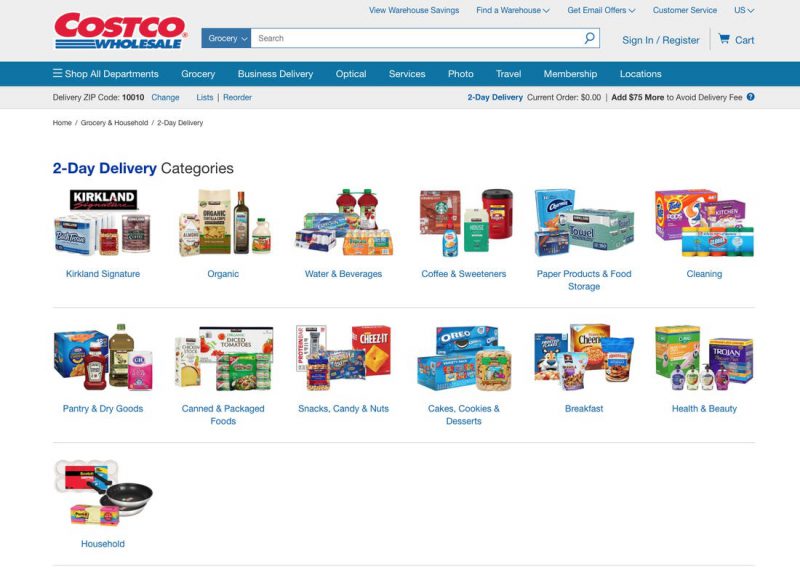
It is vital to distinguish between the main Costco.com site and the “Same-Day Delivery” portal. Costco.com handles non-perishable goods, electronics, furniture, and “2-Day Delivery” items (mostly shelf-stable groceries and household essentials). This part of the site operates like a traditional e-commerce store, utilizing major carriers like UPS and FedEx.
The “Same-Day Delivery” service is a white-labeled integration powered by Instacart’s technology. When you select this option, you are interacting with a different inventory database that reflects the real-time stock of your local warehouse. The technical integration here is impressive; the platform syncs with local inventory management systems to ensure that when you add a gallon of milk to your cart, it is actually sitting on a shelf within a ten-mile radius of your location.
Optimizing the Cold Chain: Grocery Logistics
For “2-Day Delivery” items, Costco employs specialized packaging technology to maintain the integrity of the products. While this service primarily focuses on dry goods, any temperature-sensitive items in the broader online catalog are shipped using “Cold Chain” logistics. This involves insulated containers and dry ice, tracked through a shipping manifest that prioritizes speed to prevent spoilage. When ordering, the system will often prompt you to meet a minimum order threshold (typically $75) to waive the delivery fee, a move designed to optimize the carbon footprint and logistics costs of heavy bulk shipping.
Security and Digital Wallet Integration
In an era of increasing digital threats, the security of your financial data during an online transaction is paramount. Costco has implemented several layers of technical security to protect its members.
Protecting Your Account and Data
Costco’s online platform utilizes industry-standard SSL (Secure Sockets Layer) encryption to protect data in transit. Furthermore, the site employs multi-factor authentication (MFA) triggers when it detects a login from an unrecognized device or a change in sensitive account information. For users, this means that while the convenience of “one-click” style shopping is available, the backend is constantly monitoring for anomalous patterns that might indicate a compromised account.
Managing Payment Methods and Digital Receipts
The “My Account” section of the website acts as a centralized command center for your financial interactions with the brand. Here, you can manage your “Digital Wallet.” Costco supports all major credit cards online, though it is worth noting that in-warehouse purchases are limited to Visa in the United States. This digital flexibility allows you to use your preferred rewards cards for online orders even if they aren’t accepted at the physical register.
One of the most useful technical features is the “Receipts” archive. Every online order generates a digital receipt that is stored in the cloud. These are not just images but searchable data entries. If you need to return an item or check a warranty, you can retrieve the digital record instantly, eliminating the need for paper filing.
Advanced Search and Filtering for Tech-Savvy Shoppers
The sheer volume of Costco’s online inventory—which is significantly larger than what is found in a physical warehouse—can be overwhelming. Leveraging advanced search techniques can help you find high-value items that aren’t advertised on the homepage.
Utilizing Real-Time Inventory Tracking
While Costco does not offer a “check stock” button for every single warehouse item, the online platform does feature “Costco Next.” This is a curated marketplace that gives members direct access to the inventories of high-end brands (like Apple, Bose, or Samsung) at Costco-negotiated prices. When you shop through Costco Next, you are essentially using Costco’s membership API to unlock discounted pricing on a partner’s website, a sophisticated “business-to-business-to-consumer” (B2B2C) bridge.
Identifying Online-Only Deals
Many of Costco’s most aggressive price cuts are found in the “Treasure Hunt” sections of the site, often labeled as “Online-Only.” These items are frequently shipped directly from the manufacturer (drop-shipping), which allows Costco to offer a wider variety of colors, sizes, and configurations than could ever fit in a physical store. By using the search filter “Show Out of Stock Items,” users can also gain insights into restock patterns for high-demand electronics and seasonal goods.
Troubleshooting and Technical Support
Even with a robust platform, technical glitches or logistical hurdles can occur. Understanding the support infrastructure is the final step in mastering the online ordering process.
The Virtual Assistant and Live Chat
Costco has integrated an AI-driven virtual assistant into its “Customer Service” page. This tool is programmed to handle common queries such as “Where is my order?” or “How do I cancel a shipment?” By parsing natural language, the assistant can provide real-time tracking updates by pulling data directly from carrier APIs. If the issue is too complex for the AI, the system seamlessly transitions the user to a live human agent who has access to the user’s full digital interaction history.
Managing Returns via the Online Portal
One of the most convenient features of the digital system is the ability to initiate returns online. For many items, you can print a prepaid shipping label directly from your order history. The system logs the return request and, once the carrier scans the package, triggers the refund process. This integration between the physical return of goods and the digital financial transaction ensures that the “Costco Guarantee” remains intact, even in a virtual environment.
In conclusion, ordering Costco online is a powerful tool for the modern consumer, blending the company’s legendary bulk-buying power with a sophisticated technological framework. By understanding the distinctions between the web and app interfaces, mastering the nuances of their multi-tiered delivery logistics, and utilizing the security and search features built into the platform, members can maximize their time and savings. The transition from the physical warehouse to the digital cart is a testament to how traditional retail can successfully evolve into a tech-forward future.
aViewFromTheCave is a participant in the Amazon Services LLC Associates Program, an affiliate advertising program designed to provide a means for sites to earn advertising fees by advertising and linking to Amazon.com. Amazon, the Amazon logo, AmazonSupply, and the AmazonSupply logo are trademarks of Amazon.com, Inc. or its affiliates. As an Amazon Associate we earn affiliate commissions from qualifying purchases.