
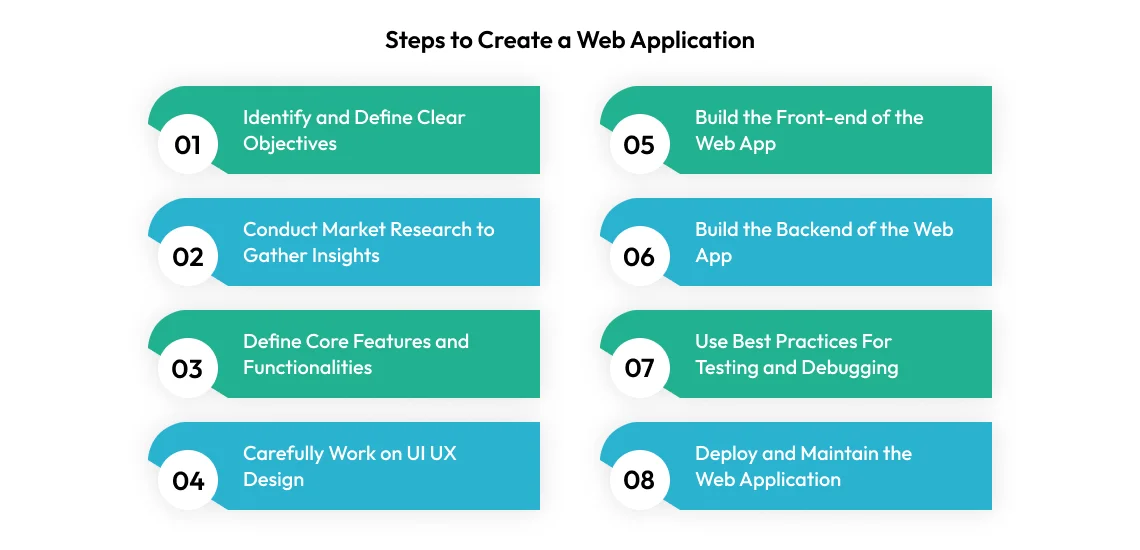
The digital landscape is increasingly dominated by applications that live not on your device’s hard drive but within the web browser. From productivity suites like Google Docs to social media platforms, e-commerce sites, and intricate business tools, web-based applications have redefined how we interact with technology and conduct our daily lives. They offer unparalleled accessibility, cross-platform compatibility, and ease of deployment, making them an attractive solution for both developers and users. This guide delves into the comprehensive process of creating a web-based app, providing a roadmap for turning your idea into a functional, user-friendly digital product.

1. Understanding Web-Based Apps and Their Advantages
Before embarking on the development journey, it’s crucial to grasp what constitutes a web-based app and why it might be the ideal choice for your project. Understanding its core characteristics and benefits will lay a solid foundation for your technical decisions and strategic planning.
What is a Web-Based App?
A web-based application, often simply called a web app, is a software application that runs on a web server, contrasting with desktop applications that run locally on the operating system of the device. Users access web apps via a web browser over a network (typically the internet). All or part of the user interface (UI) and application logic are rendered and processed by the browser, while the backend logic and data storage reside on remote servers. Examples range from simple online calculators to complex enterprise resource planning (ERP) systems. The key distinction is that no software installation is required on the user’s end beyond a standard web browser.
Key Benefits of Web Apps
The popularity of web apps stems from a multitude of advantages they offer over traditional desktop or native mobile applications:
-
Accessibility: Users can access web apps from any device with an internet connection and a web browser, regardless of the operating system (Windows, macOS, Linux, Android, iOS). This ubiquitous access dramatically expands the potential user base.
-
Cross-Platform Compatibility: Developers write the code once, and it runs across multiple platforms, eliminating the need for platform-specific versions. This saves significant development time and resources.
-
Ease of Updates and Maintenance: All updates, bug fixes, and new features are deployed directly to the server, meaning users automatically get the latest version without needing to download or install anything. This simplifies maintenance and ensures a consistent user experience.
-
Lower Distribution Costs: There are no app store fees or complex distribution channels involved. A web app can be launched simply by making its URL available, dramatically reducing overhead.
-
Scalability: Web apps are inherently designed to handle varying loads. Cloud infrastructure makes it relatively straightforward to scale resources up or down based on user demand, ensuring performance even during peak times.
-
Reduced Device Requirements: Since most processing occurs on the server, web apps often have lower local hardware requirements, making them accessible to users with older or less powerful devices.
Differentiating from Native and Hybrid Apps
While web apps are powerful, it’s helpful to understand their place relative to other app types. Native apps are built specifically for a single operating system (e.g., iOS or Android) using platform-specific languages (Swift/Objective-C for iOS, Java/Kotlin for Android). They offer superior performance, direct access to device hardware (camera, GPS, accelerometer), and a highly integrated user experience. Hybrid apps, on the other hand, wrap a web app inside a native shell, allowing them to be distributed through app stores and access some device features while still leveraging web technologies (HTML, CSS, JavaScript) for much of their content. Web apps stand out for their pure browser-based delivery, emphasizing accessibility and ease of development over deep device integration.
2. Planning Your Web App: From Idea to Blueprint
The success of any web app hinges heavily on the thoroughness of its planning phase. This stage transforms an abstract idea into a concrete blueprint, guiding every subsequent development step. Skipping or rushing planning often leads to costly rework, missed deadlines, and a product that fails to meet user needs.
Defining Your Vision and Target Audience
The initial spark for a web app usually comes from an idea to solve a problem or fulfill a need. Start by clearly articulating this core vision: what problem does your app solve? For whom does it solve it? And how does it do so uniquely?
-
Problem Statement: What specific pain point or inefficiency does your app address?
-
Target Audience: Who are your ideal users? Create user personas detailing their demographics, behaviors, goals, and pain points. Understanding your audience is paramount to designing an intuitive and useful application.
-
Unique Selling Proposition (USP): What makes your app different or better than existing solutions? Identify your competitive edge.
Feature Set and User Stories
Once the vision is clear, translate it into a tangible set of features. It’s often best to start with an Minimum Viable Product (MVP) – a version of the app with just enough features to satisfy early customers and provide feedback for future development.
-
Core Functionalities: List the essential features required for the app to function and deliver value. Prioritize ruthlessly to define your MVP.
-
User Stories: Frame features from the perspective of an end-user. A user story typically follows the format: “As a [type of user], I want to [perform an action] so that [I can achieve a goal].” For example, “As a registered user, I want to log in securely so that I can access my personalized dashboard.” User stories help maintain a user-centric focus and break down complex features into manageable tasks.
Technical Requirements and Architecture Design
With features defined, it’s time to consider the underlying technical structure. This involves mapping out how the app will be built and how its various components will interact.
-
System Architecture: Decide on the overall structure (e.g., monolithic, microservices, serverless). This influences scalability, maintainability, and deployment.
-
Database Schema: Design the structure of your data. What information will be stored? How will different pieces of information relate to each other? This forms the backbone of your application’s data management.
-
API Design: If your app will interact with other services or if you plan to have a separate frontend and backend, design the Application Programming Interfaces (APIs) that dictate how these components communicate.
-
Scalability Considerations: Plan for how the app will handle growth in users and data. Will it need to support millions of users? This impacts technology choices and infrastructure design.
User Interface (UI) and User Experience (UX) Design
UI/UX design is critical for a web app’s adoption and success. A beautiful, intuitive, and efficient interface keeps users engaged.
-
User Flows: Map out the paths users will take to complete tasks within your app. This helps identify potential roadblocks and ensures a smooth journey.
-
Wireframing: Create low-fidelity visual representations (sketches or digital mockups) of your app’s pages and their arrangement. Focus on layout and functionality, not aesthetics.
-
Prototyping: Build interactive mockups that simulate the app’s functionality. This allows for early testing and feedback on the user experience.
-
Mockups/High-Fidelity Designs: Once wireframes are approved, create detailed visual designs that incorporate colors, typography, imagery, and branding elements.
-
Design Systems: For larger projects, establish a design system (a library of reusable UI components, patterns, and guidelines) to ensure consistency and efficiency in design and development.
3. Core Technologies and Development Stack
The technical stack is the set of programming languages, frameworks, libraries, servers, and databases used to build a web application. The choice of stack is a critical decision that impacts development time, performance, scalability, and the availability of talent.
Frontend Development: The User’s Window
The frontend is everything the user sees and interacts with in their browser. It’s built upon foundational web technologies:
-
HTML (HyperText Markup Language): The standard language for creating web pages and defining their structure.
-
CSS (Cascading Style Sheets): Used for styling the appearance of web pages, including colors, fonts, layout, and responsiveness.
-
JavaScript: The programming language that enables interactive and dynamic behavior on web pages.
-
JavaScript Frameworks/Libraries: To manage complexity and boost productivity, developers often use frameworks or libraries:
-
React.js: (Facebook) A declarative, component-based library for building user interfaces. Known for its virtual DOM and efficiency.
-
Angular: (Google) A comprehensive, opinionated framework for building complex enterprise-grade single-page applications.
-
Vue.js: A progressive framework known for its ease of learning and flexibility, often chosen for smaller to medium-sized projects or when rapid prototyping is needed.
-
Backend Development: The Server’s Brain
The backend handles the server-side logic, database interactions, authentication, and communication with other services. It’s the engine room of the web app.

-
Programming Languages:
-
Python: Popular for its readability and vast ecosystem, often used with frameworks like Django (full-featured, “batteries-included”) and Flask (lightweight microframework).
-
Node.js (JavaScript): Allows developers to use JavaScript on the server-side, enabling full-stack JavaScript development (using React/Angular/Vue on the frontend and Node.js on the backend with Express.js framework).
-
Ruby: Known for developer happiness and productivity, primarily used with the Ruby on Rails framework.
-
PHP: Powers a large portion of the web, with the popular Laravel framework offering an elegant syntax for modern web development.
-
Java: Enterprise-grade language, robust and scalable, often used with frameworks like Spring Boot.
-
Go (Golang): Gaining popularity for its performance, concurrency, and efficiency in building high-scale services and APIs.
-
-
Database Management Systems (DBMS):
-
Relational Databases (SQL): Store data in structured tables with predefined schemas. Examples include PostgreSQL, MySQL, MariaDB, Oracle, SQL Server.
-
Non-Relational Databases (NoSQL): Offer flexible schemas and are often better suited for handling large volumes of unstructured or semi-structured data. Examples include MongoDB (document-oriented), Cassandra (column-family), Redis (key-value store).
-
APIs and Integrations
Most modern web apps don’t live in isolation. They often communicate with other services or provide their own interfaces for external consumption.
-
RESTful APIs (Representational State Transfer): The most common architectural style for web services, allowing different systems to communicate over HTTP using standard operations (GET, POST, PUT, DELETE).
-
GraphQL: An alternative to REST, allowing clients to request exactly the data they need, reducing over-fetching or under-fetching of data.
-
Third-Party Integrations: Payment gateways (Stripe, PayPal), authentication services (Auth0, Firebase Auth), cloud storage (AWS S3), email services (SendGrid), and other specialized APIs are frequently integrated to extend app functionality without building everything from scratch.
4. Building and Developing Your Web App
With planning complete and technologies selected, the development phase moves into execution. This involves writing code, setting up environments, and adopting practices that ensure code quality and efficient progress.
Setting Up Your Development Environment
A well-configured development environment is crucial for productivity.
-
Integrated Development Environment (IDE) / Code Editor: Tools like VS Code, Sublime Text, or WebStorm provide features like syntax highlighting, code completion, and debugging.
-
Version Control System (Git): Absolutely essential for tracking changes, collaborating with teams, and reverting to previous versions if needed. Platforms like GitHub, GitLab, and Bitbucket host Git repositories.
-
Package Managers: Tools like npm or Yarn (for JavaScript), pip (for Python), or Bundler (for Ruby) manage project dependencies and libraries.
-
Local Server: Setting up a local server environment (e.g., Node.js with Express, Python with Django’s runserver) allows developers to run and test the web app on their machine before deployment.
Modular Development and Code Best Practices
Building a maintainable and scalable web app requires adherence to best practices.
-
Modular Code: Break down the application into smaller, independent, reusable modules or components. This improves readability, makes debugging easier, and facilitates collaboration.
-
Clean Code Principles: Write code that is easy to read, understand, and modify. This includes meaningful variable names, consistent formatting, and clear comments where necessary.
-
Don’t Repeat Yourself (DRY): Avoid duplicating code. Instead, abstract common functionalities into reusable functions or components.
-
Testing Paradigms: Implement various levels of testing from the start:
-
Unit Tests: Verify individual components or functions work as expected.
-
Integration Tests: Ensure different modules or services interact correctly.
-
End-to-End Tests: Simulate real user scenarios to test the entire application flow.
-
Iterative Development and Agile Methodologies
Modern web app development often follows agile methodologies, which emphasize iterative progress, flexibility, and continuous feedback.
-
Sprints: Work is typically organized into short, fixed-length iterations (e.g., 1-4 weeks), called sprints, each resulting in a potentially shippable increment of the product.
-
Daily Stand-ups: Brief daily meetings to align the team, report progress, and identify impediments.
-
Continuous Integration (CI): Regularly merge code changes into a central repository. Automated builds and tests run on each merge to detect integration errors early.
Security Best Practices During Development
Security must be a core consideration throughout the development lifecycle, not an afterthought.
-
Input Validation: Sanitize and validate all user inputs to prevent common vulnerabilities like SQL injection, cross-site scripting (XSS), and command injection.
-
Authentication and Authorization: Implement robust mechanisms to verify user identity (authentication) and control what authenticated users can access or do (authorization). Use strong password policies, multi-factor authentication, and secure token management.
-
Data Encryption: Encrypt sensitive data both in transit (using HTTPS/SSL/TLS) and at rest (in the database).
-
Session Management: Securely manage user sessions to prevent session hijacking.
-
Dependency Security: Regularly audit and update third-party libraries and dependencies to mitigate known vulnerabilities.
-
Principle of Least Privilege: Grant users and processes only the minimum permissions necessary to perform their functions.
5. Deployment, Testing, and Post-Launch Considerations
Bringing a web app to life extends beyond writing the code. It involves rigorous testing, strategic deployment, and ongoing maintenance to ensure its continued success and reliability.
Rigorous Testing: Ensuring Quality and Performance
Thorough testing is non-negotiable for delivering a high-quality web app. It identifies bugs, performance bottlenecks, and usability issues before they impact real users.
-
Functional Testing: Verifies that all features work according to specifications.
-
Usability Testing: Involves real users interacting with the app to uncover design flaws or confusing elements. This can be done with prototypes or early versions of the app.
-
Performance Testing: Measures the app’s responsiveness, speed, and stability under various load conditions. This includes stress testing (pushing the system to its limits) and load testing (simulating expected user traffic).
-
Security Testing: Penetration testing, vulnerability scanning, and code reviews to identify and fix security flaws.
-
Browser Compatibility Testing: Ensure the app functions correctly across different web browsers (Chrome, Firefox, Safari, Edge) and their versions.
-
Accessibility Testing: Verify the app is usable by people with disabilities, adhering to guidelines like WCAG (Web Content Accessibility Guidelines).
-
User Acceptance Testing (UAT): The final stage where stakeholders or end-users test the application to confirm it meets business requirements and user needs, often before official launch.
Choosing a Deployment Environment
Once the app is tested and deemed ready, it needs to be hosted on a server that is accessible via the internet.
-
Cloud Platforms: These offer scalable and reliable infrastructure-as-a-service (IaaS) or platform-as-a-service (PaaS) solutions. Popular choices include:
-
AWS (Amazon Web Services): Comprehensive suite of services, highly scalable, but can be complex.
-
Google Cloud Platform (GCP): Strong in AI/ML and data analytics, competitive pricing.
-
Microsoft Azure: Integrates well with Microsoft ecosystem, robust enterprise features.
-
Heroku: (PaaS) Simpler to deploy, manages infrastructure, ideal for smaller to medium-sized apps or rapid development.
-
Vercel / Netlify: Excellent for static sites and serverless functions, popular for modern frontend frameworks.
-
-
Server Setup: Configure web servers (e.g., Nginx, Apache), application servers (e.g., Gunicorn for Python, PM2 for Node.js), and database servers.
-
CI/CD Pipelines (Continuous Integration/Continuous Deployment): Automate the process of building, testing, and deploying the application. This ensures faster, more reliable, and consistent deployments. Tools like Jenkins, GitLab CI/CD, GitHub Actions, and CircleCI are commonly used.
Monitoring, Maintenance, and Scalability
Launching the app is just the beginning. Ongoing efforts are required to keep it running smoothly and effectively.
-
Monitoring: Implement tools to track app performance, server health, error rates, and user behavior (e.g., Google Analytics, New Relic, Datadog). This proactive monitoring helps identify issues before they become critical.
-
Maintenance: Regularly apply security patches, update libraries and frameworks, optimize database performance, and fix bugs as they arise.
-
Scalability: As user traffic grows, the app needs to scale. This might involve adding more servers (horizontal scaling), upgrading server resources (vertical scaling), implementing load balancing, or leveraging content delivery networks (CDNs).
-
Backups: Establish robust data backup and recovery strategies to prevent data loss.
User Feedback and Iteration
A successful web app is not a static product; it evolves based on user needs and market changes.
-
Collecting Feedback: Implement mechanisms for users to provide feedback (in-app surveys, contact forms, social media monitoring, usability testing).
-
Analyzing Data: Use analytics tools to understand how users interact with your app, identify popular features, and pinpoint areas of friction.
-
Iterative Enhancement: Based on feedback and data, continuously plan and implement new features, improvements, and optimizations. The agile cycle restarts with new ideas and requirements, leading to a continuously improving product.
Building a web-based application is a complex yet highly rewarding endeavor. By meticulously planning, selecting the right technologies, adhering to best practices during development, and committing to continuous improvement post-launch, you can create a robust, scalable, and impactful digital solution that serves its users effectively for years to come. The journey requires dedication and expertise across multiple domains, but the end result is a powerful tool accessible to anyone, anywhere, with an internet connection.
aViewFromTheCave is a participant in the Amazon Services LLC Associates Program, an affiliate advertising program designed to provide a means for sites to earn advertising fees by advertising and linking to Amazon.com. Amazon, the Amazon logo, AmazonSupply, and the AmazonSupply logo are trademarks of Amazon.com, Inc. or its affiliates. As an Amazon Associate we earn affiliate commissions from qualifying purchases.