
The allure of TikTok has captivated millions worldwide, transforming how we consume and create short-form video content. From viral dance challenges and comedic skits to educational snippets and insightful commentary, TikTok has become a global phenomenon. For iPhone users, accessing this vibrant ecosystem is a straightforward process, but understanding the nuances of installation, account management, and even how to navigate its vast content landscape can enhance the user experience significantly. This guide will walk you through the entire process, from initial download to optimizing your TikTok journey on your Apple device.

Understanding TikTok’s Appeal and Its iPhone Presence
Before diving into the installation process, it’s worth briefly touching upon why TikTok has become such a dominant force. Its algorithm is remarkably adept at curating personalized content feeds, ensuring users are constantly engaged with videos tailored to their interests. This addictive quality, combined with a user-friendly interface for content creation, has propelled it to the forefront of social media.
For iPhone users, TikTok is readily available through the App Store, Apple’s dedicated platform for distributing mobile applications. This seamless integration means that acquiring the app is as simple as downloading any other program onto your device. However, the experience extends beyond just installation; it encompasses understanding how to get the most out of the app, ensuring it runs smoothly, and even how to manage your digital presence within its community.
The App Store: Your Gateway to TikTok
The App Store is the official and most secure avenue for downloading any application onto your iPhone. It’s a curated marketplace where Apple rigorously vets apps for security, functionality, and adherence to its guidelines. TikTok, being a globally recognized and widely used application, is a staple on the App Store.
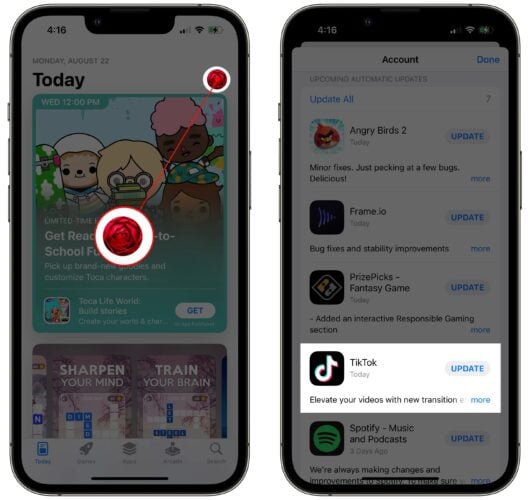
The process of finding and downloading TikTok is intuitive and mirrors the experience of installing any other app:
- Open the App Store: Locate the blue App Store icon on your iPhone’s home screen and tap to open it.
- Search for TikTok: Tap on the “Search” tab at the bottom right of the screen. In the search bar at the top, type “TikTok” and press the search button on your keyboard.
- Identify the Official App: You will see a list of search results. Look for the official TikTok app, usually characterized by its distinctive music note logo. Ensure it’s published by “TikTok Pte. Ltd.” to avoid unofficial or potentially malicious versions.
- Download the App: Tap the “GET” button next to the TikTok app. If you’ve downloaded it before, you might see a cloud icon with a downward arrow, indicating you can re-download it without repurchasing.
- Authentication (if required): You may be prompted to authenticate your download using your Apple ID password, Face ID, or Touch ID. This is a standard security measure.
- Installation: Once authenticated, the app will begin downloading and installing automatically. You’ll see a progress circle on the app icon on your home screen.
- Open TikTok: Once the installation is complete, the “GET” button will change to “OPEN.” You can tap this to launch the app directly from the App Store, or you can find the TikTok icon on your home screen and tap it to open.
Initial Setup and Account Creation
Upon launching TikTok for the first time, you’ll be guided through a brief initial setup process. This typically involves selecting your interests to help the algorithm curate your “For You” page more effectively. You’ll then have the option to create an account or explore the app as a guest.
Creating an account is essential for a personalized experience, allowing you to follow creators, save videos, comment, and upload your own content. TikTok offers several signup methods:
- Phone or Email: You can sign up directly using your phone number or email address. You’ll need to create a password and verify your account through a code sent to your provided contact information.
- Social Media Accounts: For convenience, TikTok allows you to sign up or log in using existing accounts from platforms like Facebook, Google, Apple, or Twitter (now X). This can streamline the process and connect your existing social networks.
- Apple ID: As an iPhone user, you can also use your Apple ID to sign up, leveraging Apple’s secure sign-in features.
When creating your account, you’ll be prompted to set up your profile. This includes choosing a username, adding a profile picture, and writing a bio. A well-crafted profile can help you establish your personal brand on the platform.
Optimizing Your TikTok Experience on iPhone
Installing TikTok is just the first step. To truly leverage its potential, both as a consumer and a creator, there are several settings and features to be aware of.
Navigating the Interface: Understanding Key Features
Once you’re logged in, you’ll encounter TikTok’s primary interface elements:
- For You Page (FYP): This is the heart of TikTok, presenting an endless stream of videos personalized to your viewing habits.
- Following: Here, you’ll find videos from the accounts you follow.
- Friends: This tab displays content from users you’ve connected with or who are in your contacts.
- Inbox: This section houses notifications, direct messages, and activity alerts.
- Profile: Your personal space where you can view and edit your profile information, see your uploaded videos, liked videos, and saved content.
Within a video, you’ll see icons for liking, commenting, sharing, and accessing the creator’s profile. The sound associated with the video is also a key element, and tapping on it allows you to explore other videos using the same audio.
Managing Your Account and Privacy Settings
Digital security and personal branding are paramount in today’s interconnected world. TikTok, like any social media platform, offers robust settings to manage your account and privacy.
Accessing Settings:
- Navigate to your Profile by tapping the person icon in the bottom right corner.
- Tap the three horizontal lines (hamburger menu) in the top right corner.
- Select “Settings and privacy” from the menu.
Within “Settings and privacy,” you’ll find several crucial sections:
- Account: Here, you can manage your login information, switch to a Pro account (for creators and businesses), and view your data.
- Privacy: This is vital for controlling who sees your content and interacts with your account. Key privacy options include:
- Private Account: This setting makes your account private, meaning only approved followers can see your videos.
- Activity Status: You can choose to show or hide when you were last active.
- Direct Messages: Control who can send you direct messages.
- Comments: Manage who can comment on your videos and filter comments.
- Duets and Stitches: Decide if others can create duets or stitches with your videos.
- Downloads: Control whether others can download your videos.
- Security and Safety: This section allows you to manage your login activity, set up two-factor authentication for enhanced security, and report any suspicious activity.
- Notifications: Customize the types of notifications you receive from TikTok.
- Digital Wellbeing: TikTok offers tools to manage your screen time, such as setting daily limits and taking breaks.
By diligently reviewing and configuring these settings, you can ensure a secure and personalized TikTok experience that aligns with your comfort level and digital branding goals.
Beyond Installation: Exploring TikTok’s Creative and Financial Dimensions
While the core functionality of TikTok is its entertainment value, the platform also presents significant opportunities for personal branding, marketing, and even generating online income.
Personal Branding and Marketing on TikTok
For individuals and businesses alike, TikTok has become a powerful tool for building a brand. Its algorithm can rapidly amplify content, reaching vast audiences with relatively little effort compared to traditional marketing channels.
- Content Strategy: Developing a consistent content strategy is key. This involves understanding your target audience, creating engaging and shareable videos, and utilizing relevant hashtags to increase discoverability.
- Authenticity: TikTok thrives on authenticity. Users respond well to genuine personalities and relatable content.
- Trendjacking: Participating in trending challenges, using popular sounds, and engaging with current topics can significantly boost your visibility.
- Engagement: Actively engaging with your audience by responding to comments and collaborating with other creators can foster a loyal community.
Monetizing Your TikTok Presence
For those who gain traction on TikTok, the platform offers several avenues for generating income:
- TikTok Creator Fund: This program allows eligible creators to earn money based on their video views and engagement. The exact earnings can vary widely.
- Brand Partnerships and Sponsorships: As your following grows, brands may approach you for sponsored content. This involves creating videos that promote their products or services.
- Live Gifting: During live streams, viewers can purchase virtual gifts that can be redeemed for cash.
- Affiliate Marketing: Promoting products and earning a commission on sales generated through your unique affiliate links.
- Selling Your Own Products/Services: TikTok can be a powerful tool to drive traffic to your own e-commerce store or service offerings.
To unlock these monetization features, users often need to meet certain criteria, such as a minimum number of followers and video views, and often need to switch to a TikTok Pro Account. This is readily available within the app’s settings and provides access to analytics to track your performance.
In conclusion, installing TikTok on your iPhone is a simple gateway to a world of short-form video content, creative expression, and potential income streams. By understanding the installation process, navigating the app’s features, and strategically managing your account and content, you can fully immerse yourself in the dynamic and ever-evolving TikTok universe. Whether you’re looking to be entertained, connect with like-minded individuals, or build a personal brand, TikTok on your iPhone offers a powerful and accessible platform to achieve your goals.
aViewFromTheCave is a participant in the Amazon Services LLC Associates Program, an affiliate advertising program designed to provide a means for sites to earn advertising fees by advertising and linking to Amazon.com. Amazon, the Amazon logo, AmazonSupply, and the AmazonSupply logo are trademarks of Amazon.com, Inc. or its affiliates. As an Amazon Associate we earn affiliate commissions from qualifying purchases.