
Your tax returns are more than just annual compliance documents; they are vital records reflecting your financial history, income, deductions, and overall tax liability. Whether you’re applying for a mortgage, seeking financial aid, or simply reviewing your past financial decisions, having easy access to previous tax returns is paramount. For millions of Americans, TurboTax has been the go-to platform for preparing and filing taxes, making it a critical source for retrieving these essential documents.
Navigating the complexities of tax season can be daunting, but retrieving your past returns from TurboTax doesn’t have to be. This comprehensive guide will walk you through the process, explain the enduring value of these documents, explore alternative retrieval methods, and offer best practices for future tax record management, all to ensure your financial health and peace of mind.
The Indispensable Value of Your Tax Returns
Your tax returns serve as a cornerstone of your personal financial record-keeping, extending their utility far beyond the initial act of filing. Understanding their multifaceted importance is the first step in appreciating why retaining and easily accessing them is so crucial.
More Than Just a Filing Document
At a fundamental level, your tax returns are official records of your income, expenses, and tax payments. However, their applications in your financial life are extensive:
- Proof of Income for Loans: When you apply for significant financial commitments like a mortgage, an auto loan, or student loans, lenders almost invariably require copies of your tax returns (often the past two or three years). They use these documents to verify your income, assess your debt-to-income ratio, and evaluate your ability to repay. Without these, securing favorable loan terms, or even approval, can be challenging.
- Applying for Financial Aid: If you or your dependents are pursuing higher education, tax returns are essential for completing the Free Application for Federal Student Aid (FAFSA) or other financial aid applications. These documents provide the necessary income and asset information to determine eligibility for grants, scholarships, and federal student loans.
- Verification of Income for Government Benefits: Many government assistance programs, from unemployment benefits to social security and certain healthcare subsidies, require income verification. Your tax returns serve as a standardized, official proof of your earnings history.
- Tracking Personal Financial History: Beyond formal requirements, your tax returns offer a snapshot of your financial journey year after year. They can help you track income growth, understand the impact of various deductions and credits, and see how your tax liability has evolved. This historical data is invaluable for personal financial analysis and long-term planning.
Safeguarding Against Future Audits and Discrepancies
While the thought of an IRS audit can be anxiety-inducing, having your past tax returns readily available is your primary line of defense. The IRS has a statute of limitations for auditing, typically three years from the date you filed your return (or the due date, whichever is later), though this can extend to six years or indefinitely in cases of substantial understatement of income or fraud.
- Defending Claims and Amending Returns: If the IRS questions an item on a past return, having the original return and supporting documents allows you to quickly provide clarification and evidence. Similarly, if you discover an error or missed deduction after filing, you’ll need the original return to prepare an amended return (Form 1040-X).
- Resolving Identity Theft Issues: Tax-related identity theft is a growing concern. If someone fraudulently files a tax return using your Social Security number, having your legitimate returns can help the IRS distinguish between your filings and the fraudulent ones, expediting the resolution process.
- Proof of Prior Year AGI: For various financial tasks, including electronically filing a current year return, you may be asked for your Adjusted Gross Income (AGI) from the previous year as a security measure. Your past tax returns provide this essential piece of information.
Informing Future Financial Decisions
Your past tax returns are not just relics of the past; they are powerful tools for future financial planning and strategy.
- Understanding Deductions, Credits, and Tax Liability Trends: By reviewing previous returns, you can identify patterns in your taxable income, deductions you consistently take (or miss), and credits you’ve qualified for. This insight can help you optimize your tax situation in the current and coming years.
- Planning for Retirement, Investments, and Major Purchases: Understanding your historical income and tax burdens can help you project future cash flow, inform investment strategies, and accurately budget for significant life events like retirement or buying a home. For instance, seeing the impact of retirement contributions on your taxable income in prior years can encourage you to maximize them in the future.
- Identifying Potential Tax Savings Strategies: A retrospective look at your returns might reveal opportunities you missed or strategies you could implement. Perhaps a certain investment generated unexpected tax consequences, or you overlooked a valuable credit. This historical analysis empowers you to make more tax-efficient decisions going forward, potentially saving you thousands.
Retrieving Your Returns Directly from Your TurboTax Account
For most users, the simplest and most direct method to access previous tax returns is through their TurboTax online account. TurboTax typically retains copies of your filed returns for several years, offering a convenient digital archive.
Step-by-Step Guide for Online Access
The process for downloading your returns is straightforward, provided you have your login credentials:
- Access the TurboTax Website: Go to the official TurboTax website (turbotax.intuit.com) and click on the “Sign In” button, usually located in the top right corner.
- Log In to Your Account: Enter your User ID and Password. If you’ve forgotten them, use the “Forgot User ID” or “Forgot Password” links to initiate the recovery process. This usually involves verifying your identity via email or phone.
- Navigate to Your Tax Home: Once logged in, you’ll typically land on your “Tax Home” or a similar dashboard page.
- Select the Desired Tax Year: On your Tax Home, you should see a list of tax years for which you’ve filed with TurboTax. Click on the specific tax year you need.
- Locate and Download Your Return: After selecting the year, look for options like “Download/Print Return,” “Print Your Return,” or “View Your Tax Documents.” TurboTax usually provides your complete tax return as a PDF file, which includes all forms and schedules. Click the download option.
- Save Your Document: Once downloaded, save the PDF to a secure, easily accessible location on your computer or cloud storage. Consider renaming the file with the tax year (e.g., “JaneDoe2022TaxReturn.pdf”) for easy identification.
Important Considerations:
- Browser Compatibility: Ensure you are using an up-to-date web browser (Chrome, Firefox, Edge, Safari) for optimal functionality.
- Internet Connection: A stable internet connection is crucial for downloading potentially large PDF files without interruption.
- Security: Always ensure you are on the official TurboTax website and that your connection is secure (look for “https://” in the URL).
Understanding Different TurboTax Product Tiers
The duration for which TurboTax retains your returns can sometimes depend on the product tier you used (e.g., Free Edition, Deluxe, Premier, Self-Employed). Generally, TurboTax aims to provide access to returns filed within the last seven years. However, policies can change, and it’s always best practice to download and save your returns immediately after filing. If you have filed under different TurboTax accounts over the years, make sure you are logging into the correct account associated with the specific tax return you are trying to retrieve. This is a common oversight that can lead to frustration.
Troubleshooting Common Access Issues
Even with a clear guide, you might encounter hurdles. Here’s how to address them:
- Forgotten Passwords/User IDs: TurboTax has robust account recovery tools. Follow the prompts for “Forgot User ID” or “Forgot Password.” You’ll likely need access to the email address or phone number associated with your account.
- Account Lockout: Multiple failed login attempts can temporarily lock your account for security reasons. Wait for the specified lockout period to expire, or follow the account recovery steps.
- Technical Glitches: If you experience issues with the website itself (e.g., pages not loading, download errors), try clearing your browser’s cache and cookies, using a different browser, or trying again later.
- Contacting TurboTax Customer Support: If you’ve exhausted self-help options, TurboTax provides customer support. Be prepared to verify your identity thoroughly before they can assist you with accessing sensitive tax information. Accessing customer support often requires navigating through their online help portal to find the appropriate contact method (chat, phone).

Alternative Methods for Accessing Past Tax Returns
While TurboTax offers a convenient digital archive, it’s not the only avenue for obtaining your past tax returns. Having alternative strategies ensures you’re never without these critical financial documents.
Leveraging Your Personal Records
The most reliable alternative is to establish and maintain your own comprehensive system for storing tax records. This proactive approach eliminates reliance on third-party platforms for long-term access.
- Physical Copies: Many individuals prefer the tangible security of physical documents. After filing, print a full copy of your return and all supporting schedules. Organize these by tax year in a dedicated file folder or a secure filing cabinet.
- Digital Backups: Immediately after filing and downloading your return from TurboTax, save it to at least two secure digital locations. This could include an encrypted cloud storage service (like Google Drive, Dropbox, OneDrive) and an external hard drive or a secure folder on your computer. This redundancy protects against data loss from device failure or cyber-attacks.
- Why Immediate Saving is Crucial: The moment your return is filed and accepted, download and save it. Don’t wait. Technical issues, account changes, or even changes in TurboTax’s data retention policies could occur, making timely self-archiving invaluable.
Requesting Transcripts from the IRS
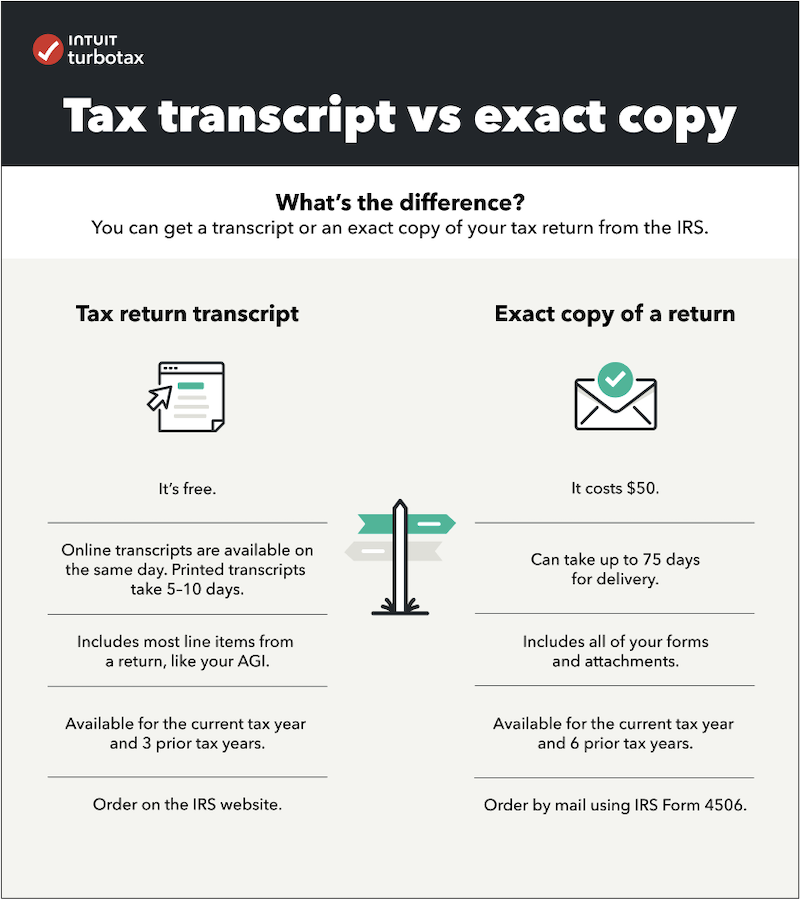
If you can’t access your returns through TurboTax or your personal records, the Internal Revenue Service (IRS) is the ultimate source for your tax information. However, it’s important to understand that the IRS typically provides tax transcripts, which are summaries of your tax returns and related information, not always the full, original Form 1040 with all schedules as you would get from TurboTax.
- What an IRS Tax Transcript Is: An IRS tax transcript summarizes your tax return information. There are several types:
- Tax Return Transcript: Shows most line items from your original Form 1040, 1040-SR, or 1040-NR, including any accompanying forms and schedules. It doesn’t show changes made after you filed the original return.
- Tax Account Transcript: Provides basic data such as marital status, type of return filed, AGI, and payment information. It also shows any adjustments made by you or the IRS after the return was filed.
- Wage and Income Transcript: Shows data from information returns, such as Forms W-2, 1099, 1098, and Form 5498.
- How to Request Transcripts:
- Online (Get Transcript Tool): The quickest method. Visit IRS.gov, search for “Get Transcript,” and follow the prompts. You’ll need to verify your identity. Transcripts are usually available immediately online for viewing, printing, or downloading.
- By Mail (Form 4506-T): You can order a transcript to be sent to you by mail. Fill out and mail Form 4506-T, Request for Transcript of Tax Return. Allow 5 to 10 calendar days for delivery.
- By Phone: Call the IRS at 800-908-9946.
- Limitations: IRS transcripts are generally available for the current tax year and the past three prior years. Wage and income transcripts are available for up to 10 years. While useful, they might not contain every detail or specific forms required by certain institutions (e.g., mortgage lenders might prefer the full filed return).
Seeking Assistance from a Tax Professional
If a certified public accountant (CPA), enrolled agent, or another tax professional prepared and filed your returns, they are an excellent resource.
- Tax Preparer Has Copies: Professional tax preparers are generally required to keep copies of returns and supporting documents for their clients for a certain period. Contact your preparer and request a copy of the specific tax year you need.
- What to Ask For: Clearly specify that you need the full tax return, including all schedules and attachments, not just a summary.
- Fees Involved: Be aware that your tax professional may charge a small fee for retrieving and providing copies of past returns, especially if it’s for a very old return or requires significant time.
Best Practices for Future Tax Record Management
Proactive and organized record-keeping is the ultimate strategy for seamless access to your tax returns. Establishing good habits now will save you time, stress, and potential financial headaches in the future.
Proactive Saving and Archiving
The golden rule of tax record management is to act immediately after your return is filed and accepted.
- Immediate Download and Multiple Saves: As soon as TurboTax confirms your filing, download the complete PDF of your return. Save it to at least two distinct locations:
- Local Storage: A dedicated “Taxes” folder on your computer’s hard drive.
- Cloud Storage: A secure, password-protected cloud service (e.g., Google Drive, OneDrive, Dropbox, iCloud). This provides an offsite backup, protecting against local device failure.
- Consider a Physical Printout: For critical returns (e.g., years with significant life changes, high income, or complex investments), printing a physical copy provides an additional layer of security against digital loss or corruption.
- Organize Files by Tax Year: Create clearly labeled folders for each tax year (e.g., “2023 Taxes,” “2022 Taxes”) and store the full return, along with all supporting documents (W-2s, 1099s, receipts, statements), within the respective folder.
Setting Up a Robust Digital Filing System
A well-structured digital system ensures quick retrieval and security.
- Using Secure Cloud Storage: Opt for cloud providers that offer robust encryption and security features. Regularly review and update your passwords.
- Naming Conventions for Easy Retrieval: Consistent file naming helps immensely. A format like “LastNameFirstNameTaxReturnYYYY.pdf” (e.g., “SmithJohnTaxReturn2022.pdf”) makes it easy to locate specific returns.
- Regular Backups: If using local storage, implement a routine backup schedule for your entire computer, which will include your tax files. Cloud services often handle this automatically, but it’s good to periodically verify your synced folders.
Understanding Retention Guidelines
Knowing how long to keep your tax documents is crucial for both compliance and personal financial planning.
- IRS Recommendations: The IRS generally recommends keeping tax returns and supporting documents for at least three years from the date you filed your original return or the due date of the return, whichever is later. However, this period extends for specific situations:
- Six Years: If you don’t report income that you should, and it’s more than 25% of the gross income shown on your return.
- Seven Years: If you file a claim for a loss from worthless securities or bad debt deduction.
- Indefinitely: For records related to property (like real estate or investments) until the period of limitations expires for the year in which you sell or dispose of the property. This helps calculate basis and gain/loss.
- Indefinitely: Employment tax records.
- State-Specific Requirements: Some states may have different or additional requirements for retaining tax records. Check your state’s tax agency website.
- Importance of Keeping Supporting Documents: Your W-2s, 1099s, investment statements, receipts for deductions, and other forms are just as important as the filed return itself. They are the evidence that substantiates the figures on your return. Keep them organized with the corresponding tax year’s return.
Conclusion
Accessing your previous tax returns from TurboTax is a vital financial task, made relatively straightforward by the platform’s digital archiving capabilities. Whether you need them for a loan application, an audit defense, or strategic financial planning, understanding the retrieval process is a critical component of sound personal finance.
Beyond relying solely on TurboTax, remember the importance of personal archiving through digital backups and physical copies, and consider the IRS as a fallback for transcripts. Ultimately, proactive tax record management—from immediate downloading and organized saving to understanding retention guidelines—empowers you with control over your financial history. By adopting these best practices, you ensure that your essential tax documents are always within reach, offering peace of mind and supporting your long-term financial well-being.
aViewFromTheCave is a participant in the Amazon Services LLC Associates Program, an affiliate advertising program designed to provide a means for sites to earn advertising fees by advertising and linking to Amazon.com. Amazon, the Amazon logo, AmazonSupply, and the AmazonSupply logo are trademarks of Amazon.com, Inc. or its affiliates. As an Amazon Associate we earn affiliate commissions from qualifying purchases.