
In the modern digital landscape, an Amazon account is far more than just a means to purchase products; it’s a foundational digital identity that unlocks an expansive ecosystem of services, content, and technological integrations. From streaming movies and music to powering smart home devices and accessing cloud-based services, Amazon has woven itself into the fabric of daily digital life for millions globally. Understanding how to securely and effectively establish this digital presence is a crucial skill for anyone looking to navigate the contemporary online world. This guide delves into the technical intricacies and best practices for creating and managing your Amazon account, framed within the lens of technology and digital security.

The Gateway to the Amazon Ecosystem: Understanding Your Digital Footprint
Before embarking on the account creation process, it’s essential to grasp the significance of an Amazon account as a core component of your online identity. It’s not merely a login; it’s a personalized portal to a vast array of digital functionalities, each requiring specific technical considerations.
Why an Amazon Account is Essential in the Digital Age
An Amazon account serves as a single sign-on (SSO) for an unparalleled suite of digital offerings. Beyond its renowned e-commerce platform, your account provides access to:
- Digital Content Libraries: Kindle e-books, Audible audiobooks, Prime Video streaming, Amazon Music, and gaming services.
- Cloud Services and Storage: While not a direct AWS account, your Amazon account underpins services like Amazon Photos, offering cloud storage solutions.
- Smart Home Integration: Essential for linking and managing Alexa-enabled devices, Ring security systems, and other smart home gadgets.
- Personalized Experiences: Leveraging sophisticated algorithms, Amazon tailors product recommendations, advertising, and content suggestions based on your interaction data.
- Subscription Management: A centralized hub for managing Prime membership, Kindle Unlimited, and various other digital subscriptions.
From a technological standpoint, this centralized access streamlines user experience but also centralizes data, making secure account management paramount. Each interaction through your account contributes to a richer digital profile, impacting everything from delivery logistics to personalized content streams.
Prerequisites: Laying the Technical Groundwork
Before initiating the account creation process, ensuring you have the necessary technical prerequisites in place will guarantee a smooth setup. These foundational elements are standard for most online service registrations but bear repeating for emphasis on digital readiness:
- A Valid Email Address: This will serve as your primary username and a crucial point of contact for account verification, notifications, and recovery. It acts as a unique identifier within Amazon’s vast user database.
- A Reliable Mobile Phone Number (Optional but Recommended): While not strictly mandatory for initial creation in some regions, a phone number is invaluable for two-factor authentication (2FA) and account recovery, significantly bolstering your digital security. It provides an alternative verification channel.
- A Strong, Unique Password: This is your primary defense mechanism. Do not reuse passwords from other online services. Think of it as the digital key to your Amazon ‘home.’
- Internet Access and a Compatible Device: Whether it’s a desktop computer via a web browser (Chrome, Firefox, Edge, Safari) or a mobile device running the Amazon Shopping app, stable internet connectivity is non-negotiable.
Navigating the Amazon Platform: Web vs. Mobile App
Amazon offers two primary interfaces for account creation and management: the traditional web browser experience and the dedicated Amazon Shopping mobile application. Both offer similar functionalities but cater to different user preferences and technical environments.
- Web Browser (Desktop/Laptop): Offers a larger screen real estate, which some users find easier for navigating forms and reviewing details. It provides a full, unconstrained view of the Amazon site. Users typically access
www.amazon.com(or their regional equivalent). - Mobile App (Smartphone/Tablet): Designed for convenience and on-the-go access, the app integrates seamlessly with mobile operating systems. It often provides push notifications for order updates and a streamlined touch interface. The app is available for iOS (Apple App Store) and Android (Google Play Store).
Choosing between them is largely a matter of personal preference, though creating an account on a desktop can sometimes feel less constrained for first-time users due to the larger display. Regardless of the platform, the underlying technical process remains consistent.
Step-by-Step: Crafting Your Amazon Digital Identity
The process of creating an Amazon account is designed to be straightforward, guiding users through a series of logical steps to establish their digital profile. Each step involves providing information crucial for account functionality, security, and service delivery.
Initiating Account Creation: The First Click
To begin, navigate to the Amazon website or open the Amazon Shopping app.
- On the Web: Look for the “Account & Lists” dropdown menu, typically located in the top right corner. Hovering over it will reveal a “Sign in” button. Below this, you’ll find the prompt “New customer? Start here.” Clicking “Start here” initiates the account creation wizard.
- On the App: Tap the “hamburger” menu icon (three horizontal lines) or the “Profile” icon (usually a silhouette of a person). Then, tap “Sign In” and look for an option like “Create account” or “New customer? Create an account.”
This initial action signals to Amazon’s servers your intent to register a new user profile, setting the stage for data input.
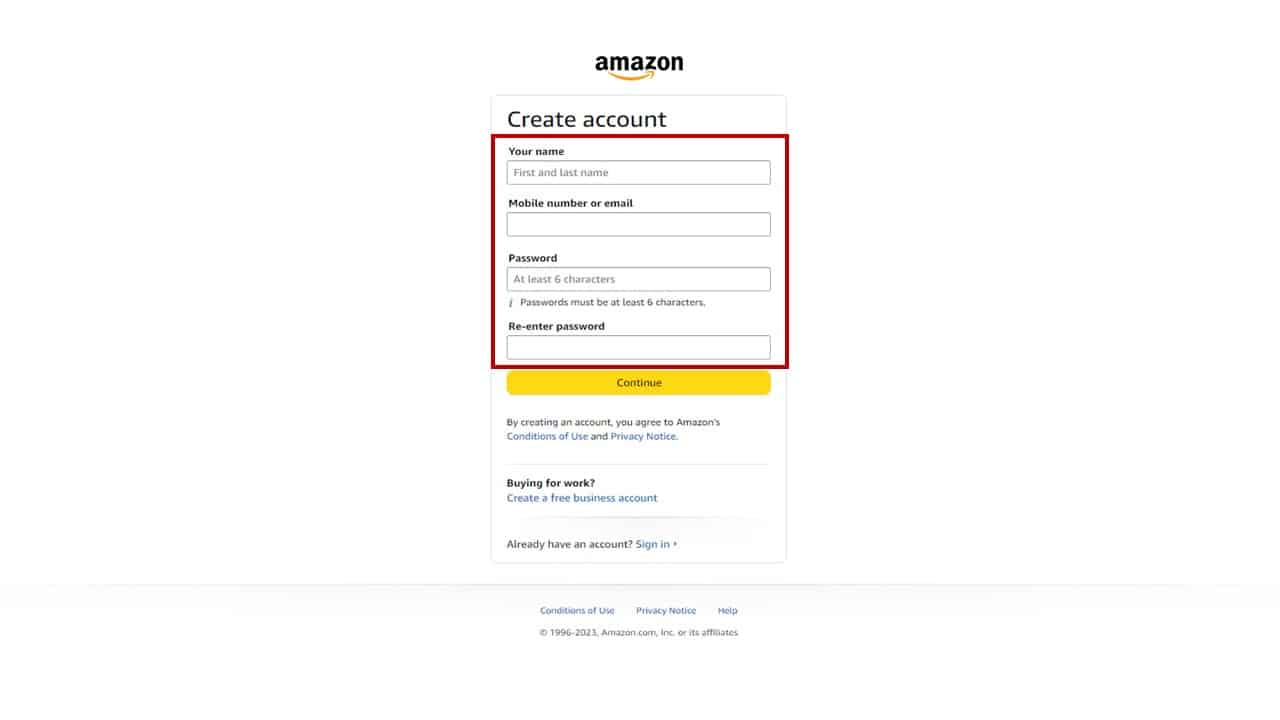
Inputting Core Credentials: Name, Email, and a Strong Password
The first key step involves providing your foundational identity details.
- Your Name: Enter your full name. This is used for personalization, shipping labels, and customer service interactions.
- Email or Mobile Phone Number: Choose one to serve as your primary identifier. If you use a mobile number, Amazon will send a One-Time Password (OTP) via SMS for verification. If you use email, a verification link or code will be sent to that address. For tech-savvy users, using an email allows for more robust password management solutions.
- Password: This is arguably the most critical input.
- Strength is Key: Aim for a password that is at least 12-14 characters long, incorporating a mix of uppercase and lowercase letters, numbers, and special characters. Avoid easily guessable information like birthdays, pet names, or common dictionary words.
- Uniqueness: Never reuse a password. If one service is compromised, reusing passwords puts all your linked accounts at risk. Consider using a password manager (e.g., LastPass, 1Password, Bitwarden) to generate and securely store unique, complex passwords for all your online accounts. This reduces cognitive load and enhances security.
After entering these details, Amazon’s backend systems process this initial data, creating a preliminary user entry.
Verifying Your Digital Presence: Email and Phone Authentication
To confirm that the provided contact information is indeed yours, Amazon employs a verification step.
- Email Verification: If you used an email address, Amazon will send a verification email containing a numeric code or a clickable link. Navigate to your email inbox, locate this email (check spam/junk folders if it’s not immediately visible), and either copy-paste the code back into Amazon’s prompt or click the provided link. This cryptographic link or code confirms you have access to that email address.
- Phone Verification: If you opted for a mobile phone number, Amazon will send an OTP via SMS. Input this code into the designated field on the Amazon page. This process leverages the ubiquity of mobile phones as a trusted verification channel.
This verification is a crucial digital security measure, preventing unauthorized individuals from creating accounts using someone else’s contact details.
Establishing Your Physical Nexus: Adding Shipping Information
While not strictly required at the very moment of account creation, providing a shipping address is a practical next step that makes your account fully functional for purchases.
- Add New Address: Go to “Your Account” > “Your Addresses.”
- Input Details: Provide your full name, street address, apartment/suite number, city, state/province, and postal code. Accuracy is paramount for successful delivery logistics.
- Default Address: You can set a primary shipping address to streamline future purchases.
From a tech perspective, this information is stored securely and integrated with Amazon’s sophisticated logistics network, enabling accurate calculation of shipping costs, delivery times, and inventory management based on geographic location.
Integrating Payment Methods: Enabling Transactions Securely
To complete purchases, you’ll need to link a payment method to your Amazon account. This step is also managed under “Your Account.”
- Add Payment Method: Navigate to “Your Account” > “Your Payments.”
- Input Details: You can add credit/debit cards, link bank accounts (for some services), or utilize Amazon Gift Cards. For card payments, you’ll enter the card number, expiration date, and cardholder name.
- Security: Amazon uses industry-standard encryption (SSL/TLS) to protect payment information during transmission. Once stored, card details are often tokenized, meaning the full card number isn’t directly stored, but rather a unique identifier linked to it, further enhancing security.
- Default Payment: Similar to addresses, you can set a default payment method for faster checkout.
This financial integration completes the primary setup, transforming your nascent digital identity into a fully operational consumer profile within the Amazon ecosystem.
Fortifying Your Digital Fortress: Security Best Practices for Your Account
Creating an Amazon account is just the first step; maintaining its security is an ongoing commitment. Given the vast amount of personal and financial data linked to your Amazon profile, robust digital security practices are non-negotiable.
The Imperative of Strong, Unique Passwords
Reiterating this point is vital. A strong password is the first line of defense.
- Randomness is Key: Avoid dictionary words, sequential numbers, or personal information. Opt for a randomly generated string of characters.
- Length Over Complexity (but both are good): A longer password (e.g., a passphrase of several unrelated words) is often more secure than a shorter, complex one.
- Password Managers: As mentioned, these tools are invaluable. They generate, store, and auto-fill complex passwords, removing the burden from you and dramatically increasing your security posture across all online services.
Implementing Two-Factor Authentication (2FA): An Essential Layer of Defense
Two-Factor Authentication (also known as Multi-Factor Authentication or MFA) adds a critical second layer of security beyond just your password. Even if a malicious actor obtains your password, they cannot access your account without the second factor.
- How to Enable: Go to “Your Account” > “Login & Security” > “Two-Step Verification” (or “2SV”).
- Verification Methods: Amazon typically offers SMS-based codes (sent to your phone) or authenticator app codes (e.g., Google Authenticator, Authy). Authenticator apps are generally considered more secure than SMS due to potential SIM swap attacks.
- Backup Codes: Amazon will provide backup codes. Store these in a safe, offline location (e.g., a physical notebook, encrypted USB drive) in case you lose access to your primary 2FA device.
Enabling 2FA is arguably the single most impactful step you can take to secure your Amazon account, protecting your purchases, payment information, and digital content.
Recognizing and Mitigating Phishing Attempts
Phishing is a common cyberattack where fraudsters attempt to trick you into revealing sensitive information by impersonating legitimate entities. Amazon is a frequent target.
- Beware of Suspicious Emails/Messages: Phishing attempts often involve emails or texts that appear to be from Amazon, asking you to click a link, verify account details, or update payment information.
- Red Flags: Look for generic greetings (“Dear Amazon Customer”), grammatical errors, urgent language, unusual sender email addresses, or links that don’t point to
amazon.com(or your regional domain). - Verify Directly: If you receive a suspicious message, do not click any links. Instead, manually type
amazon.cominto your browser, log in, and check your account notifications or order history. Legitimate Amazon communications will often appear within your account. - Report Phishing: Amazon provides mechanisms to report suspicious emails to
stop-spoofing@amazon.com.
Staying vigilant against phishing is a continuous technical security practice.
Managing Your Privacy Settings: Controlling Your Digital Data
Amazon, like many large tech companies, collects significant amounts of user data to personalize experiences and drive advertising. Understanding and managing your privacy settings allows you to control your digital footprint.
- Advertising Preferences: Under “Your Account” > “Advertising Preferences,” you can review and adjust how Amazon uses your browsing and purchase history for personalized ads.
- Communication Preferences: Manage what types of emails you receive from Amazon (e.g., marketing, recommendations, shipment notifications).
- Alexa Privacy: If you use Alexa devices, review and manage voice recordings and privacy settings within the Alexa app.
- Cookie Settings: Your browser or app settings will also allow you to control cookies, which Amazon uses for tracking and personalization.
Proactively managing these settings is key to maintaining your digital privacy within the Amazon ecosystem.
Beyond Creation: Maximizing and Managing Your Amazon Digital Assets
An Amazon account is a dynamic entity. Post-creation, understanding how to leverage its features and troubleshoot common issues ensures a seamless and productive digital experience.
Unlocking Amazon’s Digital Services: From Streaming to Smart Home
Your Amazon account is the key to a vast interconnected web of services:
- Prime Membership: If subscribed, your account instantly grants access to Prime Video, Prime Music, Prime Reading, exclusive deals, and faster shipping. These are all authenticated via your Amazon login.
- Kindle and Audible: Your account syncs your digital book and audiobook libraries across all your devices, preserving reading progress and purchases.
- Alexa and Smart Home: Registering Echo devices, Ring cameras, and other smart home gadgets ties them to your Amazon account, allowing for centralized control and voice commands.
- Amazon Pay: Your linked payment methods can be used to pay at third-party websites that support Amazon Pay, extending your secure payment options.
Each of these integrations highlights the technical extensibility of the Amazon account, turning it into a central hub for various digital functionalities.
Advanced Account Settings and Customization
Beyond basic settings, Amazon offers several advanced options:
- Linked Accounts: Manage accounts linked to your Amazon profile, such as those for games or other services.
- Content and Devices: View and manage all devices registered to your account (Kindle, Fire TV, Echo) and their associated content. You can de-register old devices here.
- Order History and Returns: A comprehensive digital record of all your purchases, making tracking, reordering, and returns straightforward.
- Gift Card Balance: Monitor any Amazon Gift Card balances applied to your account.
These functionalities empower users with granular control over their digital assets and interactions within the platform.
Troubleshooting Common Technical Hurdles
Even with a smooth setup, users may encounter technical issues.
- Forgotten Password: The “Forgot your password?” link on the sign-in page is your go-to. It will initiate a password reset flow, typically involving email or phone verification.
- Login Issues: Clear your browser’s cache and cookies, or try a different browser/device. Ensure your internet connection is stable. If using the app, try force-closing and restarting it, or reinstalling it.
- Email Verification Delays: Check your spam/junk folder. Sometimes, there can be a slight delay in email delivery due to server loads.
- Account Lockout: Repeated failed login attempts can trigger a temporary account lockout for security reasons. Follow Amazon’s recovery procedures.
Amazon’s extensive help documentation and customer support are available resources for more complex technical challenges.
Account Recovery and Maintenance
Proactive maintenance ensures your account remains secure and accessible.
- Keep Contact Info Updated: Ensure your primary email address and phone number are current. This is vital for 2FA and password recovery.
- Regular Security Reviews: Periodically review your “Login & Security” settings, especially for 2FA.
- Review Authorized Devices: Regularly check which devices are signed into your Amazon account. If you see an unfamiliar device, sign it out immediately.
The Evolving Digital Landscape: Amazon’s Role and Your Future Account
As technology advances, so too will the functionalities and integrations of your Amazon account. What began as a simple e-commerce login has evolved into a comprehensive digital identity, poised to adapt to future innovations.
Anticipating Future Integrations and Features
Amazon continues to expand its technological footprint, from artificial intelligence (AI) enhancements in Alexa to advancements in logistics and cloud computing. Your account will likely be the central nexus for accessing these future services, be they more personalized shopping experiences powered by advanced AI, deeper integration with smart city infrastructure, or new forms of digital content. Understanding your account as a dynamic, evolving component of your digital self is crucial for future readiness.
The Longevity and Adaptability of Your Amazon Account
Your Amazon account is designed for longevity, adapting to new technologies and user needs. Its fundamental role as an identifier and access point means it will continue to be a cornerstone of your digital life for the foreseeable future. By employing diligent security practices, staying informed about new features, and actively managing your privacy settings, you ensure your Amazon account remains a powerful, secure, and beneficial digital asset.
In conclusion, getting an Amazon account is a straightforward technical process, but understanding its implications as a digital identity and applying rigorous security measures is paramount. It’s not merely about creating a login; it’s about establishing a secure, functional gateway to an ever-expanding technological ecosystem, making it an indispensable tool in the modern digital age.
aViewFromTheCave is a participant in the Amazon Services LLC Associates Program, an affiliate advertising program designed to provide a means for sites to earn advertising fees by advertising and linking to Amazon.com. Amazon, the Amazon logo, AmazonSupply, and the AmazonSupply logo are trademarks of Amazon.com, Inc. or its affiliates. As an Amazon Associate we earn affiliate commissions from qualifying purchases.