
In today’s digitally driven world, a robust online presence is no longer just about static web pages. Businesses, entrepreneurs, and individuals alike are increasingly turning to dynamic web applications to deliver rich, interactive experiences directly through web browsers. Moving beyond the traditional website, a web app offers enhanced functionality, user engagement, and data processing capabilities, blurring the lines between desktop software and the internet. This comprehensive guide will demystify the process of creating a website app, navigating the technical landscape from conceptualization to deployment, and empowering you with the knowledge to bring your vision to life.
Understanding the Landscape: Website vs. Web App
Before diving into the specifics of creation, it’s crucial to distinguish between a traditional website and a modern web application. While the terms are often used interchangeably, their underlying architectures and functionalities serve different purposes. Grasping these differences is the foundational step in planning your project effectively.
Defining Websites and Web Apps
A website is typically a collection of static or semi-static content pages, primarily designed to display information. Think of a company’s informational site, a personal blog, or an online brochure. While websites can include some interactive elements like contact forms, their primary function is one-way communication: delivering content to the user. They are generally built using HTML, CSS, and minimal JavaScript, with content updates often requiring manual intervention or simple Content Management Systems (CMS) like WordPress.
A web application, on the other hand, is a software program that runs on a web server and is accessed by users through a web browser. Unlike static websites, web apps are highly interactive, dynamic, and often personalized. They allow users to perform actions, manipulate data, and experience rich functionality akin to desktop or mobile applications. Examples include online banking portals, e-commerce stores (Amazon), social media platforms (Facebook), project management tools (Trello), and cloud-based document editors (Google Docs). Web apps rely heavily on robust backend logic, databases, and sophisticated frontend frameworks to deliver their interactive experiences.
Key Differences and Why They Matter
The distinction between websites and web apps boils down to interactivity, data processing, and user engagement.
- Interactivity: Websites offer limited interaction; web apps provide rich, real-time user interaction.
- Functionality: Websites display information; web apps perform tasks and computations.
- Data Handling: Websites primarily retrieve data; web apps create, read, update, and delete (CRUD) data.
- Technology Stack: Websites can be simpler (HTML, CSS, basic JS); web apps require complex frameworks, backend languages, and databases.
- User Experience (UX): Web apps aim for an application-like experience, often single-page (SPA), feeling faster and more fluid without full page reloads.
Understanding these differences is paramount because it dictates your project’s scope, the technologies you’ll choose, the development team composition, and ultimately, the budget and timeline. Building a web app is typically a more complex and resource-intensive endeavor than creating a standard website.
When to Build a Website vs. a Web App
Choosing between a website and a web app depends entirely on your objectives:
- Opt for a Website if: Your primary goal is to disseminate information, establish an online presence, showcase a portfolio, or publish content with minimal user interaction. SEO is often a top priority, and a simpler development process is desired.
- Opt for a Web App if: You need to offer users personalized experiences, facilitate complex transactions, manage user-generated content, provide productivity tools, or enable real-time data manipulation. If your solution requires dynamic data processing, user authentication, or a highly interactive interface, a web app is the way to go.
Planning Your Web App Project
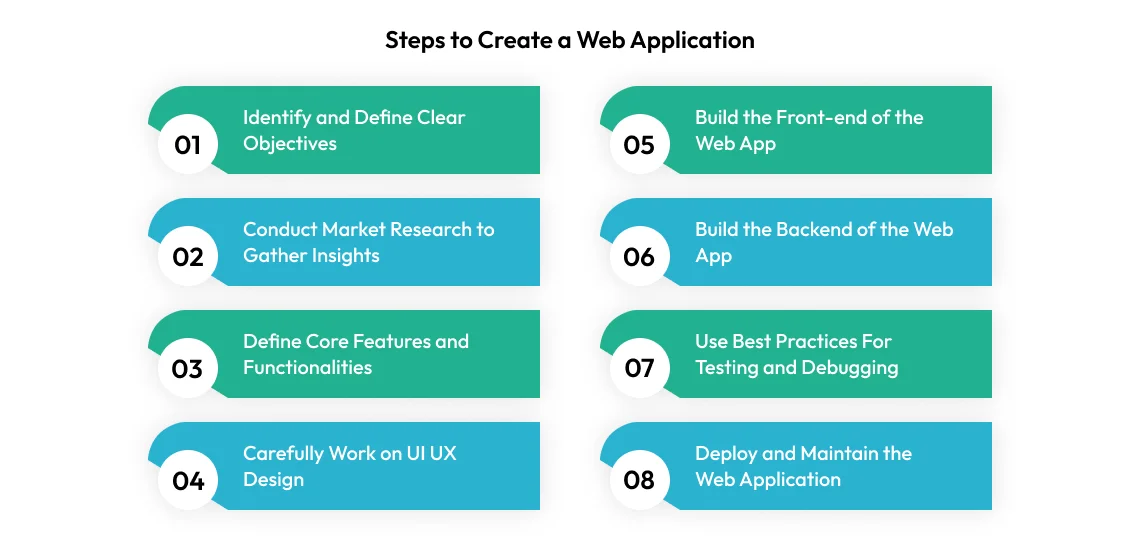
A successful web app begins with meticulous planning. Skipping this crucial phase can lead to scope creep, technical debt, and ultimately, project failure. This section outlines the essential steps in formulating a clear roadmap for your web application.
Identifying Your Core Purpose and Target Audience
The very first step is to articulate the why behind your web app. What problem does it solve? What value does it provide? A clear, concise purpose statement will guide all subsequent decisions. Simultaneously, define your target audience. Who will be using this app? Understanding their needs, technological proficiency, and pain points will directly influence features, design, and user experience. Creating user personas can be incredibly helpful here.
Feature Set Definition and Prioritization
Once your purpose and audience are clear, brainstorm all potential features. This can be an extensive list. The next, more critical step is prioritization. Not all features are equally important for the initial launch. Employ methodologies like MoSCoW (Must-have, Should-have, Could-have, Won’t-have) or impact-effort matrix to identify the Minimum Viable Product (MVP) — the smallest set of features that delivers core value to early users. Launching with an MVP allows for faster market entry, gathering feedback, and iterating based on real user data.
User Experience (UX) and User Interface (UI) Design Considerations
UX and UI are fundamental to a web app’s success.
- User Experience (UX): Focuses on how users interact with your app and how they feel about that interaction. It encompasses usability, accessibility, and overall satisfaction. UX design involves user research, information architecture, wireframing (skeletal layouts), and prototyping (interactive mockups). A good UX ensures the app is intuitive, efficient, and enjoyable to use.
- User Interface (UI): Deals with the visual aspects of the app – what the user sees and interacts with. This includes button styles, typography, color schemes, iconography, and overall aesthetic. A strong UI complements a good UX, making the app visually appealing and easy to navigate.
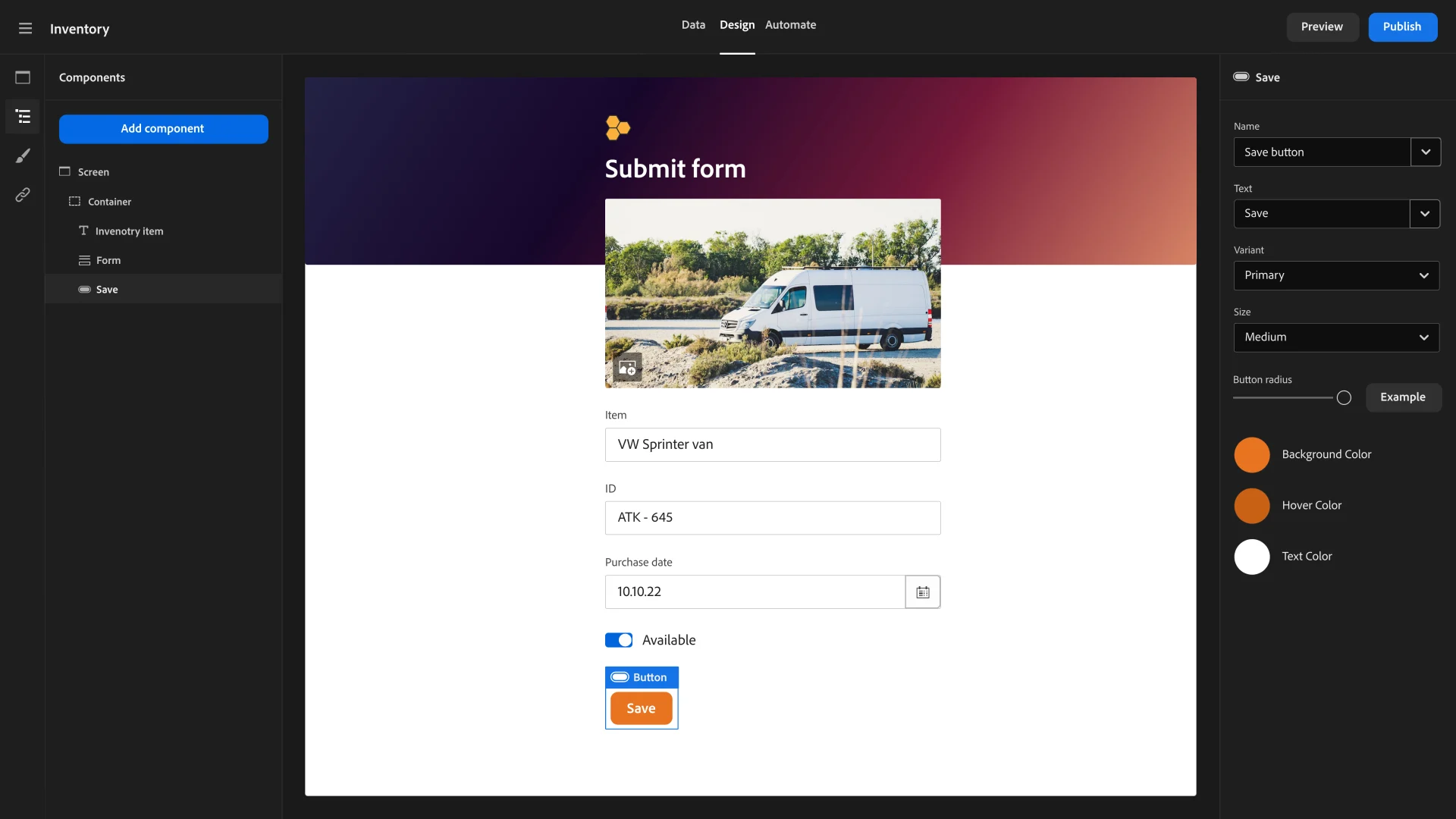
These two aspects should be designed collaboratively, ensuring both functionality and aesthetics are aligned with your user’s needs and your brand identity. Tools like Figma, Sketch, or Adobe XD are commonly used for design.
Technology Stack Selection (Frontend, Backend, Database)
Choosing the right technology stack is a critical decision that impacts development speed, scalability, performance, and maintenance. The “stack” typically refers to:
- Frontend (Client-side): What users interact with in their browser. Technologies include HTML, CSS, JavaScript, and popular JavaScript frameworks/libraries like React.js, Angular, or Vue.js.
- Backend (Server-side): The engine room that handles data processing, business logic, and database communication. Common languages include Node.js (JavaScript), Python (with frameworks like Django/Flask), Ruby (Ruby on Rails), PHP (Laravel/Symfony), or Java (Spring Boot).
- Database: Where your application’s data is stored and retrieved. Options include relational databases (SQL) like PostgreSQL, MySQL, SQL Server, or non-relational (NoSQL) databases like MongoDB, Cassandra, or Firebase.
Factors influencing this choice include developer familiarity, community support, scalability requirements, project complexity, and integration needs with existing systems. It’s often beneficial to consult with experienced developers or solution architects at this stage.
Step-by-Step Development Process
With a solid plan in place, the development phase transforms concepts into a functional web application. This typically involves parallel efforts on the frontend, backend, and database layers, followed by their integration.
Frontend Development: Bringing the UI to Life
Frontend development is where the designs crafted during the UX/UI phase come to fruition. Using HTML for structure, CSS for styling, and JavaScript for interactivity, developers build the user-facing part of the application. Modern web apps heavily leverage JavaScript frameworks like:
- React.js: A declarative, component-based library for building user interfaces, maintained by Facebook. It excels in single-page applications (SPAs) and complex UIs.
- Angular: A comprehensive, opinionated framework maintained by Google, offering a structured approach to building large-scale applications with features like data binding and dependency injection out-of-the-box.
- Vue.js: A progressive framework known for its simplicity and flexibility, making it easy to learn and integrate into existing projects while still powerful enough for complex applications.
These frameworks streamline development, improve performance, and enable a more organized codebase by allowing developers to build reusable UI components.
Backend Development: Powering the Logic and Data
The backend is the server-side of your application, responsible for everything the user doesn’t see but is crucial for the app’s functionality. This includes:
- Business Logic: Processing user requests, performing calculations, and enforcing rules.
- Authentication and Authorization: Managing user logins, permissions, and security.
- API (Application Programming Interface): Defining how the frontend communicates with the backend and how the backend interacts with other services.
- Database Interaction: Storing, retrieving, updating, and deleting data.
Popular backend technologies and frameworks include:
- Node.js (with Express.js): A JavaScript runtime environment that allows server-side execution of JavaScript, ideal for highly scalable, real-time applications. Express.js is a minimalist web framework for Node.js.
- Python (with Django or Flask): Python is highly versatile. Django is a “batteries-included” framework for rapid development of complex, database-driven websites, while Flask is a lightweight micro-framework offering more flexibility.
- Ruby (with Ruby on Rails): Known for its developer-friendliness and convention-over-configuration philosophy, Rails enables fast development of web applications.
- PHP (with Laravel or Symfony): A mature language with excellent frameworks like Laravel, which provides a rich set of tools for building modern web applications, and Symfony, a robust framework for complex enterprise-level projects.
Database Management: Storing and Retrieving Information
The database is where all your application’s persistent data resides. Choosing the right database depends on the type, volume, and structure of your data, as well as scalability needs.
- Relational Databases (SQL): Store data in structured tables with predefined schemas. Examples include PostgreSQL, MySQL, and Microsoft SQL Server. They are excellent for applications requiring strong data integrity, complex queries, and ACID (Atomicity, Consistency, Isolation, Durability) compliance, common in financial or inventory systems.
- Non-Relational Databases (NoSQL): Offer more flexibility with schema-less or flexible schemas, suitable for handling large volumes of unstructured or semi-structured data. Examples include:
- MongoDB: A document-oriented database, great for handling rapidly changing data structures and large datasets.
- Cassandra: A highly scalable, distributed database for large amounts of data across many commodity servers.
- Redis: An in-memory data structure store, used as a database, cache, and message broker, known for its speed.
- Firebase Firestore: A NoSQL document database offered by Google, popular for real-time applications and mobile backends.
API Integration and Third-Party Services
Most modern web apps don’t exist in isolation. They often integrate with various third-party services to provide extended functionality without having to build everything from scratch. This is done via APIs. Common integrations include:
- Payment Gateways: Stripe, PayPal, Square for processing transactions.
- Authentication Services: Google OAuth, Facebook Login, Auth0 for user identity management.
- Mapping Services: Google Maps API, Mapbox for location-based features.
- Email Services: SendGrid, Mailgun for sending transactional emails.
- Cloud Storage: Amazon S3, Google Cloud Storage for storing files and media.
Integrating these services requires understanding their respective APIs and securely handling sensitive data, typically through the backend.
Testing, Deployment, and Maintenance
Developing the web app is only half the battle. Ensuring it works flawlessly, is accessible to users, and remains functional over time requires rigorous testing, strategic deployment, and ongoing maintenance.
Comprehensive Testing Strategies
Testing is an indispensable part of the development lifecycle, ensuring the app is robust, bug-free, and performs as expected. Different types of testing are employed:
- Unit Testing: Tests individual components or functions of the code in isolation. This helps catch bugs early and ensures small pieces of logic work correctly.
- Integration Testing: Verifies that different modules or services of the application work together seamlessly. This is crucial for checking the interaction between frontend and backend, or various backend services.
- End-to-End (E2E) Testing: Simulates real user scenarios, testing the entire application flow from start to finish, including UI interactions, backend logic, and database operations. Tools like Selenium, Cypress, or Playwright are commonly used.
- Performance Testing: Evaluates the app’s responsiveness, stability, and scalability under various workloads. This includes load testing (checking performance under heavy traffic) and stress testing (determining the breaking point).
- Security Testing: Identifies vulnerabilities that could be exploited by malicious actors, such as SQL injection, cross-site scripting (XSS), or insecure direct object references.
Automated testing is highly recommended to streamline this process and catch regressions as new features are added.
Choosing a Deployment Environment
Once the app is thoroughly tested, it needs to be deployed to a server where it can be accessed by users globally. The choice of deployment environment impacts scalability, cost, and management complexity.
- Cloud Platforms: Offer scalable, flexible, and often cost-effective solutions. Popular choices include:
- Amazon Web Services (AWS): A comprehensive suite of cloud services, including EC2 for virtual servers, S3 for storage, and Elastic Beanstalk for easier app deployment.
- Google Cloud Platform (GCP): Similar to AWS, with services like Compute Engine, App Engine, and Cloud Storage.
- Microsoft Azure: Microsoft’s cloud offering, providing a wide range of services for application hosting.
- Heroku: A platform-as-a-service (PaaS) that simplifies deployment for many popular languages and frameworks, abstracting away server management.
- Virtual Private Servers (VPS): Provide more control over the server environment but require more hands-on management. DigitalOcean, Linode, and Vultr are popular VPS providers.
- Dedicated Servers: Offer maximum performance and control, but are the most expensive and require extensive server administration expertise.
Consider factors like expected traffic, budget, required customization, and team expertise when making this decision.
Continuous Integration/Continuous Deployment (CI/CD) Pipelines
For agile development and efficient updates, implementing CI/CD is highly beneficial.
- Continuous Integration (CI): Developers regularly merge their code changes into a central repository. Automated builds and tests are run to detect integration issues early.
- Continuous Deployment (CD): Once code passes all automated tests in CI, it’s automatically deployed to production. This ensures that new features and bug fixes are delivered to users quickly and reliably.
Tools like Jenkins, GitLab CI/CD, GitHub Actions, and CircleCI automate these pipelines, significantly reducing manual effort and potential errors.
Post-Launch Monitoring, Updates, and Security
Launching the web app is not the end; it’s the beginning of its lifecycle. Ongoing efforts are required to ensure its continued success:
- Monitoring: Implement tools to track performance, errors, user activity, and resource usage. Services like New Relic, Datadog, or Google Analytics provide valuable insights.
- Updates and Feature Enhancements: Based on user feedback, analytics, and market trends, continuously plan and implement new features and improvements.
- Security: Regularly audit your application and infrastructure for vulnerabilities. Apply security patches promptly, keep libraries and frameworks updated, and adhere to best security practices (e.g., OWASP Top 10).
- Scalability: As your user base grows, you may need to scale your infrastructure (e.g., add more servers, optimize database queries, implement caching) to maintain performance.
Essential Tools and Technologies for Web App Development
Navigating the vast ecosystem of web development tools can be daunting. Here’s a concise overview of widely adopted and highly effective technologies that form the backbone of modern web app creation.
Frontend Frameworks: React, Angular, Vue.js
These JavaScript frameworks are indispensable for building interactive and dynamic user interfaces.
- React.js: Maintained by Facebook, known for its component-based architecture and virtual DOM, which optimizes rendering performance. Ideal for single-page applications and complex UIs. Its vast ecosystem and strong community support make it a popular choice.
- Angular: A comprehensive, opinionated framework by Google, providing a complete solution for enterprise-grade applications. It includes features like data binding, dependency injection, and a command-line interface (CLI) for rapid development.
- Vue.js: Praised for its progressive adoptability, meaning it can be easily integrated into existing projects or used to build full-scale single-page applications. It strikes a balance between React’s flexibility and Angular’s structure, often considered easier to learn for newcomers.
The choice among these often comes down to team familiarity, project requirements, and personal preference. All three are capable of building robust web applications.
Backend Frameworks: Express, Django, Laravel, Ruby on Rails
These frameworks streamline backend development by providing structure, common functionalities, and best practices, saving developers significant time.
- Express.js (Node.js): A fast, unopinionated, minimalist web framework for Node.js. It provides a robust set of features for web and mobile applications, allowing developers to build APIs and web servers quickly. Its JavaScript-based nature allows for full-stack JavaScript development.
- Django (Python): A “web framework for perfectionists with deadlines,” Django is known for its “batteries-included” philosophy, offering an ORM (Object-Relational Mapper), admin panel, authentication, and more out-of-the-box. It promotes rapid development of complex, database-driven applications.
- Laravel (PHP): A modern, elegant PHP framework renowned for its expressive syntax and robust features, including an ORM (Eloquent), routing, queue management, and authentication. It simplifies many common web development tasks, making it a favorite for many PHP developers.
- Ruby on Rails (Ruby): Often credited for popularizing the Model-View-Controller (MVC) architectural pattern, Rails emphasizes convention over configuration, enabling fast development of powerful web applications. It has a strong focus on developer happiness and productivity.
Database Solutions: PostgreSQL, MySQL, MongoDB, Firebase
The choice of database hinges on your data structure, scalability needs, and consistency requirements.
- PostgreSQL: A powerful, open-source object-relational database system known for its reliability, feature robustness, and performance. It supports a wide array of data types and advanced features, making it suitable for complex applications requiring strong data integrity.
- MySQL: The world’s most popular open-source relational database. It’s known for its speed, ease of use, and widespread adoption, making it a solid choice for many web applications, especially those with structured data.
- MongoDB: A leading NoSQL, document-oriented database. It stores data in flexible, JSON-like documents, making it ideal for applications with evolving data models, large volumes of data, and high scalability requirements.
- Firebase (Firestore/Realtime Database): A Google-backed platform offering a suite of development tools, including NoSQL databases (Firestore and Realtime Database). They excel in real-time data synchronization, making them perfect for collaborative and highly dynamic applications, often used for mobile and web backends.
Version Control: Git and GitHub/GitLab
Version control is absolutely critical for any development project, especially when working in teams.
- Git: A distributed version control system that tracks changes in source code during software development. It enables multiple developers to work on the same project concurrently without overwriting each other’s work and allows for easy rollback to previous versions.
- GitHub/GitLab/Bitbucket: These are web-based platforms that provide hosting for Git repositories. They offer collaboration features like pull requests, issue tracking, and CI/CD integration, making them central hubs for software development teams.
Integrated Development Environments (IDEs)
IDEs are software applications that provide comprehensive facilities to computer programmers for software development.
- VS Code (Visual Studio Code): A lightweight yet powerful code editor developed by Microsoft. It’s highly extensible with a vast marketplace of plugins, making it suitable for almost any programming language and framework.
- WebStorm: A commercial IDE by JetBrains specifically designed for JavaScript development, offering advanced features for frontend and Node.js development, including intelligent code completion, refactoring, and debugging.
- Sublime Text/Atom: Lightweight text editors that can be enhanced with plugins to become powerful development environments.
By carefully selecting and leveraging these tools and technologies, you can build a robust, scalable, and user-friendly web application that meets your objectives and stands out in the digital landscape. The journey from concept to deployment is intricate, but with a structured approach and the right technical arsenal, creating a successful web app is an achievable and rewarding endeavor.
aViewFromTheCave is a participant in the Amazon Services LLC Associates Program, an affiliate advertising program designed to provide a means for sites to earn advertising fees by advertising and linking to Amazon.com. Amazon, the Amazon logo, AmazonSupply, and the AmazonSupply logo are trademarks of Amazon.com, Inc. or its affiliates. As an Amazon Associate we earn affiliate commissions from qualifying purchases.