
In the sprawling digital marketplace, Amazon Prime stands as a cornerstone service, offering a vast array of benefits from expedited shipping to an extensive library of digital entertainment. For many, it’s an indispensable part of their online experience, while for others, it might be a forgotten subscription or a benefit they’re unsure if they possess. Understanding your Amazon Prime status is not just about curiosity; it’s about optimizing your digital life, avoiding unnecessary expenses, and fully leveraging the technological advantages available to you. This comprehensive guide will walk you through the various methods to definitively check your Amazon Prime membership status, ensuring you’re always in the know.
The digital landscape is complex, with multiple accounts, subscriptions, and services vying for our attention and our wallets. Amazon Prime, with its tiered offerings and integration across numerous Amazon services, can sometimes be a source of confusion. Whether you’ve recently signed up, inherited an account, are part of a shared household, or simply can’t recall your last interaction with the service, verifying your membership is a straightforward technical task that empowers you to manage your digital footprint effectively. From navigating web interfaces to exploring mobile app features, we’ll delve into the precise steps to confirm your Prime status across Amazon’s ecosystem.
Why Confirming Your Amazon Prime Status Matters
In an era of subscription fatigue and digital overload, clarity regarding your active services is paramount. Knowing your Amazon Prime status extends beyond mere verification; it’s a critical step in managing your digital expenses, maximizing the utility of your subscriptions, and troubleshooting potential access issues within the vast Amazon ecosystem.
Avoiding Unnecessary Subscriptions
One of the most common pitfalls in the digital age is paying for services you don’t use or, worse, duplicate subscriptions. Perhaps you signed up for a free trial and forgot to cancel, or a promotional period ended, automatically converting into a paid membership. By regularly checking your Prime status, you can prevent accidental charges and ensure that every dollar spent on subscriptions provides genuine value. This proactive approach to digital finance management, through a technical verification process, is crucial for maintaining a healthy budget and preventing financial leakage from dormant or unwanted services. It’s about being an informed consumer in a subscription-driven economy, leveraging technology to keep your finances in check.
Maximizing Your Membership Benefits
Conversely, there are instances where users possess an Amazon Prime membership but aren’t fully aware of its extensive suite of benefits. Faster shipping, exclusive access to deals, Prime Video, Prime Music, Prime Reading, unlimited photo storage via Amazon Photos, and even gaming benefits through Prime Gaming are all part of the package. If you confirm you have Prime, this verification can serve as a prompt to explore and utilize these features. From a technical perspective, it means unlocking functionalities within various Amazon apps and services that you already pay for, enhancing your user experience across entertainment, shopping, and data storage platforms. Understanding your status is the first step toward harnessing the full technological potential of your Prime membership.
Troubleshooting Account Access and Service Availability
There might be times when you encounter issues accessing Prime-exclusive content or receiving expedited shipping. A quick check of your Prime status can often be the first troubleshooting step. Is your membership active? Has it expired? Is there an issue with your payment method? Is the specific item or service genuinely covered by Prime? By verifying your status, you can quickly diagnose whether the problem lies with your membership itself, allowing you to either renew, update payment information, or contact Amazon support with precise information. This technical diagnostic approach saves time and frustration, ensuring seamless access to the services you expect.
Primary Methods to Verify Your Prime Membership
Amazon provides multiple, user-friendly avenues to check your Prime status, whether you prefer using a desktop browser or a mobile device. Each method leads you to the same crucial information but through slightly different navigational paths.
Checking Via the Amazon Website (Desktop/Browser)
This is arguably the most common and robust method, offering a comprehensive view of your account and subscription details.
Logging In and Navigating to Account Settings
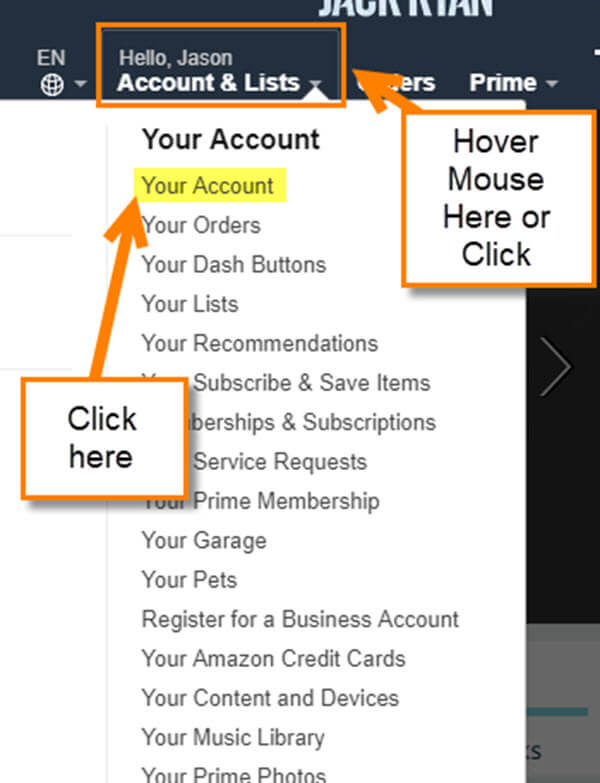
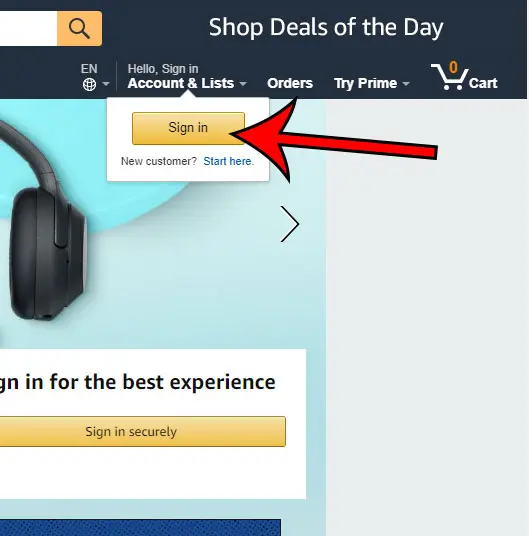
Begin by opening your preferred web browser and going to Amazon.com. In the top right corner of the page, hover over “Accounts & Lists” and then click on “Sign in.” Enter your registered email address or mobile number and password. Once logged in, hover over “Accounts & Lists” again. From the dropdown menu, click on “Your Account.” This page serves as your central hub for all account-related management.
Locating “Prime Membership” Section
On the “Your Account” page, you’ll see various sections. Look for a box or link labeled “Prime Membership,” “Prime,” or “Prime options.” It’s typically within the “Digital content and devices” or “Memberships and subscriptions” sections. Click on this link. This will direct you to a dedicated page detailing your Prime membership.
Interpreting Your Membership Status
On the “Your Prime Membership” page, you will see a clear indication of your current status. If you are an active member, it will state something like “Your Prime membership” followed by your next billing date. It will also show your membership type (e.g., Annual, Monthly, Free Trial). If your membership has expired, it will usually prompt you to “Join Prime” or “Restart Prime.” This page also allows you to manage your membership, update payment information, or cancel your subscription.
Using the Amazon Shopping App (Mobile)
For those who primarily use Amazon on their smartphones or tablets, the Amazon Shopping app offers a convenient way to check your Prime status on the go.
Accessing Account Settings on Mobile
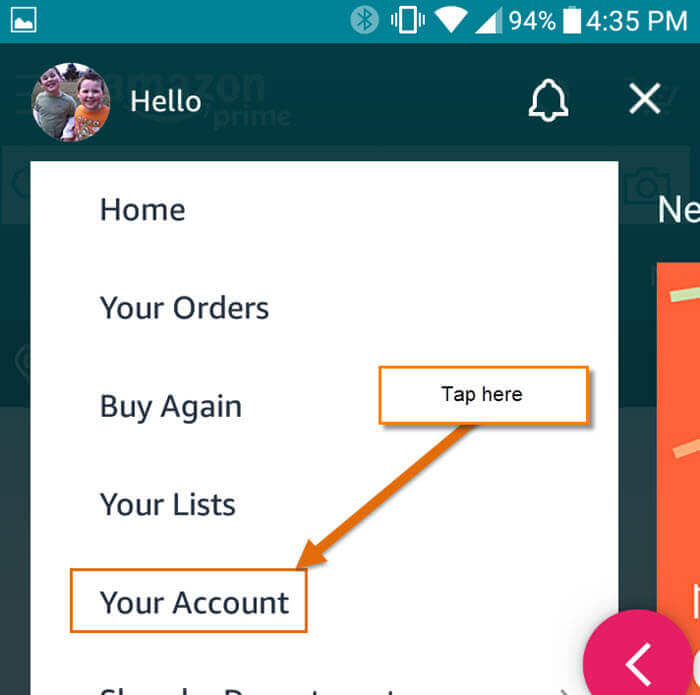
Open the Amazon Shopping app on your device. Ensure you are signed in to the correct account. Tap the “Profile” icon (usually a silhouette of a person or a hamburger menu icon with “You” written below it) at the bottom navigation bar. From the profile screen, tap on “Your Account.”
Finding the Prime Section
Similar to the website, on the “Your Account” screen, scroll down until you find “Account Settings.” Within this section, look for “Manage Prime Membership” or “Prime Membership.” Tap on this option.
On-screen Indicators of Prime Status
The resulting screen will display your Prime status. Active members will see details like “Your Prime Membership,” the renewal date, and options to manage benefits or payment methods. If your membership is inactive, the app will typically present an option to “Join Prime” or “Start your free trial.” The app’s interface is designed for quick visual confirmation, streamlining the process of checking your digital subscription status.
Through Amazon Prime Video or Other Prime-Eligible Apps
Amazon’s ecosystem extends beyond just shopping. Many Prime benefits are integrated into standalone apps.
Verifying Playback and Exclusive Content Access
Open the Amazon Prime Video app on your smart TV, streaming device, or mobile device. If you can stream Prime-exclusive titles without an additional rental or purchase prompt, it’s a strong indicator that your Prime Video benefit (and thus your Prime membership) is active. Try playing a title clearly marked “Included with Prime.” If it plays, your Prime is active. If it prompts you to rent/buy or start a trial, your Prime membership for that account is likely inactive. This real-time functional check is a direct technical verification of your access rights.
Checking Account Details within Prime Video App
Some Prime-eligible apps, including Prime Video, also offer a way to check account details directly. Within the Prime Video app, navigate to “Settings” or “Your Account.” You might find an option there that explicitly states your Prime membership status or directs you to the Amazon website to manage it. This feature provides a convenient, context-specific way to confirm your benefits within the app you’re currently using.
Understanding Different Prime Membership Types and Statuses
Amazon Prime isn’t a one-size-fits-all service. There are various membership types and statuses, each with its own implications. Recognizing these differences is crucial for accurate status interpretation and effective account management.
Paid Annual vs. Monthly Memberships
The most common Prime memberships are either annual or monthly. An annual membership typically offers a slight discount compared to paying month-by-month over a year. Your status page will explicitly state whether you are on an “Annual” or “Monthly” plan and display your next billing date accordingly. Understanding this helps you predict charges and manage your budget. From a technical billing perspective, these represent recurring payment schedules tied to different pricing tiers.
Free Trials and Promotional Memberships
Many users start with a free trial of Amazon Prime, often for 30 days. Promotional memberships, such as those offered by mobile carriers or other services, may also grant temporary Prime access. If you’re on a free trial, your Prime status page will clearly indicate the trial period and the date it’s set to convert to a paid membership (unless you cancel). Being aware of these transitional statuses is vital to avoid unexpected charges. Technically, these are time-bound access grants that automatically transition to a paid subscription unless actively opted out.
Student Prime and EBT/Medicaid Discounts
Amazon offers discounted Prime memberships for eligible students (Prime Student) and for individuals receiving qualifying government assistance like EBT or Medicaid. These memberships typically come at a reduced rate but offer the same core benefits. Your Prime status page will reflect if you are enrolled in one of these specific programs, often requiring periodic re-verification of eligibility. These are specific subscription types with conditional access and pricing rules, managed through Amazon’s account verification systems.
Shared Household Prime Benefits
Amazon allows Prime members to share certain benefits (like expedited shipping and Prime Video) with one other adult in their household. If you are part of an Amazon Household, your Prime status might indicate that you are receiving benefits from another member’s subscription rather than having your own full-fledged Prime membership. It’s important to distinguish between having your own Prime account and being a beneficiary in a household setup. Technically, this involves account linking and permission delegation features within Amazon’s platform.
Expired or Cancelled Memberships
If your Prime membership has ended, either due to cancellation or an expired payment method, your status page will clearly reflect this. It will typically prompt you to “Join Prime” or “Restart Prime.” You might also see a message indicating the date your membership ended. Identifying an expired or cancelled status is essential for understanding why certain Prime benefits might no longer be available to you. This is a crucial technical indicator of your service entitlement.
Common Issues and Troubleshooting When Checking Prime Status
Even with clear instructions, users might encounter specific issues or confusions when trying to verify their Prime membership. Addressing these common scenarios can prevent frustration and provide clarity.
Logging into the Wrong Account
This is a surprisingly common issue. Many users have multiple Amazon accounts (e.g., a personal one and a business one, or old accounts they no longer use). If you log into an account that isn’t subscribed to Prime, you obviously won’t see an active membership. Always double-check the email address or phone number you used to sign in to ensure it’s the one associated with the Prime membership you expect. Amazon’s login system is robust, but user error in selecting the correct credential set is a frequent point of failure.
Recognizing Shared Household Access vs. Personal Membership
As mentioned, being part of an Amazon Household means you might be using someone else’s Prime benefits. When you check your status, if you don’t see your own active Prime membership but still receive benefits, navigate to the “Manage Your Household” section within your account. Here, you can confirm if you are linked to another Prime member’s account. This distinction is vital for understanding who is responsible for the subscription and to avoid unintended duplicate sign-ups. It’s a technical configuration within the account settings that dictates shared access.
Issues with Payment Methods or Expired Cards
If your Prime membership status shows as “expired” or “pending cancellation” despite your intention to maintain it, the problem often lies with the payment method. Check the “Manage Prime Membership” section for any alerts regarding an expired credit card, an insufficient balance, or a failed payment. Updating your payment information is usually a quick fix. Amazon’s automated billing systems require valid payment details to maintain continuous service.
What to Do if You Believe You Should Have Prime but Don’t
If you are confident you signed up for Prime but can’t find any active membership under your account, consider the following:
- Check alternate email addresses/phone numbers: You might have used a different contact detail for your Prime account.
- Review bank/credit card statements: Look for “Amazon Prime” charges to identify which account they’re associated with. The transaction details might reveal the email or account ID.
- Contact Amazon Customer Service: If all else fails, Amazon’s customer support can help. Provide them with as much detail as possible (potential email addresses, payment methods used, dates of sign-up) to help them locate your membership. Their sophisticated account lookup tools can often pinpoint issues that self-service methods cannot.
Leveraging Your Confirmed Prime Membership
Once you’ve definitively confirmed your Amazon Prime membership, the next step is to make the most of it. Knowing your status is the gateway to unlocking a world of integrated digital services and conveniences.
Accessing Prime Video and Music
With your Prime status confirmed, you can seamlessly access thousands of movies and TV shows on Prime Video and millions of songs ad-free on Amazon Music Prime. Simply log into the respective apps or websites using your Prime-linked Amazon account. The tech behind these services ensures that your authenticated Prime status grants you instant playback and streaming capabilities, transforming your devices into entertainment hubs.
Expedited Shipping Options
One of the most utilized Prime benefits is expedited shipping. When shopping on Amazon, you will automatically see Prime-eligible items clearly marked, often with “FREE Two-Day Shipping” or even “FREE Same-Day Delivery” in select areas. Your confirmed Prime status allows the Amazon fulfillment system to prioritize your orders, ensuring faster delivery through optimized logistics and delivery networks.
Exclusive Deals and Early Access
Prime members often receive early access to Lightning Deals and exclusive discounts during events like Prime Day. With your membership verified, you’ll be eligible to participate in these time-sensitive offers, leveraging the technological infrastructure of Amazon’s sales platform to secure better deals. Staying informed about your Prime status means never missing out on these member-exclusive advantages, enhancing your overall shopping experience.
In conclusion, understanding how to check your Amazon Prime membership is a fundamental skill in today’s digital landscape. It empowers you to manage your subscriptions efficiently, troubleshoot access issues, and fully capitalize on the extensive suite of benefits that Prime offers. By following these technical guides, you ensure that your digital life with Amazon is both seamless and optimized.
aViewFromTheCave is a participant in the Amazon Services LLC Associates Program, an affiliate advertising program designed to provide a means for sites to earn advertising fees by advertising and linking to Amazon.com. Amazon, the Amazon logo, AmazonSupply, and the AmazonSupply logo are trademarks of Amazon.com, Inc. or its affiliates. As an Amazon Associate we earn affiliate commissions from qualifying purchases.