
In the modern financial landscape, the ability to track your capital in real-time is not just a convenience; it is a fundamental component of proactive personal finance management. For Bank of America customers, understanding how to verify the status of a deposit—whether it is a payroll direct deposit, a mobile check upload, or an ACH transfer—is essential for maintaining an accurate picture of available liquidity. As digital banking continues to eclipse traditional storefront interactions, mastering the tools provided by one of the world’s largest financial institutions ensures that you stay ahead of your bills, investments, and daily expenditures.
Navigating the Bank of America Digital Ecosystem for Deposit Tracking
The primary method for most consumers to verify their deposits is through the Bank of America digital suite. This includes both the highly-rated mobile app and the robust online banking portal. These platforms offer a transparent, line-item view of every transaction that affects your account balance.
Using the Bank of America Mobile Banking App
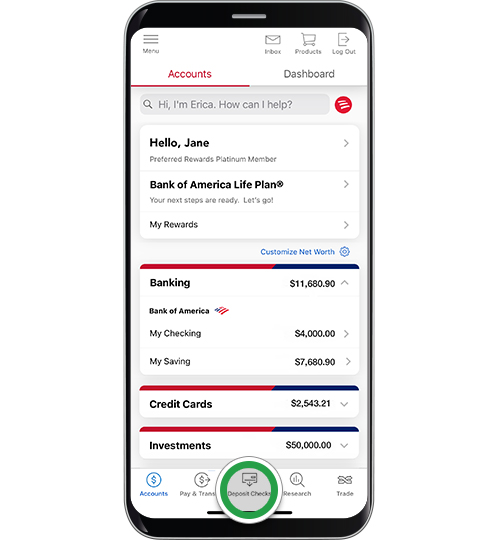
The mobile app is arguably the most efficient way to check a deposit. Once you log in using your secure credentials—often supplemented by biometric markers like FaceID or Fingerprint scanning—your account dashboard provides an immediate overview. To see the specifics of a deposit, you simply tap on the specific account (Checking, Savings, or Business).
Within the account view, the “Activity” tab displays a chronological list of transactions. Deposits that have been fully processed will appear in black text, while “Pending” deposits—those that the bank has acknowledged but has not yet fully cleared for withdrawal—will often appear at the top of the list, sometimes highlighted or italicized. This distinction is critical for financial planning, as pending funds may not be available for immediate debit card purchases or bill payments.
Leveraging Online Banking via Desktop
For those who prefer a larger screen for more detailed financial auditing, the Bank of America online banking website offers extensive search and filter tools. After logging in, users can navigate to the “Accounts” menu and select “Account Details.”
One of the advantages of the desktop interface is the ability to filter by “Transaction Type.” By filtering for “Deposits,” you can bypass your spending history to focus solely on incoming capital. Furthermore, the desktop site allows you to view and download images of deposited checks. If you are unsure whether a specific check was processed, you can click on the transaction to see a high-resolution scan of the front and back of the document, providing an extra layer of verification.
Understanding Different Deposit Types and Their Availability
Not all deposits are created equal. The method by which funds enter your Bank of America account significantly dictates how quickly you can check their status and, more importantly, when you can spend the money. Understanding the “Funds Availability Policy” is a hallmark of sophisticated personal finance management.
Mobile Check Deposits and Holding Periods
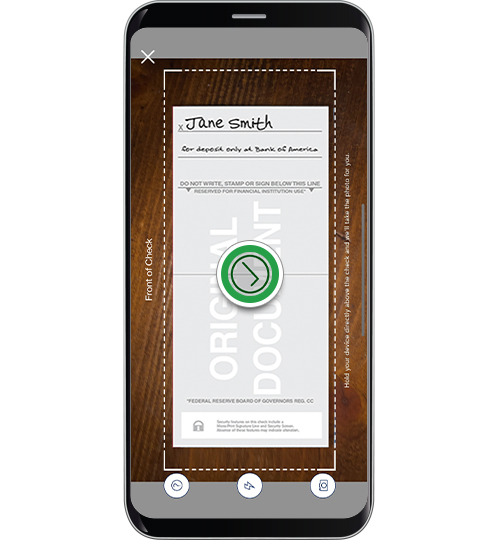
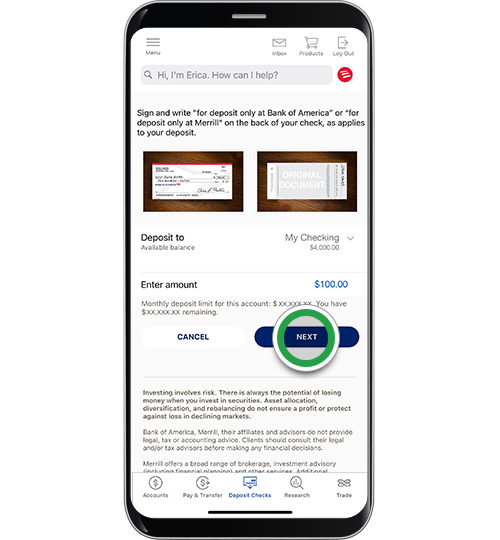
The Mobile Check Deposit feature has revolutionized the way we handle physical checks. By taking a photo of the check via the app, the deposit process begins instantly. However, checking the status of these deposits requires a slightly different approach.
Within the app’s “Deposit Checks” menu, there is a “View History” option. This section tracks the lifecycle of your mobile deposit from “Received” to “Accepted” and finally “Posted.” It is important to note that Bank of America, like most major institutions, may place a “hold” on mobile deposits. Typically, the first $225 of a check deposit is made available the next business day, with the remainder following a day or two later. By checking the “Deposit History” tab, you can see the specific date the bank expects the full amount to be available.
Direct Deposits and ACH Transfers
Direct deposits—such as those from employers or government agencies—are handled via the Automated Clearing House (ACH) network. These are generally the most predictable deposits. Most employers send the files days in advance, and Bank of America typically reflects these in your “Pending” balance by the early morning hours of your designated payday.
If you are waiting for a direct deposit that hasn’t appeared, the first step is to verify the “Effective Date” with the sender. Because Bank of America processes these electronically, they often clear faster than physical checks, frequently appearing in the “Posted” section by the start of the business day.
Wire Transfers: Real-Time Monitoring
Domestic and international wire transfers are designed for speed. When checking for a wire deposit, you are looking for near-instantaneous updates. Unlike ACH transfers, which are processed in batches, wires are processed individually. If someone has sent you a wire, it should appear in your transaction history almost as soon as the bank receives the data. For high-value transactions, you can use the “Erica” virtual assistant within the app to ask, “Show me my recent wires,” which provides a streamlined view of these specific movements.
Advanced Tools for Financial Oversight and Security
Beyond simply looking at a list of transactions, Bank of America provides several automated tools that proactively inform you of deposit activity. Utilizing these tools shifts the burden of monitoring from the user to the system, reducing the risk of missing an unexpected delay or a fraudulent transaction.
Setting Up Real-Time Deposit Alerts
The most effective way to “check” a deposit is to have the bank tell you when it arrives. Within the “Alert Settings” of the mobile app or website, you can toggle on “Deposit Alerts.” These can be customized based on a dollar threshold (e.g., “Alert me for any deposit over $100”) or for any deposit activity whatsoever.
These alerts can be delivered via push notification, email, or text message. For individuals managing side hustles or multiple streams of income, these real-time notifications provide immediate peace of mind and allow for the instant reallocation of funds into savings or investment accounts without the need to manually refresh a banking app throughout the day.
Differentiating Between Available and Current Balances
A common point of confusion when checking deposits is the difference between the “Current Balance” and the “Available Balance.”
-
Current Balance: This is the total amount of money in the account, including all pending deposits and excluding pending withdrawals that haven’t cleared the bank’s processing system.
-
Available Balance: This is the actual amount of money you can spend right now.
When you check a deposit, always look at how it affects the Available Balance. If you see a $1,000 deposit in your history but your Available Balance has only increased by $225, you are seeing the Bank of America hold policy in action. Monitoring this delta is crucial for avoiding overdraft fees and ensuring that scheduled transfers or mortgage payments have sufficient liquid backing.
Troubleshooting and Maximizing Your Deposit Efficiency
Occasionally, a deposit may not appear when expected, or it may be flagged for additional review. Understanding the internal mechanics of the bank can help you navigate these hurdles professionally.
What to Do if a Deposit Is Missing or Delayed
If a deposit does not appear in your transaction history, the first variable to check is the time of day and the day of the week. Bank of America’s “Business Days” are Monday through Friday, excluding federal holidays. Any deposit made after the “Cut-off Time” (usually 9:00 PM ET for mobile deposits and the end of the business day for branch deposits) is technically considered to have been made on the following business day.
If the timeframe has passed and the funds are not visible, the next step is to use the “Search” function in your online banking to ensure the deposit wasn’t miscategorized. If it still isn’t there, you should have the “Trace Number” (for ACH/Direct Deposits) or the “Reference Number” (for Wires) ready before contacting customer service. This allows the bank’s back-end specialists to locate the transaction within the clearing network.
Best Practices for Secure Deposit Management
Finally, checking your deposits should always be done through a secure connection. Avoid using public Wi-Fi when accessing the Bank of America app, as financial data is a prime target for intercept attacks. Furthermore, always keep the physical copy of any check you deposit via the mobile app for at least 14 days. Once you have verified that the deposit status is “Posted” and the funds are in your “Available Balance,” you should securely shred the check.
By integrating these habits—utilizing alerts, understanding hold policies, and distinguishing between balance types—you transform the simple act of checking a deposit into a robust strategy for financial health. Bank of America’s tools are designed to provide transparency; your role is to use that data to make informed decisions about your wealth.
aViewFromTheCave is a participant in the Amazon Services LLC Associates Program, an affiliate advertising program designed to provide a means for sites to earn advertising fees by advertising and linking to Amazon.com. Amazon, the Amazon logo, AmazonSupply, and the AmazonSupply logo are trademarks of Amazon.com, Inc. or its affiliates. As an Amazon Associate we earn affiliate commissions from qualifying purchases.