
The Cash Card, an integral component of the Cash App ecosystem, serves as a tangible link between your digital balance and the physical world of transactions. For millions of users, it’s the primary method for accessing funds, making purchases, and withdrawing cash. However, circumstances often arise—be it a lost card, an expired one, damage, or even a desire for a new design—that necessitate changing or replacing this vital piece of plastic. Navigating this process efficiently requires a clear understanding of Cash App’s interface and its underlying technical mechanisms. This comprehensive guide will walk you through the specifics of managing your Cash Card, ensuring a seamless experience within the digital payment platform.
Understanding the Cash Card and Its Role in the Cash App Ecosystem
At its core, the Cash Card is a free, customizable debit card issued by Sutton Bank and powered by Visa. It is directly linked to your Cash App balance, allowing you to spend the funds in your account anywhere Visa debit cards are accepted, both online and in brick-and-mortar stores. From a technological perspective, it acts as a crucial interface, translating your digital money into a format usable by traditional point-of-sale systems and ATMs. Its design, integration with app features like “Boosts,” and security protocols are all testament to its sophisticated place within modern fintech.
What is the Cash Card?
More than just a piece of plastic, the Cash Card is a sophisticated financial instrument tightly integrated with a mobile application. When you receive a Cash Card, you’re essentially getting a physical manifestation of your Cash App balance. Unlike traditional bank debit cards that draw from a checking account, the Cash Card draws directly from your Cash App balance. This direct linkage means that managing your physical card is inherently tied to managing your digital wallet within the app. From a software perspective, the card leverages backend APIs to communicate with your Cash App account in real-time, ensuring that transactions are accurately reflected and security measures are enforced. It represents a significant step in making digital-first banking accessible and practical for everyday use.
Why Would You Need to Change Your Cash Card?
The necessity to change or replace a Cash Card often stems from a variety of technical or logistical reasons. Understanding these triggers can help users proactively manage their cards and prevent disruptions.
- Expiration: Like all debit cards, Cash Cards have an expiration date. As this date approaches, the existing card becomes unusable, requiring a replacement to maintain uninterrupted service. The app often notifies users in advance, prompting them to order a new one.
- Loss or Theft: This is perhaps the most common reason. A lost or stolen card poses an immediate security risk, as unauthorized individuals could potentially access your funds. Cash App provides robust in-app tools to instantly disable or freeze a card in such situations, followed by ordering a replacement.
- Damage: Physical cards are subject to wear and tear. A cracked chip, a bent card, or illegible numbers can render the card dysfunctional at payment terminals or ATMs.
- Fraud or Security Breach: While rare, if you suspect your card details have been compromised, even if the physical card is in your possession, replacing it is a critical security measure. This isolates your account from potential future fraudulent activities linked to the compromised card number.
- Upgrades or Customization: Cash App occasionally offers new card designs or features (like customizable elements). Users might choose to replace their existing card simply to avail themselves of these aesthetic or functional enhancements.
- Boosts Not Working: Sometimes, issues with specific card features like “Boosts” might prompt users to consider a replacement, although this is less common than physical damage or loss.
Each of these scenarios underscores the importance of the app’s card management features, allowing users to address these technical and security concerns directly within the platform.
The Digital Connection: How Your Physical Card Links to Your Virtual Wallet
The seamless operation of the Cash Card is a testament to sophisticated software integration. When you use your physical card, the transaction request is routed through the Visa network to Sutton Bank, and then to Cash App’s servers. These servers instantaneously verify your account balance, apply any applicable Boosts, and approve or decline the transaction. This entire process happens in milliseconds, relying on robust network infrastructure and secure API calls. Your virtual wallet in the app is the single source of truth for your funds, and the physical card merely acts as an authorized conduit to access and spend those funds. Changes made to your card status in the app (e.g., freezing it) are immediately communicated to the payment networks, reflecting the powerful real-time capabilities of modern fintech applications.
Step-by-Step Guide to Replacing Your Cash Card
Replacing your Cash Card is a straightforward process designed to be intuitive within the Cash App interface. The steps prioritize user security and clarity, guiding you through verification and delivery protocols.
Initiating a Replacement through the App Interface
The journey to a new Cash Card begins within the Cash App itself, ensuring that the request originates from an authenticated user.
Navigating to the Card Tab
- Open the Cash App: Launch the Cash App on your mobile device.
- Access the Cash Card Tab: Tap on the “Cash Card” icon, which typically looks like a debit card and is usually located on the bottom navigation bar or near the center of the main screen. This will take you to your Cash Card management screen.
- Locate the Replacement Option: On the Cash Card screen, you’ll see various options related to your card. Look for options such as “Replace Card,” “Card Status,” or a visual representation of your card. If your card is lost or stolen, you might first need to tap “Problem with Card” or a similar option to report it. If it’s simply expired or you want a new design, the option to “Order a new Cash Card” or “Get a new design” should be readily available. For lost or stolen cards, specifically, you’ll typically tap “Replace Card” after confirming the issue.
Selecting “Cash Card” or “Replace Card” Option
Once you’ve navigated to the correct section, the app will present you with options related to ordering a new card. If you’re replacing a lost or stolen card, the system will prompt you to confirm this action. For expired cards or design changes, the process is similar but without the immediate security implications of a lost card. The app usually provides clear prompts, asking “Why are you replacing your card?” which helps tailor the subsequent steps, especially regarding immediately disabling the old card.
Verification and Confirmation Protocols
Security is paramount when issuing a new card. Cash App implements several verification steps to ensure the request is legitimate and the card is sent to the correct individual.
Confirming Shipping Address
Before a new card is dispatched, the app will always ask you to confirm your current shipping address. This is a critical security measure to prevent a new card from being sent to an unauthorized location.
- Review Address: Carefully review the displayed address.
- Update if Necessary: If the address is incorrect or outdated, you must update it within the app’s profile settings before proceeding. Ensure accuracy to avoid delivery issues.
- Confirm: Once verified, confirm the address to proceed.
Security Checks (PIN, Touch ID, Face ID)
To authorize the order for a new card, Cash App will require you to confirm your identity using your established security protocols. This might include:
- PIN (Personal Identification Number): Entering your Cash App PIN.
- Touch ID/Face ID: Using your device’s biometric authentication (fingerprint or facial recognition).
These steps are crucial for protecting your account from unauthorized card replacements.
What to Expect: Delivery and Activation Process
After successfully ordering your new card, the waiting period begins, followed by an essential activation step.
Tracking Your New Card
Cash App typically provides an estimated delivery window, usually within 5-10 business days. While real-time tracking might not always be as granular as for a package, the app will often update you on the shipping status once the card has been dispatched. Keep an eye on your app notifications and the Cash Card section for updates.
Activating the Replacement Card Upon Arrival
Receiving your new Cash Card is only half the process; it needs to be activated before it can be used. This process links the physical card to your digital account securely.
- Locate Your New Card: Once it arrives in the mail, find the new card.
- Open Cash App: Go back to the Cash Card tab within the app.
- Tap “Activate Cash Card”: There should be a prominent option to activate your new card.
- Enter Card Details: You’ll be prompted to enter the CVV (Card Verification Value) and the expiration date from your new card. This ensures you have the physical card in hand and helps link it correctly.
- Set a PIN (if prompted): For security, you might be asked to set or confirm your PIN for the new card, particularly if it’s your first card or if you’re replacing a compromised one.
Once activated, your new Cash Card is ready for use, and the old card (if not already disabled) will be permanently deactivated.
Troubleshooting Common Issues and Ensuring Digital Security
Even with a streamlined process, technical glitches or user errors can occur. Understanding how to troubleshoot these common issues and maintain digital security is vital for a smooth Cash App experience.
Resolving Order and Delivery Problems
Delivery issues can be frustrating, but Cash App provides avenues for resolution.
Incorrect Address
If you accidentally confirmed an incorrect address, or if your card hasn’t arrived within the expected timeframe and you suspect an address issue, contact Cash App support immediately through the app. They might be able to intercept the shipment or guide you on ordering a new replacement with the correct address. Prevention is key here: always double-check your shipping address during the order process.
Delayed Shipment
While the standard delivery time is 5-10 business days, external factors like postal delays can extend this. If your card is significantly delayed (e.g., beyond two weeks), check for any updates within the app. If no information is available, reaching out to Cash App support via the app’s help section is the next step. They can verify the shipping status from their end and advise on potential re-orders.
Card Not Arriving
If your card never arrives, it’s crucial to report this to Cash App support. There might have been a postal error, or in rare cases, the card could have been lost or stolen in transit. Cash App will investigate and arrange for a new card to be sent out. In such scenarios, they might implement additional verification steps to ensure the security of your replacement card.
Safeguarding Your Account During and After the Change
The period around a card replacement is a critical time for digital security. Proactive measures can prevent unauthorized access and protect your funds.
Temporary Card Disablement
If you’ve reported your card lost or stolen, Cash App’s immediate action is to disable or freeze the old card. This instant technical measure prevents any further transactions from occurring on the compromised card, effectively severing its connection to your Cash App balance. Even if you find the old card later, it will no longer function, emphasizing the app’s robust security protocols.
Monitoring Transactions
During the waiting period for your new card and immediately after its activation, it’s good practice to regularly monitor your Cash App transaction history. This helps you quickly identify any suspicious activity that might have occurred before the old card was fully disabled or if there were any residual issues. The app provides a detailed ledger of all incoming and outgoing funds.
Strong Passwords and Two-Factor Authentication (2FA)
Beyond card-specific security, the overall security of your Cash App account hinges on strong foundational practices. Ensure you use a unique, complex password for your Cash App account and enable Two-Factor Authentication (2FA) if you haven’t already. 2FA adds an extra layer of security by requiring a second form of verification (like a code sent to your phone) in addition to your password, making it significantly harder for unauthorized users to access your account, even if they somehow obtain your password.
When to Contact Cash App Support
For issues that cannot be resolved through the app’s self-service options, or for security concerns, contacting Cash App support is essential. The most efficient way to do this is directly through the app:
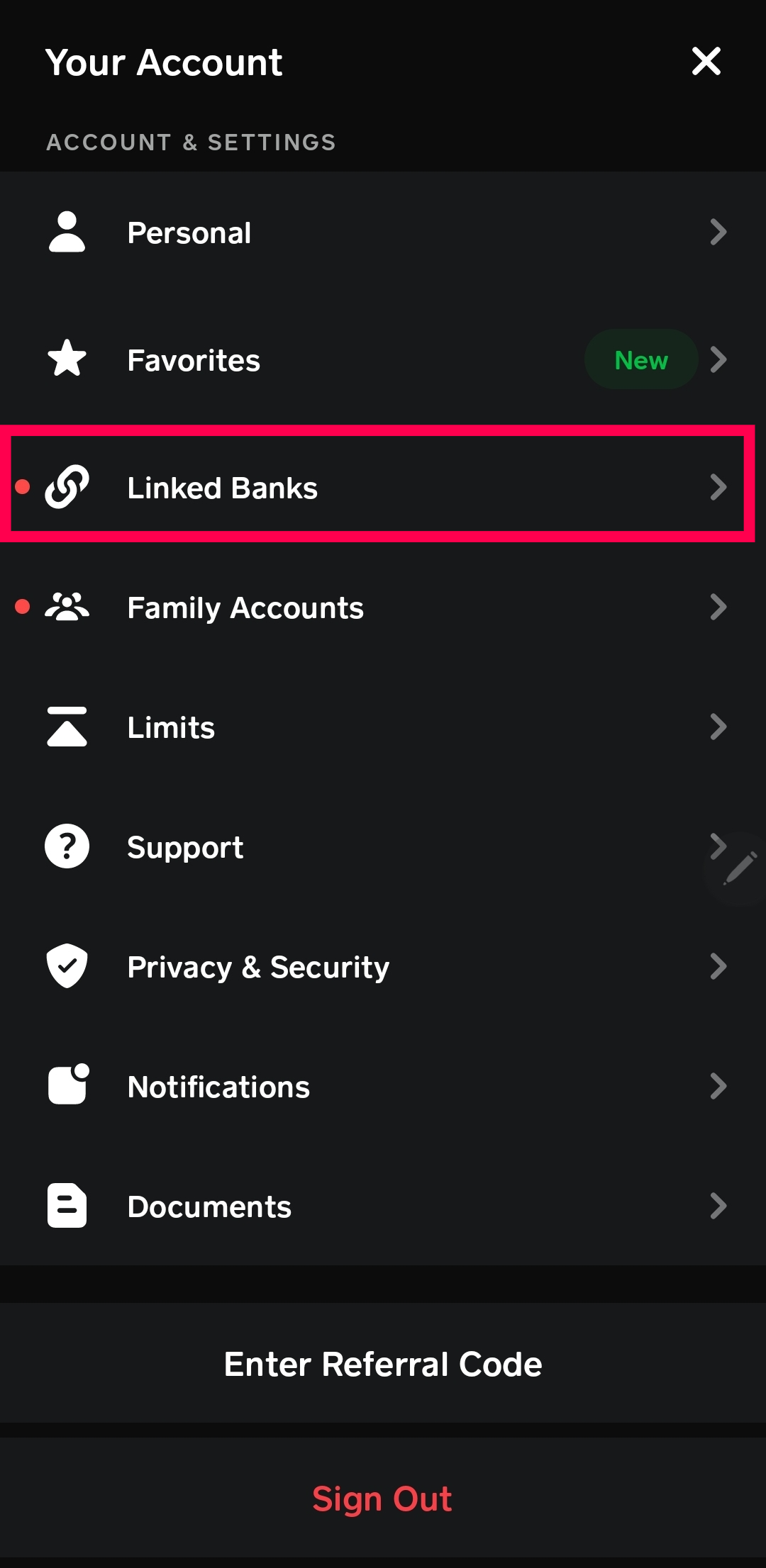
- Navigate to the Profile Icon: Tap the profile icon on your Cash App home screen.
- Select “Support”: Scroll down and tap on “Support.”
- Choose “Something Else” or search for your issue: You can either search for specific keywords related to your problem (e.g., “missing card”) or select “Something Else” to initiate a chat with a support agent.
Providing clear, concise details about your issue will help the support team assist you more effectively.
Leveraging Advanced Features and Future-Proofing Your Cash App Experience
Beyond simple card replacement, Cash App offers several features and best practices that can enhance your card management and overall digital finance experience, reflecting the continuous evolution of financial technology.
Exploring Virtual Cash Cards and Their Benefits
In addition to the physical Cash Card, Cash App also provides a virtual card. This digital equivalent offers several advantages, particularly for online transactions:
- Instant Access: A virtual card is available immediately upon account setup, allowing you to make online purchases without waiting for a physical card to arrive.
- Enhanced Security: For online shopping, using a virtual card adds an extra layer of security. If its details are compromised, you can quickly regenerate a new virtual card number without affecting your physical card.
- Convenience: Easily accessible within the app, the virtual card details can be copied and pasted directly into online payment forms.
Embracing the virtual card alongside its physical counterpart provides flexibility and strengthens your digital security posture.
Customizing Your Cash Card
Cash App occasionally offers options to customize your physical Cash Card, such as choosing different designs or adding personal touches (like signatures or unique artwork through “Custom Cash Card”). While purely aesthetic, these customization options enhance the user experience by giving a sense of ownership and personalization to a functional financial tool. If you desire a new design, the process for ordering a replacement is largely the same as outlined above, with the primary difference being the selection of the desired design during the order process.
Understanding Card Management: Freezing, Unfreezing, and Reporting Lost Cards
Cash App provides robust in-app controls for your Cash Card:
- Freezing Your Card: With a single tap in the app, you can instantly “freeze” your Cash Card. This temporarily disables all transactions, making it a critical security feature if you misplace your card but believe it’s not stolen, or if you simply want to prevent unauthorized use. The card can be “unfrozen” just as easily.
- Unfreezing Your Card: If you find a temporarily frozen card, you can reactivate it instantly through the app, restoring its functionality.
- Reporting Lost/Stolen: For definitive loss or theft, the “Replace Card” option often initiates a permanent disablement of the old card and triggers the order for a new one, as detailed in the replacement steps. These granular controls reflect a modern approach to card security, putting power directly into the user’s hands.
The Evolution of Digital Payment Cards and App Integration
The Cash Card is a prime example of the ongoing evolution of digital payment methods. Its deep integration with the Cash App demonstrates how mobile applications are transforming traditional banking services. Features like instant card freezing, virtual card provision, and real-time transaction monitoring were once luxuries confined to high-end banking but are now standard in popular fintech apps. This trend points towards a future where the distinction between physical and virtual banking continues to blur, with apps serving as the central hub for managing all aspects of personal finance. Staying updated with Cash App’s features and regularly checking for app updates ensures you benefit from the latest security enhancements and functional improvements.
Beyond the Replacement: Optimizing Your Cash App Management
Successfully changing your Cash Card is a specific task, but it fits into the broader context of effective Cash App management. Adopting best practices for how you interact with all aspects of the app ensures a secure, efficient, and reliable digital financial experience.
Linking External Bank Accounts and Cards
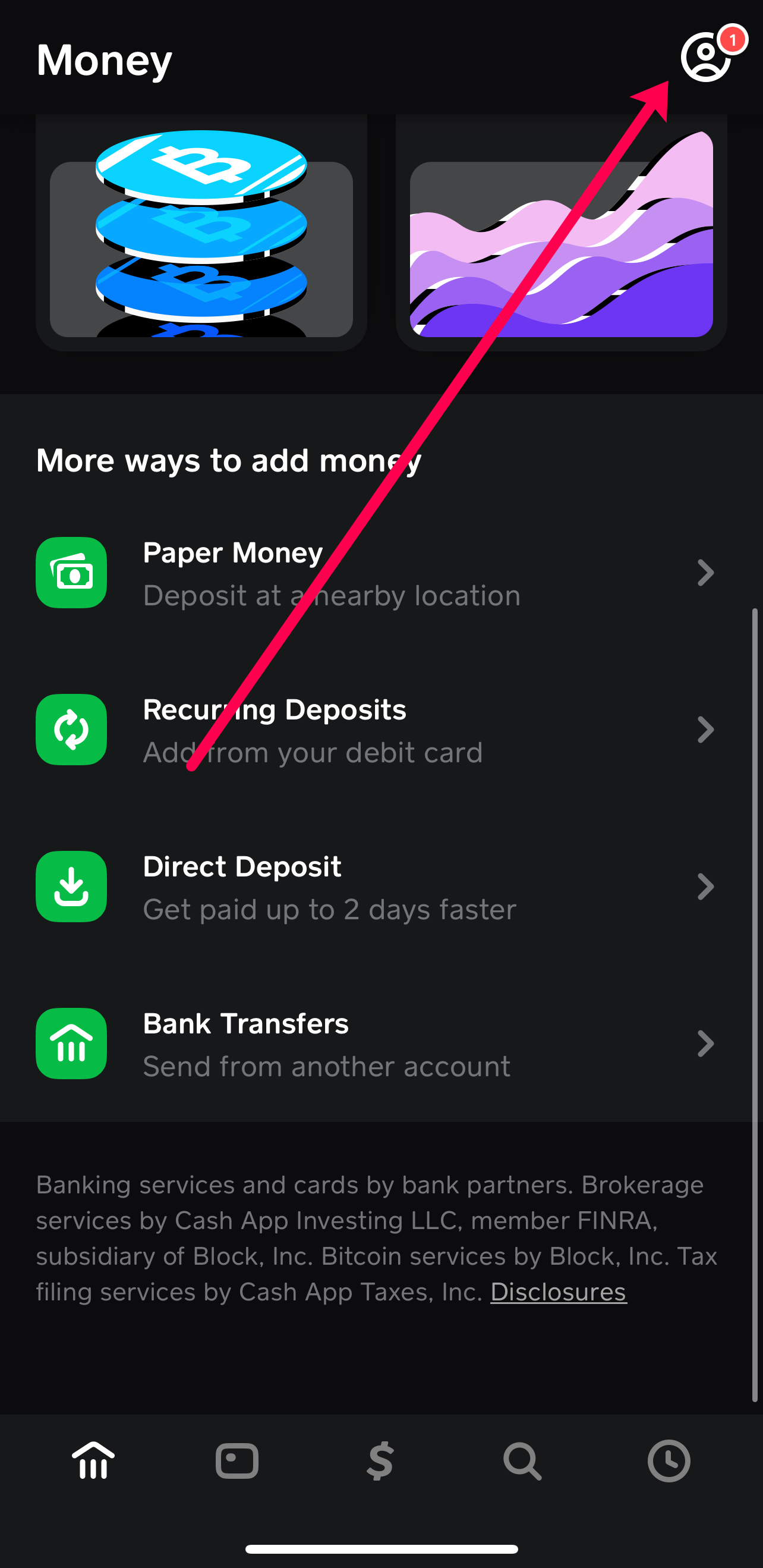
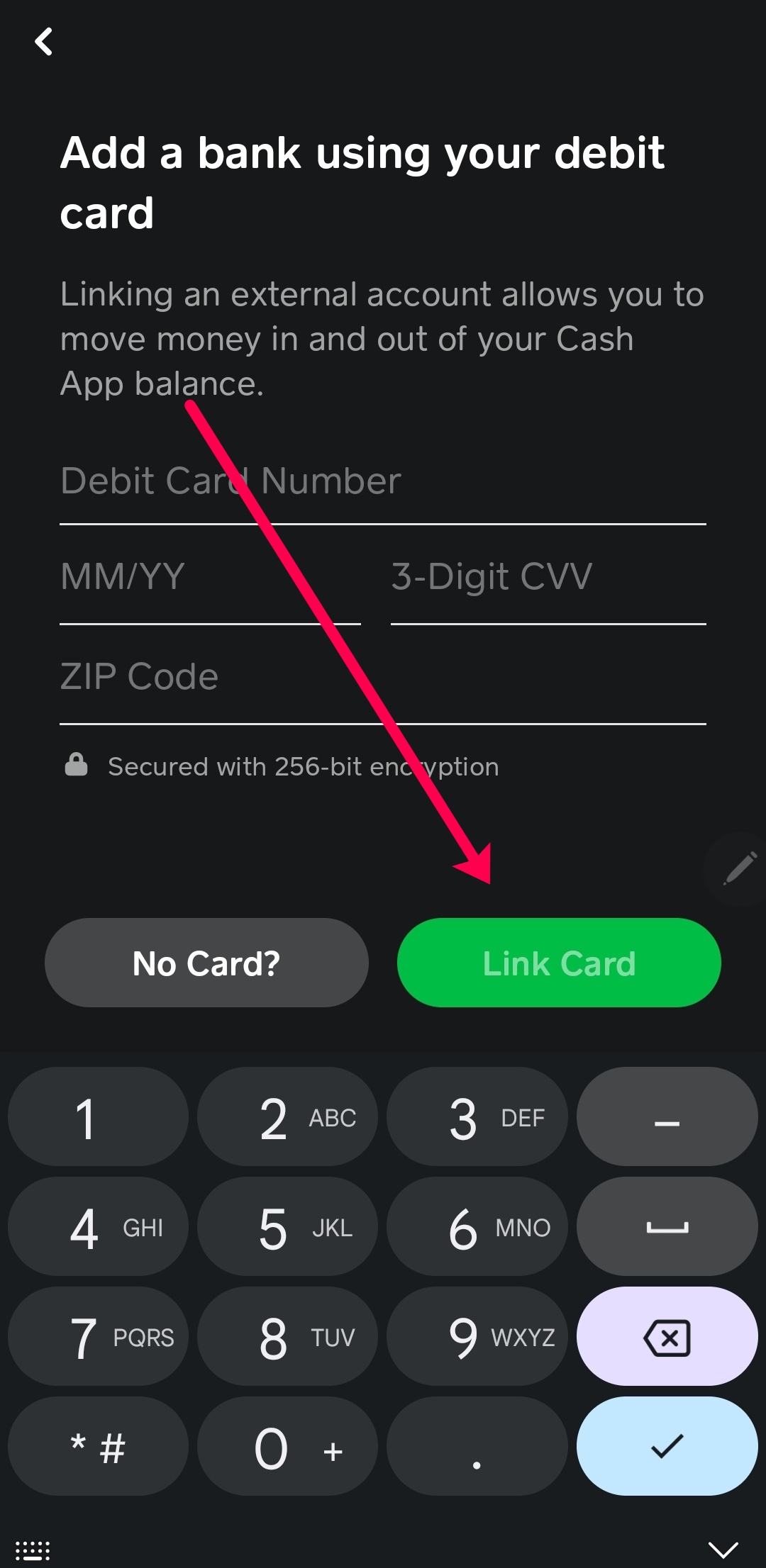
While the Cash Card is your direct access point to your Cash App balance, the app’s utility extends to managing other financial connections. You can link external bank accounts and traditional debit/credit cards to your Cash App profile. This integration allows for seamless transfers of funds between your bank and Cash App, or directly adding funds from a linked debit card. For instance, if your Cash App balance is low and you need to use your Cash Card for a purchase, you can quickly add funds from a linked debit card or bank account. This interconnectivity is a cornerstone of digital wallets, creating a unified platform for diverse financial transactions. Regularly reviewing and updating your linked accounts ensures accurate and secure fund transfers.
Best Practices for Digital Wallet Security
Beyond just managing your Cash Card, holistic digital wallet security is paramount.
- Regular App Updates: Always keep your Cash App updated to the latest version. Updates often include critical security patches and performance improvements that protect your account from new threats.
- Device Security: Ensure your mobile device itself is secure. Use a strong screen lock (PIN, pattern, fingerprint, Face ID) and keep your device’s operating system updated. Avoid jailbreaking or rooting your device, as this can compromise security.
- Beware of Phishing: Be highly suspicious of unsolicited emails, texts, or calls claiming to be from Cash App. Cash App will never ask for your PIN, sign-in code, or full social security number outside of the secure app interface. Always verify the sender and access support directly through the app.
- Public Wi-Fi Caution: Avoid accessing sensitive financial apps like Cash App over unsecured public Wi-Fi networks, which can be vulnerable to eavesdropping. Use a VPN or wait until you’re on a secure network.
Keeping Your App Updated for Optimal Performance and Features
The world of fintech is constantly evolving, and Cash App regularly releases updates that introduce new features, enhance existing ones, and patch security vulnerabilities. Enabling automatic updates for your Cash App, or checking for them manually in your device’s app store, is crucial for maintaining an optimal experience. Newer versions might streamline card management, offer more robust security options, or introduce features that make your financial life easier. Staying current ensures you’re leveraging the full potential of the platform and benefiting from the latest technological advancements in digital payments.
Changing your Cash Card on Cash App is more than just a procedural task; it’s an exercise in leveraging powerful digital tools for personal financial management. By understanding the technical underpinnings, following the step-by-step guidance, and adhering to best practices for security and app management, users can confidently navigate their Cash App experience, ensuring seamless access to their funds and peace of mind in the digital age.
aViewFromTheCave is a participant in the Amazon Services LLC Associates Program, an affiliate advertising program designed to provide a means for sites to earn advertising fees by advertising and linking to Amazon.com. Amazon, the Amazon logo, AmazonSupply, and the AmazonSupply logo are trademarks of Amazon.com, Inc. or its affiliates. As an Amazon Associate we earn affiliate commissions from qualifying purchases.