
In today’s dynamic financial landscape, mobile payment applications like Cash App have become indispensable tools for managing personal finances, facilitating everything from peer-to-peer payments to direct deposits and investments. However, as financial circumstances evolve – perhaps due to switching banks, closing an old account, or simply preferring a different institution for specific transactions – the need to update linked bank accounts within these applications becomes crucial. Successfully changing your bank account on Cash App is not just a technical task; it’s a vital step in maintaining control over your financial flow, ensuring transaction efficiency, and safeguarding your funds.
The Importance of Up-to-Date Financial Links
Maintaining current and accurate financial linkages within digital payment platforms is paramount for several reasons, directly impacting your personal finance management and transactional security. An outdated or incorrect bank account can lead to a cascade of financial inconveniences, potential losses, and unnecessary delays.
Ensuring Seamless Transactions
The primary function of linking a bank account to Cash App is to enable the smooth transfer of funds between your bank and your Cash App balance. This includes cashing out funds from Cash App to your bank, adding funds to your Cash App from your bank, and facilitating direct deposits. If the linked bank account is no longer active, has incorrect details, or is simply not your preferred account, all these transactions can fail. This not only causes frustration but can also delay access to your money, potentially impacting bill payments, savings goals, or immediate financial needs. Seamless transactions are the bedrock of efficient personal finance, and keeping your bank links current is a fundamental aspect of achieving this.
Mitigating Financial Disruptions
Financial disruptions can manifest in various forms, from missed payments to unexpected overdraft fees. An incorrectly linked bank account on Cash App can contribute to these issues. For instance, if you attempt to cash out a significant sum to an old, closed account, the transaction will likely be rejected. While the funds may eventually be returned to your Cash App balance, the delay can be critical if those funds were earmarked for a time-sensitive payment. Furthermore, attempting to load funds from an account with insufficient balance or one that has been flagged can lead to banking fees. Proactively updating your bank account information prevents these disruptions, ensuring that your financial operations proceed as intended without costly or inconvenient detours.
Protecting Your Funds
Beyond transactional efficiency, keeping your linked accounts current is a crucial security measure. Linking a bank account that you no longer actively monitor or one that is compromised could expose your financial data or assets to risk. While Cash App employs robust security protocols, the first line of defense in personal finance security is always vigilant management by the user. Regularly reviewing and updating your linked accounts ensures that only the financial institutions you actively use and trust are connected to your digital payment platforms. This practice minimizes potential vulnerabilities and provides peace of mind that your funds are being managed through secure and recognized channels.
Step-by-Step Guide to Updating Your Bank Account on Cash App
Changing your bank account on Cash App is a straightforward process designed to be user-friendly. However, attention to detail is crucial to avoid errors and ensure a successful transition.
Removing Your Old Bank Account
The first step in updating your linked bank account is to disassociate the old one from your Cash App profile.
-
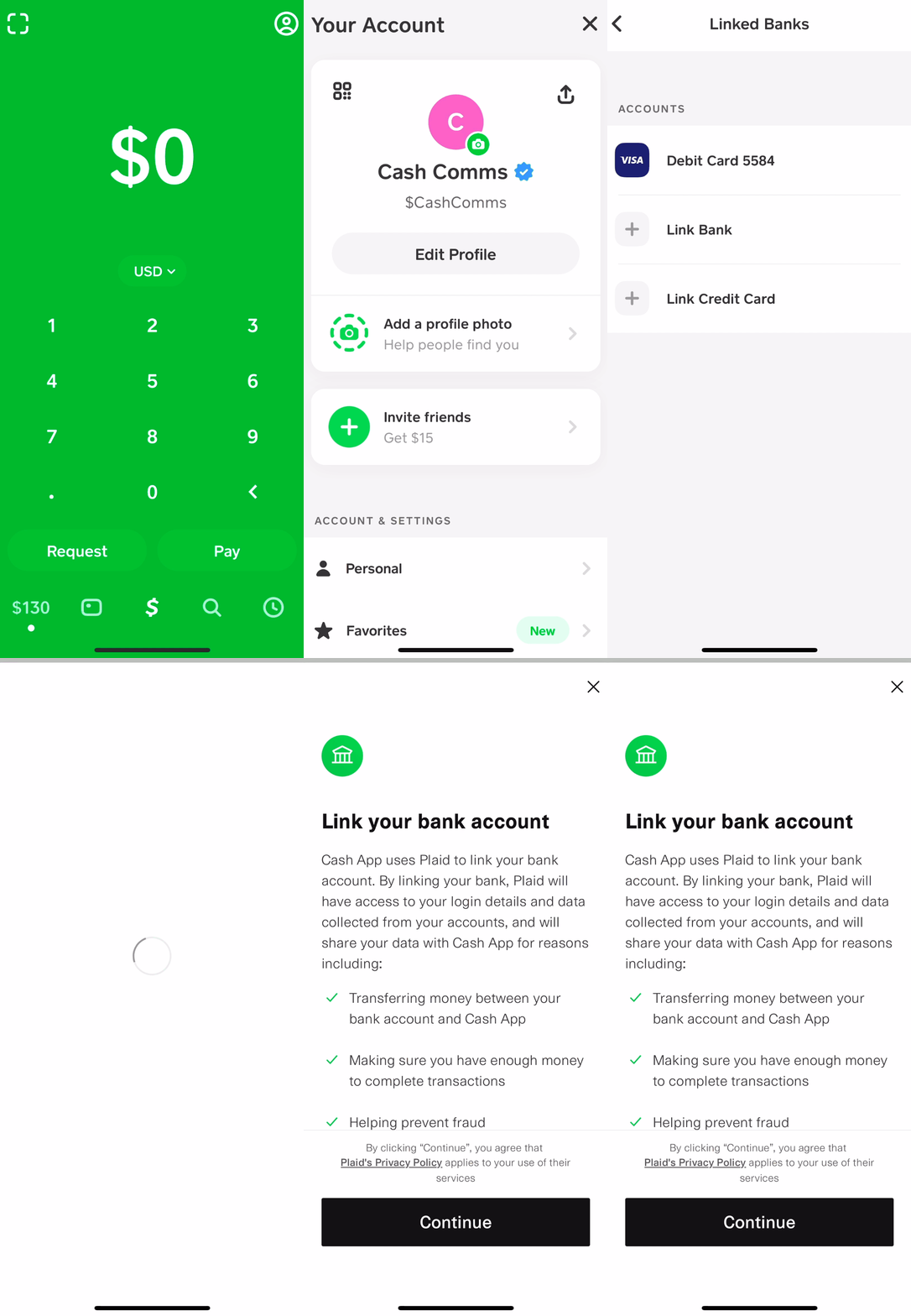
Open Cash App: Launch the Cash App application on your mobile device.
-
Navigate to Your Profile: Tap on your profile icon, usually located in the top-right corner of the home screen. This will take you to your personal profile page.
-
Access Linked Banks: Scroll down and select “Linked Banks.” This section displays all your currently connected financial instruments, including debit cards and bank accounts.
-
Select the Bank Account to Remove: Under the “Bank Account” section, you will see the details of your currently linked bank. Tap on this bank account.
-
Initiate Removal: On the subsequent screen, you will typically see an option to “Replace Bank” or “Remove Bank.” If you wish to entirely remove it before adding a new one, select “Remove Bank.”
-
Confirm Removal: Cash App will prompt you to confirm your decision. Review the warning carefully and confirm to unlink the account. Ensure any pending transactions to or from this account have been settled before removal.
It’s important to note that if you have an active Cash Card directly linked to your old bank account, you might need to update the Cash Card’s funding source separately or consider ordering a new Cash Card if the old one is tied inextricably to the account you are removing.
Linking Your New Bank Account
Once the old bank account is removed (or if you simply want to add a new one without removing an existing one first, though replacement is often smoother), you can proceed to link your new bank.
-
Return to Linked Banks Section: From your profile, navigate back to the “Linked Banks” section.
-
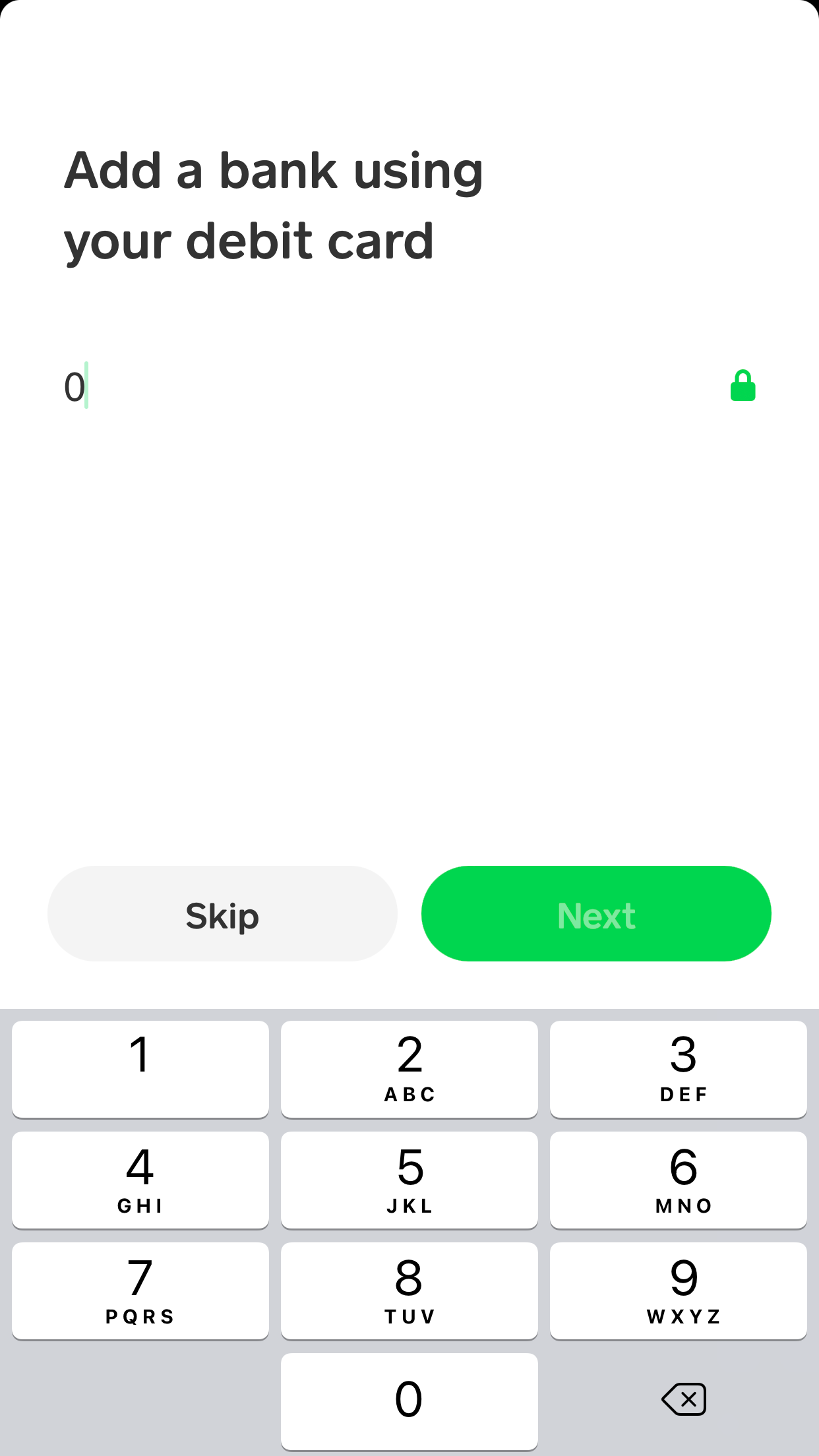
Add Bank: Look for an option that says “Link Bank” or “Add Bank.” Tap on this.
-
Choose Your Bank: Cash App will present a list of popular banks. If your bank is listed, select it. If not, you may need to search for it or opt for a manual linking process (though direct integration is usually preferred for speed and accuracy).
-
Login to Your Bank: Cash App utilizes Plaid, a secure third-party service, to link bank accounts. You will be redirected to your bank’s online banking portal within the Cash App interface. Enter your online banking username and password. This allows Plaid to securely verify your account and establish the link. It’s a secure process, as Cash App itself does not store your bank login credentials.
-
Select Account: If you have multiple accounts with your bank (e.g., checking, savings), you will be prompted to select which account you wish to link to Cash App. Choose your preferred checking account, as savings accounts often have restrictions on third-party transactions.
-
Confirm Link: After selecting the account, confirm the linking process. Cash App will then confirm that your new bank account has been successfully linked.
Verifying Your New Account
While linking via Plaid often includes instant verification, sometimes additional steps are required, or it’s simply good practice to confirm.
-
Check for Micro-Deposits: In some cases, especially if manual linking was involved, Cash App might send small “micro-deposits” (usually a few cents) to your new bank account. You would then need to confirm the amounts of these deposits within the Cash App to verify ownership.
-
Test a Transaction: The most reliable way to verify the link is to perform a small test transaction. Try adding a small amount (e.g., $1-$5) from your new bank account to your Cash App balance, or cashing out a small amount from Cash App to your new bank. If these transactions go through without issue, your account is successfully linked and verified.
-
Monitor Bank Statements: Keep an eye on your new bank’s statement for the Cash App transactions to ensure everything is reflecting correctly.
Common Pitfalls and Troubleshooting Tips
Even with a clear step-by-step guide, users can encounter issues when attempting to change their bank account on Cash App. Understanding these common pitfalls and knowing how to troubleshoot them can save time and prevent financial frustration.
Incorrect Account Information

The most frequent error is simply entering incorrect banking details. This includes typos in account numbers, routing numbers, or misselecting the type of account (e.g., trying to link a savings account when only checking is permitted for certain functions).
- Solution: Double-check all numbers and selections. Refer to your bank’s official documentation (e.g., checks, online banking portal) to confirm routing and account numbers. Ensure you are linking a checking account, as most payment apps have restrictions on savings accounts due to federal regulations (Regulation D limits withdrawals/transfers).
Linking Limits and Restrictions
Cash App, like other financial platforms, imposes certain limits and restrictions to ensure security and compliance.
-
Account Already Linked: An account can typically only be linked to one Cash App profile at a time. If your bank account is already linked to another Cash App account (perhaps an old one or a family member’s), you will not be able to link it to your current profile.
- Solution: Ensure the account is unlinked from any other Cash App profile first. Contact Cash App support if you suspect unauthorized linking.
-
Unsupported Bank Type: Some niche banks, credit unions, or online-only financial institutions might not be directly supported by Plaid or Cash App’s linking infrastructure.
- Solution: While less common now, if your bank isn’t listed or direct linking fails, you may need to use an alternative method if available (e.g., manual verification with micro-deposits) or contact Cash App support for guidance. In rare cases, you might need to use a different bank account.
Dealing with Failed Verification
Sometimes, the linking process appears to complete, but verification fails, or transactions don’t go through.
-
Login Credentials Issues: Errors during the Plaid login process (incorrect username/password for your online bank) are common.
- Solution: Verify your online banking credentials directly with your bank’s website or app. If you can log in there, retry the Cash App linking process.
-
Security Blocks: Your bank might have security protocols that temporarily block third-party access attempts, especially if it’s a new connection or from an unrecognized device.
- Solution: Check your bank’s security alerts or notifications. You might need to approve the connection from your bank’s side or contact your bank directly to whitelist Cash App/Plaid connections.
-
Temporary System Glitches: Occasionally, Cash App or Plaid might experience temporary technical issues.
- Solution: Wait a few hours and try again. If the problem persists, contact Cash App support with details of the error message received.
Best Practices for Managing Your Cash App Financials
Integrating Cash App into your personal finance ecosystem requires thoughtful management to maximize its benefits and minimize risks. Changing your bank account is a critical maintenance task, but it’s part of a broader set of best practices for financial hygiene.
Regular Account Review
Periodically reviewing all linked accounts on Cash App is a prudent financial habit. This involves checking not only which bank accounts are connected but also verifying the status of your Cash Card, direct deposit settings, and any connected debit or credit cards.
-
Financial Insight: A regular review helps you understand where your money is coming from and going to, providing a clearer picture of your spending habits and financial liquidity.
-
Security Check: It’s an opportunity to identify any unauthorized links or outdated information, proactively safeguarding your financial identity and assets.
-
Optimization: You might discover opportunities to optimize which accounts are linked for specific purposes, such as linking a dedicated spending account versus a primary savings account.
Security Measures for Financial Tools
While Cash App employs advanced security features, the user remains the first and most important line of defense.
-
Strong, Unique Passwords: Always use a strong, unique password for your Cash App account. Avoid using passwords reused from other online services.
-
Enable Two-Factor Authentication (2FA): 2FA adds an extra layer of security, requiring a code from your phone in addition to your password, making unauthorized access significantly harder.
-
Monitor Notifications: Pay attention to Cash App notifications, especially those regarding linked accounts, large transactions, or security alerts.
-
Be Wary of Phishing: Be highly skeptical of unsolicited messages (emails, texts) claiming to be from Cash App, especially those asking for personal information or directing you to suspicious links. Always access your account directly through the official app.
Understanding Cash App’s Role in Your Personal Finance Ecosystem
Cash App is a versatile tool, but it’s essential to understand its specific role in your overall financial strategy.
-
Complement, Not Replace: For most users, Cash App serves as a complementary tool to traditional banking, not a replacement. Its strengths lie in quick peer-to-peer transfers, easy direct deposits for paychecks, and small investments.
-
Budgeting and Tracking: While Cash App provides transaction history, integrating it with broader budgeting tools or spreadsheets can offer a more holistic view of your finances. Regularly export your Cash App transaction data for comprehensive financial analysis.
-
Emergency Funds: Do not solely rely on Cash App for storing large emergency funds. While it offers FDIC insurance through its partner banks, it’s generally advisable to keep significant savings in dedicated, interest-bearing savings accounts at traditional banks.
The Financial Impact of Efficient Account Management
The seemingly minor task of changing a bank account on Cash App carries significant implications for your overall financial health. Efficient management of your digital financial tools can lead to tangible benefits.
Avoiding Fees and Delays
A correctly linked and managed bank account is fundamental to avoiding unnecessary financial penalties. Failed transactions due to outdated bank details can sometimes incur fees from your bank, or at the very least, cause significant delays in accessing your money. For businesses using Cash App for income, such delays can impact cash flow, leading to missed opportunities or late payment penalties for their own obligations. By ensuring your bank account is always current, you streamline your financial operations, minimizing these avoidable costs and time-consuming resolutions.
Maintaining Financial Flow
Effective personal finance is about maintaining a smooth and predictable flow of funds. Your linked bank account is the primary conduit for money entering and leaving your Cash App ecosystem. Any blockage in this conduit—such as an invalid account link—can disrupt this flow, creating financial friction. This friction can lead to a lack of liquidity when you need it most, making it difficult to pay bills, make investments, or respond to unexpected expenses. Proactive account management ensures that your money is always accessible and can move freely between your various financial instruments as required, contributing to robust financial health.
Empowering Your Personal Finance Strategy
Ultimately, diligently managing your Cash App’s linked bank account empowers your broader personal finance strategy. It allows you to:
-
Optimize Funds Allocation: Easily direct funds to the most appropriate bank account for savings, investments, or specific spending categories.
-
Enhance Financial Control: Maintain complete authority over where your money resides and how it moves, supporting your financial goals.
-
Build Financial Resilience: By having reliable and updated connections, you reduce vulnerabilities and enhance your ability to adapt to changes in your financial life without disruption.
In conclusion, changing your bank account on Cash App is more than just navigating a menu; it’s a critical aspect of responsible financial stewardship. By understanding the process, avoiding common pitfalls, and adhering to best practices, you ensure that this powerful financial tool continues to serve your personal finance needs effectively and securely.
aViewFromTheCave is a participant in the Amazon Services LLC Associates Program, an affiliate advertising program designed to provide a means for sites to earn advertising fees by advertising and linking to Amazon.com. Amazon, the Amazon logo, AmazonSupply, and the AmazonSupply logo are trademarks of Amazon.com, Inc. or its affiliates. As an Amazon Associate we earn affiliate commissions from qualifying purchases.