
In the rapidly evolving landscape of digital finance, applications like Cash App have become indispensable tools for managing everyday transactions, from sending money to friends to receiving direct deposits. At the core of leveraging Cash App’s full functionality is the ability to securely link external debit or credit cards. This process connects your traditional banking infrastructure with the agile world of peer-to-peer payments and mobile banking, unlocking a suite of features that enhance financial fluidity. Understanding the precise steps and the underlying technical considerations involved in adding a new card is crucial for ensuring both convenience and digital security. This guide meticulously details the process, addresses common technical queries, and outlines best practices for integrating your cards into the Cash App ecosystem.
Understanding the Importance of Linking a Card to Cash App
Linking a payment card to your Cash App account is more than just a setup step; it’s the fundamental action that bridges your existing financial resources with the app’s digital capabilities. Without a linked card, Cash App’s utility is significantly limited, primarily to receiving funds into your Cash App balance. The ability to add and manage cards transforms the app into a powerful financial hub, enabling a broad spectrum of transactions that cater to modern spending habits.
Facilitating Seamless Transactions
The primary benefit of a linked card is its role in facilitating outgoing transactions. Whether you need to send money to a friend, pay a bill, or make a purchase, a linked debit or credit card provides the funding source. This eliminates the need to maintain a separate balance within Cash App for every transaction, offering a direct conduit from your bank account or credit line. It streamlines the process of moving funds, ensuring that you can initiate payments quickly and efficiently, often within seconds. Furthermore, for users who rely on the “Boosts” feature offered by Cash App, a linked card is often a prerequisite to unlock specific discounts and rewards when spending with their Cash Card.
Accessing Direct Deposit and Other Features
While direct deposit typically involves routing numbers linked to your Cash App balance, having a connected card enhances the overall financial management experience. It allows for instant transfers of funds from your Cash App balance to your linked bank account, providing immediate access to your money outside the app. This instant transfer capability, although sometimes incurring a small fee, is a key convenience for users who need quick access to their Cash App funds in their traditional bank accounts. Additionally, linking a card strengthens your account’s verification, often unlocking higher sending and receiving limits within the application, which is a significant advantage for active users.
Distinguishing Between Debit and Credit Cards
Cash App generally supports both debit and credit cards from major networks like Visa, MasterCard, American Express, and Discover. However, there are crucial technical and functional differences. Debit cards are typically preferred for funding transactions as they draw directly from your bank account, often incurring no fees for standard transfers into Cash App or for sending money. Credit cards, while accepted, are treated differently. Cash App usually charges a 3% fee for sending money using a linked credit card, reflecting the higher processing costs associated with credit card transactions for the platform. This distinction is vital for users to understand when choosing which card to link and how to fund their payments, impacting overall transaction costs and personal finance management. While credit cards can be useful for emergencies or specific spending, debit cards generally offer a more cost-effective option for day-to-day Cash App usage.
Step-by-Step Guide to Adding a Card
Adding a new card to your Cash App account is a straightforward process designed for user accessibility. Following these steps precisely ensures a smooth integration, allowing you to quickly begin leveraging your card for various transactions within the app.
Navigating the Cash App Interface
- Open Cash App: Launch the Cash App application on your mobile device. Ensure you are logged into your account.
- Access the Home Screen: Upon opening, you will typically land on the main Cash App screen, which displays your current balance and provides quick access to core functionalities like sending and requesting money.
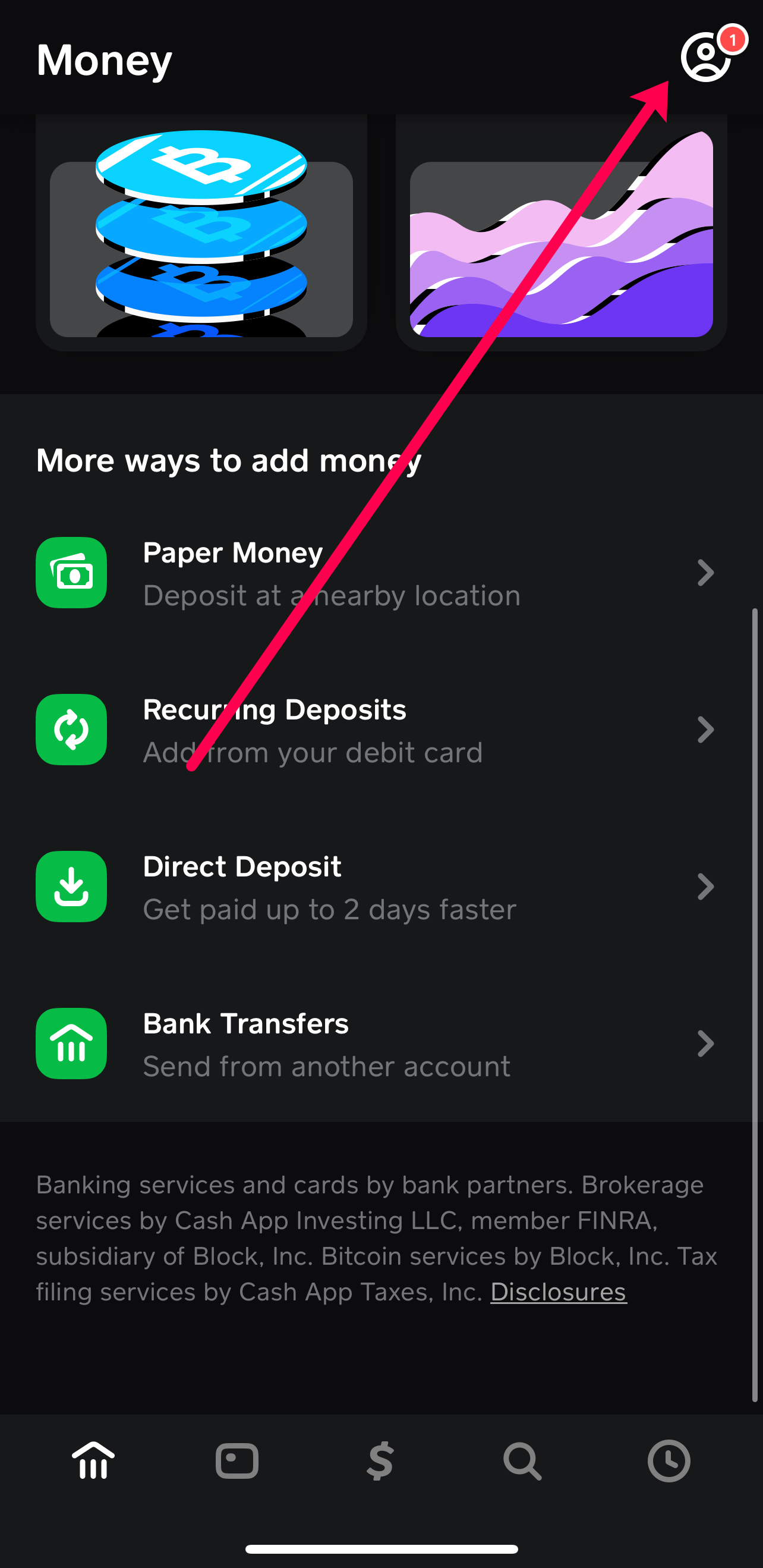
- Tap the Profile Icon: In the upper right or left corner of the screen (depending on your app version and device), locate and tap the profile icon. This icon usually looks like a person or a circle with your profile picture/initials. Tapping this icon opens your profile menu.
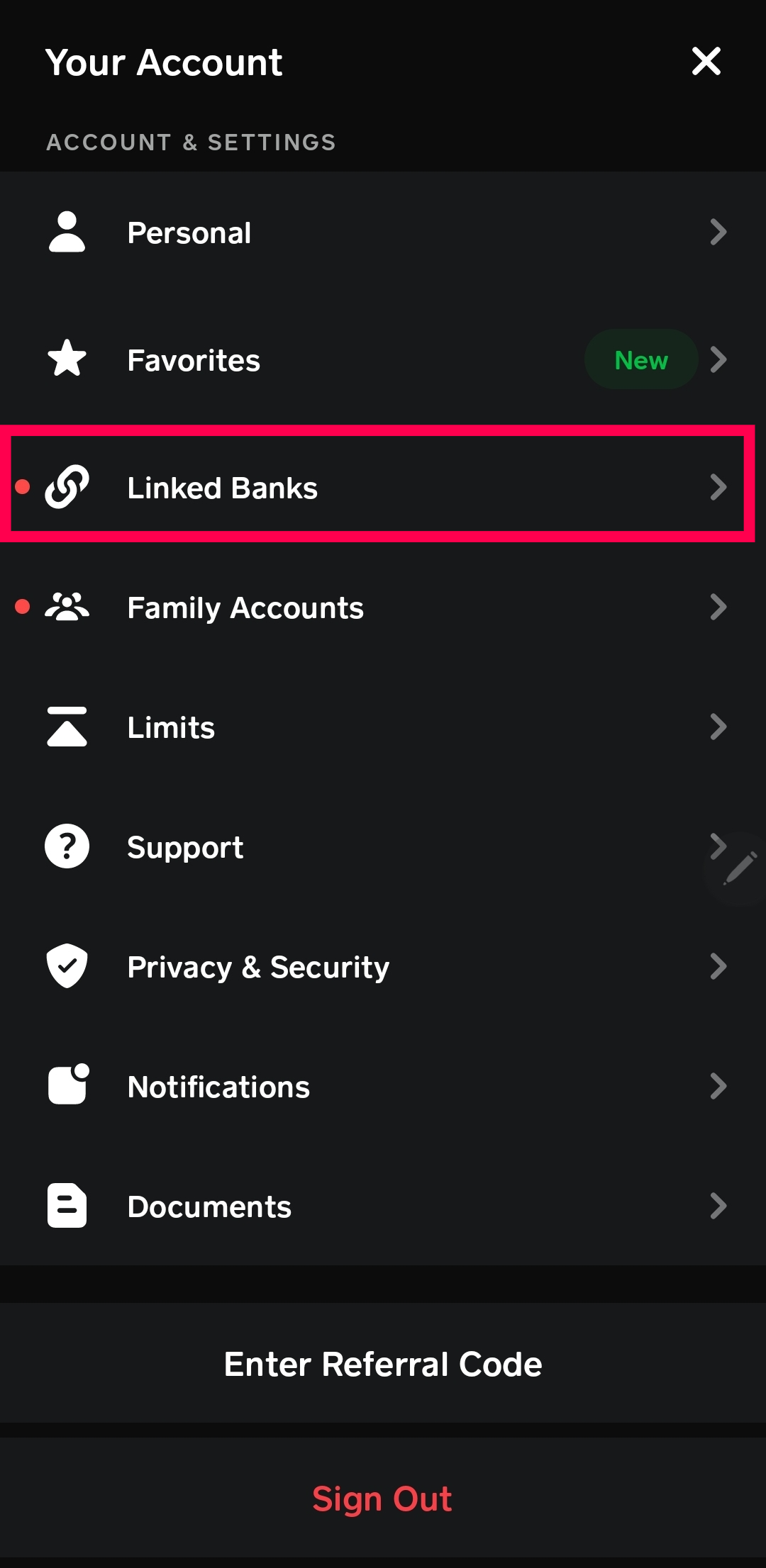
- Scroll to ‘Linked Banks’: Within your profile menu, scroll down until you find the section titled ‘Linked Banks’ or ‘Linked Accounts’. This section manages all your connected financial instruments, including banks and cards.
- Select ‘Link Debit Card’ or ‘Link Bank’: Tap on the option that allows you to add a new card. It might specifically say ‘Link Debit Card’ or ‘Add Bank & Cards’. Even if it says ‘Link Bank,’ it will typically lead to an option for adding a debit card.
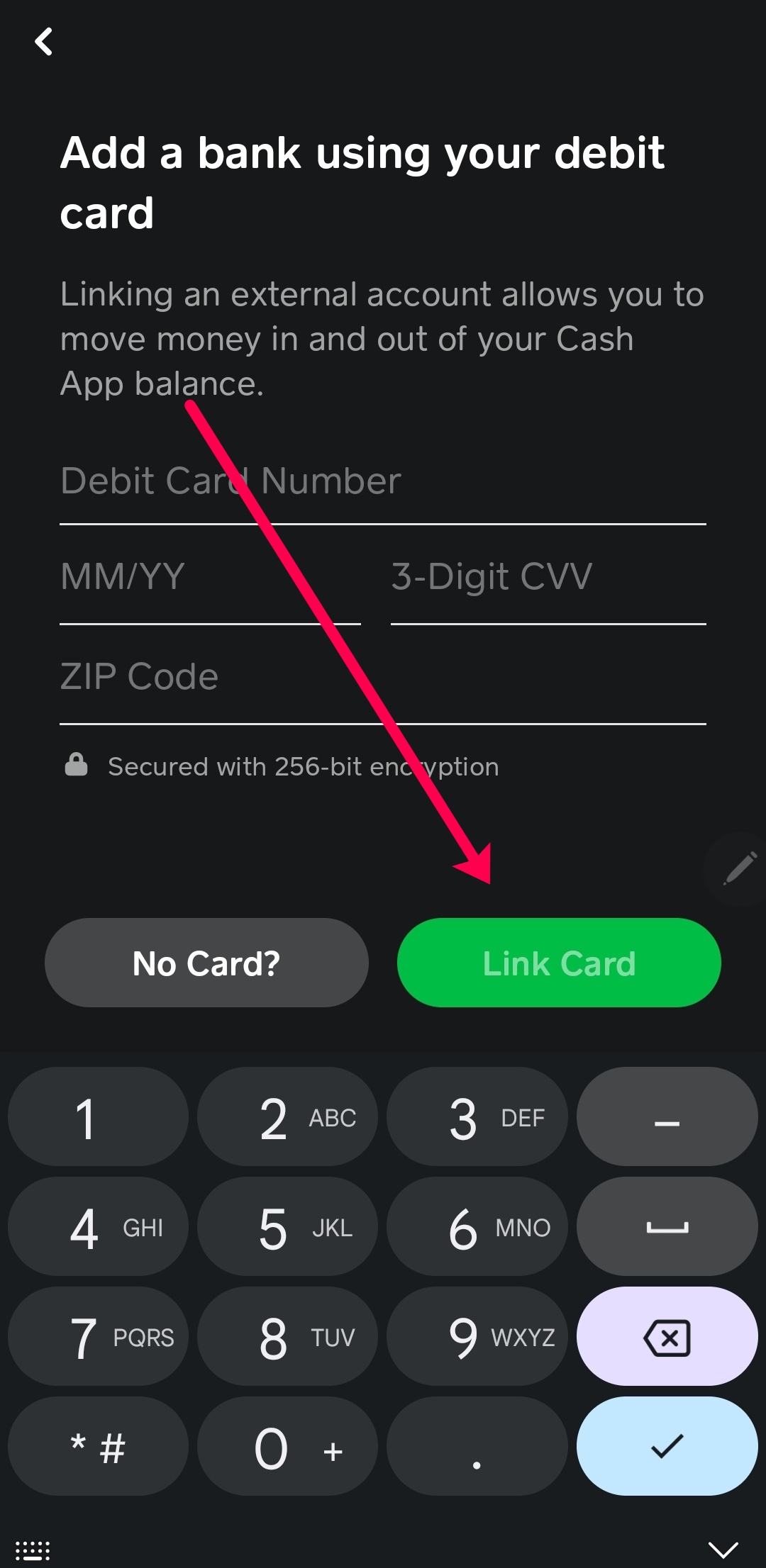
- Choose ‘Link Card’ (if applicable): If prompted to link a bank or a card, select the option to ‘Link Card’.
Entering Card Details Manually
Once you’ve navigated to the ‘Link Card’ section, you will be prompted to enter your card information. Accuracy here is paramount for successful linking.
- Enter Card Number: Carefully type in the 16-digit card number located on the front of your debit or credit card. Double-check each digit to avoid errors.
- Enter Expiration Date: Provide the two-digit month and two-digit year (MM/YY) of your card’s expiration date, also found on the front of the card.
- Enter CVV/CVC: Input the three- or four-digit Card Verification Value (CVV or CVC) found on the back of your card (for Visa, MasterCard, Discover) or the front (for American Express). This security code is crucial for verifying card authenticity.
- Enter ZIP Code: Provide the billing ZIP code associated with your card’s billing address. This helps confirm your identity and prevent fraudulent use.
- Tap ‘Link Card’: After meticulously entering all the required details, tap the ‘Link Card’ or ‘Add Card’ button to complete the process. Cash App will then attempt to verify the card with your bank.
Verifying Your Card Information
Upon tapping ‘Link Card,’ Cash App initiates a verification process. This typically involves:
- Instant Validation: Cash App will send a small, temporary authorization request to your card issuer to confirm the card’s validity and that the provided information (number, expiry, CVV, ZIP) matches records. This authorization is usually reversed immediately and does not appear as a charge on your statement.
- Confirmation Message: If successful, you will receive a confirmation message within the app indicating that your card has been successfully linked. Your new card will then appear under your ‘Linked Banks’ or ‘Linked Accounts’ section.
- Troubleshooting: If the linking fails, Cash App will display an error message. Common reasons include incorrect card details, issues with your bank, or network problems. In such cases, carefully review the entered information and try again.
Digital Security and Best Practices for Card Linking
The convenience of digital finance comes with the imperative of robust digital security. When linking a card to Cash App or any other financial application, understanding and implementing best practices is essential to protect your personal and financial information. Cash App employs various security measures, but user vigilance remains a critical component of a secure experience.
Recognizing Secure Connections
Cash App, like other legitimate financial apps, utilizes encryption to protect data transmitted between your device and its servers. This ensures that your card details are scrambled and unreadable to unauthorized parties during transmission. Always ensure you are using the official Cash App from a trusted source (Apple App Store or Google Play Store) and that your device’s operating system is up-to-date. Outdated OS versions can have security vulnerabilities that could be exploited. Avoid linking cards or accessing financial apps on public Wi-Fi networks unless absolutely necessary and with a VPN, as these networks are often less secure and susceptible to eavesdropping.
Protecting Your Personal Information
Beyond encrypted connections, safeguarding your personal data is paramount. When entering card details, ensure no one is looking over your shoulder. Never share your Cash App login credentials, PIN, or card details with anyone, even if they claim to be from Cash App support. Legitimate support will never ask for your full card number, CVV, or account PIN. Enable two-factor authentication (2FA) for your Cash App account and the email address linked to it. This adds an extra layer of security, requiring a second verification step (like a code sent to your phone) even if someone obtains your password. Regularly review the privacy settings within your Cash App to control what information is shared.
Monitoring Account Activity
Proactive monitoring of your financial accounts is a fundamental security practice. Regularly check your Cash App transaction history for any unauthorized activity. Similarly, review your bank and credit card statements periodically. Many banks offer real-time transaction alerts via SMS or email, which can be invaluable for quickly identifying and reporting suspicious charges. If you notice any unfamiliar transactions or believe your Cash App account or linked card has been compromised, immediately unlink the card within the app and contact Cash App support as well as your bank or card issuer to report the fraudulent activity. Swift action can often prevent significant financial loss.
Troubleshooting Common Issues When Adding a Card
While the process of adding a card to Cash App is generally smooth, users may occasionally encounter technical hurdles. Understanding the common issues and their respective solutions can save time and frustration.
Incorrect Card Details
The most frequent reason for a card failing to link is incorrect information entry. This could include:
- Typos in Card Number: Even a single digit error will prevent validation.
- Incorrect Expiration Date: Ensure the month and year match exactly what’s on the card.
- Wrong CVV/CVC: This security code is often misread or entered incorrectly. Double-check its location (back for most cards, front for Amex).
- Mismatched ZIP Code: The billing ZIP code must precisely match the one on file with your bank or card issuer.
Solution: Carefully re-enter all card details, paying close attention to each field. If possible, have the physical card in hand to verify every digit and date. If repeated attempts fail, confirm your billing ZIP code with your bank.
Bank or Issuer Restrictions
Sometimes, the issue isn’t with your entry but with the card’s issuer or bank.
- Security Blocks: Your bank might automatically flag attempts to link your card to a new service like Cash App as a potential security risk, especially if it’s your first time using the card with the app or if there have been recent unusual activities on your bank account.
- Unsupported Card Type: While Cash App supports most major debit and credit cards, certain prepaid cards or specific institution-issued cards might not be compatible. Corporate or business cards may also have restrictions.
- Insufficient Funds (for debit cards): Although linking doesn’t require funds, some banks might decline the small authorization check if the account is completely empty, though this is rare.
Solution: If you suspect a bank restriction, contact your bank or card issuer’s customer service. Inform them you are trying to link your card to Cash App and ask if there are any blocks or restrictions. They can often lift temporary holds or confirm compatibility.
App Glitches and Updates
Like any software, Cash App can sometimes experience temporary glitches or require an update.
- Outdated App Version: An old version of the app might have bugs or compatibility issues with the latest server-side updates.
- Cache or Data Corruption: Accumulated cache data can sometimes interfere with app functions.
- Network Issues: A poor or unstable internet connection can interrupt the linking process.
Solution:
- Update Cash App: Go to your device’s app store (Apple App Store or Google Play Store) and check for any pending updates for Cash App. Install them if available.
- Restart App/Device: Close Cash App completely and reopen it. If the issue persists, try restarting your entire mobile device.
- Clear Cache (Android): For Android users, go to your phone’s Settings > Apps > Cash App > Storage, then tap ‘Clear Cache’. Do NOT clear data unless instructed, as this might log you out.
- Check Internet Connection: Ensure you have a strong and stable Wi-Fi or cellular data connection. Try switching between Wi-Fi and cellular data to see if one works better.
If all troubleshooting steps fail, contacting Cash App support directly through the app’s help section is the next logical step. Provide them with details of the error message and the steps you’ve already taken.
Beyond Linking: Leveraging Your Card in the Cash App Ecosystem
Once your card is successfully linked, Cash App transforms into a powerful digital wallet, enabling a wide array of financial activities that go beyond simple peer-to-peer transfers. Understanding how to utilize your linked card effectively within this ecosystem maximizes its utility and enhances your overall digital finance experience.
Sending and Receiving Funds
The most fundamental use of a linked card is to fund payments. When you choose to send money, Cash App will offer your linked cards as a funding source. This allows you to instantly send money to friends, family, or businesses directly from your bank account (via debit card) or credit line (via credit card). While receiving funds typically adds money to your Cash App balance, having a linked card also enables you to instantly transfer that balance out of Cash App and into your traditional bank account, providing quick access to your money whenever needed. This flexibility in funding and withdrawal options is a cornerstone of Cash App’s appeal.
Using the Cash App Card
It’s important to distinguish between linking your personal debit/credit card and the “Cash App Card.” The Cash App Card is a free, customizable debit card issued by Cash App itself, linked directly to your Cash App balance. While it is a distinct product, linking an external card makes the Cash App Card more powerful. You can use your linked debit card to add funds to your Cash App balance, which in turn fuels your Cash App Card for everyday spending at any merchant that accepts Visa. This creates a seamless flow of funds from your external bank account, through Cash App, and onto the Cash App Card, allowing you to manage spending, access “Boosts” (instant discounts), and even withdraw cash from ATMs (with associated fees).
Managing Your Digital Wallet
With one or more cards linked, your Cash App acts as a comprehensive digital wallet. You can easily switch between linked cards for different transactions, manage spending, and track your financial inflows and outflows. Regularly reviewing your linked cards ensures they are current and relevant to your financial habits. If a card expires or you get a new one, you can easily update the details or remove the old card and add the new one through the same ‘Linked Banks’ section in your profile. Maintaining an organized digital wallet within Cash App not only streamlines your financial interactions but also provides a clear overview of your various funding sources, empowering more informed and agile financial decision-making in the digital age.
aViewFromTheCave is a participant in the Amazon Services LLC Associates Program, an affiliate advertising program designed to provide a means for sites to earn advertising fees by advertising and linking to Amazon.com. Amazon, the Amazon logo, AmazonSupply, and the AmazonSupply logo are trademarks of Amazon.com, Inc. or its affiliates. As an Amazon Associate we earn affiliate commissions from qualifying purchases.