
Navigating the complexities of tax season can often feel like deciphering an ancient riddle. For millions of Americans, TurboTax has emerged as a popular solution, promising ease, accuracy, and efficiency in preparing and filing their tax returns. However, one of the most common questions that arises, particularly as tax day looms, is: “How much does TurboTax actually charge to file taxes?” The answer, as many discover, isn’t a simple flat fee. It’s a nuanced structure dependent on the complexity of your financial situation, the specific features you require, and the level of assistance you desire. Understanding TurboTax’s pricing model is crucial for making an informed decision that aligns with both your tax needs and your budget.
This article will delve into the various pricing tiers and services offered by TurboTax, dissecting the factors that influence the final cost. We’ll explore the “free” options, the premium packages, and the additional services that can add to your bill. Our goal is to provide a comprehensive financial guide to TurboTax’s costs, helping you budget effectively and select the most suitable option for your unique financial landscape.
Understanding TurboTax’s Pricing Model: A Tiered Approach to Tax Filing
TurboTax, a product of Intuit, employs a tiered pricing strategy designed to cater to a wide spectrum of taxpayers, from those with the simplest returns to self-employed individuals and investors with complex financial portfolios. This model allows users to choose a product that best matches their specific tax situation, theoretically ensuring they only pay for the features they need. However, this flexibility can also lead to confusion about the true cost.
The Freemium Approach: What’s Truly Free?
At the core of TurboTax’s marketing strategy is its “Free Edition.” This offering is genuinely free for a significant portion of taxpayers, specifically those with very simple tax situations. This typically includes individuals who only need to file Form 1040 and claim the standard deduction, without needing to report income from investments, rental properties, or self-employment. It covers basic W-2 income and unemployment income. For many first-time filers or those with straightforward finances, the Free Edition is an invaluable resource, allowing them to file federal and often state taxes at no cost. However, the moment your tax situation becomes even slightly more complex, you’ll likely be prompted to upgrade to a paid version. This transition is a key element of TurboTax’s freemium model, enticing users with a free entry point before guiding them towards paid services as their needs evolve.
Factors Influencing Your Cost: Complexity and State Filings
The primary drivers of your TurboTax cost are the complexity of your tax return and whether you need to file state taxes. Each additional tax form, schedule, or financial scenario you need to report adds a layer of complexity that can trigger an upgrade to a higher-priced tier. For instance, if you itemize deductions, have capital gains or losses, or run a small business, the Free Edition quickly becomes insufficient.
State tax filings represent another significant cost factor. While some federal returns can be filed for free, state tax filings often incur a separate, additional fee. These fees vary by state and by TurboTax product, adding another layer to the total expenditure. It’s crucial to factor in both federal and state filing costs when estimating your overall expense. Many users are surprised by this additional charge, underscoring the importance of understanding the fine print before committing to a service.
The Spectrum of TurboTax Products: From Basic to Self-Employed
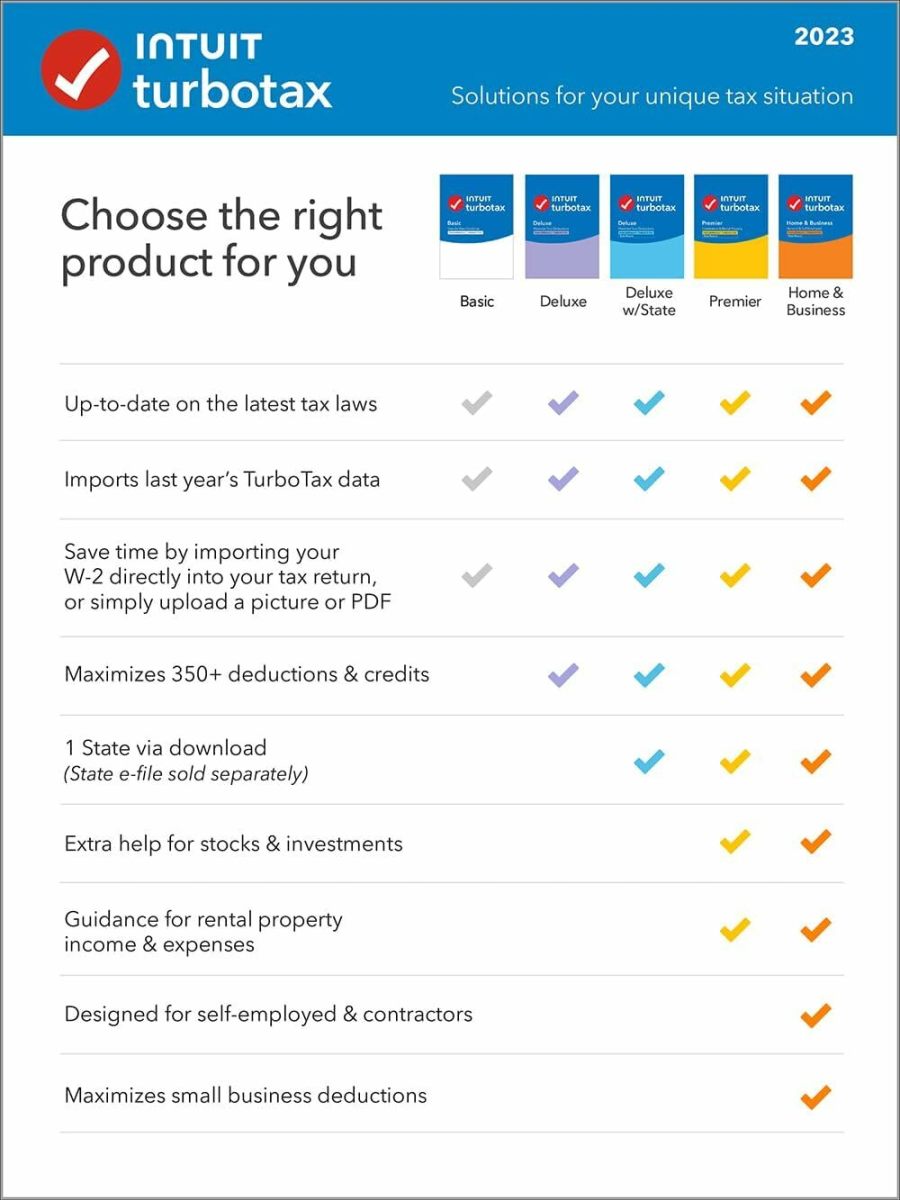
TurboTax offers a range of products, each designed to handle increasing levels of tax complexity and offering different features. Understanding these options is the first step in budgeting for your tax preparation. From the free option for basic filers to comprehensive packages for small business owners, the product line addresses a broad audience. The prices for these tiers are dynamic, often changing seasonally and depending on promotional offers, but they generally fall within established ranges.
A Deep Dive into TurboTax Product Tiers and Their Costs
Let’s break down the main TurboTax product tiers and what financial situations they are designed to handle, along with their typical price points. These prices are generally for federal filing, with state filing usually being an additional cost.
TurboTax Free Edition: For Simple Returns
- Who it’s for: Taxpayers with simple tax returns, typically involving W-2 income, limited interest and dividend income (Form 1099-INT, 1099-DIV), standard deduction, and basic credits like the Earned Income Tax Credit or Child Tax Credit. It’s ideal for students, recent graduates, or individuals with straightforward finances.
- Cost: Federal filing is $0. State filing may also be $0 for simple returns, but it’s essential to check your specific state’s eligibility.
- Key financial aspects: This is the baseline, offering no-cost filing for federal returns with basic income and deductions. It’s excellent for budget-conscious individuals whose financial situations fall within these narrow parameters.
TurboTax Deluxe: Maximizing Deductions and Credits
- Who it’s for: Individuals who own a home, make charitable contributions, have medical expenses, or other deductions that require itemizing. It’s also suitable for those with health savings accounts (HSAs) or who need to report energy-efficient home improvements.
- Cost: Typically ranges from $40-$70 for federal filing, plus an additional $40-$60 per state filed.
- Key financial aspects: This tier is designed to help users identify and claim over 350 tax deductions and credits. The added cost often pays for itself through increased refunds or reduced tax liabilities compared to simply taking the standard deduction, making it a sound financial investment for many homeowners and those with significant deductible expenses.
TurboTax Premier: Investments & Rental Properties
- Who it’s for: Investors with stocks, bonds, mutual funds, cryptocurrency, or those with rental property income and expenses. It’s also suitable for individuals who have received K-1 forms from partnerships or S-corps.
- Cost: Typically ranges from $70-$100 for federal filing, plus an additional $40-$60 per state filed.
- Key financial aspects: This product caters to more complex asset management. It helps manage capital gains and losses, depreciation for rental properties, and other investment-related tax nuances. For investors, the ability to accurately report these complex transactions and optimize tax strategies can make this tier a financially prudent choice, despite its higher price point.
TurboTax Self-Employed: For Freelancers and Small Business Owners
- Who it’s for: Freelancers, independent contractors, gig workers, sole proprietors, and small business owners who file Schedule C (Profit or Loss From Business). This includes managing business income and expenses, depreciation, home office deductions, and estimated taxes.
- Cost: Typically ranges from $90-$120 for federal filing, plus an additional $40-$60 per state filed.
- Key financial aspects: This is TurboTax’s most comprehensive DIY offering, specifically tailored to the unique financial challenges of self-employment. It helps maximize business deductions, track expenses, and manage quarterly estimated taxes. Given the potential for significant deductions for business owners, this investment can yield substantial tax savings.
TurboTax Live: Expert Assistance Options
Beyond the DIY products, TurboTax also offers “Live” versions for each tier (e.g., TurboTax Live Basic, Live Deluxe, Live Premier, Live Self-Employed). These services provide on-demand access to a certified tax expert (CPA or Enrolled Agent) who can answer questions, review your return, or even prepare and file it for you.
- Cost: TurboTax Live services typically add a significant premium to the standard product costs, ranging from an additional $80 to over $200, depending on the tier and the level of expert involvement (review vs. full service).
- Key financial aspects: While more expensive, TurboTax Live can be a valuable financial investment for those who seek assurance, have complex questions, or prefer professional oversight without the higher cost of a traditional tax accountant. It bridges the gap between DIY software and full-service accounting.
The Hidden Costs and Add-ons: Unveiling Potential Expenditures
While the base product prices provide a good starting point, several additional services and fees can increase your total TurboTax expenditure. Being aware of these potential add-ons is crucial for accurate financial planning during tax season.

State Filing Fees: An Often Overlooked Expense
As previously mentioned, state tax filings are almost always an additional charge. Even if your federal return is free, your state return will likely cost between $40 and $60. For residents of states with no income tax, this isn’t an issue. However, for the majority of U.S. taxpayers, this is a recurring expense that should be factored into the overall cost calculation. Ignoring this common fee can lead to unexpected budget strains at the last minute.
Audit Defense and Other Optional Services
TurboTax offers various optional add-on services designed to provide peace of mind or additional support.
- Audit Defense: This service, typically offered through a third-party provider like TaxAudit, provides representation and assistance if your return is audited by the IRS. While a relatively rare occurrence for most taxpayers, the service offers security for an additional fee, usually around $40-$60. For those with complex returns or a history of audits, this can be a worthwhile financial safeguard.
- Premium Services: Some tiers might offer premium support options or faster access to customer service representatives, which can come with an additional charge. While not always directly tax-related, these services offer convenience for a price.
Understanding Refund Processing Fees
TurboTax offers the option to deduct your preparation fees directly from your federal tax refund. While this seems convenient by avoiding an out-of-pocket payment, it typically comes with an additional “refund processing service” fee, often around $40. For individuals who prefer not to pay upfront, this service provides flexibility but at an added financial cost. Budget-conscious filers should consider paying directly by credit card or bank transfer to avoid this extra charge.
Is TurboTax Worth the Cost? A Value Proposition Analysis
Deciding whether TurboTax is worth its cost ultimately boils down to a personal financial assessment, weighing convenience, accuracy, and support against the price tag.
Weighing Convenience Against Price
TurboTax’s primary value proposition is its user-friendly interface and step-by-step guidance, which simplifies a historically daunting task. For many, the time saved, the reduction in stress, and the confidence in filing an accurate return justify the expenditure. The software automatically imports W-2s and other financial data from various institutions, minimizing manual entry and potential errors. This convenience has a financial value, freeing up time that could be spent on other income-generating activities or personal pursuits.
Comparing TurboTax to Competitors: H&R Block, TaxAct, FreeTaxUSA
TurboTax operates in a competitive market, and comparing its costs and features to rivals is crucial for making an optimal financial decision.
- H&R Block: Offers similar tiered products and pricing, often slightly less expensive or comparable to TurboTax. H&R Block also has a strong physical presence, offering in-person tax prep services as well.
- TaxAct: Generally positions itself as a more budget-friendly alternative, often providing similar features at a lower price point across its tiers.
- FreeTaxUSA: As its name suggests, it offers free federal filing for most forms, with a very low flat fee for state filing (typically around $15-$20). While its interface might not be as polished as TurboTax’s, it offers significant cost savings for savvy filers.
For those on a tight budget, exploring these alternatives can yield substantial financial savings without necessarily sacrificing accuracy.
When to Consider a Professional Tax Accountant
While TurboTax is an excellent tool for many, there are situations where the cost of a professional tax accountant is a worthwhile financial investment, even if it’s significantly higher. These include:
- Highly Complex Financial Situations: Multiple businesses, intricate investment portfolios, foreign income, or significant inheritance can warrant expert human guidance.
- Major Life Changes: Divorce, starting a new business, significant property transactions, or dealing with an estate can introduce complexities best handled by a CPA.
- Audit History: If you’ve been audited before or anticipate one, a professional can offer invaluable representation.
- Lack of Confidence: If you feel overwhelmed or unsure about your ability to accurately navigate your taxes, the peace of mind offered by a professional can outweigh the increased cost.
In these scenarios, the potential for errors, missed deductions, or legal issues if filing incorrectly could far outweigh the fee charged by a qualified tax professional.
Strategies for Minimizing Your TurboTax Expenses
Even if TurboTax is your preferred filing method, there are strategies you can employ to minimize the charges and maximize your financial efficiency.
Choosing the Right Product Tier
The most effective way to control your TurboTax cost is to accurately assess your tax situation and select the lowest-tier product that meets all your needs. Avoid overpaying for features you won’t use. Carefully read the descriptions of each tier and confirm that all your necessary forms and schedules are supported by the chosen product. If you’re teetering between two tiers, consider the potential tax savings from the higher tier against its increased cost. Sometimes, the extra expense for a “Deluxe” or “Premier” product can uncover enough deductions or credits to pay for itself and then some.
Utilizing Free Filing Programs (IRS Free File)
For many taxpayers whose Adjusted Gross Income (AGI) falls below a certain threshold (which changes annually, often around $79,000), the IRS offers the “Free File” program. Through this program, taxpayers can use commercial tax preparation software, including a select version of TurboTax, for free. This is distinct from TurboTax’s own Free Edition and can often handle slightly more complex returns within the AGI limit. Checking your eligibility for IRS Free File can unlock significant savings.

Early Bird Discounts and Promotional Offers
TurboTax, like many software providers, frequently offers promotional discounts, especially during the early parts of tax season (January and February). Filing early can often secure a lower price for paid tiers. Keep an eye out for discounts through financial institutions, employers, or online coupon sites. Subscribing to TurboTax’s email list or following them on social media can also alert you to timely promotions. Taking advantage of these early-bird specials can result in tangible financial savings on your tax preparation fees.
In conclusion, while TurboTax offers a convenient and generally reliable method for filing taxes, its “how much does it cost?” question has a multi-faceted answer. By understanding the tiered pricing, factoring in state filing fees and potential add-ons, and comparing options with competitors, taxpayers can make an informed financial decision. Whether opting for the free edition, a premium package, or leveraging expert assistance, a clear grasp of TurboTax’s cost structure empowers you to manage your tax season expenses effectively and ensure you’re getting the best value for your money.
aViewFromTheCave is a participant in the Amazon Services LLC Associates Program, an affiliate advertising program designed to provide a means for sites to earn advertising fees by advertising and linking to Amazon.com. Amazon, the Amazon logo, AmazonSupply, and the AmazonSupply logo are trademarks of Amazon.com, Inc. or its affiliates. As an Amazon Associate we earn affiliate commissions from qualifying purchases.