
In an era dominated by digital demands, where seamless connectivity is not just a luxury but a fundamental necessity, fiber optic internet stands as the undisputed champion. Far surpassing the capabilities of traditional copper wiring, fiber optics deliver breathtaking speeds, unparalleled reliability, and significantly lower latency. For anyone keen to unlock the full potential of their digital life – from streaming 8K content and engaging in lag-free online gaming to hosting demanding cloud applications and powering a fully integrated smart home – understanding the installation process of this cutting-edge technology is invaluable. This article delves into the intricate journey of how fiber optic internet is brought from the vast digital backbone directly into your home or business, shedding light on the technical marvels and meticulous steps involved.

The Foundation: Understanding Fiber Optic Technology
Before we embark on the installation journey, it’s crucial to grasp the fundamental technology that underpins fiber optic internet. Unlike traditional internet connections that transmit electrical signals over copper wires, fiber optics use hair-thin strands of glass or plastic to transmit data as pulses of light. This fundamental difference is the source of its superior performance. Light signals travel at incredible speeds and are less susceptible to electromagnetic interference, ensuring a more stable and faster connection over longer distances.
Fiber optic cables are comprised of several layers: the core (where light travels), the cladding (which reflects light back into the core, preventing signal loss), and various protective layers of coating, buffering, and sheathing. This robust construction makes fiber not only incredibly fast but also remarkably durable and secure. From a tech perspective, this represents a significant leap forward, moving beyond the physical limitations of electrical currents to harness the speed and purity of light. The underlying architecture also inherently supports higher bandwidth, meaning more data can be transmitted simultaneously without degradation, which is crucial for modern applications like AI tools, advanced software, and real-time data processing that characterize current technology trends.
The External Installation Journey: Bringing Fiber to Your Doorstep
The journey of fiber optic internet to your premises is a multi-stage process, beginning far from your property and culminating at your exterior wall. This “last mile” connectivity is often the most complex and resource-intensive part of the installation.
From the Core Network to Your Neighborhood
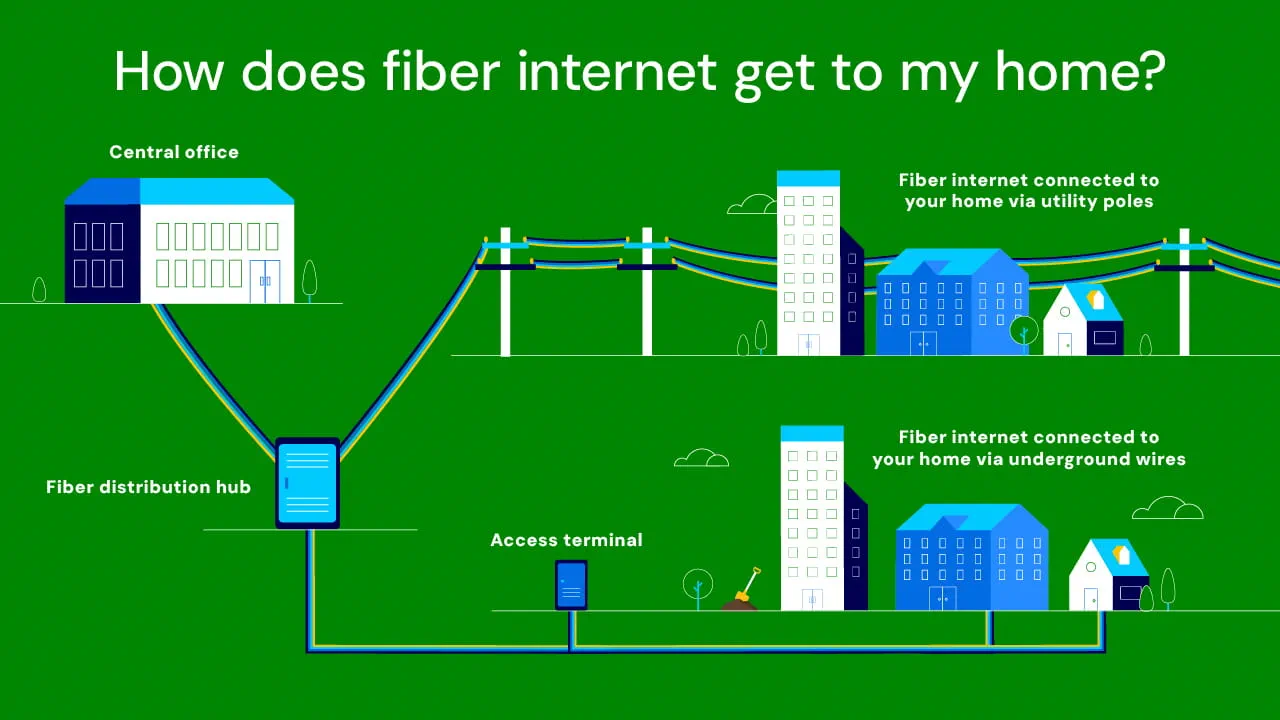
The deployment of fiber optic internet begins at the internet service provider’s (ISP) central office or local hub, often referred to as a “Point of Presence” (PoP). From here, thick bundles of fiber optic cables, known as backbone cables, are laid across vast distances, often running underground or alongside major utility infrastructure. These high-capacity cables connect different regions and cities, forming the core of the ISP’s network.
As these backbone cables approach a residential or business area, they branch out into smaller, more localized distribution cables. These cables typically terminate at neighborhood distribution points, often found in pedestals or utility cabinets strategically placed within communities. These points serve as crucial junctions, enabling the ISP to connect individual homes and businesses to the broader fiber network. The planning for this stage involves extensive engineering and geospatial mapping, ensuring efficient coverage and minimal disruption. This foundational infrastructure is a significant investment for any ISP, directly impacting its brand reputation and ability to deliver on service promises. A well-planned and executed network build-out is key to establishing a strong market presence and customer trust, especially in competitive markets where consumers value reliability and speed above all else.
The Last Mile: Connecting to Your Property
Once the fiber optic cable reaches the neighborhood distribution point, the final stage of external installation – the “last mile” – begins. This is where the fiber is physically brought from the street to your specific property. There are two primary methods for this connection:
-
Aerial Installation: If your existing utilities (like telephone or electricity lines) are run overhead on poles, the fiber optic cable will likely be installed aerially. A technician will attach the fiber cable to existing utility poles, extending it directly to your home. This method is generally quicker and less disruptive, as it avoids excavation. However, aerial cables can be more susceptible to weather damage or accidental snagging.
-
Underground Installation: If your utilities are buried, or if there are no suitable utility poles, the fiber will be installed underground. This process is more involved and typically requires trenching or horizontal directional drilling (HDD).
- Trenching: A narrow trench is dug from the street to your home, typically along the property line, into which the fiber optic conduit is laid. Once the conduit is in place and the fiber cable pulled through, the trench is backfilled, and the ground is restored.
- Horizontal Directional Drilling (HDD): For properties where trenching would be too disruptive (e.g., across driveways, landscaped areas, or beneath existing structures), HDD is used. This involves drilling a borehole underground from an entry point to an exit point, through which the fiber conduit is then pulled. This method minimizes surface disruption but requires specialized equipment and expertise.
Regardless of the method, the goal is to securely and discreetly run the fiber optic cable to the side of your home or business, where it will connect to an outdoor network interface device. The choice between aerial and underground often depends on local regulations, existing infrastructure, and the specific characteristics of your property. For homeowners, understanding this process can impact property aesthetics and potential landscaping considerations.
The Optical Network Terminal (ONT) – Outdoor Component
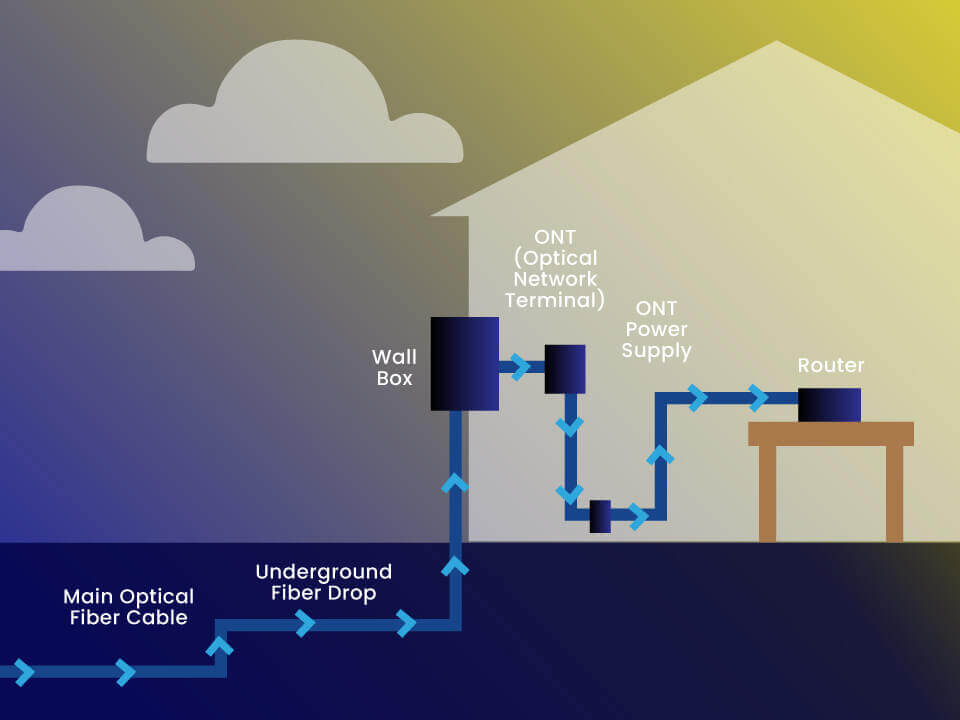
Upon reaching the exterior of your property, the fiber optic cable is terminated and connected to an Optical Network Terminal (ONT), sometimes referred to as a Network Interface Device (NID) or Fiber Network Terminal (FNT) when mounted outdoors. This weather-resistant box is typically installed on an exterior wall of your home, near other utility connections.
The ONT is a critical piece of tech hardware; it acts as the bridge between the fiber optic network and your internal home network. Its primary function is to convert the optical signals carried by the fiber cable into electrical signals that your internal networking equipment, such as your Wi-Fi router, can understand. It also provides reverse functionality, converting electrical signals from your home network back into optical signals for transmission back to the ISP. This outdoor ONT is powered by electricity, often drawing power from an indoor outlet via a thin power cable that also enters the home. Proper installation of the ONT is vital for a stable connection and is exclusively handled by professional technicians, ensuring the integrity of the fiber connection and the safety of the power supply.
The Internal Setup: Integrating Fiber into Your Home
With the fiber optic cable and outdoor ONT securely in place, the installation moves indoors, focusing on routing the connection to your internal devices and establishing your home network.
Running the Fiber Inside
From the outdoor ONT, a dedicated fiber optic jumper cable needs to be routed into the interior of your home or business. This step requires careful planning to minimize visual impact and ensure the cable is protected. The technician will typically drill a small, discreet hole through the exterior wall, guiding the fiber optic cable through it.
Once inside, the cable is routed to the desired location where the indoor ONT and Wi-Fi router will be placed. Common locations include a utility closet, a centralized living area, or near an existing data jack. The goal is to choose a location that offers:
- Proximity to a power outlet: Both the indoor ONT and the router require continuous power.
- Centrality: For Wi-Fi performance, a central location helps maximize signal coverage throughout the property.
- Accessibility: For future troubleshooting or upgrades.
- Aesthetics: Minimizing visible cable runs is usually preferred.
Technicians are trained to conceal the cable as much as possible, often running it along baseboards, through wall cavities, or within conduit, ensuring a tidy and professional finish. This stage requires precision to avoid damaging the delicate fiber core while integrating it seamlessly into the home environment.
The Indoor ONT and Router Connection
Inside your home, the fiber optic cable connects to an indoor ONT. In some modern installations, the outdoor ONT might handle both roles, or the indoor ONT might be integrated into the Wi-Fi router itself, simplifying the gadget count. However, in many setups, a separate indoor ONT is installed. This device is functionally identical to the outdoor version, converting optical signals to electrical signals.
From the indoor ONT, a standard Ethernet cable (Cat5e or Cat6) is used to connect to your primary Wi-Fi router. This router is the gateway to your home’s local area network (LAN), distributing the internet connection to all your devices, both wirelessly (via Wi-Fi) and wired (via Ethernet ports).
Setting up your router involves:
- Powering it on: Connecting it to an electrical outlet.
- Connecting to the ONT: Plugging the Ethernet cable from the ONT into the router’s WAN (Wide Area Network) or Internet port.
- Configuration: Accessing the router’s administration interface (usually via a web browser) to set up your Wi-Fi network name (SSID), password, and security protocols (WPA2/WPA3). Many ISPs provide pre-configured routers, simplifying this step.
This setup transforms the raw fiber optic signal into a usable, distributed internet connection, ready to power all your smart home gadgets, computers, and mobile devices.
Activation, Configuration, and Testing
The final stages of installation involve activating the service, configuring network settings, and rigorously testing the connection to ensure optimal performance.
-
Service Activation: The technician contacts the ISP to activate your specific fiber line. This involves provisioning your account on their network, assigning an IP address, and enabling your service. This is a critical backend process that makes your physical connection live.
-
Signal Verification: Using specialized optical power meters, the technician will verify the strength and quality of the light signal at various points, from the outdoor ONT to the indoor ONT. This ensures there’s no significant signal loss due to bends, crimps, or poor splices in the fiber cable. Optimal signal levels are crucial for reliable, high-speed performance.
-
Network Configuration: While basic router setup is often user-friendly, the technician may perform advanced configurations, such as optimizing Wi-Fi channels, enabling specific security features (an important aspect of digital security), or setting up Quality of Service (QoS) parameters to prioritize certain types of traffic. They will also ensure all connected equipment, like the ONT and router, are running the latest firmware updates, enhancing both performance and security.
-
Speed Tests: Once everything is configured, the technician will run multiple speed tests using dedicated tools or popular online speed test platforms. These tests measure download speeds, upload speeds, and latency, comparing them against your subscribed plan. This step confirms that you are receiving the advertised speeds and that the connection is stable. Any discrepancies are investigated and resolved on the spot.
-
Customer Handover: Finally, the technician will walk you through the basic operation, explain your equipment, confirm your Wi-Fi details, and answer any questions you may have. They will ensure you can successfully connect your devices and browse the internet before concluding the installation. This tutorial aspect is key for customer satisfaction and reducing future support calls.
The Transformative Impact of Fiber Optic Internet
Beyond the technical steps, understanding why fiber optic internet is installed and its far-reaching implications highlights its significance in modern tech and lifestyle.
Unparalleled Performance and Reliability
The most immediate and apparent benefit of fiber optic internet is its unparalleled speed and low latency. Gig-speed internet (1,000 Mbps) is commonplace with fiber, enabling instantaneous downloads, smooth 4K/8K streaming on multiple devices simultaneously, and virtually lag-free online gaming. For businesses, this translates to faster data transfers, more efficient cloud operations, and seamless video conferencing. From a technological standpoint, fiber removes previous bottlenecks, allowing users to fully leverage advanced software, AI tools, and data-intensive applications without frustration.
Furthermore, fiber optic cables are incredibly reliable. Unlike copper, they are immune to electromagnetic interference (EMI) from power lines, appliances, and radio signals, which can degrade DSL and cable connections. They are also less susceptible to environmental factors like temperature fluctuations or moisture. This inherent robustness ensures consistent performance, leading to fewer service interruptions and a more stable online experience, crucial for both personal productivity and business continuity.
Economic and Lifestyle Advantages
The benefits of fiber extend beyond raw speed into significant economic and lifestyle improvements. For homeowners, installing fiber optic internet can increase property value, making a home more attractive to potential buyers who prioritize high-speed connectivity. This is a tangible return on investment (ROI) that complements the monthly service cost.
For individuals seeking online income or engaging in side hustles, fiber provides the essential backbone. Whether it’s high-volume content creation, running an e-commerce store, participating in the gig economy, or remote work, a fast and reliable connection is critical for productivity and competitive advantage. Businesses benefit from enhanced operational efficiency, better collaboration tools, and the ability to access cloud-based financial tools and services seamlessly, contributing positively to overall business finance. The stability of fiber also reduces IT troubleshooting costs and downtime, indirectly saving money.
Security and Future-Proofing Your Digital Life
Fiber optic internet offers inherent digital security advantages. Tapping into a fiber optic cable to steal data is significantly harder to detect than tapping a copper cable because it requires physically interrupting the light signal, which would immediately cause a noticeable service disruption. This makes fiber a more secure medium for transmitting sensitive data.
Perhaps one of the most compelling aspects of fiber optic installation is its future-proofing capability. The underlying fiber infrastructure has an enormous capacity for bandwidth upgrades. While current residential speeds are often capped at 1-2 Gbps, the fiber itself can theoretically handle much higher speeds (tens of terabits per second) with upgrades only to the electronic equipment at either end. As technology trends evolve and bandwidth demands continue to soar with increasingly complex software, higher resolution media, and the proliferation of IoT devices, fiber optic internet is already equipped to meet those future needs, ensuring your connectivity remains cutting-edge for years to come.
In conclusion, the installation of fiber optic internet is a sophisticated process involving intricate external infrastructure development and meticulous internal wiring. However, the investment in time and resources yields profound benefits, delivering unmatched speed, reliability, and security that transform our digital interactions. It’s not merely an upgrade to faster internet; it’s an essential foundation for the modern, connected world, powering everything from advanced tech applications and smart gadgets to burgeoning online businesses and seamless personal digital experiences.
aViewFromTheCave is a participant in the Amazon Services LLC Associates Program, an affiliate advertising program designed to provide a means for sites to earn advertising fees by advertising and linking to Amazon.com. Amazon, the Amazon logo, AmazonSupply, and the AmazonSupply logo are trademarks of Amazon.com, Inc. or its affiliates. As an Amazon Associate we earn affiliate commissions from qualifying purchases.