
In an increasingly digital financial landscape, the humble paper check might seem like a relic of a bygone era. Yet, for millions of individuals and businesses, checks remain an essential tool for managing finances, making payments, and maintaining detailed records. Whether you’re paying rent to a landlord who prefers traditional methods, compensating a contractor, providing a monetary gift, or managing business expenses, knowing how to efficiently order checks from your bank, like PNC, is a fundamental aspect of sound financial management. This comprehensive guide will walk you through the process, ensuring you can acquire the checks you need with confidence and security.

The Enduring Relevance of Checks in Modern Finance
While digital payment solutions like Zelle, online bill pay, and card transactions have revolutionized how we move money, checks continue to play a vital, often indispensable, role in personal and business finance. Understanding their persistent utility is key to appreciating why the process of ordering them remains important.
Why Checks Still Hold a Place
For many, checks are not just an alternative but a preferred or necessary payment method in specific scenarios.
- Formal Transactions: For large purchases, escrow payments, or legal settlements, a physical check can provide a tangible record and a sense of formality that digital transfers sometimes lack.
- Situations Requiring Paper Trails: Rent payments, contractor invoices, or payments to smaller businesses often require a clear, physical paper trail for tax purposes or dispute resolution. A canceled check serves as irrefutable proof of payment.
- Security Concerns for Recipients: Not everyone is comfortable sharing bank account details for direct transfers, or they may not have access to or prefer digital payment platforms. Checks offer an alternative that doesn’t require sharing sensitive online banking information.
- Gifts and Donations: For personal gifts, especially to children or for special occasions, a check is often a more traditional and well-received method than a digital transfer. Similarly, many charitable organizations accept checks.
- Offline Transactions: In areas with limited internet access or for face-to-face transactions where a card reader isn’t available, a check provides a universally accepted payment mechanism.
Understanding Check Components
Before you place an order, it’s beneficial to understand the critical information encoded on every check. This knowledge helps you verify details during the ordering process and ensures your checks are correctly configured for your account.
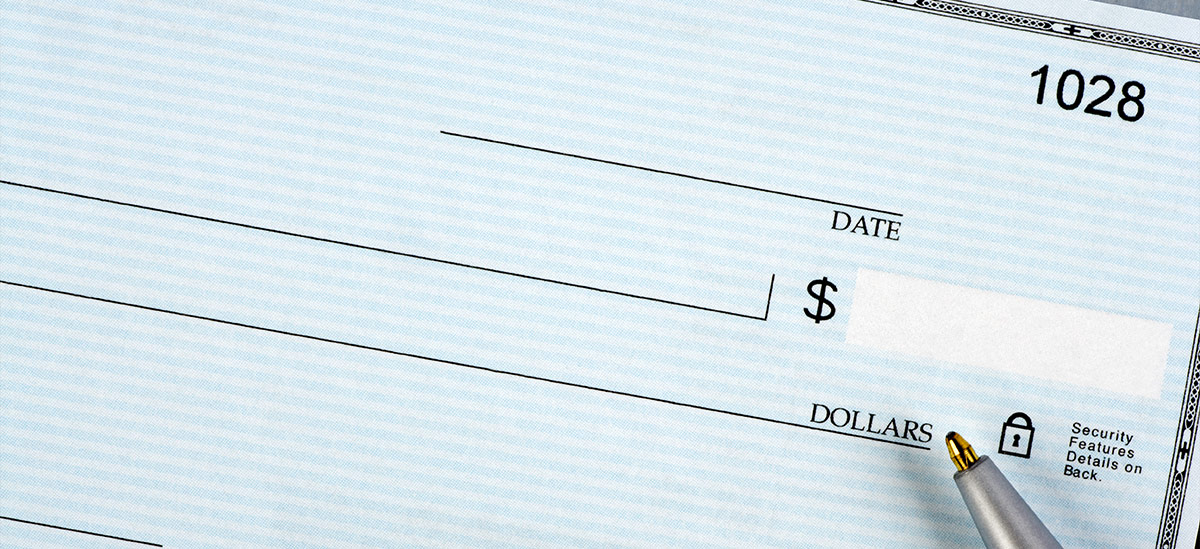
- Bank Information: This includes the bank’s name (PNC Bank) and sometimes its logo.
- Payee Line: Where you write the name of the person or entity you are paying.
- Date Line: Where you write the date of the payment.
- Amount Box and Line: Where you write the payment amount in numerical and written form.
- Memo Line: For your personal notes regarding the payment.
- Signature Line: Your authorization for the payment.
- MICR Line (Magnetic Ink Character Recognition): This sequence of numbers at the bottom of the check is crucial for automated processing. It typically contains:
- Routing Number: A nine-digit code identifying your bank.
- Account Number: Your specific checking account number.
- Check Number: A unique identifier for each check.
Ensuring these details are accurate when ordering is paramount to preventing payment issues and maintaining financial security.
Your Comprehensive Guide to Ordering Checks from PNC
PNC Bank offers several convenient methods for ordering checks, catering to different preferences and situations. Understanding each option allows you to choose the most efficient path for your needs.
Ordering Through PNC Online Banking (Most Common)
For most PNC customers, the quickest and most secure way to order checks is directly through their online banking portal.
- Log In Securely: Visit the official PNC Bank website (pnc.com) and log into your online banking account using your username and password. Always ensure you are on a secure connection (look for “https://” in the URL and a padlock icon).
- Navigate to Check Reordering: Once logged in, look for a section labeled “Account Services,” “Customer Service,” “Order Checks,” or a similar option. This is usually found within the main navigation menu or directly on your account summary page.
- Select Your Account: If you have multiple checking accounts, choose the specific account for which you wish to order checks.
- Verify Information: The system will typically pre-populate your account and routing numbers. Double-check that all displayed information, including your name and address, is accurate. This is crucial for security and correct delivery.
- Choose Check Design and Quantity: You’ll be presented with various check designs, styles (e.g., standard, duplicate), and quantities. Select your preferences. You might also have options for adding security features, personalized messages, or specific starting check numbers.
- Review and Confirm: Carefully review your entire order, including the cost, shipping address, and estimated delivery date. Make any necessary adjustments before proceeding.
- Place Order: Authorize the purchase using your debit card or by direct debit from your PNC checking account. You will receive an order confirmation, often via email.
Utilizing the PNC Mobile Banking App
The PNC Mobile Banking app provides a convenient way to manage your finances on the go, including ordering checks. The process is similar to online banking:
- Open the App and Log In: Launch the PNC Mobile Banking app on your smartphone or tablet and log in using your credentials or biometric authentication.
- Find the Ordering Option: Navigate through the app menu, looking for “Account Services” or an explicit “Order Checks” option, usually found under the selected checking account details.
- Follow On-Screen Prompts: The app will guide you through verifying your account details, selecting check styles, quantities, and reviewing your order, much like the online banking portal.
- Confirm Purchase: Complete the purchase within the app.
Placing an Order Over the Phone
If you prefer speaking with a representative or encounter issues with online ordering, PNC’s customer service can assist you.
- Gather Information: Have your PNC account number, routing number, and personal identification ready.
- Call PNC Customer Service: Dial PNC’s general customer service number (usually available on their website or the back of your debit card).
- Verify Your Identity: The representative will ask you security questions to verify your identity before proceeding.
- Place Your Order: Clearly state that you wish to order new checks. The representative will guide you through the available options, confirm your details, and process the order. This method can be particularly helpful for complex orders or if you have specific questions.
Visiting a PNC Branch In-Person
For those who prefer face-to-face interaction or need assistance with unique situations, visiting a PNC branch is an excellent option.
- Locate a Branch: Use the PNC website or app to find the nearest branch.
- Bring Identification: Carry a valid government-issued ID (driver’s license, passport) and your PNC debit card or account information.
- Speak with a Banker: A customer service representative or banker can help you fill out the order form, answer questions about check styles, security features, and costs, and ensure all details are accurate. This is often the best route for first-time orders, name changes on checks, or if you need temporary checks immediately.
Third-Party Check Providers (Considerations and Cautions)
While PNC facilitates ordering checks directly, you might encounter third-party providers online that offer checks at potentially lower prices or with more design options.
- Examples: Harland Clarke (often a default vendor for many banks, including PNC), Deluxe, CheckAdvantage, and numerous other online check printers.
- Advantages: Potentially lower costs, wider range of designs, faster shipping options.
- Disadvantages and Cautions:
- Security Risk: Sharing your bank account and routing numbers with an unfamiliar third-party vendor carries an inherent security risk. Always verify the legitimacy and security protocols of any third-party provider.
- Compatibility: Ensure the checks ordered from a third-party are fully compatible with PNC’s processing systems to avoid issues.
- Verification: PNC may not be able to directly assist with order issues if placed through an independent vendor.
- Cost vs. Risk: Weigh the potential savings against the increased risk to your financial information. PNC’s direct ordering methods generally offer the highest level of security and peace of mind.
Navigating Choices: Types, Customization, and Costs
Ordering checks isn’t a one-size-fits-all process. PNC and its affiliated check printers offer a variety of options to suit different financial needs and personal preferences.
Selecting the Right Check Type
The type of checks you choose should align with how you plan to use them.
- Personal Checks:
- Standard: The most common form, suitable for everyday payments.
- Duplicate Checks: Feature a carbonless copy of each check you write, providing an instant record for easy tracking and budgeting. Highly recommended for personal financial management.
- Wallet/Compact Checks: Smaller checks designed to fit easily into a wallet.
- Desk/Larger Checks: Offer more space for writing details and are often preferred for record-keeping.
- Business Checks: Designed for business transactions, these often include space for company logos, specific payment details, and are available in formats like:
- Payroll Checks: For paying employees.
- Voucher Checks: With detachable stubs for detailed record-keeping.
- Deposit Slips: Essential for making cash or check deposits to your business account.
Personalizing Your Checks
Beyond basic functionality, you can often personalize your checks in various ways.
- Design Options: Choose from a wide array of themes, colors, and graphics, ranging from scenic landscapes to sports teams, or even custom images for business accounts.
- Security Features: Modern checks come with sophisticated security features to deter fraud. These may include:
- Void Pantograph: A hidden word (e.g., “VOID”) that appears when the check is copied.
- Microprint: Tiny text visible only under magnification, which becomes illegible when photocopied.
- Chemical Protection: Paper that reacts to chemical alterations, revealing a stain.
- Security Backer: Warnings and features printed on the back of the check.
- Watermarks: Embedded designs visible when held to light.
- Investing in checks with enhanced security features is a prudent financial decision.
- Adding Contact Information: Ensure your correct name, address, and sometimes phone number are printed clearly. Some businesses may opt to include their logo or business name prominently.
Understanding the Cost and Delivery
The cost of ordering checks can vary significantly based on several factors.
- Pricing Tiers: The price usually depends on the quantity of checks (e.g., a box of 100 vs. 200), the chosen style (standard vs. duplicate), design complexity, and any added security features.
- Shipping Options: You’ll typically have standard shipping (which can take 7-14 business days) and expedited options for an additional fee.
- Expected Delivery Times: Always note the estimated delivery timeframe. If you are running low on checks, plan your order accordingly to avoid being without them.
- Potential for Free Checks: Some PNC accounts, particularly new checking accounts or premium accounts, may offer a free box of checks as a benefit. It’s always worth checking with PNC customer service or your account agreement to see if you qualify.
Ensuring Security and Exploring Modern Payment Alternatives
While ordering checks, and using them, involves certain financial practices, it’s equally important to consider security measures and be aware of alternative payment methods that might better suit certain transactions.
Protecting Your Financial Information During Ordering
Security is paramount when dealing with your bank account details.
- Secure Connections: Always order checks through PNC’s official, secure channels (online banking, mobile app, phone, or in-person). Ensure websites display “https://” and a padlock symbol.
- Verify Vendor Legitimacy: If you consider a third-party vendor, thoroughly research their reputation, security practices, and customer reviews before providing sensitive information.
- What to Do with Old Checks: Never simply throw away old or unused checks. Shred them thoroughly to prevent identity theft and fraud.
- Monitor Account Statements: After placing an order, review your bank statements to confirm the correct charge for checks and to ensure no unauthorized transactions occur.
When Checks Arrive: Best Practices
Once your new checks arrive, responsible handling is key to preventing fraud.
- Storing Checks Securely: Keep your blank checks in a safe, private location, away from prying eyes. Treat them like cash.
- Review for Accuracy: Immediately check the printed details (your name, address, account number, routing number) for any errors. If you find discrepancies, contact PNC immediately.
- What to Do if Checks Are Lost or Stolen: If your checks are lost, stolen, or you suspect fraud, contact PNC Bank immediately to report the incident. They can advise on steps to take, which might include placing a stop payment on a range of checks or closing the account and opening a new one. Prompt action can limit your liability.
Modern Alternatives to Traditional Checks
While checks maintain their relevance, it’s wise to integrate modern payment alternatives into your financial strategy where appropriate, often offering greater speed and convenience.
- PNC Online Bill Pay: Most banks, including PNC, offer robust online bill pay services, allowing you to schedule and send payments directly from your checking account to businesses or individuals, often electronically or via a bank-issued check. This is ideal for recurring bills.
- Digital Payment Apps (e.g., Zelle, Venmo): For person-to-person (P2P) transfers, apps like Zelle (integrated directly into PNC’s online banking and mobile app) offer instant transfers between accounts at participating banks. Venmo and PayPal are also popular for smaller, less formal transfers. Always exercise caution and only send money to trusted individuals.
- Debit and Credit Cards: For everyday purchases, debit and credit cards offer immediate payment and transaction tracking. Credit cards also provide consumer protection and rewards, making them a strategic choice for many purchases.
- ACH Transfers and Wire Transfers: For larger, often business-to-business or international transactions, Automated Clearing House (ACH) transfers are cost-effective for electronic payments, while wire transfers offer same-day, guaranteed funds for a higher fee.
Knowing how to order checks from PNC Bank is an essential skill for managing your finances effectively. By understanding the available methods, navigating your choices, and prioritizing security, you can confidently maintain access to this enduring financial tool, ensuring all your payment needs are met, both traditionally and digitally.
aViewFromTheCave is a participant in the Amazon Services LLC Associates Program, an affiliate advertising program designed to provide a means for sites to earn advertising fees by advertising and linking to Amazon.com. Amazon, the Amazon logo, AmazonSupply, and the AmazonSupply logo are trademarks of Amazon.com, Inc. or its affiliates. As an Amazon Associate we earn affiliate commissions from qualifying purchases.