
In an increasingly digital world, managing money often transcends traditional banking. Platforms like PayPal have revolutionized how we send, receive, and spend funds, becoming indispensable tools for personal finance, online income generation, and business transactions. Far more than just a payment processor, PayPal functions as a versatile digital wallet, connecting individuals and businesses across the globe. Understanding “how to do PayPal” means more than just knowing where to click; it involves grasping its financial implications, leveraging its features for optimal money management, and navigating its landscape with security and strategic foresight.
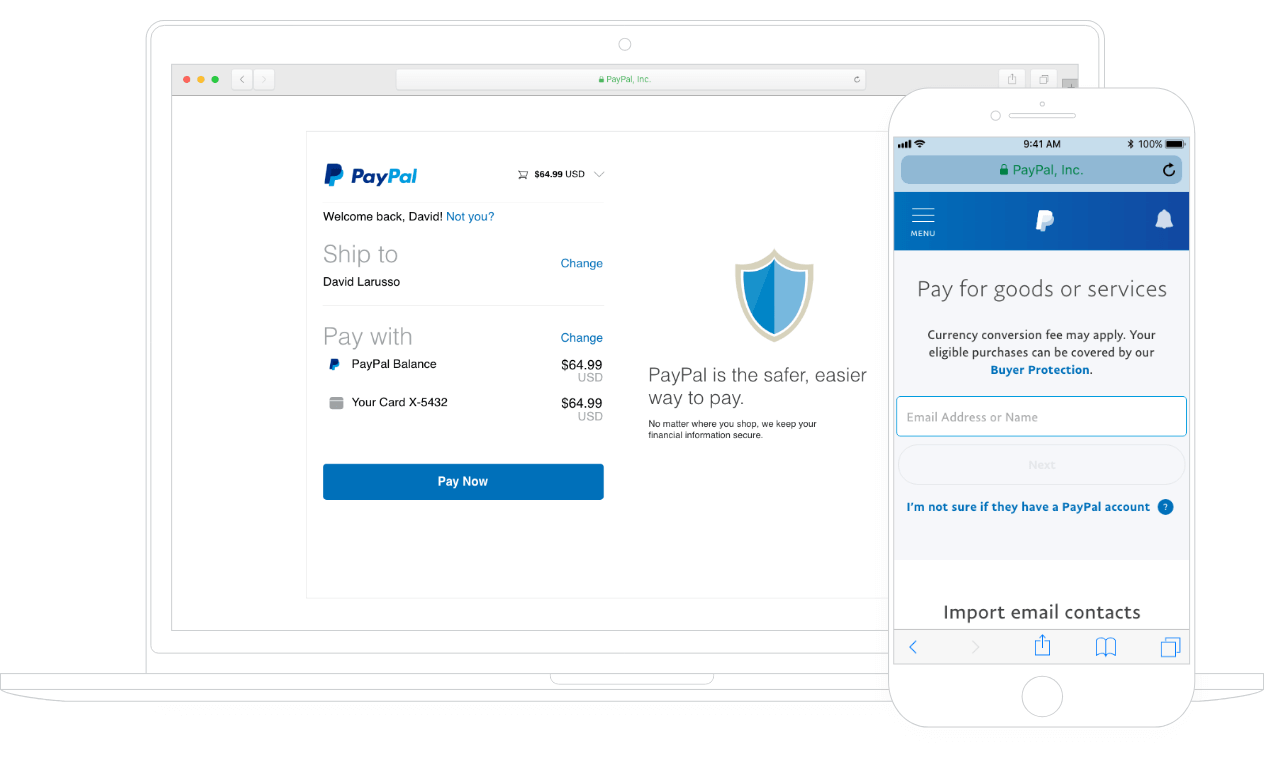
This guide delves into mastering PayPal from a financial perspective, offering insights into setting up your account, executing various transactions, utilizing it to grow your online income, and protecting your financial interests. Whether you’re a casual user, a burgeoning freelancer, or a small business owner, harnessing the full power of PayPal can streamline your financial life and open new avenues for economic activity.
Establishing Your PayPal Foundation: Secure Account Setup and Configuration
The journey to effective digital money management with PayPal begins with a robust and well-configured account. This foundational step is crucial for ensuring security, maximizing functionality, and aligning the platform with your specific financial needs.
The Initial Steps: Creating Your Personal or Business Account
The first decision you’ll face is choosing between a Personal and a Business account. This choice is fundamental, as it dictates the features available to you, the fees you might incur, and how you’re perceived by those you transact with.
-
Personal Accounts are designed for individuals sending money to friends and family, making online purchases, and occasionally receiving payments for small personal sales. They are simpler to set up, often with fewer verification requirements initially, and cater to everyday financial interactions without commercial intent.
-
Business Accounts are tailored for merchants, freelancers, and companies that regularly send and receive payments for goods and services. They offer advanced features such as invoicing tools, multi-user access, customer service options, and detailed sales reports, all crucial for professional financial tracking and compliance. While a Personal account can sometimes receive goods and services payments, a Business account legitimizes these transactions and provides necessary tools for scalability.
When creating either account, ensure you use accurate personal or business information. This is not only for regulatory compliance but also vital for future identity verification and dispute resolution.
Integrating Your Financial Ecosystem: Linking Bank Accounts and Cards
For PayPal to function as a true digital money management tool, it must be connected to your existing financial ecosystem. Linking bank accounts and credit/debit cards provides the necessary conduits for funding your PayPal balance, withdrawing funds, and making payments directly from these sources.
-
Linking a Bank Account: This is often the most critical step for financial fluidity. A linked bank account allows you to transfer money to and from your PayPal balance without incurring fees (for standard transfers). It also serves as a primary funding source for larger payments and a destination for withdrawing earned income. Verification typically involves PayPal making small deposits to your bank account, which you then confirm on the PayPal platform, ensuring you are the legitimate owner.
-
Linking Credit/Debit Cards: These provide immediate payment options. While using a debit card often acts similarly to a bank account in terms of direct spending, credit cards offer an additional layer of consumer protection and can be useful for managing cash flow or earning rewards points. Be mindful that certain transactions funded by credit cards via PayPal might incur sender fees, which is a key financial consideration.
Properly linking these instruments ensures you always have options for funding transactions and can easily access your PayPal funds when needed.
Verifying Your Identity for Enhanced Capabilities and Security
While basic account creation might allow some limited functionality, full utilization of PayPal’s features and higher transaction limits often requires identity verification. This is a crucial step for both your security and PayPal’s compliance with anti-money laundering (AML) regulations.
Verification typically involves providing personal identification documents (e.g., driver’s license, passport), proof of address (e.g., utility bill), and sometimes your Social Security Number (for US users). While it might seem like an extra hurdle, a verified account:
-
Increases Transaction Limits: Allowing you to send and receive larger sums of money.
-
Enhances Security: Making it harder for fraudsters to misuse your account.
-
Unlocks Features: Such as instant transfers to linked debit cards (often for a fee) or access to specific merchant services.
-
Facilitates Dispute Resolution: A verified identity provides legitimacy when dealing with potential issues.
From a money management perspective, verifying your account is an investment in stability and functionality, preventing future frustrations or limitations.
Differentiating Personal vs. Business Accounts: Choosing the Right Tool
Revisiting the personal vs. business account decision, it’s essential to understand the financial implications of each.
-
Personal Account Strengths (Financial): Ideal for managing personal spending, sharing expenses with friends, and receiving occasional gifts. Transactions between friends and family (funded by bank account or PayPal balance) typically incur no sender fees. However, receiving payments for goods/services on a personal account might still incur seller fees, and these transactions lack the structured tracking and protection offered by business accounts.
-
Business Account Strengths (Financial): Essential for anyone conducting regular commerce. Business accounts come with specific transaction fees for receiving payments for goods and services, but in return, they provide robust seller protection, invoicing tools, dedicated customer service, and easier tax reporting. They also allow for higher transaction volumes and the acceptance of various payment methods. Attempting to run a business solely through a Personal account can lead to issues with tax compliance, transaction limits, and potential account suspension due to violation of user agreements.
Choosing the correct account type from the outset saves time, money, and potential headaches down the line, aligning your digital payment solution with your actual financial activities.
Navigating Core Transactions: Sending, Receiving, and Spending Smartly
Once your PayPal foundation is solid, you can effectively engage in the core financial transactions the platform facilitates. Mastering these operations involves understanding the nuances of each, particularly concerning fees and protections.
Seamless Transfers: Sending Money to Friends, Family, and International Recipients
Sending money is one of PayPal’s most popular features, offering a quick way to transfer funds domestically and internationally.
-
Friends and Family (Personal Payments): This option is designed for non-commercial transfers. When funded by your PayPal balance or a linked bank account, there are typically no fees for the sender. However, if funded by a credit card, the sender usually incurs a fee. Crucially, these transactions generally do not come with PayPal’s Buyer Protection, meaning if something goes wrong, you might have limited recourse. Use this option only with people you trust implicitly.
-
Goods and Services (Commercial Payments): When purchasing an item or paying for a service, always select the “Goods and Services” option. While the recipient (seller) will incur a fee, the sender (buyer) is protected by PayPal’s Buyer Protection Policy. This is a vital financial safety net, allowing you to dispute transactions if the item isn’t received, is not as described, or if there’s unauthorized activity.
-
International Transfers: PayPal facilitates cross-border payments, making it a convenient option for sending money abroad. Be aware of exchange rates and potential international transfer fees, which can vary. Always compare PayPal’s rates to other remittance services to ensure cost-effectiveness for larger sums.
Understanding the fee structure and protection policies associated with each sending method is paramount for smart financial decision-making.
Monetizing Your Endeavors: Receiving Payments for Goods and Services
For freelancers, online sellers, or anyone conducting commercial activity, receiving payments through PayPal is a cornerstone of online income.
-
Standard Goods and Services Payments: When someone pays you for an item or service, PayPal automatically applies its seller protection policies, provided certain conditions are met (e.g., shipping to the address on the Transaction Details page). You, as the recipient, will typically pay a standard transaction fee (a percentage plus a fixed amount per transaction). This fee is a cost of doing business and should be factored into your pricing strategy.
-
Invoicing: PayPal’s invoicing tool (primarily for Business accounts) allows you to create professional invoices with itemized lists, taxes, shipping costs, and custom notes. This streamlines the payment process for clients and provides clear financial records for both parties, essential for accounting and tax purposes.
-
Payment Requests: For less formal situations where a full invoice isn’t needed, you can simply request money from someone. This is useful for getting paid back by a friend or for a quick, small service. The fee structure for the recipient will depend on whether the sender marks it as “friends and family” or “goods and services.”
Accurately tracking incoming payments and understanding the associated fees is crucial for financial health and accurate income reporting.
Powering Your Purchases: Paying Online and Managing Subscriptions
PayPal is a ubiquitous payment option across thousands of online retailers, making it a convenient way to spend.
-
Online Shopping: Using PayPal at checkout often simplifies the process, as your shipping and billing information are securely stored within PayPal, reducing the need to re-enter details on multiple merchant sites. Furthermore, using PayPal for purchases automatically enrolls you in Buyer Protection, adding a layer of security beyond what a credit card might offer on its own.
-
Managing Subscriptions and Automatic Payments: Many services (streaming, software, memberships) allow PayPal for recurring payments. It’s vital to regularly review and manage these subscriptions within your PayPal account settings. Unchecked recurring payments can lead to unnecessary expenses. PayPal provides a centralized dashboard to view and cancel these, offering better financial control.
Managing Your Funds: Balance Withdrawal and Direct Deposits
Your PayPal balance represents funds available within the platform. Knowing how to manage these funds effectively is key to liquidity.
-
Standard Bank Transfer: This is the most common and often free method to move money from your PayPal balance to a linked bank account. Standard transfers typically take 1-3 business days.
-
Instant Transfer: For a small fee, PayPal often offers instant transfers to eligible linked debit cards. This is invaluable when you need immediate access to your funds, perhaps for an unexpected expense or to cover a payment quickly.
-
PayPal Debit Card: If available in your region, a PayPal Debit Card allows you to spend your PayPal balance directly, like a regular debit card, avoiding the need for transfers to a bank account for everyday purchases. This can be particularly useful for managing online income directly.
-
Direct Deposit (for Business accounts): Some business accounts might offer capabilities to set up direct deposit of paychecks or other recurring payments into your PayPal account, further integrating it into your primary financial flow.
Strategic management of your PayPal balance ensures funds are available when needed and minimizes unnecessary fees.
PayPal for Entrepreneurs: Fueling Your Online Income and Business Growth
For the burgeoning entrepreneur, freelancer, or small business owner, PayPal isn’t just a payment method; it’s a vital component of their financial infrastructure. Leveraging its business-centric features can significantly streamline operations and contribute to growth.
Optimizing for Online Sales: Payment Processing for Small Businesses and Freelancers
PayPal offers diverse tools for accepting payments, making it accessible for businesses of all sizes to monetize their offerings online.
-
PayPal Buttons: For simple websites or individual product sales, customizable “Buy Now,” “Add to Cart,” or “Donate” buttons can be easily integrated, allowing customers to pay directly from your site. This is a low-tech entry point for e-commerce.
-
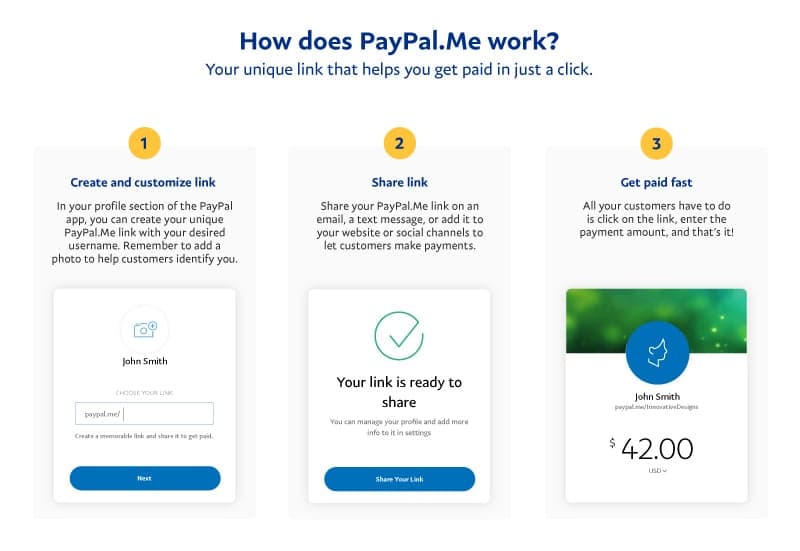
PayPal.Me: A personalized link (e.g., paypal.me/yourname) that customers can use to send you money quickly. It’s incredibly convenient for freelancers or service providers who need to receive payment from clients without a full website setup.
-
Checkout Integration: For more sophisticated e-commerce platforms (like Shopify, WooCommerce, Etsy, eBay), PayPal integrates seamlessly as a payment gateway, often being a preferred option for customers due to its familiarity and security. This broadens your reach and reduces cart abandonment.
Choosing the right payment integration method depends on your business model and technical capabilities, but all aim to make receiving money as frictionless as possible.
Professionalizing Transactions: Utilizing Invoicing and Payment Requests
Professionalism in financial transactions builds trust and ensures timely payments. PayPal’s invoicing features are key here.
-
Customizable Invoices: Beyond basic details, PayPal invoices can include your business logo, custom terms and conditions, discounts, and itemized lists of services or products. This level of detail is crucial for clear communication and preventing payment disputes.
-
Automated Reminders: PayPal’s invoicing system can send automated payment reminders to clients, reducing the administrative burden of chasing overdue payments – a significant financial benefit for small businesses.
-
Partial Payments and Deposits: For larger projects, the ability to request partial payments or deposits upfront helps manage cash flow and mitigates risk for service providers.
Efficient invoicing not only gets you paid faster but also provides a professional image that reinforces your brand and encourages repeat business.
Understanding the Cost of Doing Business: PayPal Fees and Profit Margins
For any business, understanding and managing costs is paramount. PayPal’s transaction fees are a direct cost that impacts your profit margins.
-
Standard Transaction Fees: These are typically a percentage of the transaction amount plus a fixed fee. The exact rates can vary by country, transaction type (domestic vs. international), and whether you have a special merchant rate.
-
Micro-payment Fees: For businesses dealing with very small transactions (e.g., digital content sales), PayPal offers a “micro-payments” rate structure, which involves a higher percentage but a much lower fixed fee per transaction, often more economical for low-value items.
-
International Transaction Fees: Receiving payments from international customers usually involves higher fees, and currency conversion charges can also apply. It’s vital to factor these into your international pricing strategy.
A clear understanding of these fees allows you to accurately price your products or services, ensuring profitability rather than absorbing unforeseen costs. Regularly reviewing your PayPal statements can help identify fee patterns and optimize your payment collection strategies.
Streamlining Operations: Integrating PayPal with E-commerce and Platforms
PayPal’s API and integrations allow for a high degree of automation and streamlining of business operations, especially when combined with other software.
-
E-commerce Platform Integration: As mentioned, PayPal is a standard payment option for most e-commerce platforms. This integration handles payment processing, order updates, and inventory management, significantly reducing manual effort.
-
Accounting Software Integration: Many accounting software solutions (e.g., QuickBooks, Xero) can link directly to your PayPal Business account, automatically importing transactions. This simplifies reconciliation, tax preparation, and overall financial reporting, saving valuable time and reducing the chance of errors.
-
Subscription Services: For businesses offering recurring services, PayPal’s subscription features can automate billing, manage customer subscriptions, and handle cancellations, creating a predictable revenue stream with minimal oversight.
Leveraging these integrations transforms PayPal from a mere payment processor into an integral part of your business’s financial and operational backbone.
Fortifying Your Financial Future: Security, Protection, and Smart Practices
While PayPal offers incredible convenience and financial opportunities, safeguarding your account and understanding its protection mechanisms are crucial for securing your digital assets. Proactive security measures and a clear understanding of your rights can prevent financial loss and mitigate risks.
Safeguarding Your Digital Wallet: Best Practices for Account Security
Your PayPal account holds sensitive financial information and potentially valuable funds. Treating its security with the utmost importance is non-negotiable.
-
Strong, Unique Passwords: Never reuse passwords. Create a complex password for your PayPal account that combines uppercase and lowercase letters, numbers, and symbols.
-
Two-Factor Authentication (2FA): Enable 2FA immediately. This adds an extra layer of security, requiring a code from your phone (via SMS or an authenticator app) in addition to your password during login. Even if your password is stolen, your account remains secure.
-
Regular Monitoring: Periodically review your transaction history for any unauthorized or suspicious activity. Set up email or text notifications for every transaction.
-
Beware of Phishing: PayPal will never ask for your password or full financial details via email. Be extremely cautious of emails that demand urgent action, threaten account closure, or contain suspicious links. Always log directly into your PayPal account via their official website or app.
-
Secure Devices and Networks: Only access PayPal from trusted devices and secure internet connections. Avoid public Wi-Fi networks when handling financial transactions.
These practices are not just suggestions; they are essential habits for robust financial security in the digital age.
Leveraging Buyer and Seller Protection: Understanding Your Rights
PayPal’s protection policies are a significant advantage, but understanding their scope and limitations is key to using them effectively.
-
Buyer Protection: If you purchase an eligible item online and it doesn’t arrive, or it significantly differs from the seller’s description, PayPal’s Buyer Protection can help you get a refund. This protection typically covers physical goods and some intangible items, provided you follow the dispute resolution process within the specified timeframe. It’s a critical safety net for online shopping.
-
Seller Protection: For businesses, Seller Protection safeguards against specific types of buyer claims (e.g., unauthorized transactions, items not received) when certain criteria are met (e.g., shipping to the address on the Transaction Details page, proof of delivery). This reduces the risk of chargebacks and fraudulent claims, providing confidence to sell online.
Knowing these policies empowers you to act decisively if a problem arises and helps you conduct transactions with greater peace of mind.
Vigilant Monitoring: Tracking Transactions and Resolving Disputes
Proactive monitoring and swift action are vital components of financial health.
-
Regular Statement Review: Just as you’d review bank statements, regularly check your PayPal transaction history. Look for any unfamiliar charges, payments, or transfers.
-
Dispute Resolution Process: If you identify an issue, PayPal has a structured dispute resolution center. For buyers, this typically involves opening a dispute, attempting to resolve it with the seller, and escalating it to a claim if necessary. For sellers, it involves responding to disputes and providing evidence to support your case. Acting quickly and providing comprehensive information increases your chances of a favorable outcome.
-
Contacting Customer Support: For complex issues or situations outside the standard dispute process, PayPal’s customer support can provide guidance. Ensure you’re contacting official PayPal channels, not fraudulent ones.

Strategic Financial Planning: When and How to Best Utilize PayPal
Finally, integrating PayPal into your broader financial strategy is about understanding its strengths and weaknesses relative to other financial tools.
-
Complementary Tool: View PayPal as a complement to your traditional banking, not a replacement. It excels at quick online payments, international transfers, and e-commerce transactions, but a traditional bank account is usually better for large savings, loans, and investment vehicles.
-
Budgeting Aid: For online spenders, using PayPal can help segment your digital budget. By transferring a specific amount to your PayPal balance for online purchases, you can effectively ring-fence your spending.
-
Emergency Fund Access: The instant transfer feature (for a fee) can be a useful, albeit costly, way to access funds quickly from your online income in an emergency.
-
Global Reach: For businesses looking to expand internationally, PayPal provides an accessible way to accept payments from customers worldwide without the complexities of setting up multiple international bank accounts.
Mastering PayPal isn’t just about technical proficiency; it’s about making informed financial choices that align with your personal and business goals. By understanding its features, fees, security protocols, and strategic applications, you can transform “how do I do PayPal” into “how do I excel with PayPal,” optimizing your digital money management for a secure and prosperous financial future.
aViewFromTheCave is a participant in the Amazon Services LLC Associates Program, an affiliate advertising program designed to provide a means for sites to earn advertising fees by advertising and linking to Amazon.com. Amazon, the Amazon logo, AmazonSupply, and the AmazonSupply logo are trademarks of Amazon.com, Inc. or its affiliates. As an Amazon Associate we earn affiliate commissions from qualifying purchases.