
In the rapidly evolving landscape of financial technology, the tools we use to manage our digital transactions are often subject to a lifecycle of utility. Whether you are streamlining your digital footprint, migrating to a more specialized fintech stack, or enhancing your personal cybersecurity posture, knowing how to properly decommission a long-standing account is a critical skill in digital hygiene. Closing a PayPal account is not merely a matter of clicking a “delete” button; it is a technical process that requires careful preparation to ensure data integrity, financial settlement, and the removal of persistent digital links.
As we move toward a more decentralized and privacy-conscious digital era, the decision to close a legacy payment platform often stems from a desire for better software integration or more robust security protocols. This guide provides a comprehensive technical roadmap for navigating the complexities of closing a PayPal account, ensuring that no digital loose ends are left behind.
Pre-Closure Checklist: Safeguarding Your Data and Software Integrations
Before initiating the final deletion sequence, it is imperative to perform a series of technical audits. A PayPal account often serves as a central hub for various digital services, and a hasty closure can lead to broken payment pipelines or the loss of essential historical data.
Withdrawing Your Balance and Resolving Pending Transactions
The first technical hurdle is the liquidation of the account balance. PayPal’s software architecture prevents the closure of any account with a remaining balance—even if it is only a few cents. Users must initiate a transfer to a linked bank account or request a physical check.
Beyond the balance, you must audit the “Pending” tab. If there are active disputes, unresolved claims, or transactions in a “Pending” state, the system will trigger a hard block on the closure request. From a technical standpoint, these transactions represent open database entries that must be reconciled before the account’s unique identifier can be flagged for deletion. Ensure all outgoing payments have been cleared by the recipient’s bank and that no “eChecks” are still in the clearing cycle, which can take between 3 to 5 business days.
Disconnecting Linked Banking and Credit Card Information
While PayPal technically removes your financial data from its active interface upon closure, a best practice in digital security is to manually unbind your financial instruments before hitting the final delete button. This involves navigating to the “Wallet” section and systematically removing each linked credit card, debit card, and bank account.
By manually removing these links, you send an explicit command to the platform’s database to sever the connection between your external financial APIs and the PayPal ecosystem. This minimizes the risk of “zombie” authorizations where a subscription service might attempt to ping a closed account, leading to unexpected technical errors or bank-side NSF (Non-Sufficient Funds) fees.
The Step-by-Step Technical Process of Account Deletion
PayPal’s user interface (UI) is designed for retention, meaning the path to account closure is often nested within several layers of the settings menu. Understanding the specific software workflow is essential for a smooth exit.
Closing via Desktop Browser: The Standard Procedure
The most reliable method for closing an account is through a desktop web browser, as the mobile interface sometimes limits access to deep-level account settings. Once logged in, the technical path is as follows:
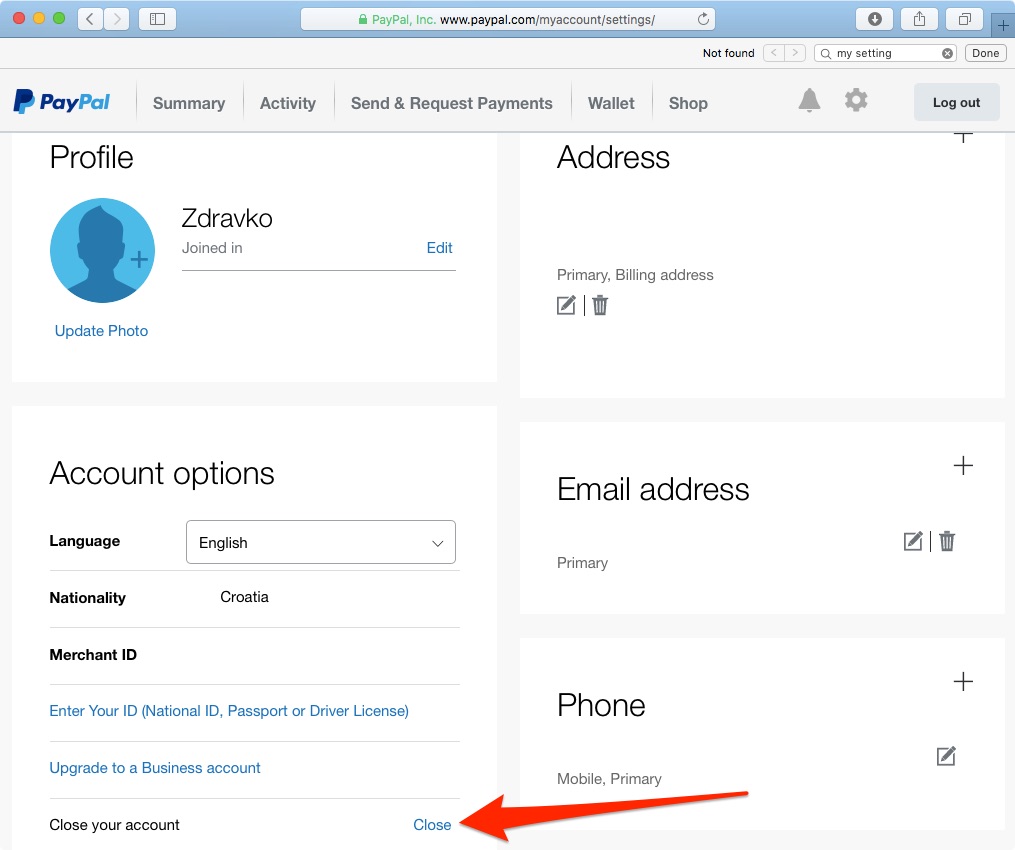
- Navigate to Settings: Click the gear icon in the top-right corner of the dashboard.
- Account Options: Scroll to the bottom of the “Account” tab under your profile information.
- Execute Closure: Locate the link labeled “Close your account.”
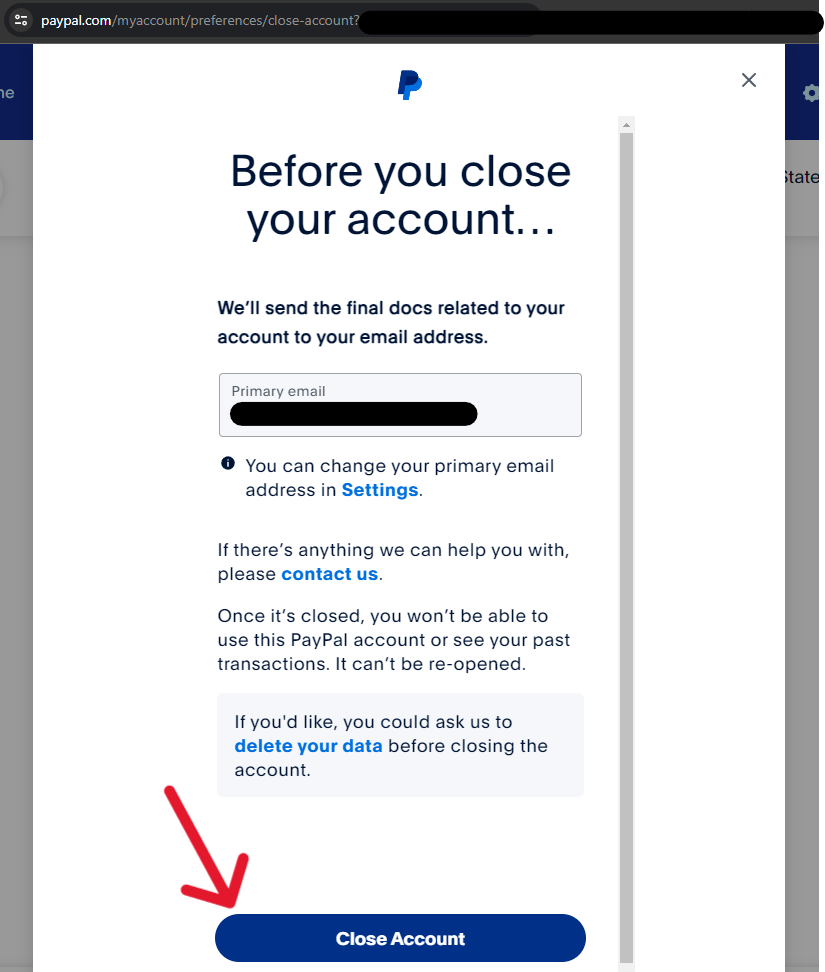
At this stage, the software will perform an automated check of your account status. If the system detects an outstanding balance, an open dispute, or an unverified identity flag, it will interrupt the process and provide a specific error code or notification. If the account is clear, you will be asked to provide a reason for leaving—a data point used by PayPal’s product teams for churn analysis—before confirming the permanent deletion.
Navigating the Mobile App Interface for Deactivation
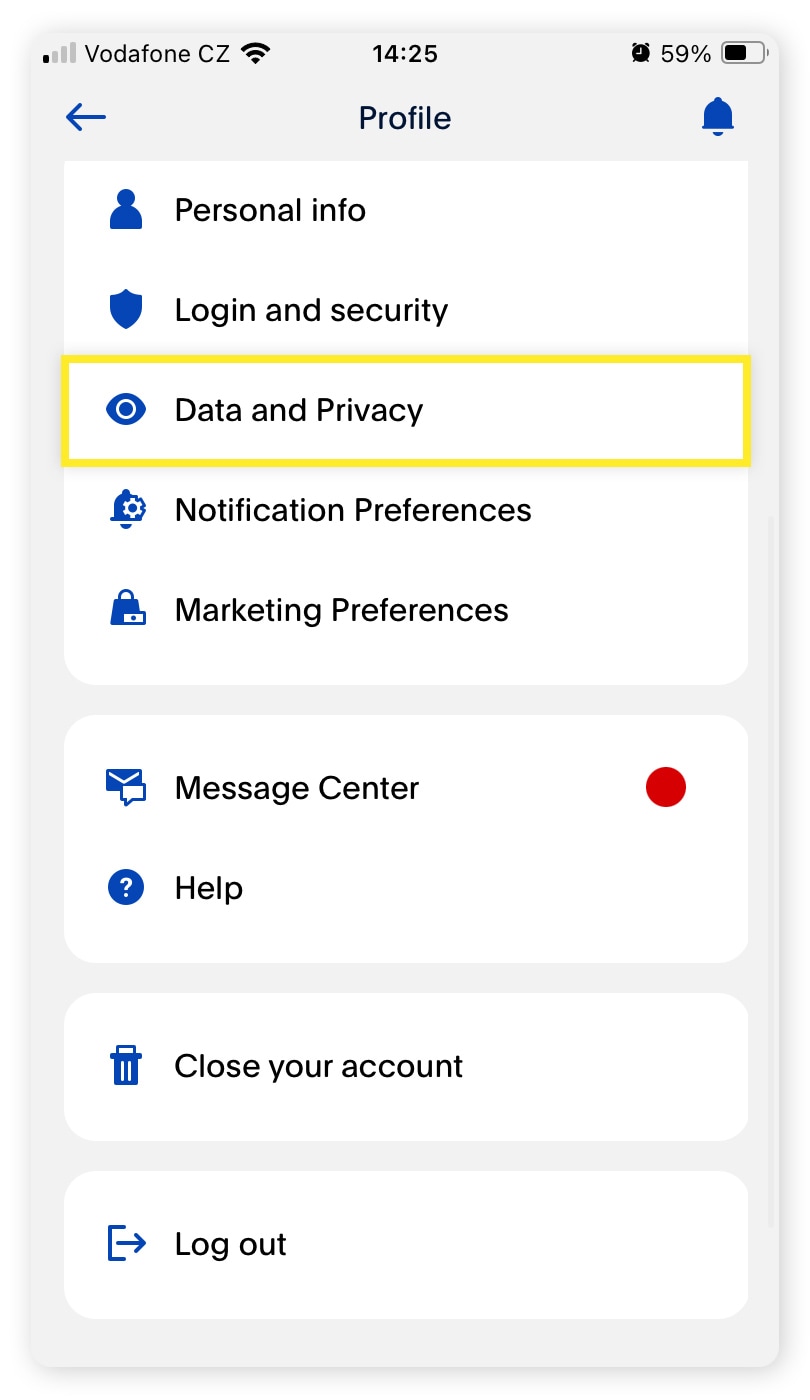
For users who primarily interact with the platform via the iOS or Android application, the workflow is slightly different. Within the app, the “Close Account” feature is often found under the “Profile” icon. However, it is important to note that deleting the PayPal app from your smartphone does not close your account. It merely removes the local software interface.
When using the app, the software may redirect you to a mobile-optimized web view to complete the closure. This is a security measure to ensure that the request is authenticated through a standard web protocol, which often includes an additional layer of Two-Factor Authentication (2FA). Always ensure your app is updated to the latest version before attempting this, as legacy versions may have broken links to the account closure API.
Understanding the Digital Aftermath: Privacy and Security Implications
Closing your account is a significant step in enhancing your digital privacy, but it is essential to understand what happens to your data once the “Close Account” command is executed.
What Happens to Your Transaction History?
Once an account is closed, you lose all access to your transaction history. From a technical and tax-compliance perspective, this is a critical point. Before closure, you should navigate to the “Activity” tab and use the “Download” tool to export your entire history into a CSV or PDF format.
PayPal, as a regulated financial institution, is legally required to retain certain data points for a specific period (often 7 to 10 years depending on the jurisdiction) to comply with Anti-Money Laundering (AML) and Know Your Customer (KYC) regulations. This means that while your account is “closed” to you and the public, a sanitized version of your data remains in their cold storage for regulatory audits. Understanding this distinction is key for those pursuing a “Right to be Forgotten” under frameworks like GDPR or CCPA.
Removing Third-Party Permissions and API Access
One of the most overlooked aspects of PayPal is its role as an Identity Provider (IdP). Many websites allow you to “Log in with PayPal.” Closing your account will break these authentication tokens.
Furthermore, you must audit “Automatic Payments” and “API Permissions.” If you have granted a third-party app (like a budgeting tool or an e-commerce platform) access to your PayPal API, you should revoke these permissions in the “Security” settings before closing the account. This ensures that the third-party software receives a “revoked” status rather than a “404 Not Found” error, which can cause synchronization loops in other software you use.
Troubleshooting Common Barriers to Account Closure
In some instances, users may find that the “Close your account” button is unresponsive or produces an error message. These barriers are usually triggered by automated security scripts designed to prevent fraudulent account deactivations.
Resolving Limitations, Disputes, and Holds
If your account has been “Limited”—meaning PayPal has restricted certain functions due to suspicious activity or the need for identity verification—you cannot close the account until the limitation is lifted. This creates a technical paradox for some users. To resolve this, you must navigate to the “Resolution Center” and provide the requested documentation (such as a photo ID or proof of address).
Similarly, if a buyer has opened a dispute against you, the account is effectively locked in the database to protect the financial interests of both parties. The software logic dictates that the “closure” state cannot be toggled while a “dispute” state is active. You must either resolve the claim through a refund or wait for the PayPal arbitration team to close the case.
Dealing with Unconfirmed Email Addresses and Technical Glitches
An unconfirmed email address can sometimes prevent the final closure of an account. The system requires a verified communication channel to send the final “Account Closed” confirmation. If you encounter a generic “Something went wrong” error, try clearing your browser’s cache and cookies or switching to an Incognito/Private mode. This often resolves issues where legacy session tokens interfere with the account closure script.
Transitioning to Modern Digital Payment Alternatives
Once the PayPal account is successfully decommissioned, the focus shifts to selecting a replacement that fits your current tech stack. The fintech industry has moved toward more modular and developer-friendly platforms that offer better transparency and lower latency.
Evaluating Security Protocols in Emerging Fintech
When choosing a new platform—whether it’s a hardware-integrated solution like Apple Pay/Google Pay or a specialized tool like Wise or Stripe—it is vital to evaluate their technical security architecture. Look for platforms that offer:
- Native Multi-Factor Authentication (MFA): Moving beyond SMS-based codes to hardware keys or TOTP (Time-based One-Time Password) apps.
- Virtual Card Provisioning: The ability to generate “burner” card numbers for specific software subscriptions, adding a layer of abstraction between the merchant and your bank.
- Granular API Controls: For power users, the ability to see exactly what data third-party apps are accessing is a significant upgrade over legacy payment systems.
By closing an outdated account and carefully selecting a new suite of digital tools, you are not just changing how you pay; you are optimizing your digital architecture for a faster, more secure, and more private financial future. The process of closing a PayPal account serves as a perfect exercise in taking control of your digital identity and ensuring that your tech stack remains lean and efficient.
aViewFromTheCave is a participant in the Amazon Services LLC Associates Program, an affiliate advertising program designed to provide a means for sites to earn advertising fees by advertising and linking to Amazon.com. Amazon, the Amazon logo, AmazonSupply, and the AmazonSupply logo are trademarks of Amazon.com, Inc. or its affiliates. As an Amazon Associate we earn affiliate commissions from qualifying purchases.