
In the rapidly evolving landscape of digital finance, applications like Venmo have become indispensable tools for peer-to-peer payments, splitting bills, and managing everyday transactions with remarkable ease. This convenience, however, can quickly turn into frustration when the app ceases to function as expected. A Venmo hiccup, whether it prevents sending money, receiving funds, or even just logging in, isn’t just an inconvenience; it can disrupt plans, cause delays, and even impact personal financial liquidity.
Understanding the root cause of why your Venmo might not be working requires a systematic approach, diving deep into common technical glitches, account-specific security measures, payment processing complexities, and even the broader digital ecosystem it operates within. This guide is designed to empower you with the knowledge to diagnose and resolve these issues, ensuring your digital wallet remains a reliable companion. From simple app updates to intricate security protocols, we’ll explore the technical underpinnings that govern Venmo’s performance, offering actionable steps to get you back on track.

Diagnosing Fundamental App and Device Issues
Before delving into more complex scenarios, it’s crucial to address the foundational technical aspects that often underpin Venmo’s functionality. Many “not working” complaints stem from common software or device-related issues that are surprisingly easy to fix. Understanding these initial diagnostics can save significant time and frustration.
Checking for App Updates and Compatibility
One of the most frequent culprits behind an uncooperative app is outdated software. Developers constantly release updates to introduce new features, improve performance, and, crucially, patch bugs and security vulnerabilities. If your Venmo app hasn’t been updated recently, it might be running on an older codebase that has known issues or is no longer fully compatible with Venmo’s backend servers.
- Actionable Step: Head to your device’s app store (Google Play Store for Android, Apple App Store for iOS) and search for “Venmo.” If an “Update” button is present, tap it. Ensure your device’s operating system (iOS or Android) is also up to date, as Venmo may require certain minimum OS versions for optimal performance. An outdated OS can lead to compatibility conflicts, causing the app to crash or freeze.
Internet Connectivity: The Unsung Hero
Venmo, by its very nature, is an online service. It relies heavily on a stable and robust internet connection to communicate with its servers, process transactions, and update account information in real-time. A weak, intermittent, or non-existent internet connection is a prime suspect when Venmo refuses to cooperate.
- Actionable Step: First, check your Wi-Fi signal strength or mobile data connection. Try opening other internet-reliant apps or a web browser to confirm your device can access the internet. If you’re on Wi-Fi, try switching to mobile data (and vice-versa) to rule out issues with a specific network. Restarting your router or toggling your device’s airplane mode on and off can often resolve minor network glitches. Remember, even if you seem connected, a slow or throttled connection can prevent Venmo’s real-time processes from completing successfully.
Device Resources: Clearing Cache and Restarting
Like any complex application, Venmo stores temporary data (cache) to speed up its operations. Over time, this cache can become corrupted or overloaded, leading to sluggish performance, crashes, or incorrect data display. Similarly, your device itself can become bogged down with running processes, leading to resource contention.
- Actionable Step: For Android users, navigate to your device’s Settings > Apps > Venmo > Storage > Clear Cache. iOS users don’t have a direct “clear cache” option for individual apps; instead, offloading the app (Settings > General > iPhone Storage > Venmo > Offload App) and then reinstalling it serves a similar purpose without deleting your data. A universal troubleshooting step, regardless of OS, is simply restarting your device. This clears out temporary memory, refreshes background processes, and can resolve a surprising number of software conflicts.
Server Outages: When It’s Not You, It’s Them
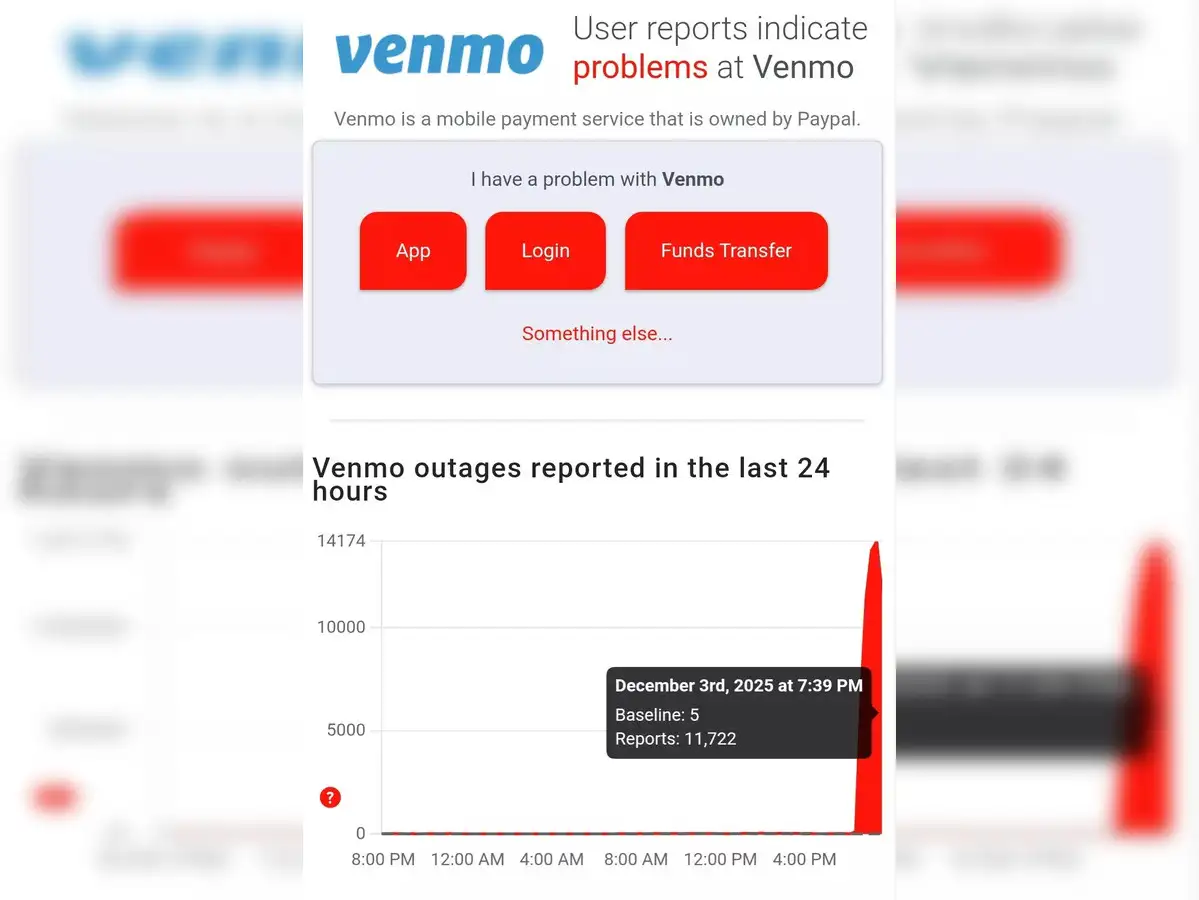
Occasionally, the problem isn’t with your device or app but with Venmo’s own servers. Like any major online service, Venmo can experience maintenance periods, unexpected outages, or high traffic loads that temporarily impact its availability. During such times, no amount of troubleshooting on your end will resolve the issue.
- Actionable Step: Check Venmo’s official status page (if available), their social media channels (like X/Twitter), or third-party outage detectors like DownDetector. If a widespread outage is confirmed, patience is key. Venmo’s technical teams are typically working diligently to restore service, and your best course of action is to wait until the issue is resolved on their end.
Resolving Account Access and Security Hurdles
Beyond the basic technical glitches, Venmo incorporates robust security measures to protect user accounts and prevent fraud. While essential for financial safety, these protocols can sometimes inadvertently hinder legitimate access or transactions if certain conditions are not met or if suspicious activity is flagged. Understanding these mechanisms is crucial for navigating potential account-specific roadblocks.
Login Difficulties and Password Reset Protocols
The most fundamental barrier to using Venmo is often the inability to log in. This can range from forgotten credentials to security features preventing access. Venmo employs multi-factor authentication (MFA) and other robust protocols to ensure only the account holder gains entry.
- Actionable Step: If you’ve forgotten your password, use the “Forgot Password” link on the login screen. Follow the prompts for email or phone verification. Ensure you’re entering the correct email address or phone number associated with your Venmo account. If you’re encountering repeated login failures, Venmo might temporarily lock your account as a security measure. In such cases, waiting a short period or contacting Venmo support directly might be necessary. Also, confirm that your device’s date and time settings are accurate, as discrepancies can sometimes interfere with security token validation.
The Importance of Identity Verification (KYC)
Financial regulations, particularly Know Your Customer (KYC) and Anti-Money Laundering (AML) laws, require Venmo to verify the identity of its users, especially those who wish to exceed certain transaction limits or utilize specific features like direct deposit. Failing to complete identity verification can lead to account restrictions or the inability to perform certain transactions.
- Actionable Step: If you receive notifications about identity verification, follow the instructions meticulously. This usually involves providing your full legal name, date of birth, mailing address, and the last four digits of your Social Security Number (SSN), and sometimes uploading a photo ID. Ensure all information matches official records exactly. Any mismatch or incomplete submission can cause delays or outright rejection, leading to restricted functionality. Venmo’s systems use automated processes to cross-reference this data, and precision is paramount.
Account Freezes Due to Security Flags
Venmo’s sophisticated fraud detection systems constantly monitor transactions and account activity for patterns indicative of fraudulent behavior. Unusual login locations, large or frequent transactions, or activity inconsistent with your typical usage can trigger security flags, potentially leading to a temporary account freeze or hold on funds.
- Actionable Step: If your account is frozen, you will likely receive an email or an in-app notification from Venmo. These communications typically outline the reason for the freeze and the steps required to unfreeze your account, which often involves providing additional verification or explaining the flagged activity. Respond promptly and provide any requested documentation or information truthfully. Transparency is key to resolving these security holds.
Violations of Terms of Service and Account Restrictions
Venmo’s Terms of Service (ToS) are a legally binding agreement outlining acceptable use. Engaging in prohibited activities—such as using Venmo for commercial purposes without a business profile, selling prohibited goods, or using the service for gambling or illegal transactions—can lead to permanent account restrictions or closure.
- Actionable Step: If your Venmo account has been restricted due to a ToS violation, you should receive communication detailing the specific infringement. Review Venmo’s ToS carefully to understand their policies. Resolving such issues often requires direct communication with Venmo support, where you may need to explain your actions and demonstrate compliance going forward. In severe cases, restrictions may be irreversible, highlighting the importance of adhering to the platform’s guidelines.
Addressing Payment Processing Complications
Even when your app is updated and your account is in good standing, issues can arise during the actual process of sending or receiving money. These complications often relate to the linked funding sources, transaction limits, or external bank policies that interface with Venmo’s payment gateway.
Managing Linked Payment Methods: Banks and Cards
Venmo relies on correctly linked bank accounts, debit cards, or credit cards to facilitate transactions. If these funding sources are outdated, incorrect, or encountering issues on their end, your Venmo transactions will fail.
- Actionable Step: Navigate to the “Payment Methods” section within your Venmo app settings. Review all linked accounts and cards. Ensure bank account numbers, routing numbers, and card details (number, expiration date, CVV) are accurately entered and up to date. If a card has expired, remove it and add the new one. If a bank account is incorrectly linked, remove it and relink it, following Venmo’s verification process (often involving small deposits). Sometimes, simply re-verifying a linked bank account can resolve intermittent issues.
Understanding Transaction Limits and Insufficient Funds
Venmo imposes limits on the amount of money you can send, receive, and transfer to your bank account within a specific timeframe (daily or weekly). These limits vary based on whether your identity is verified and the type of transaction. Additionally, trying to send money when your linked funding source has insufficient funds will naturally lead to a failed transaction.
- Actionable Step: First, confirm you have sufficient funds in your linked bank account or Venmo balance to cover the transaction. If funds are available, check your Venmo transaction limits within the app or on their website. If you’re nearing a limit, consider completing identity verification if you haven’t already, as this typically increases transaction ceilings. For large transactions, plan accordingly or consider alternative payment methods if Venmo’s limits are insufficient.
Bank Declines: Beyond Venmo’s Control
Often, a declined Venmo transaction isn’t Venmo’s fault but rather an issue originating from your bank or card issuer. Banks have their own fraud detection systems, security protocols, and spending limits that can flag or block transactions, especially those occurring through third-party apps like Venmo.
- Actionable Step: If Venmo reports a bank decline, contact your bank or card issuer directly. Inform them about the Venmo transaction you attempted. They can provide specific reasons for the decline, such as “suspicious activity,” “exceeded daily limit,” or “incorrect billing information.” You may need to authorize the transaction with your bank or adjust your account settings before retrying it on Venmo. Remember, Venmo acts as an intermediary; the final approval for funds typically rests with your financial institution.
Expired or Outdated Funding Sources
Debit and credit cards have expiration dates, and bank accounts can sometimes be closed or updated. If you attempt a Venmo transaction using an expired card or a defunct bank account, the transaction will inevitably fail.
- Actionable Step: Regularly review and update your payment methods in the Venmo app. Proactively remove expired cards and add new ones. If you’ve changed banks or closed an account, ensure it’s removed from Venmo and replaced with current information. This simple maintenance step can prevent many transaction failures.
Proactive Steps and Advanced Support Strategies
While troubleshooting reactive issues is essential, understanding how to proactively manage your Venmo account and interact with its support systems can significantly enhance your user experience and prevent future problems. It also involves grasping the technical environment in which Venmo operates.
Decoding Notifications and Transaction History
Venmo’s app and email notifications often contain critical information about your account status, transaction outcomes, and potential issues. Ignoring these alerts can lead to missed opportunities for early problem resolution.
- Actionable Step: Regularly check your in-app notifications and the email address linked to your Venmo account. Familiarize yourself with your transaction history, which can provide clues about recurring issues or specific transactions that failed. Venmo’s notifications are designed to be informative, guiding you towards understanding the ‘why’ behind a problem, such as a payment being declined or a security alert.
Best Practices for Digital Security on Venmo
The integrity of your Venmo experience is directly tied to your digital security practices. Compromised credentials or device security vulnerabilities can lead to unauthorized access and severe financial repercussions, making the app appear “not working” in the worst possible way.
- Actionable Step: Enable multi-factor authentication (MFA) on your Venmo account. Use a strong, unique password. Be wary of phishing attempts via email or text messages that mimic Venmo. Keep your device’s operating system and Venmo app updated to benefit from the latest security patches. Avoid using Venmo on public Wi-Fi networks without a VPN. Regularly review your linked devices in Venmo settings and revoke access for any unfamiliar devices.
Engaging Venmo Support Effectively
If you’ve exhausted all self-troubleshooting steps and your Venmo still isn’t working, contacting customer support becomes necessary. Providing them with accurate and detailed information from the start can significantly expedite the resolution process.
- Actionable Step: Before contacting support, gather all relevant information: the exact date and time of the issue, any error messages you received (screenshots are helpful), the specific transaction in question (if applicable), and all troubleshooting steps you’ve already attempted. Venmo offers in-app chat support, email support, and sometimes phone support. Choose the most appropriate channel and clearly articulate your problem, providing all gathered details upfront. Be patient, as response times can vary.
Understanding Venmo’s Underlying Technology and Limitations
At its core, Venmo is a complex distributed system that leverages APIs to connect with banks, card networks, and other financial institutions. Its functionality depends on real-time data exchange, secure encryption, and robust server infrastructure. Understanding this technical complexity helps contextualize why certain issues might arise.
- Insight: When you initiate a payment, Venmo’s backend systems instantly communicate with your bank or card issuer to authorize the transaction, transfer funds (either from your balance or via a linked source), and update both your and the recipient’s account. This chain involves multiple points of failure, from network latency to API outages at partner institutions. Features like instant transfers rely on even more sophisticated, real-time banking interfaces, which can be sensitive to micro-outages or processing delays. Acknowledging this intricate web of dependencies helps to temper expectations and provides a deeper appreciation for the resilience of these payment systems, even when they occasionally falter.
Navigating the Digital Payment Ecosystem: A Broader Perspective
Beyond individual troubleshooting, it’s beneficial to appreciate the broader technological ecosystem that Venmo inhabits. The functionality of any digital payment app is intricately linked to advancements in fintech, cybersecurity, and regulatory compliance.
The Architecture of Instant Payments
Modern payment platforms like Venmo are built on highly scalable, microservices-based architectures. This means their functionalities (e.g., sending money, managing profiles, fraud detection) are handled by separate, independent services that communicate via APIs. This modularity allows for resilience and rapid development but can also introduce complexity in diagnosing issues when one service in the chain encounters a problem.
- Technological Insight: When your Venmo isn’t working, it could be a single microservice failing (e.g., the service responsible for linking new cards), rather than the entire platform being down. This distributed nature is a key tech trend, moving away from monolithic applications to more agile, cloud-native solutions.
User Experience vs. Backend Complexity
The sleek, intuitive user interface of Venmo belies the immense complexity operating behind the scenes. Every tap and swipe triggers a cascade of backend processes, database queries, and inter-system communications designed to be instantaneous and secure.
- Technological Insight: The challenge for companies like Venmo is to abstract this complexity entirely from the user. When a problem occurs, it often exposes a fissure between the user’s simple interaction and the underlying intricate technical operations. This gap is where effective troubleshooting guides bridge the divide, helping users understand what’s happening beneath the surface.
The Role of AI in Fraud Detection
Artificial intelligence and machine learning play a pivotal role in Venmo’s security infrastructure. These systems continuously analyze vast datasets of transaction patterns, user behavior, and device information to identify and flag potentially fraudulent activities in real-time. This is why legitimate actions can sometimes trigger a security hold.
- Technological Insight: AI models learn and adapt, making them powerful deterrents against fraud. However, they are not infallible and can occasionally generate “false positives,” temporarily blocking legitimate users. Understanding that these AI systems are constantly at work helps explain why your account might experience a temporary freeze after an unusual transaction or login attempt.
Future Trends in Peer-to-Peer Payments
The technology behind Venmo is not static. Innovations in blockchain, real-time payment networks (like FedNow in the US), and enhanced biometric authentication are continuously shaping the future of P2P payments. These advancements aim to make transactions even faster, more secure, and more globally accessible.
- Technological Insight: As these new technologies integrate, they will bring both new capabilities and potential new points of failure. Users experiencing “not working” issues today might find resolutions or new types of problems emerging from these evolving technical landscapes in the future, necessitating continuous adaptation and learning about new troubleshooting methods.

Conclusion
Encountering a “not working” scenario with an essential financial tool like Venmo can be profoundly frustrating, but it’s rarely an insurmountable problem. By systematically addressing common technical glitches, understanding and complying with Venmo’s security protocols, diligently managing your payment methods, and leveraging effective support strategies, you can swiftly diagnose and resolve most issues.
Remember that Venmo, despite its user-friendly facade, is a sophisticated piece of technology operating within a complex digital financial ecosystem. Patience, methodical troubleshooting, and a commitment to good digital security practices are your best allies. By empowering yourself with the insights provided in this guide, you can minimize disruptions and ensure Venmo remains the reliable, convenient payment solution it’s designed to be, keeping your digital transactions flowing smoothly.
aViewFromTheCave is a participant in the Amazon Services LLC Associates Program, an affiliate advertising program designed to provide a means for sites to earn advertising fees by advertising and linking to Amazon.com. Amazon, the Amazon logo, AmazonSupply, and the AmazonSupply logo are trademarks of Amazon.com, Inc. or its affiliates. As an Amazon Associate we earn affiliate commissions from qualifying purchases.