
The Cash App Card has emerged as a popular financial tool, offering users a convenient way to manage and spend their money. As a Visa debit card directly linked to your Cash App balance, it functions much like a traditional debit card but with the added flexibility and features of a digital wallet. Understanding how to effectively fund this card is crucial for maximizing its utility, whether for daily expenses, online purchases, or simply managing your personal finances more efficiently. This guide delves into the various methods available to load money onto your Cash App Card, offering insights into each process, associated costs, and best practices for financial management.

The Essentials of Your Cash App Card
Before exploring the funding mechanisms, it’s vital to grasp the foundational aspects of the Cash App Card and its role in your financial ecosystem. This understanding lays the groundwork for making informed decisions about where and how to put money onto it.
What is the Cash App Card?
The Cash App Card is a free, customizable debit card issued by Sutton Bank, powered by Visa. It’s not a credit card; rather, it allows you to spend the funds available in your Cash App balance wherever Visa is accepted, both online and in physical stores. The card extends the functionality of the Cash App beyond peer-to-peer transfers, transforming your digital balance into tangible spending power. It also enables ATM withdrawals, though fees may apply. Essentially, your Cash App balance acts as a digital bank account, and the card provides the physical access point to those funds.
Why Fund Your Cash App Card?
There are numerous compelling reasons why individuals choose to fund and utilize their Cash App Card. For many, it serves as a primary spending card, separating their daily transactions from their main bank account. This can be an effective budgeting strategy, limiting spending to the amount loaded onto the card. Others use it for specific purposes, such as online shopping, bill payments, or managing income from side hustles. For those who frequently receive money via Cash App from friends, family, or customers, the card offers an immediate and seamless way to access and spend those funds without needing to transfer them to another bank account first. Its growing acceptance and integration into daily financial life make it a versatile tool for various personal finance needs.
Understanding Your Cash App Balance
Your Cash App Card draws directly from your Cash App balance. This balance represents the total amount of money you have in your Cash App account, accumulated through various deposits, direct payments, and transfers. When you use your Cash App Card for a purchase, the amount is deducted from this balance. It’s crucial to regularly monitor your balance within the app to avoid overdrafts or declined transactions, although Cash App typically prevents transactions that exceed your available funds. Effectively, managing your Cash App Card means effectively managing your Cash App balance, which in turn involves strategically funding it.
Direct Methods for Loading Funds
The most common and straightforward ways to put money onto your Cash App Card involve direct interactions, either through linking external financial accounts or by physically adding cash. These methods form the backbone of managing your Cash App funds.
Linking an External Bank Account
One of the most widely used methods to fund your Cash App Card is by linking an external bank account. This allows for seamless transfers between your traditional bank and your Cash App balance.
- The Process: To link a bank account, navigate to the “Banking” or “Money” tab in your Cash App. You’ll typically find an option to “Link Bank.” You can either connect instantly by logging into your online banking portal through a secure third-party service like Plaid, or manually input your bank’s account and routing numbers. The instant verification is often quicker and more secure.
- Initiating Transfers: Once linked, you can initiate transfers to add money to your Cash App balance. You’ll have two primary options:
- Standard Transfers: These typically take 1-3 business days to process and are usually free. They are ideal for planned deposits where immediate access to funds isn’t critical.
- Instant Deposits: For a fee (typically 0.5% to 1.75% of the transfer amount), your funds can be available in your Cash App balance immediately. This option is valuable when you need urgent access to money on your card.
- Advantages: Linking a bank account provides significant control over your funds, allowing you to transfer precise amounts whenever needed. It also facilitates recurring transfers if you wish to budget specific amounts for your Cash App Card regularly.
- Considerations: Be mindful of the security implications of linking bank accounts. Always ensure you are using the official Cash App and are cautious about phishing attempts. Also, be aware of any daily or weekly transfer limits imposed by either Cash App or your linked bank.
Adding Cash at Retail Locations
For those who prefer to handle physical currency or receive cash payments, Cash App offers a convenient way to add money directly to your balance at participating retail stores.
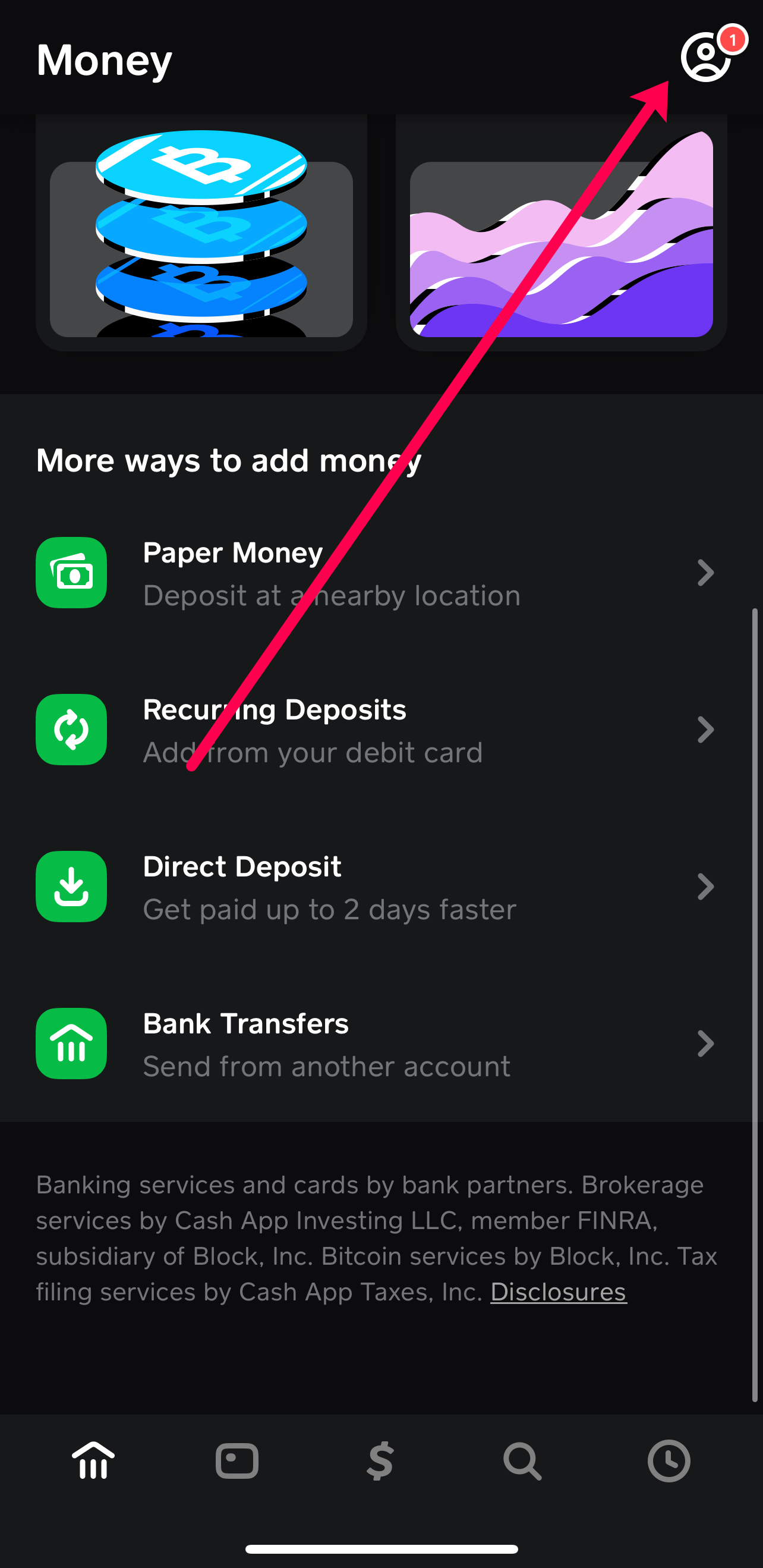
- Participating Merchants: A growing number of major retailers across the U.S. support Cash App deposits. Common locations include 7-Eleven, Walgreens, CVS, Walmart, Dollar General, and Family Dollar. It’s always a good idea to check the Cash App map within the app for the nearest participating location.
- The Process: To add cash, open your Cash App and tap the “Banking” or “Money” tab. Select “Paper Money” or “Deposit Cash” and follow the prompts to generate a unique barcode. Present this barcode to the cashier along with the cash you wish to deposit. The cashier will scan the barcode and accept your money, which should then appear in your Cash App balance within minutes.
- Fees and Limits: There is typically a small fee associated with adding cash at retail locations, often ranging from $1 to $4 per transaction. Cash App also imposes limits on these deposits, such as a maximum of $500 to $1,000 per transaction, and daily or weekly aggregate limits.
- Pros & Cons: This method is highly convenient for individuals who primarily deal in cash or need to convert physical money into digital funds quickly. However, the associated fees and location dependency can be drawbacks compared to fee-free bank transfers.
Receiving Direct Deposits
Setting up direct deposit with Cash App is an increasingly popular method for funding your card, especially for regular income like paychecks or government benefits.
- Setting Up Payroll: Cash App provides each user with unique account and routing numbers, much like a traditional bank account. To set up direct deposit, you simply provide these numbers to your employer’s payroll department. They will typically require a voided check or a direct deposit form, which you can easily generate or find within the Cash App.
- Government Benefits: Similarly, government agencies responsible for benefits like Social Security, unemployment, or tax refunds can deposit funds directly into your Cash App account using the same account and routing numbers. This streamlines the process and can often lead to quicker access to funds.
- Benefits: A significant advantage of direct deposit is the potential for early access to funds. Cash App users often receive their paychecks or benefits up to two days earlier than traditional bank deposits. This method is also entirely fee-free and completely automated once set up.
- Key Details: To find your account and routing numbers, tap the “Banking” or “Money” tab on your Cash App home screen. Look for the section related to “Direct Deposit.” Ensure all information provided to your employer or agency is accurate to avoid delays.
Leveraging Peer-to-Peer and Other Digital Transfers

Beyond direct deposits from banks or cash, your Cash App Card can be funded through peer-to-peer transfers and by integrating it into various aspects of your digital financial life.
Receiving Funds from Other Cash App Users
The core functionality of Cash App is peer-to-peer (P2P) payments, and any money received this way instantly becomes part of your Cash App balance and, by extension, available on your Cash App Card.
- How It Works: When a friend, family member, or client sends you money via Cash App, it appears in your balance almost immediately. There’s no additional action required on your part to “put” this money onto your card; it’s automatically accessible.
- Instant Availability: The instant nature of P2P transfers means funds are ready for use with your card for purchases, bill payments, or ATM withdrawals without any waiting period.
- Use Cases: This method is ideal for splitting bills with roommates, receiving repayment for a loan from a friend, getting paid for small tasks, or even receiving gifts. It’s a frictionless way to consolidate informal payments into a usable balance.
Income from Online Ventures and Side Hustles
Many freelancers, independent contractors, and small business owners use Cash App as a payment method. If clients or platforms pay you directly into your Cash App account, these earnings instantly fund your card.
- Freelance Payments: If you offer services online through platforms that support Cash App as a payout option, or if your clients prefer to pay directly via Cash App, your earnings will immediately be reflected in your balance.
- Selling Goods/Services: For individuals selling items on marketplaces or offering local services, accepting payments via Cash App is a convenient option for customers. These received payments directly bolster your Cash App Card’s spending power.
- Considerations: While convenient, it’s essential to track these transactions, especially if they constitute business income. You may have tax obligations related to these earnings, and proper record-keeping is crucial for financial compliance.
Transfers from Other Digital Payment Platforms (Indirect Method)
While not a direct funding method like linking a bank account, it is sometimes possible to indirectly fund your Cash App Card using other digital payment platforms. This typically involves using your Cash App account and routing numbers as a destination for withdrawals from other services.
- Linking Cash App as a Bank: Some digital wallets, online investment platforms, or payment processors allow users to withdraw funds to a linked bank account. By inputting your Cash App account and routing numbers into these platforms, you might be able to direct withdrawals to your Cash App balance.
- Potential Limitations: This method’s success depends entirely on the compatibility and policies of the other digital platform. Transfer times can vary, and some platforms may not recognize Cash App as a valid banking institution for withdrawals. Always check the terms and conditions of both platforms before attempting such a transfer. This is generally less direct and reliable than linking a traditional bank account directly within Cash App.
Managing Your Funds and Maximizing Card Use
Once you understand how to put money onto your Cash App Card, effective management becomes the next crucial step. This ensures security, maximizes convenience, and helps you achieve your financial goals.
Monitoring Your Cash App Balance
Regularly checking your Cash App balance within the app is fundamental. The app provides real-time updates on your available funds, transaction history, and pending deposits. Setting up notifications for deposits and withdrawals can also help you stay informed without constantly checking the app. This proactive monitoring is key to preventing overspending and managing your budget effectively.
Security Best Practices
Protecting your Cash App Card and balance is paramount. Always use a strong, unique PIN for your card. Enable security features within the app, such as Face ID, Touch ID, or a custom PIN for accessing the app and authorizing payments. Implement two-factor authentication for an added layer of security. Immediately report a lost or stolen card through the app to prevent unauthorized use, and be vigilant against phishing scams attempting to trick you into revealing your account credentials.
Understanding Fees
While Cash App offers many free services, certain transactions incur fees. Be aware of fees for instant deposits from a linked bank account, ATM withdrawals (especially if you don’t meet specific criteria for fee reimbursement), and adding cash at retail locations. Budgeting for these potential fees ensures you have an accurate picture of your available funds and avoid unexpected charges.
When to Use Your Cash App Card
Your Cash App Card is highly versatile. It’s excellent for everyday spending, managing a specific budget (e.g., groceries, entertainment), making online purchases without exposing your primary bank details, and easily spending funds received via peer-to-peer transfers or direct deposit. Its convenience makes it an ideal choice for regular, smaller transactions.
When to Transfer Funds Out
While the Cash App Card is great for spending, it’s not designed to be a long-term savings vehicle. If you accumulate a significant balance beyond your immediate spending needs, consider transferring excess funds back to your traditional bank account for savings, investments, or larger financial goals. This strategy balances the convenience of Cash App with the stability and comprehensive services of a traditional bank.
aViewFromTheCave is a participant in the Amazon Services LLC Associates Program, an affiliate advertising program designed to provide a means for sites to earn advertising fees by advertising and linking to Amazon.com. Amazon, the Amazon logo, AmazonSupply, and the AmazonSupply logo are trademarks of Amazon.com, Inc. or its affiliates. As an Amazon Associate we earn affiliate commissions from qualifying purchases.