
For many users, the question “where is my Google Wallet?” isn’t just a casual inquiry; it reflects a genuine confusion stemming from Google’s dynamic and sometimes complex strategy in the realm of digital payments and mobile credentials. Over the past decade, Google has introduced, rebranded, merged, and relaunched various services, creating a tapestry that, while ultimately robust, can be bewildering to those simply looking to manage their digital lives. This article delves into the technological journey of Google Wallet, dissecting its evolution, clarifying its current role, and providing a comprehensive guide for users to understand and leverage this essential piece of the Android ecosystem. We will explore the shifts from the original Google Wallet to Google Pay, and the subsequent re-emergence of Google Wallet, all strictly within the context of technology trends, software development, application functionality, and digital security.
The Genesis of Google Wallet: A Pioneering Vision
Google’s foray into the digital wallet space began with an ambitious vision: to transform how consumers carry and use their payment information. The original Google Wallet was a groundbreaking technology for its time, aiming to digitize not just credit cards but also loyalty programs and offers, all accessible from a smartphone.
Early Ambitions and Initial Hurdles
Launched in 2011, the original Google Wallet was one of the earliest mainstream attempts to popularize Near Field Communication (NFC) for mobile payments. It allowed users to tap their phones at compatible payment terminals, essentially turning their smartphone into a digital credit card. This was revolutionary, predating Apple Pay by several years. However, its initial rollout faced significant hurdles. NFC-enabled phones were not yet ubiquitous, and merchant adoption of NFC payment terminals was sparse. Furthermore, securing partnerships with banks and payment networks proved challenging, as many were hesitant to embrace a technology that could disrupt their established models. The app required a secure element chip, which wasn’t standard on all Android devices, further limiting its reach. Despite these challenges, Google Wallet laid crucial groundwork, demonstrating the potential of mobile payments and setting the stage for future innovations. It was a bold step that, while not immediately achieving widespread dominance, sowed the seeds for the ubiquitous mobile payment landscape we see today.
Paving the Way for Mobile Payments
Despite its early struggles, the original Google Wallet’s existence forced the mobile payment industry to take notice. It proved the concept of secure mobile transactions and highlighted the technical requirements and user experience considerations for such a system. It pushed device manufacturers to integrate NFC technology more broadly into their smartphones and encouraged payment processors to consider broader acceptance of contactless payments. More importantly, it educated early adopters about the convenience and potential of a cashless, cardless future, even if the technology was still in its infancy. This pioneering spirit, though sometimes met with resistance, ultimately accelerated the development and adoption of competing and complementary digital wallet solutions, making it an indispensable part of technology history.
The Google Pay Consolidation: Unifying the Digital Experience
As the mobile payment landscape evolved, Google recognized the need to streamline its offerings and present a more unified brand experience. This led to a significant strategic shift: the absorption of Google Wallet’s core tap-to-pay functionality into a new, broader platform known as Google Pay.
From Wallet to Pay: A Strategic Rebranding
In 2015, Google introduced Android Pay, a new service designed to simplify mobile payments on Android devices. This move coincided with the broader industry trend toward standardizing mobile payment APIs and improving user experience. Android Pay was designed to be easily accessible to all Android users, leveraging the established security protocols of the Android platform. Following this, in 2018, Google consolidated its various payment services – including Android Pay and the person-to-person (P2P) payment features of the legacy Google Wallet app – under a single, unified brand: Google Pay. This consolidation aimed to reduce user confusion by offering a single application for contactless payments, P2P money transfers, online purchases, and loyalty programs. The “Google Pay” brand became the default digital wallet experience for Android users globally, effectively replacing the standalone Google Wallet app for many of its core functions. This rebranding was a strategic decision to simplify the ecosystem and compete more directly with other unified payment platforms.
Expanding Horizons: Beyond Just Payments
The Google Pay era marked a significant expansion of Google’s digital wallet ambitions beyond just tap-to-pay at physical terminals. Google Pay evolved into a comprehensive platform that integrated various financial and commerce-related functionalities. Users could not only make NFC payments but also securely store payment information for online purchases across websites and apps, send and request money from friends and family (P2P payments), store digital loyalty cards, gift cards, and even event tickets. It also facilitated transit payments in select cities, allowing users to tap their phone or smartwatch to pay for bus or train fares. This holistic approach aimed to embed Google Pay deeply into the user’s daily digital life, acting as a central hub for all financial transactions and credentials. The technological infrastructure behind Google Pay was designed to be versatile, supporting a wide array of digital credentials and payment methods, thereby enhancing convenience and security for the user across multiple touchpoints.
The Return of Google Wallet: A Refined Identity
Just as users became accustomed to Google Pay as their go-to digital wallet, Google introduced another significant shift in its strategy. In 2022, the Google Wallet brand was revived, but with a refined identity and a distinct purpose, creating a nuanced separation from Google Pay. This re-introduction was a response to evolving user needs and the expanding scope of digital credentials.
Distinguishing Wallet from Pay: Clarifying Roles
The key to understanding the current Google ecosystem lies in distinguishing between the re-launched Google Wallet and Google Pay. Essentially, Google Pay continues to exist as the underlying payment technology and platform that powers digital transactions across Google products and for many third-party integrations (e.g., Google Pay checkout buttons on e-commerce sites). In many regions, the Google Pay app itself became more focused on financial insights, budgeting, and P2P payments, especially in markets like the US and India.
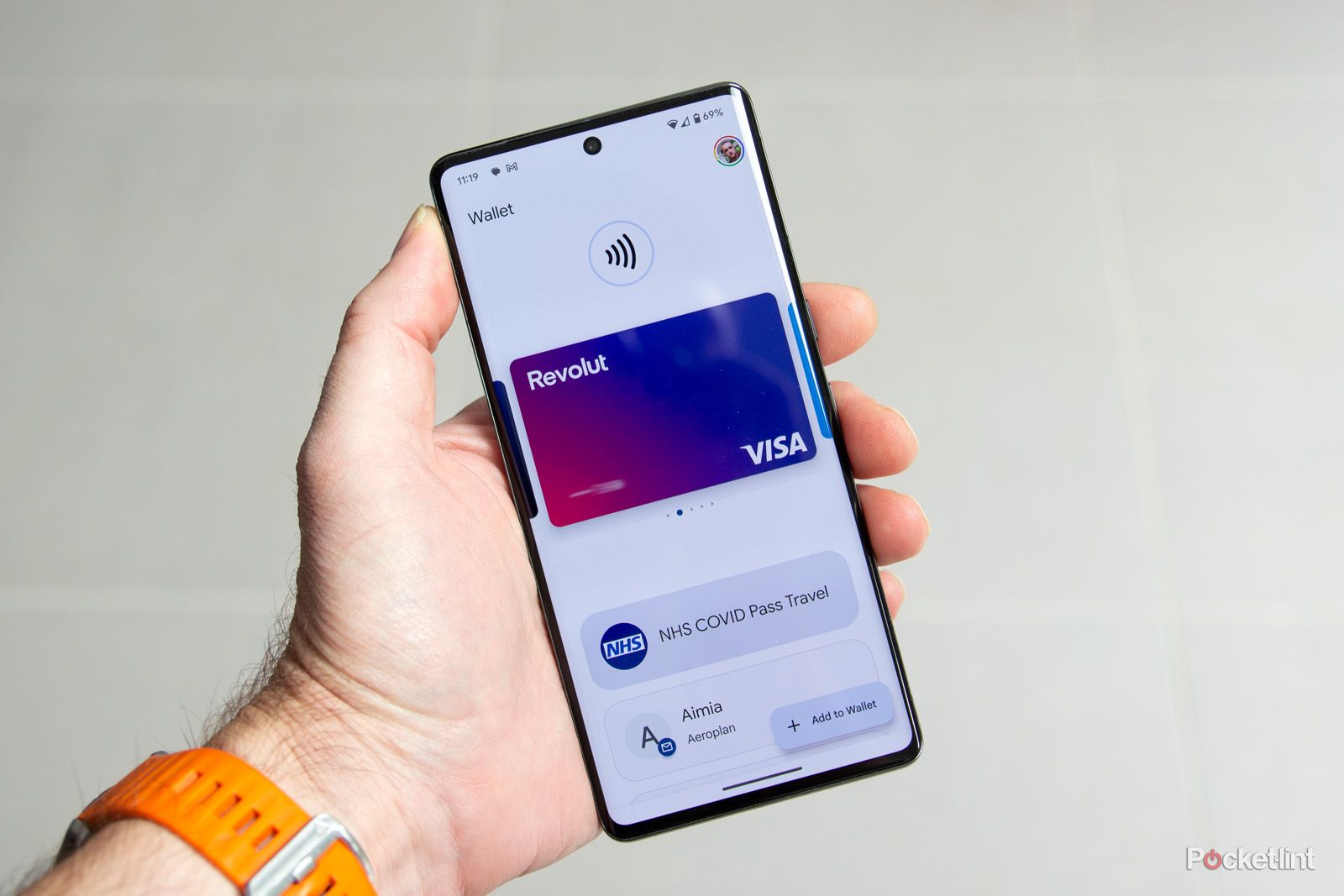
The new Google Wallet, however, was re-envisioned as the dedicated app on your Android phone and Wear OS watch where you physically store and manage your digital items. Think of it as your virtual pocket or purse. While it certainly contains your payment cards (which are powered by Google Pay’s backend), its scope is much broader. It’s the front-end application designed to hold more than just money: transit passes, loyalty cards, digital car keys, student IDs, vaccine cards, event tickets, and eventually, digital government IDs. This separation allows Google Wallet to focus on credential management and presentation, while Google Pay continues to handle the processing power behind the transactions. In essence, Google Wallet is where you keep things, and Google Pay is how you pay (often using the items stored in Wallet). In some regions, Google Pay’s tap-to-pay functionality is integrated directly into the Wallet app, further blurring the lines for users but conceptually, the distinction remains.

What the New Google Wallet Offers Today
The re-imagined Google Wallet is a testament to the increasing digitization of everyday essentials. Today, it serves as a robust digital repository for an expanding array of items:
- Payment Cards: Credit, debit, and prepaid cards from numerous banks, enabling contactless payments via NFC, in-app purchases, and online transactions.
- Transit Passes: Digital versions of public transport cards, allowing seamless tapping at turnstiles and readers. This includes integration with systems like those in London (TfL), Japan (Suica), and many others.
- Loyalty Cards & Gift Cards: Consolidating rewards programs and gift cards, reducing the need for physical plastic cards.
- Event Tickets: Storing concert, movie, and airline tickets digitally, often with dynamic updates and easy scanning.
- Digital Car Keys: Partnering with select car manufacturers, Google Wallet allows users to lock, unlock, and even start their vehicles using their smartphone.
- Student IDs: For participating educational institutions, students can store their ID cards for campus access, payments, and library services.
- Vaccine Cards & Health Passes: A secure way to store and present health-related credentials.
- Government IDs (Upcoming): Google is actively working with governments to integrate digital driver’s licenses and state IDs, leveraging robust security and privacy features.
This comprehensive approach positions Google Wallet not just as a payment app, but as a universal digital passbook for a wide range of essential credentials, reflecting a broader technological shift towards a truly paperless and cardless future.
Maximizing Your Digital Wallet: Features and Future
The current iteration of Google Wallet is more than just a place to store cards; it’s a powerful tool designed for seamless integration into the Android ecosystem, enhancing daily convenience and security. Understanding its capabilities and looking ahead to its future developments helps users maximize its utility.
A Hub for All Things Digital: Payments, Passes, and More
Google Wallet excels as a centralized hub for managing various digital assets. Its strength lies in its ability to securely store and quickly present a diverse range of credentials. For payments, it leverages tokenization, replacing your actual card number with a unique, encrypted token for each transaction, significantly enhancing security. When paying in-store, a simple tap of your phone or smartwatch to an NFC terminal completes the transaction, often without needing to open the app itself. For non-payment items, Wallet provides quick access. For instance, boarding a flight becomes effortless when your digital boarding pass, complete with gate and seat information, is readily available with a swipe. Loyalty cards are automatically presented at checkout (if enabled), ensuring you never miss out on rewards. The underlying technology ensures these digital items are updated in real-time and are accessible even without an internet connection once downloaded. This comprehensive approach transforms the smartphone into a truly indispensable personal assistant for daily life.
Seamless Integration into the Android Ecosystem
Google Wallet is deeply integrated into the broader Android ecosystem, providing a cohesive user experience. It’s pre-installed on most new Android devices and works seamlessly with Wear OS smartwatches, allowing for wrist-based payments and access to passes. Features like “Quick Access” shortcuts from the lock screen or power menu ensure that your most used cards and passes are always just a tap away. It also integrates with other Google services: for example, event tickets purchased via Google Search or Gmail can often be automatically added to your Wallet. This tight integration means that your digital wallet is not an isolated app but a core component of your overall Android experience, leveraging device security features like fingerprint or facial recognition for authentication, ensuring that your sensitive information remains protected.
The Road Ahead: Enhancements and Emerging Use Cases
The future of Google Wallet is poised for even greater expansion and sophistication. The most anticipated development is the widespread integration of digital government IDs, such as driver’s licenses and state IDs, which will further solidify Wallet’s role as a primary personal identity tool. Imagine being able to prove your age or identity securely with your phone, eliminating the need for physical cards in many scenarios. Furthermore, Google is continually enhancing the security architecture, leveraging advanced encryption and biometric authentication to protect user data. Expect to see deeper integration with smart home devices, potentially allowing your Wallet to act as a digital key for your home, or even for access to workplaces. As the metaverse and augmented reality continue to evolve, Google Wallet might also play a role in managing digital assets and identities within these virtual spaces. The trajectory suggests an increasingly intelligent, secure, and ubiquitous digital wallet that will adapt to new technologies and expand its utility across an ever-growing array of real-world and digital interactions.
Resolving the Confusion: Finding and Utilizing Your Google Wallet
Given Google’s journey through various branding changes, it’s understandable why users might be asking “where is my Google Wallet?”. The good news is, for most modern Android users, it’s readily available and easy to use, once you understand its current iteration.
Locating the App on Your Device
If you have a relatively recent Android smartphone (running Android 5.0 Lollipop or higher, though Android 10+ offers the best experience), the Google Wallet app is likely already on your device or easily downloadable from the Google Play Store. Search for “Google Wallet” in the Play Store, and you should find the official app. Once installed, simply open it and follow the prompts to add your payment cards, transit passes, loyalty cards, and other credentials. If you previously used the Google Pay app for tap-to-pay and have updated your device’s software, it’s possible the Google Pay app automatically transitioned or offered to install the new Google Wallet. For quick access, look for its icon on your home screen or in your app drawer, typically a colorful square with a “W” or a wallet icon. Many devices also offer quick access to Wallet from the power button menu or by swiping down from the top of the screen to access quick settings.

Best Practices for Digital Wallet Security and Convenience
Utilizing Google Wallet effectively involves more than just adding your cards; it requires adopting best practices for security and maximizing convenience.
- Enable Device Security: Always ensure your phone has a strong screen lock (PIN, pattern, fingerprint, or facial recognition). This is your primary defense against unauthorized access to your Wallet.
- Verify Your Cards: When adding a card, banks often require a verification step (e.g., a code sent via SMS or email). Complete this to ensure your card is fully functional.
- Manage Notifications: Allow Wallet to send notifications for transactions, ensuring you’re immediately aware of any activity.
- Set Default Cards: You can set a default payment card for quicker transactions, though you can easily switch to another card at the point of sale.
- Review Permissions: Understand what permissions the Wallet app requests and ensure they align with your comfort level.
- Backup and Sync: Google Wallet data is typically synced with your Google account, meaning your cards and passes can be restored if you get a new device, provided you log in with the same Google account.
- Stay Updated: Regularly update the Google Wallet app and your Android operating system to benefit from the latest security patches and features.
By understanding the historical context, the current distinctions between Google Wallet and Google Pay, and the robust feature set of the modern Google Wallet, users can confidently leverage this powerful technological tool to simplify their payments, manage their digital credentials, and navigate an increasingly cashless and cardless world with ease and security. The “where is my Google Wallet” question now has a clear and empowering answer: it’s right here, ready to transform your mobile experience.
aViewFromTheCave is a participant in the Amazon Services LLC Associates Program, an affiliate advertising program designed to provide a means for sites to earn advertising fees by advertising and linking to Amazon.com. Amazon, the Amazon logo, AmazonSupply, and the AmazonSupply logo are trademarks of Amazon.com, Inc. or its affiliates. As an Amazon Associate we earn affiliate commissions from qualifying purchases.