
The question “Where does Steam install games?” might seem straightforward, a simple query for any PC gamer. However, for those who operate within the broader spheres of technology, brand management, and even personal finance, this seemingly niche question unlocks a surprisingly rich understanding of digital asset management, user experience design, and the economic underpinnings of the gaming industry. This article will explore the technical location of Steam game installations, but more importantly, we’ll delve into why this matters from a tech, brand, and even a money perspective.
Understanding the Default Installation Path: The Technical Foundation
At its core, Steam is a digital distribution platform. When you purchase or download a game through Steam, the client software needs a designated space on your computer’s storage to store the game’s files. This is where the concept of installation paths becomes crucial.
The Default Steam Library Folder
By default, when you first install Steam, it typically creates a primary “Steam Library” folder in a standard location on your system. This location is generally as follows:
- On Windows:
C:Program Files (x86)Steamsteamappscommon - On macOS:
~/Library/Application Support/Steam/steamapps/common/ - On Linux:
~/.local/share/Steam/steamapps/common/
Within this common folder, each game you install will have its own dedicated subfolder. For instance, a game named “AwesomeGame” would likely reside in C:Program Files (x86)SteamsteamappscommonAwesomeGame (on Windows).
It’s important to note that the steamapps folder itself contains more than just the common directory. You’ll also find downloading (for games currently being downloaded), depotcache (for game depots), and shadercache (for shader data). The common folder is specifically for the actual game files that make the game playable.
The Importance of the “steamapps” Directory
The steamapps directory is a critical component of the Steam client’s infrastructure. It’s a self-contained unit that manages all aspects of your game installations. This organizational structure is a deliberate design choice that offers several benefits from a technical standpoint:
- Organization and Management: It provides a clear, centralized location for all your Steam games, making it easy for the client to locate and launch them.
- Updates and Patches: Steam can efficiently identify and update specific game files within these directories, ensuring a smooth patching process.
- Backup and Restore: Understanding this structure is fundamental for manual backups or transferring your game library to a new drive.
Beyond the Default: Customizing Your Steam Library Locations
While the default path is a sensible starting point, the flexibility of Steam allows users to designate multiple installation locations, often referred to as “Steam Library Folders.” This feature is not just a convenience; it’s a powerful tool for managing storage, optimizing performance, and catering to diverse user needs.
Why Create Multiple Library Folders?
The decision to create additional Steam Library folders stems from several practical considerations:
- Storage Management and SSD vs. HDD: This is perhaps the most common reason. Modern games are notoriously large, often exceeding 100GB. Users with smaller Solid State Drives (SSDs) – which offer significantly faster loading times but are more expensive per gigabyte – will quickly run out of space. By creating a secondary library folder on a larger, more affordable Hard Disk Drive (HDD), they can strategically place less frequently played or older games on the HDD, freeing up precious SSD space for their most anticipated titles or games that benefit most from fast loading.
- Performance Optimization: Games installed on an SSD will generally load faster, and in some cases, exhibit smoother in-game performance due to quicker asset streaming. By directing your most demanding games to an SSD library, you actively enhance your gaming experience.
- Organization and Categorization: Some users prefer to group games by genre, developer, or even by their “importance” (e.g., a library for games they are actively playing, another for backlog titles). While Steam doesn’t offer built-in categories for library folders themselves, the user can implement their own organizational schemes.
- System Drive Protection: Installing games on a separate drive from your operating system can offer a layer of protection. If your primary OS drive encounters issues, your game library remains intact on a different partition or physical drive.

How to Add and Manage Steam Library Folders
Adding and managing these library folders within Steam is a straightforward process:
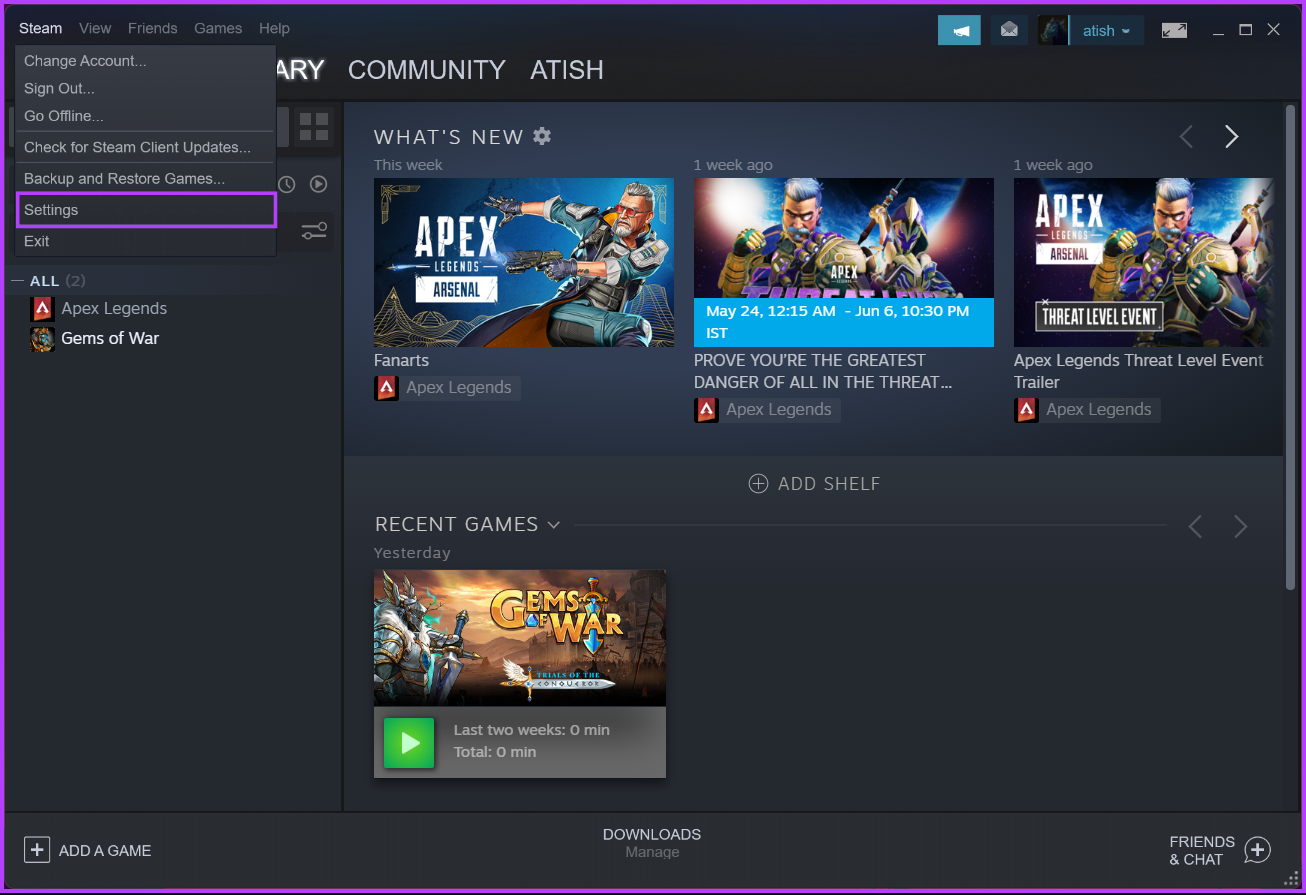
- Open Steam: Launch the Steam client on your computer.
- Access Steam Settings: Click on “Steam” in the top-left corner, then select “Settings.”
- Navigate to Downloads: In the Settings window, choose the “Downloads” tab from the left-hand menu.
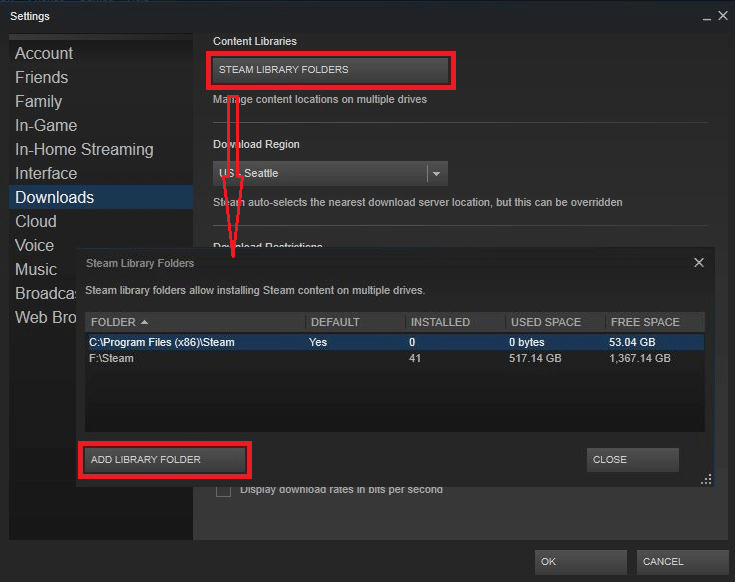
- Manage Library Folders: Under the “Steam Library Folders” section, click the “Steam Library Folders” button.
- Add a New Folder: A new window will appear. Click the “+ Add Drive” button (or similar wording). You will then be prompted to select the drive and a specific folder where you want to create your new Steam Library. It’s advisable to create a dedicated folder (e.g., “SteamLibrary”) on the desired drive for better organization.
- Move Existing Games (Optional but Recommended): Once a new library folder is created, you can move existing games to it. To do this, go back to your Steam Library, right-click on the game you wish to move, select “Properties,” then navigate to the “Local Files” tab. Here, you’ll find a “Move Install Folder” button. Clicking this will allow you to select your newly created library folder as the destination.
This ability to manage multiple library locations is a testament to Steam’s user-centric design, recognizing that gamers have diverse hardware and storage needs.
The Broader Implications: Tech, Brand, and Money
The seemingly simple question of where Steam installs games, and the ability to manage these locations, has ripple effects that extend far beyond just where your game files reside.
Tech: Digital Asset Management and User Experience
From a Tech perspective, Steam’s approach to game installation is a prime example of effective digital asset management.
- Decentralized Storage: Allowing multiple library folders means Steam doesn’t rely on a single, monolithic installation. This decentralization is crucial for scalability and user flexibility. It mirrors how many modern cloud services manage data distribution.
- User Control and Empowerment: The ability to choose installation locations empowers users, moving away from a rigid, one-size-fits-all approach. This aligns with the trend in technology towards providing users with greater control over their digital environments.
- System Integration: Steam seamlessly integrates with the operating system’s file system, abstracting away much of the complexity for the end-user. This is a hallmark of good software design – making complex processes appear simple.
- Performance Tuning: The ability to manually direct games to faster storage is a direct application of performance tuning principles. It’s akin to how IT professionals might optimize server configurations for specific workloads.
Brand: Trust, Longevity, and User Loyalty
The way Steam handles game installations also significantly impacts its Brand.
- Reliability and Trust: A robust system for installing, updating, and managing games builds trust with consumers. Gamers know their investments in digital titles are safe and accessible. The ability to easily manage libraries, even across multiple drives, reinforces this reliability.
- User Experience as a Brand Differentiator: In the competitive landscape of PC gaming storefronts (Epic Games Store, GOG, etc.), Steam’s intuitive interface and advanced features like library management become key differentiators. A positive user experience fosters brand loyalty.
- Ecosystem Lock-in (Positive and Negative): While not solely about installation paths, the entire Steam ecosystem, including how games are managed, contributes to its strong user base. For many, the convenience of the Steam platform outweighs the desire to explore alternative launchers.
- Perception of Value: The perceived value of a game isn’t just its price; it’s also how easily it can be accessed, played, and managed. Steam’s robust library management adds to the overall value proposition of purchasing games through its platform.
Money: Investment, Efficiency, and Cost-Effectiveness
The implications for Money are also substantial.
- Maximizing Hardware Investment: By allowing users to leverage both SSDs and HDDs effectively, Steam enables gamers to get the most out of their existing hardware. This is a form of cost-efficiency – avoiding the need to purchase multiple expensive SSDs just to house a large game library.
- The Economics of Storage: Understanding where games are installed directly impacts the cost-effectiveness of your gaming setup. Choosing to install large, infrequently played games on cheaper, high-capacity HDDs can save significant upfront costs compared to filling an expensive SSD.
- Time is Money: Faster loading times from SSDs translate to less time waiting and more time playing, effectively increasing the “value” of the gaming time purchased. Conversely, inefficient storage management can lead to frustrating delays.
- Long-Term Digital Ownership: The ability to manually manage and back up Steam libraries provides a sense of long-term ownership and control over digital assets, which can be crucial for dedicated collectors or those concerned about platform longevity. While Steam is unlikely to disappear, having the technical know-how to manage your own backups offers peace of mind.
- Platform Competitiveness and Pricing: The efficiency of distribution and installation can indirectly influence the pricing strategies of game developers and publishers. A platform that handles these aspects flawlessly can support a more vibrant and economically sustainable marketplace.
Conclusion: More Than Just a Folder
The question, “Where does Steam install games?” is more than just a technical query. It’s a gateway to understanding how technology empowers users, how brands build loyalty through robust features, and how intelligent management of digital assets translates into tangible cost-effectiveness. By offering granular control over game installation locations, Steam not only caters to the practical needs of modern PC gamers but also reinforces its position as a leader in the digital distribution space. Whether you’re optimizing your rig for peak performance, ensuring the longevity of your digital library, or simply want to understand the underlying mechanics of your favorite gaming platform, grasping the nuances of Steam’s installation process offers valuable insights into the interconnected worlds of technology, branding, and personal finance.
aViewFromTheCave is a participant in the Amazon Services LLC Associates Program, an affiliate advertising program designed to provide a means for sites to earn advertising fees by advertising and linking to Amazon.com. Amazon, the Amazon logo, AmazonSupply, and the AmazonSupply logo are trademarks of Amazon.com, Inc. or its affiliates. As an Amazon Associate we earn affiliate commissions from qualifying purchases.