
Cash App has emerged as a ubiquitous financial tool, transforming how millions manage their money. More than just a peer-to-peer payment platform, it functions as a digital wallet, a banking alternative, and even an investment portal for a growing user base. For anyone looking to leverage its capabilities, the fundamental first step is understanding how to add money to your account. This guide delves into the various methods available for funding your Cash App, offering insights from a personal finance perspective to help you manage your digital funds effectively and securely.

The Foundation: Linking Your Bank Account for Seamless Transfers
The most common and often most recommended method for adding money to your Cash App involves linking your external bank account. This method provides the highest degree of flexibility and typically allows for larger transfers, making it a cornerstone for managing significant portions of your personal finance through the app.
The Seamless Bank Transfer
Linking your bank account to Cash App creates a direct pipeline between your traditional banking institution and your digital wallet. This process is secure, utilizing industry-standard encryption to protect your financial information. Once linked, you can initiate transfers directly from your bank account to your Cash App balance. This method is ideal for moving larger sums of money, consolidating funds, or simply ensuring your Cash App balance is topped up for everyday expenses, investments, or peer-to-peer payments. From a financial planning standpoint, linking your bank account centralizes your money management, allowing for easier tracking of funds moving in and out of your primary financial hub.
Setting Up Direct Deposit for Paychecks and Benefits
Beyond manual transfers, Cash App offers a powerful feature for personal finance management: direct deposit. By obtaining your unique Cash App routing and account number (accessible within the app), you can set up direct deposit for your paychecks, government benefits, tax refunds, or other regular income streams. This effectively turns your Cash App into a primary banking destination for many, offering the convenience of receiving funds up to two days earlier than traditional banks in some cases. This can be a game-changer for budgeting, enabling faster access to funds and providing a clear overview of your incoming cash flow directly within the app. For individuals who prefer managing their entire financial life digitally, direct deposit into Cash App simplifies their financial ecosystem, reducing reliance on multiple banking interfaces.
Benefits of Linking Your Bank Account for Financial Management
The advantages of linking your bank account are manifold. Firstly, it offers unmatched convenience. Once connected, transfers are typically quick and hassle-free, often completing within a few business days for standard transfers, or even instantly for smaller amounts depending on the bank. Secondly, security is paramount; Cash App employs robust security protocols to protect your linked accounts. Thirdly, linking your bank account often comes with higher transaction limits compared to other funding methods, which is crucial for those who use Cash App for substantial financial transactions or as a primary financial tool. From a personal finance angle, it establishes a reliable and secure pathway for ensuring your digital wallet always has the necessary funds, facilitating budgeting and expense management without interruption.
Instant Funding: Using Your Debit Card to Add Money
While linking a bank account provides a broad financial connection, using a debit card offers an immediate and highly accessible way to add funds to your Cash App balance. This method is particularly useful for those moments when you need to top up your account quickly.
Instant Transfers from Your Debit Card
Adding money via a linked debit card is straightforward and, as the name suggests, typically instant. Once you’ve linked a debit card to your Cash App account (a quick process involving entering card details and sometimes a verification step), you can instantly transfer funds from your bank account (associated with that debit card) to your Cash App balance. This real-time transfer capability is invaluable for urgent payments, unexpected expenses, or simply ensuring you have funds available for immediate use without waiting for bank transfer processing times. It acts as a quick bridge between your physical bank account and your digital Cash App wallet.
Debit Card vs. Bank Account: Which to Choose for Your Finances?
The choice between using a debit card and linking your bank account often comes down to immediacy versus magnitude. Debit card transfers are ideal for quick, smaller top-ups when you need money in your Cash App right now. For instance, if you’re out with friends and need to send money or make a quick purchase, a debit card transfer is usually the fastest route. However, bank account transfers, while sometimes taking a little longer for larger sums, are generally preferred for larger amounts or for establishing regular direct deposits due to potentially higher limits and lower associated fees (though Cash App typically does not charge fees for standard debit card transfers, your bank might have limits). From a financial planning perspective, using a debit card for immediate needs and a linked bank account for larger, planned transfers provides a balanced approach to managing your Cash App funds.
Understanding Transaction Limits and Potential Fees
While Cash App generally doesn’t charge fees for standard debit card transfers to your balance, it’s crucial for users to be aware of a few financial considerations. Firstly, there are daily and weekly limits on how much you can add to your Cash App account, regardless of the method. These limits are typically higher for verified users (those who have confirmed their identity with a Social Security number). Secondly, while Cash App usually doesn’t charge fees, your bank might impose its own fees for certain debit card transactions or if you exceed daily spending limits set by them. Always review your bank’s policies to avoid unexpected charges. Managing these limits and understanding potential fees is a key part of responsible personal finance when using digital tools like Cash App.
Bridging the Gap: Depositing Physical Cash at Retail Stores
For many individuals, particularly those who prefer dealing in physical currency, receive cash income, or are unbanked, the ability to deposit cash directly into Cash App is a game-changer. This method expands Cash App’s accessibility, effectively turning cash into digital funds.
The Convenience of Cash Deposits
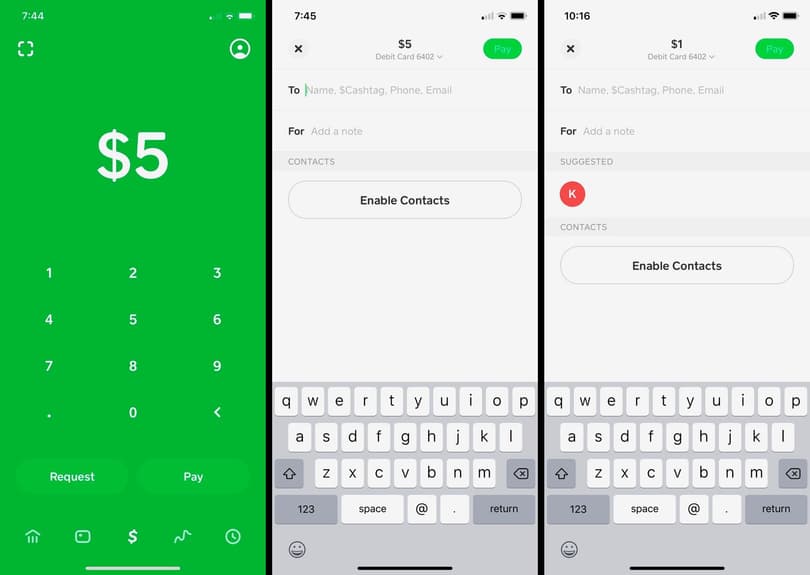
Cash App has partnered with various retail chains to facilitate cash deposits, allowing users to convert their physical money into a digital balance directly within their Cash App account. This feature is immensely valuable for anyone working in the gig economy, receiving cash payments, or simply those who manage their day-to-day finances primarily with cash. It removes the barrier of needing a traditional bank account to transition from cash to digital funds, empowering a broader demographic to participate in the digital economy and leverage Cash App’s features like direct deposit, instant payments, and even investing.
Finding Participating Retailers for Cash Deposits
To deposit cash, you’ll need to visit a participating retail location. Major chains like Walgreens, 7-Eleven, Dollar General, Family Dollar, and Walmart are often part of Cash App’s cash deposit network, though availability can vary. The Cash App itself provides a convenient map or list of nearby locations where you can make a deposit. Users simply need to select the “Paper Money” option within the app’s banking tab, generate a barcode, and present it to the cashier along with the cash they wish to deposit. This integration with a vast retail network makes depositing cash surprisingly convenient and accessible, often available during extended store hours.
Step-by-Step Guide to Cash Deposits for Financial Planning
- Open Cash App: Navigate to the “Banking” tab (the house icon) on your Cash App home screen.
- Select “Paper Money”: Look for an option related to “Paper Money” or “Deposit Cash.”
- Find a Location: The app will help you locate the nearest participating retail store.
- Generate Barcode: Once at the store, follow the in-app instructions to generate a unique barcode.
- Present to Cashier: Hand the barcode and your cash (typically in denominations of $5, $10, $20, etc.) to the cashier. They will scan the barcode and accept your cash.
- Confirmation: The funds are usually instantly added to your Cash App balance, and you’ll receive an in-app confirmation.
This straightforward process integrates physical cash into your digital financial toolkit, making it easier to manage all your funds in one place.
Fees and Limits Associated with Cash Deposits
While incredibly convenient, cash deposits usually come with a small fee, typically $1 or a percentage of the deposit, charged by the retailer for processing the transaction. Users should be aware of these nominal fees when budgeting for cash-to-digital conversions. Additionally, there are daily and weekly limits on the amount of cash you can deposit into your Cash App account. These limits are in place for security and regulatory compliance. It’s advisable to check the current limits within your Cash App to plan your cash deposits accordingly, especially if you anticipate depositing large amounts of physical currency. Understanding these fees and limits is a crucial aspect of responsible personal finance when utilizing this valuable feature.
Beyond Self-Funding: Receiving Money from Others
While the above methods focus on actively adding your own money to Cash App, a significant portion of funds flowing into Cash App accounts originates from other users. This peer-to-peer functionality is a core aspect of its design and a key component of its utility in personal finance.
Peer-to-Peer Transfers: The Core of Cash App’s Financial Ecosystem
Cash App’s most famous feature is its ability to send and receive money from friends, family, and other users with ease. Someone can send you money directly to your Cash App by simply knowing your Cashtag, phone number, or email address. These transfers are typically instant and free, making it incredibly convenient for splitting bills, contributing to group gifts, repaying debts, or simply sending money to loved ones. From a personal finance perspective, this streamlines social financial interactions, reducing the need for physical cash or complex bank transfers for everyday financial exchanges.
Receiving Payments from Businesses or Clients
For freelancers, small business owners, or those engaged in side hustles, Cash App can also serve as a convenient way to receive payments from clients or customers. With its business account capabilities and the ability to send invoices or payment requests, it acts as a simple point-of-sale system for many. This broadens its utility beyond personal use, integrating it into online income strategies and making it a viable tool for managing cash flow for micro-enterprises. The funds received directly contribute to your Cash App balance, making them immediately available for spending or further financial management.
Requesting Money: A Convenient Financial Tool
Cash App includes a “Request” feature, allowing you to easily ask others for money. This is a polite and effective way to remind someone they owe you money or to solicit funds for a specific purpose. You simply enter the amount and the recipient’s details, add a note if desired, and send the request. Upon approval, the requested funds are instantly transferred to your account. This feature, while simple, is a powerful organizational tool for personal finance, helping users keep track of receivables and ensuring they receive the money they are due without awkward confrontations.
Leveraging Financial Tools and Best Practices for Smart Funding
Effectively funding your Cash App account goes beyond knowing the mechanics; it involves integrating these methods into a broader personal finance strategy and ensuring security.
Integrating Cash App with Your Budgeting Strategy
For Cash App to be a truly effective financial tool, it should be integrated into your overall budgeting and financial planning. Think of your Cash App balance as a specific component of your budget—perhaps for daily spending, discretionary funds, or a specific savings goal. Regularly transferring a set amount from your linked bank account (either manually or via direct deposit) can help you stick to your budget. For example, you could allocate a weekly “spending allowance” to your Cash App, making it easier to track and control impulse purchases. Understanding your income streams and carefully choosing which method to use for adding money ensures your Cash App usage aligns with your financial goals, rather than derailing them.
Understanding Cash App Limits and Best Practices for Financial Management
Being aware of Cash App’s transaction limits (daily, weekly, and per transaction) for both sending and receiving money, as well as for adding funds, is paramount. These limits can vary based on whether your account is verified. For larger transactions or frequent use, ensuring your account is fully verified by providing your full name, date of birth, and the last four digits of your Social Security number is a critical best practice. This not only increases your limits but also enhances the security of your account. Regularly reviewing your transaction history and setting up notifications for activity can help you maintain control and identify any unauthorized use promptly.

Security Considerations for Funding Your Account
When adding money to Cash App, whether from a bank account, debit card, or cash deposit, security should always be a top priority.
- Use Strong Passwords/PINs: Ensure your Cash App account is protected by a strong, unique PIN or biometric login.
- Enable Two-Factor Authentication (2FA): This adds an extra layer of security, requiring a code from your phone in addition to your PIN for certain actions.
- Be Wary of Scams: Never share your PIN or sign-in code with anyone, and be suspicious of unsolicited requests for money or offers that seem too good to be true. Cash App will never ask for your PIN.
- Monitor Your Account: Regularly check your transaction history for any unfamiliar activity.
- Secure Wi-Fi: Avoid funding your account or accessing sensitive financial information over unsecured public Wi-Fi networks.
By adhering to these security best practices, you can confidently and safely utilize Cash App to manage your funds, leveraging its convenience without compromising your financial well-being.
In conclusion, Cash App offers a versatile array of methods for adding money to your account, catering to diverse financial habits and needs. Whether through seamless bank transfers, instant debit card top-ups, convenient cash deposits, or receiving funds from others, understanding each option empowers you to integrate Cash App effectively into your personal finance strategy. By combining these methods with diligent financial management and robust security practices, Cash App becomes a powerful ally in navigating the digital economy.
aViewFromTheCave is a participant in the Amazon Services LLC Associates Program, an affiliate advertising program designed to provide a means for sites to earn advertising fees by advertising and linking to Amazon.com. Amazon, the Amazon logo, AmazonSupply, and the AmazonSupply logo are trademarks of Amazon.com, Inc. or its affiliates. As an Amazon Associate we earn affiliate commissions from qualifying purchases.