
In an increasingly digitized world, entertainment is just a click, tap, or voice command away. Streaming services have reshaped how we consume media, bringing an endless library of content directly into our homes and onto our portable devices. Among the prominent players in this landscape is Paramount Plus, a service that bundles a rich history of content from CBS, Paramount Pictures, MTV, Comedy Central, BET, and Nickelodeon, alongside exclusive originals, live sports, and news.
The question “where can I watch Paramount Plus?” isn’t just about identifying compatible platforms; it’s an exploration into the technical ecosystems that facilitate modern digital entertainment. This guide dives deep into the technological avenues available, ensuring you can access your favorite shows and movies seamlessly, irrespective of your preferred device or setup. From smart televisions to gaming consoles and mobile apps, understanding the tech behind your viewing experience is key to unlocking its full potential.
Understanding Paramount Plus: A Digital Entertainment Hub
Before we delve into the ‘where,’ it’s crucial to grasp the ‘what’ from a technological perspective. Paramount Plus is more than just a collection of shows; it’s a sophisticated software application designed to deliver high-quality video content over the internet.
What is Paramount Plus? A Software Perspective
At its core, Paramount Plus is an over-the-top (OTT) streaming service, meaning it delivers content directly to viewers via the internet, bypassing traditional broadcast, cable, or satellite television providers. Technically, it’s a multi-platform application developed to run on various operating systems and hardware architectures. This involves complex back-end servers for content storage and delivery (CDN – Content Delivery Network), robust encryption for digital rights management (DRM) to protect copyrighted material, and a user-friendly front-end interface built with modern web and app development frameworks. Subscribers gain access to its library for a monthly or annual fee, streamed directly to their chosen internet-connected devices.
The Technology Behind Your Entertainment
The magic of streaming lies in the intricate technology that works behind the scenes. When you press play, a series of technical processes are initiated. Video files, often large and high-resolution, are compressed using advanced codecs (like H.264 or H.265 for video, and AAC or Dolby Digital for audio) to reduce bandwidth requirements without significant loss of quality. These compressed files are then broken into small data packets and sent across the internet, optimized by CDNs to minimize latency and buffering. Adaptive bitrate streaming technology dynamically adjusts the video quality based on your internet connection’s speed and stability, ensuring a continuous playback experience. For the user, this translates to crisp visuals and clear audio, whether streaming in standard definition, HD, or even 4K where available, provided their device and network can support it.
Devices and Platforms: Your Gateway to Paramount Plus
The versatility of Paramount Plus lies in its broad compatibility across a myriad of digital devices, making it accessible from virtually any corner of your home or on the go. This section outlines the primary technological avenues for accessing the service.
Smart TVs: Integrated Access for the Living Room
Modern Smart TVs are often the central hub for home entertainment, and Paramount Plus has made itself a native resident on many. Most Smart TVs running operating systems like Samsung’s Tizen, LG’s webOS, Vizio’s SmartCast, and Android TV (found on Sony, Hisense, and others) come with built-in app stores where the Paramount Plus application can be easily downloaded. The advantage here is simplicity: no extra hardware, just a direct connection to your internet and the TV itself. For older Smart TVs or those without native support, casting technologies like Google Chromecast built into the TV (or Apple AirPlay 2 on compatible models) can bridge the gap, allowing you to send content from your mobile device directly to the big screen.
Streaming Devices: Enhancing Your Non-Smart TV
If your television lacks smart capabilities or its integrated apps feel sluggish, dedicated streaming devices are powerful, cost-effective upgrades. These gadgets plug into your TV’s HDMI port and provide a robust operating system dedicated to streaming apps. Paramount Plus is widely supported across the most popular ecosystems:
-
Roku Devices (e.g., Roku Express, Roku Streaming Stick, Roku Ultra): Known for their user-friendly interface and vast app selection, Roku devices offer a seamless Paramount Plus experience.
-
Amazon Fire TV Devices (e.g., Fire TV Stick, Fire TV Cube): Integrated with Amazon’s Alexa voice assistant, Fire TV devices allow for convenient voice-activated search and playback of Paramount Plus content.
-
Apple TV (HD and 4K models): For users entrenched in the Apple ecosystem, the Apple TV provides a polished interface, excellent performance, and deep integration with other Apple services, supporting the Paramount Plus app.
-
Google Chromecast (with Google TV): While earlier Chromecasts relied solely on casting, newer models like the Chromecast with Google TV offer a full app-based interface, including the Paramount Plus application, alongside traditional casting capabilities.
Mobile Devices & Tablets: Entertainment on the Go
The Paramount Plus app is a staple for portable entertainment, available for both major mobile operating systems:
-
iOS Devices (iPhone, iPad, iPod Touch): Downloadable from the Apple App Store, the iOS app is optimized for touch interaction and offers features like offline downloads. Ensure your device meets the minimum iOS version requirement for optimal performance.
-
Android Devices (Smartphones, Tablets): Available on the Google Play Store, the Android app provides similar functionality, adaptable to a wide range of screen sizes and resolutions. Regular updates ensure compatibility with the latest Android versions.
Both mobile versions typically feature intuitive navigation, user profile management, and the ability to cast content to larger screens.
Web Browsers: Desktop and Laptop Viewing
For those who prefer a keyboard and mouse, or simply want to watch on a larger computer monitor, Paramount Plus is fully accessible via web browsers. Supported browsers typically include Google Chrome, Mozilla Firefox, Microsoft Edge, and Apple Safari. Users simply navigate to the Paramount Plus website, log in, and begin streaming. Minimum system requirements usually include a modern operating system (Windows, macOS, Chrome OS, Linux), sufficient RAM, and a capable processor to handle video decoding, particularly for higher resolutions. Ensuring your browser is up-to-date is crucial for security and optimal playback.
Gaming Consoles: Beyond Gaming
Modern gaming consoles have evolved into comprehensive media centers, offering much more than just video games. Paramount Plus is available as a dedicated app on:
-
PlayStation (PS4, PS5): Access the PlayStation Store to download the app.
-
Xbox (Xbox One, Xbox Series X|S): Find the app on the Microsoft Store.
These consoles leverage their powerful processing capabilities to deliver high-quality streaming, often with 4K and HDR support, making them excellent choices for integrated entertainment.
Setting Up and Troubleshooting: Ensuring a Smooth Streaming Experience
Getting Paramount Plus up and running is typically straightforward, but understanding the underlying technical aspects can significantly enhance your experience and help resolve common issues.
Getting Started: The Tech Setup Process
The initial setup involves a few key technological steps. First, ensure your chosen device is connected to the internet, ideally via a stable Wi-Fi or Ethernet connection. Next, navigate to your device’s app store (e.g., Apple App Store, Google Play Store, Roku Channel Store, PlayStation Store) and search for “Paramount Plus.” Download and install the app. Upon launching, you’ll be prompted to log in with existing credentials or create a new account, which involves providing an email address, setting a password, and selecting a subscription plan. The application will then authenticate your account against Paramount Plus’s servers, granting you access to the content library.
Connectivity Matters: Optimizing Your Network for Streaming

The quality of your streaming experience is heavily dependent on your internet connection. For standard definition, a minimum of 3 Mbps is generally recommended, while HD content requires 5-10 Mbps, and 4K Ultra HD demands 25 Mbps or more. To optimize your network:
-
Bandwidth: Ensure your internet plan provides adequate bandwidth for all connected devices, especially if multiple users are streaming simultaneously.
-
Wi-Fi vs. Ethernet: For critical devices like Smart TVs or streaming boxes, an Ethernet cable provides a more stable and faster connection than Wi-Fi, reducing latency and buffering.
-
Router Placement: Position your Wi-Fi router centrally in your home, away from obstructions and other electronics that might cause interference.
-
Router Age: Older routers may not support newer Wi-Fi standards (like Wi-Fi 5 or Wi-Fi 6) which offer better speeds and efficiency. Upgrading can significantly improve performance.
Common Tech Issues and Solutions
Even with a robust setup, occasional technical glitches can occur. Here are some common problems and their tech-centric solutions:
-
Buffering or Lagging: Often due to slow internet. Try restarting your router and modem. Close other bandwidth-intensive applications. If on Wi-Fi, try moving closer to the router or switching to Ethernet.
-
App Crashes or Freezes: This usually indicates a software issue. Force close the app and reopen it. If that doesn’t work, clear the app’s cache (via device settings) or uninstall and reinstall the app. Ensure your device’s operating system is up to date.
-
Login Errors: Double-check your username and password. If forgotten, use the “Forgot Password” feature. If the issue persists, ensure the Paramount Plus servers are not experiencing an outage (check their support page or social media).
-
Video Quality Issues: If content looks pixelated despite a good connection, check the app’s settings for resolution preferences. Ensure your device and display support the desired resolution (e.g., 4K TV for 4K content).
User Interface and Navigation: A Look at the App Experience
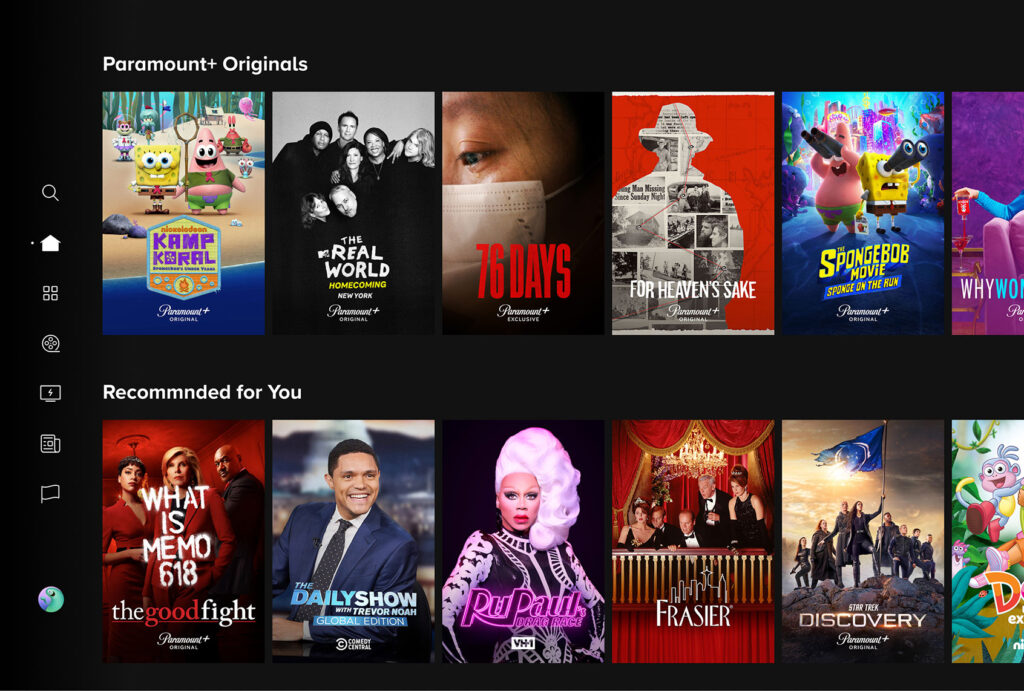
The design and functionality of the Paramount Plus user interface (UI) are critical technical considerations for user experience. The app employs various content discovery algorithms to recommend shows based on your viewing history. Its navigation structure, typically featuring categories, search functions, and watchlists, is designed for intuitive access. Performance aspects, such as quick loading times for menus and instant playback starts, are heavily influenced by the app’s code optimization and its ability to efficiently communicate with the backend servers. A well-designed UI is not just aesthetically pleasing but is engineered to minimize friction in the user’s journey through content.
Advanced Features and Considerations for the Tech-Savvy Streamer
Beyond basic playback, Paramount Plus offers several advanced features that cater to users looking to optimize their streaming experience from a technical standpoint.
Streaming Quality: HD, 4K, and Beyond
Paramount Plus offers content in various resolutions, from standard definition (SD) to high definition (HD) and increasingly, 4K Ultra HD with High Dynamic Range (HDR) support (like Dolby Vision or HDR10). Achieving these higher qualities requires specific technical conditions:
-
4K TV/Display: A television or monitor capable of displaying 3840 x 2160 pixels.
-
Compatible Streaming Device: A device that supports 4K output (e.g., Apple TV 4K, Fire TV Stick 4K, Chromecast with Google TV, PS5, Xbox Series X).
-
High-Speed Internet: A stable connection of at least 25 Mbps is recommended for 4K.
-
HDMI 2.0 or higher cable: To transmit 4K signals from your device to your TV.
-
HDR Support: For enhanced color and contrast, both your display and streaming device must support HDR standards like Dolby Vision or HDR10.
Audio quality is also a technical consideration, with some content offering Dolby Digital 5.1 surround sound or even Dolby Atmos for a more immersive audio experience, requiring compatible sound systems.
Offline Viewing: Data Management and Storage
A valuable tech feature, especially for mobile users, is the ability to download select content for offline viewing. This circumvents the need for an active internet connection, perfect for travel. From a technical standpoint, this involves:
-
Local Storage: Downloaded files consume storage space on your device. Users should be mindful of their device’s available memory.
-
DRM (Digital Rights Management): Downloaded content is encrypted and tied to your account, usually with an expiry period, to prevent unauthorized sharing.
-
Codec Optimization: The downloaded files are often optimized for mobile playback, balancing file size with visual quality.
Managing downloads, checking storage, and understanding download limitations are all part of utilizing this feature effectively.
Multiple Streams and Profiles: Family Tech Management
Paramount Plus allows for multiple concurrent streams, typically up to three, meaning different users can watch different content on separate devices simultaneously under one subscription. This is a technical feature managed by the service’s backend, tracking active sessions. User profiles, a software feature, allow individual viewers within a household to maintain their own watch history, recommendations, and settings. This segmentation helps maintain a personalized experience within a shared account. Parental control settings, often part of profile management, are crucial tech tools that allow adults to restrict access to certain content based on ratings.
Digital Security and Privacy: Protecting Your Account
In the digital age, protecting your streaming account is paramount. Paramount Plus, like any online service, relies on robust security protocols.
-
Strong Passwords: Use unique, complex passwords and consider a password manager.
-
Account Monitoring: Be aware of login notifications from unfamiliar locations.
-
Data Handling: Understand Paramount Plus’s privacy policy regarding your viewing data and personal information.
-
Parental Controls: Utilize the built-in parental control features to secure profiles for children, preventing them from accessing inappropriate content or making unauthorized purchases. These are software-based tools that apply content filters and PIN protections.
The Future of Paramount Plus: Technological Evolution
The streaming landscape is constantly evolving, driven by technological advancements. Paramount Plus is expected to continue adapting and integrating new technologies to enhance user experience and content delivery.
Integration with Other Services and Ecosystems
Future developments might include deeper integration with smart home ecosystems, allowing for voice commands to initiate playback via smart speakers, or seamless content discovery across multiple streaming platforms through universal search functionalities. Bundling services and strategic partnerships with telecommunication providers could also lead to new access points and simplified subscription management.
Continuous Software Updates and Enhancements
Like all modern software, the Paramount Plus app and its underlying infrastructure receive continuous updates. These updates aren’t just for adding new content; they’re vital for:
-
Bug Fixes: Addressing technical issues and improving stability.
-
Performance Optimizations: Making the app faster, more responsive, and efficient in its use of device resources.
-
Feature Enhancements: Introducing new functionalities, improving existing ones (e.g., better search algorithms, enhanced accessibility features).
-
Security Patches: Protecting against emerging cyber threats and vulnerabilities.
Staying up-to-date with these software releases ensures you benefit from the latest technological improvements and security measures.
Conclusion
Paramount Plus, as a comprehensive streaming service, is accessible across a vast array of digital platforms and devices, each offering a unique technological pathway to its rich content library. Whether you prefer the integrated convenience of a Smart TV, the portability of a smartphone, the power of a gaming console, or the familiarity of a web browser, the underlying technology has been engineered to provide a seamless and high-quality viewing experience. By understanding the compatible hardware, optimizing your network, and leveraging the app’s advanced features, you can ensure that “where can I watch Paramount Plus?” always has a satisfying answer, tailored to your specific tech ecosystem and preferences.
aViewFromTheCave is a participant in the Amazon Services LLC Associates Program, an affiliate advertising program designed to provide a means for sites to earn advertising fees by advertising and linking to Amazon.com. Amazon, the Amazon logo, AmazonSupply, and the AmazonSupply logo are trademarks of Amazon.com, Inc. or its affiliates. As an Amazon Associate we earn affiliate commissions from qualifying purchases.