
In the evolving landscape of personal finance, mobile payment applications like Cash App have become indispensable tools for managing day-to-day transactions. For many, the ability to quickly send, receive, and spend money digitally is a game-changer. However, a fundamental step often overlooked by new users, and even some seasoned ones, is understanding the various methods available to load funds onto their Cash App balance. Effectively adding cash to your account is critical for maximizing the app’s utility, whether you’re paying a friend, making online purchases, or utilizing its investing features. This comprehensive guide delves into the primary avenues for funding your Cash App, exploring the nuances, fees, and best practices associated with each method.

Understanding Cash App and Its Loading Mechanisms
Cash App, developed by Square, Inc., functions as a mobile payment service that allows users to transfer money to one another using a mobile phone number or email address. Beyond peer-to-peer payments, it offers a range of financial services, including direct deposit, a linked debit card (the “Cash Card”), and even cryptocurrency and stock investing capabilities. For all these features to be utilized effectively, a sufficient balance within the app is necessary. Loading cash is essentially the process of transferring funds from an external source into your Cash App account, making it available for immediate use within the platform.
The Core Functionality of Cash App
At its heart, Cash App simplifies money management. Users can send and receive funds instantly, often without transaction fees for standard transfers. The platform also provides a personalized debit card, the Cash Card, which can be used anywhere Visa is accepted, drawing directly from your Cash App balance. This integration blurs the lines between a traditional bank account and a mobile wallet, offering a flexible financial tool for a diverse user base.
Why Loading Cash is Essential for Full Utility
Without funds, Cash App’s functionalities are severely limited. Loading cash enables you to:
-
Send money to friends and family: Pay back debts, split bills, or send gifts.
-
Make purchases: Use your Cash Card online or in-store, or pay select merchants directly through the app.
-
Invest: Buy stocks or Bitcoin directly within the app (requires a funded balance).
-
Save: Keep funds separate from your primary bank account for specific goals.
-
Withdraw cash: Access physical cash from ATMs using your Cash Card, though fees may apply.
Understanding how to efficiently and economically load your account is the first step toward harnessing its full potential.
Primary Methods for Adding Cash to Your Cash App Balance
There are several straightforward methods to add money to your Cash App account, each catering to different user preferences and financial situations.
Linking a Bank Account or Debit Card
This is by far the most common and often the most convenient method for funding your Cash App. By securely linking an external financial institution, you enable seamless transfers.
Direct Transfers from External Accounts
To link your bank account or debit card:
-
Navigate to the “Banking” tab (the house icon) on your Cash App home screen.
-
Tap “Link Bank” or “Link Debit Card.”
-
Follow the on-screen prompts to enter your bank’s login credentials or your debit card details. This process usually involves verifying your account through a micro-deposit or a secure third-party service like Plaid.
Once linked, you can easily add money:
-
From the “Banking” tab, tap “Add Cash.”
-
Enter the desired amount.
-
Confirm the transaction with your PIN or Touch ID.
Standard transfers from a linked bank account typically take 1-3 business days to process and are generally free of charge. This is the most cost-effective method for planned transfers.
Instant Deposit Options and Fees
For situations where speed is critical, Cash App offers an “Instant Deposit” feature. When you add cash from a linked debit card, you usually have the option for instant transfer. However, this convenience comes with a fee, typically 0.5% to 1.75% of the transaction amount, with a minimum fee of $0.25. The exact fee percentage will be displayed before you confirm the transaction. While practical for urgent needs, frequent use of instant deposits can accumulate significant costs over time, impacting your personal finance strategy.
Depositing Physical Cash at Retail Locations
For those who primarily deal with physical cash or prefer not to link a bank account, Cash App facilitates cash deposits at participating retail locations. This method bridges the gap between digital and physical money.
Participating Stores and How It Works
Cash App has partnered with numerous retailers across the United States to allow cash deposits. Common participating stores include:
-
Walmart
-
Walgreens
-
7-Eleven
-
Dollar General
-
Family Dollar
-
CVS Pharmacy
-
Rite Aid
To deposit physical cash:
-
Go to the “Banking” tab in your Cash App.
-
Tap “Deposit Paper Money” (or “Paper Money”).
-
Cash App will display a map of nearby participating locations. Select a store.
-
At the cashier, inform them you want to add cash to your Cash App account.
-
The cashier will scan a unique barcode generated within your Cash App (found by tapping “Show Barcode”).
-
Hand over the cash amount you wish to deposit to the cashier. The funds should appear in your Cash App balance almost instantly.
Transaction Limits and Potential Fees
While convenient, this method often has specific limitations and can incur fees. Cash App typically allows deposits of $5 to $500 per transaction, with daily limits often around $1,000 and weekly limits potentially higher (e.g., $4,000 within a 7-day rolling period). Some retailers might also charge a small service fee for facilitating the deposit, though Cash App itself generally does not charge for this specific service. It’s advisable to confirm any potential retailer fees beforehand.
Advanced Strategies and Less Common Loading Options
Beyond the standard bank transfers and retail deposits, Cash App offers other avenues for receiving funds, which can indirectly act as methods to “load” your balance.
Direct Deposits from Your Employer
One of Cash App’s powerful features is the ability to receive direct deposits of paychecks, government benefits (like tax refunds or unemployment), or other regular income directly into your account. This effectively turns your Cash App into a primary financial hub.
Setting Up for Paychecks and Government Benefits
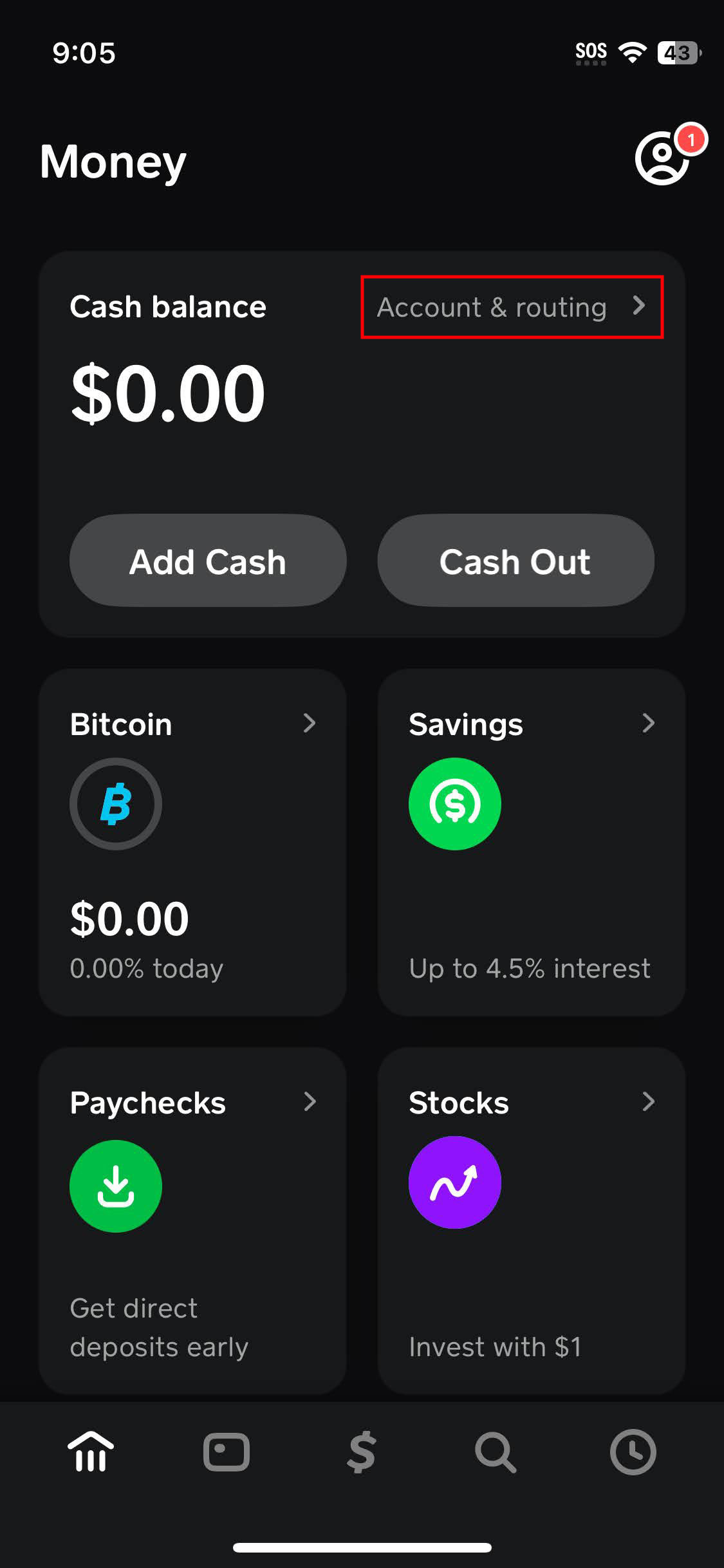
To set up direct deposit:
-
In the “Banking” tab, locate and tap “Direct Deposit.”
-
Cash App will provide you with a unique routing number and account number.
-
Provide these details to your employer’s payroll department, your government benefits provider, or any other institution that sends you money via direct deposit.
Advantages of Direct Deposit to Cash App
Direct depositing into Cash App offers several advantages:
-
Speed: Funds often become available up to two days earlier than traditional banks, thanks to Cash App’s “Early Payday” feature.
-
Convenience: Your income goes straight into the app, ready for spending, sending, or investing.
-
No Fees: There are no fees associated with receiving direct deposits.
-
Financial Planning: It simplifies managing your primary income stream within the app alongside your other financial activities.
Receiving Funds from Other Cash App Users
While not a “loading” method in the traditional sense of transferring from an external bank, receiving money from another Cash App user is a fundamental way to increase your balance.
Peer-to-Peer Transfers
Cash App’s core functionality allows for instant peer-to-peer transfers. If a friend or family member sends you money, it automatically gets added to your Cash App balance. This is a common way to split expenses, receive money for gifts, or settle small debts. These transfers are typically free for both the sender and receiver.
Requesting Money Functionality
If you’re owed money, you can use Cash App’s “Request” feature:
-
From the home screen, tap the “$ Request” button.
-
Enter the amount you wish to request.
-
Select the person you’re requesting money from (or enter their $Cashtag, phone number, or email).
-
Add an optional note and tap “Request.”
Once the other user approves and sends the funds, they will be credited to your balance.
Navigating Fees, Limits, and Security Considerations
Understanding the financial implications and security measures is paramount when utilizing any digital financial tool. Cash App, while convenient, has its own set of rules and best practices.
Understanding Transaction Fees for Various Loading Methods
-
Linking a Bank Account: Standard transfers are free. Instant transfers incur a fee (typically 0.5% to 1.75%).
-
Linking a Debit Card: Instant transfers often have a fee (0.5% to 1.75%).
-
Physical Cash Deposits: Generally free from Cash App’s side, but some retailers might charge a small service fee.
-
Direct Deposit: Free.
-
Peer-to-Peer Transfers: Free for standard transfers. If a sender uses a credit card to send money, they may incur a 3% fee, but the recipient typically receives the full amount.
Always review the fee disclosure before confirming any transaction to avoid unexpected charges.
Daily, Weekly, and Monthly Loading Limits
Cash App imposes limits on how much money you can send, receive, and add to your account. These limits are typically higher for verified accounts (those that have provided personal information like full name, date of birth, and the last four digits of their SSN).
-
Unverified Accounts: May have strict limits, e.g., $250 sent per week and $1,000 received per 30 days.
-
Verified Accounts: Limits are significantly higher. You might be able to send up to $7,500 per week and receive an unlimited amount. Cash deposits at retailers also have daily and weekly limits (e.g., $1,000 per day, $4,000 per week).
These limits are subject to change and may vary based on your account history and verification status. Verifying your account is highly recommended for full access to Cash App’s features and higher transaction limits.
Protecting Your Funds: Security Best Practices
As with any financial platform, vigilance is key to protecting your funds on Cash App.
Two-Factor Authentication
Always enable Two-Factor Authentication (2FA) for your Cash App account. This adds an extra layer of security, requiring a code sent to your phone or email in addition to your password or PIN, significantly reducing the risk of unauthorized access.
Recognizing Scams
Be wary of common scams:
-
“Cash App Flip” Scams: Promises to multiply your money if you send a small amount first. These are fraudulent.
-
Fake Customer Support: Scammers posing as Cash App support asking for your PIN or login details. Cash App will never ask for your PIN.
-
Phishing Attempts: Emails or texts with malicious links designed to steal your credentials.
Always verify the legitimacy of requests and communications directly through the official Cash App support channels within the app. Do not share your login details, PIN, or confirmation codes with anyone.
Optimizing Your Cash App Experience
Integrating Cash App seamlessly into your personal finance routine requires thoughtful consideration of efficiency and cost.
Choosing the Most Cost-Effective Loading Method
Your choice of loading method should align with your priorities.
-
For regular, non-urgent transfers, linking a bank account and opting for standard deposits is the most cost-effective solution, as it’s free.
-
For immediate needs, an instant debit card transfer, despite the small fee, offers unparalleled speed.
-
For individuals dealing primarily with physical cash, retail deposits are an excellent option, though being mindful of retailer fees is important.
-
For income management, direct deposit is the most efficient and free way to get your funds into Cash App.
Integrating Cash App into Your Personal Finance Strategy
Cash App can be more than just a peer-to-peer payment tool; it can be an integral part of your financial ecosystem. By strategically loading funds, utilizing its budgeting features (if available), and taking advantage of direct deposit, you can streamline your financial life. Always stay informed about new features, potential fees, and security updates to ensure your funds are managed effectively and securely. Making informed choices about how and where you load your Cash App will empower you to fully leverage this versatile financial tool.
aViewFromTheCave is a participant in the Amazon Services LLC Associates Program, an affiliate advertising program designed to provide a means for sites to earn advertising fees by advertising and linking to Amazon.com. Amazon, the Amazon logo, AmazonSupply, and the AmazonSupply logo are trademarks of Amazon.com, Inc. or its affiliates. As an Amazon Associate we earn affiliate commissions from qualifying purchases.