
In the modern era of telecommunications, our reliance on mobile devices has transcended simple text messaging and browsing. Despite the proliferation of high-speed 5G networks, we still encounter the frustration of “dead zones”—those specific corners of an office building, basement apartments, or rural retreats where cellular bars vanish. This is where WiFi calling enters the frame as a transformative technology.
WiFi calling is a high-definition voice service that allows you to make and receive calls, as well as send text messages, over a wireless internet connection rather than a traditional cellular signal. While it may seem like a minor feature hidden in your smartphone’s settings, it represents a significant shift in how mobile architecture functions. By leveraging the internet to carry voice data packets, WiFi calling ensures that as long as you have a router nearby, you have a functional phone line.
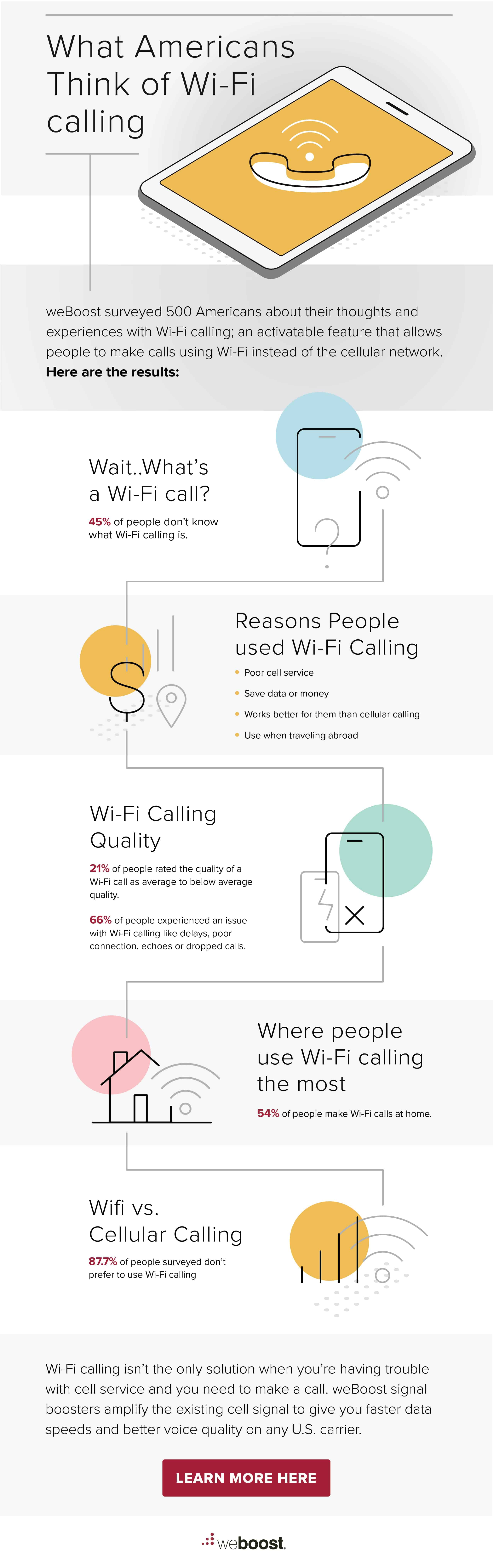
Understanding the Mechanics: How WiFi Calling Works
To appreciate WiFi calling, one must first understand how it differs from traditional cellular communication. In a standard setup, your phone communicates with the nearest cell tower via radio frequencies. WiFi calling, however, bypasses the tower and uses your internet connection to transmit voice data to your carrier’s network.
The Technology Behind the Talk: VoIP and SIP
At its core, WiFi calling is built upon Voice over Internet Protocol (VoIP) technology, similar to the protocols used by applications like Skype, WhatsApp, or Zoom. However, unlike these third-party apps, WiFi calling is integrated directly into the phone’s native dialer and the carrier’s infrastructure. It uses a protocol known as Session Initiation Protocol (SIP) to establish, maintain, and terminate the communication session.
When you speak, your voice is digitized into small data packets. These packets are encrypted for security and sent through your WiFi router, across the open internet, and into your mobile carrier’s “Evolved Packet Core.” From the perspective of the person you are calling, there is no difference; they see your standard mobile number, and the call proceeds as usual.
Seamless Handover: From Cellular to WiFi
One of the most impressive technical feats of modern smartphones is the “seamless handover.” If you start a call while connected to a strong 4G or 5G signal and then walk into a building where the cellular signal drops but a known WiFi network is available, the device can transition the call to WiFi without dropping the connection. This is achieved through sophisticated algorithms that monitor signal-to-noise ratios and packet loss in real-time, switching the data path to whichever medium provides the most stable throughput.
Key Benefits of Integrating WiFi Calling Into Your Routine
The transition to WiFi-based voice services offers more than just a backup for poor signal areas; it enhances the overall user experience through improved audio fidelity and cost management.
Solving the “Dead Zone” Dilemma
Architecture is often the enemy of cellular signals. Materials like reinforced concrete, steel beams, and low-E glass are notorious for blocking radio waves. This often results in dropped calls in high-rise offices or suburban homes. WiFi calling effectively turns every private and public hotspot into a localized mini-cell tower. This ensures that connectivity is no longer dictated by your proximity to a massive steel mast miles away, but rather by the router sitting on your desk.
Superior Audio Quality and HD Voice
Standard cellular calls are often compressed to save bandwidth on crowded radio frequencies, which can lead to “tinny” or muffled audio. WiFi calling typically utilizes “HD Voice” codecs (such as AMR-WB). These codecs capture a wider range of audio frequencies, making the person on the other end sound as if they are standing in the same room. Because modern home and office fiber-optic connections have significantly more bandwidth than a congested cell tower, the data rate for your voice can be much higher, resulting in crystal-clear clarity.
Cost-Efficiency for International Travelers
For frequent travelers, WiFi calling is a powerful tool for avoiding exorbitant roaming charges. Most major carriers treat WiFi calls back to your home country as “domestic” calls, regardless of where you are in the world. If you are in London and use a hotel’s WiFi to call a number in New York, many carriers will not charge you international roaming rates because the call originated “on-net” via the internet. This provides a significant financial advantage over traditional international cellular plans.
Technical Requirements and Compatibility

Not every device or network is created equal when it comes to WiFi calling. To utilize this feature, three components must align: your hardware, your software, and your service provider.
Device Support: iOS vs. Android
Most smartphones manufactured within the last five to seven years are hardware-equipped for WiFi calling. On the iOS side, every model from the iPhone 5c onwards supports the feature. On the Android side, the situation is slightly more fragmented due to the sheer variety of manufacturers. While flagship devices like the Samsung Galaxy S-series or Google Pixel have robust support, some budget-tier international models may lack the necessary firmware to authenticate with specific North American or European carriers.
Carrier Participation and Plans
Even if you have the latest smartphone, your carrier must support the feature on their backend. Most “Big Three” carriers (like Verizon, AT&T, and T-Mobile in the US) offer WiFi calling as a standard, no-cost feature. However, some Mobile Virtual Network Operators (MVNOs)—prepaid carriers that rent space on larger networks—may disable this feature to keep their operating costs low. It is always advisable to check your carrier’s feature list before relying on WiFi calling for your primary communication.
Bandwidth and Network Stability
While WiFi calling doesn’t require a massive amount of data, it does require a stable connection. A typical voice call uses approximately 100kbps to 200kbps of bandwidth. While this is a small fraction of a modern 100Mbps home connection, the “latency” (ping) and “jitter” (variation in delay) are more important than raw speed. If you are on a public WiFi network with hundreds of other users, you may experience “jitter,” which sounds like “robot voice” or momentary silences, even if the overall internet speed seems fast.
Security and Privacy Considerations in a Digital World
In an age where digital security is paramount, users often wonder if routing their private conversations over the internet is safer than using a cellular tower.
Is Your Voice Data Encrypted?
When you make a WiFi call, your voice data is encrypted between your phone and the carrier’s network. This is known as IPsec (Internet Protocol Security) tunneling. Even if someone were “sniffing” the traffic on a public WiFi network at a coffee shop, they would likely only see encrypted packets that are unreadable without the specific security keys held by your device and your carrier. In many ways, this makes WiFi calling more secure than traditional GSM calls, which historically had vulnerabilities to “stingray” devices (cell site simulators).
The E911 Limitation
One of the most critical technical nuances of WiFi calling involves emergency services. When you call 911 from a cell tower, the carrier uses triangulation and GPS to find your location. However, a WiFi signal doesn’t always provide an accurate geographic location. To solve this, carriers require you to register an “Emergency Address” when you enable WiFi calling. If you call 911 over WiFi, the dispatcher will see this registered address. It is vital to update this address if you move or use the device in a different long-term location to ensure emergency responders can find you.
How to Enable WiFi Calling on Your Device
If you have confirmed that your carrier and device are compatible, enabling the feature is usually a straightforward process within your settings menu.
Step-by-Step for iPhone Users
-
Open the Settings app.
-
Scroll down and tap on Phone.
-
Select Wi-Fi Calling.
-
Toggle the Wi-Fi Calling on This iPhone switch to “On.”
-
Follow the prompts to enter your emergency contact address for E911.
Once enabled, you will see “Wi-Fi” next to your carrier name in the Control Center when the feature is active.
Step-by-Step for Android Users
While menus vary by manufacturer, the general path is:
-
Open the Phone app (the dialer).
-
Tap the three-dot menu (Settings) in the top right corner.
-
Look for Settings or Calls.
-
Tap on Wi-Fi Calling and toggle it to “On.”
-
Alternatively, you can find this in Settings > Network & Internet > Mobile Network.

Conclusion: The Future of the “Always-On” Society
WiFi calling is no longer a niche “experimental” feature; it is a fundamental pillar of modern mobile infrastructure. As we move toward a future dominated by 5G and eventually 6G, the lines between “cellular” and “internet” will continue to blur. WiFi calling represents the first major step in that convergence, ensuring that our ability to communicate is limited only by our access to the global network, not by the thickness of our walls. By understanding and utilizing this technology, users can enjoy better call quality, lower costs, and the peace of mind that comes with knowing they are always reachable, even in the deepest “dead zone.”
aViewFromTheCave is a participant in the Amazon Services LLC Associates Program, an affiliate advertising program designed to provide a means for sites to earn advertising fees by advertising and linking to Amazon.com. Amazon, the Amazon logo, AmazonSupply, and the AmazonSupply logo are trademarks of Amazon.com, Inc. or its affiliates. As an Amazon Associate we earn affiliate commissions from qualifying purchases.