
In the modern telecommunications landscape, having immediate access to technical support and account management is essential for maintaining both personal and professional connectivity. AT&T, as a global leader in fiber-optic internet and 5G wireless technology, manages an expansive network of support channels designed to assist millions of subscribers. While many users instinctively search for a direct phone number, the process of reaching the right department involves navigating a sophisticated technological ecosystem. Understanding these channels ensures that your technical issues are resolved efficiently, your digital security remains intact, and your service remains uninterrupted.
Navigating the AT&T Support Directory: Direct Lines for Every Service
When a technical failure or an urgent billing inquiry arises, the telephone remains a primary point of contact for many users. However, because AT&T operates across multiple sectors—including mobile wireless, high-speed fiber internet, and business enterprise solutions—dialing a single general number may not always be the fastest route to a solution.
Wireless and Mobile Support
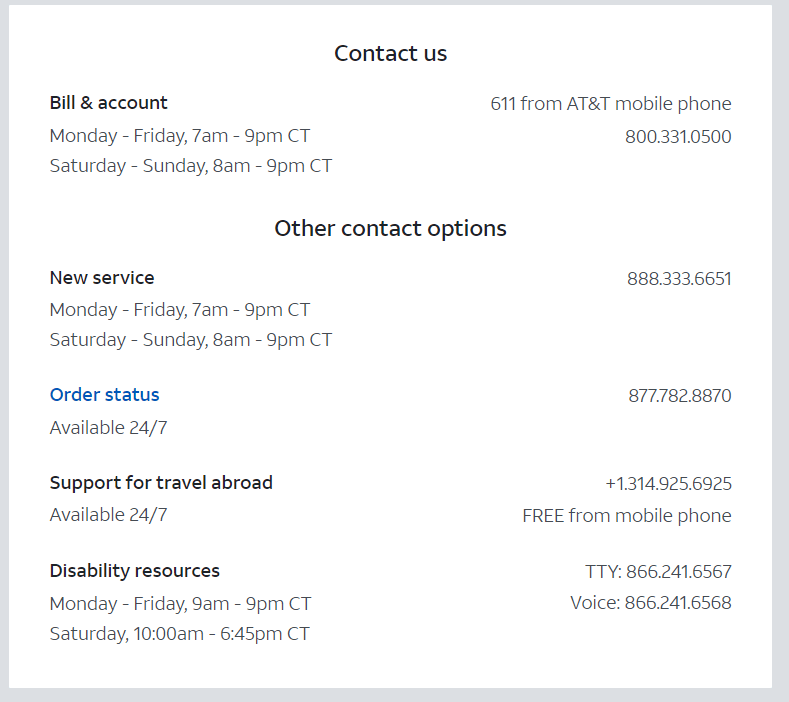
For the vast majority of AT&T customers, wireless service is the primary concern. The standard customer service number for AT&T Wireless is 1-800-331-0500. For those already using an AT&T device, dialing 611 directly from the handset provides a streamlined connection to the automated system and subsequent live representatives. These lines handle everything from device activation and plan upgrades to complex troubleshooting of network connectivity issues.
If you are traveling internationally and encounter service disruptions, AT&T provides a dedicated international support line at +1-314-925-6925. This is a free call from your AT&T mobile phone, regardless of your roaming location, ensuring that global connectivity remains a priority even when you are far from home.
Internet and Home Phone Services
The requirements for fiber-optic internet and traditional landline support differ significantly from mobile services. To reach the technical support team for AT&T Internet, users should call 1-800-288-2020. This department specializes in diagnosing router configurations, physical line issues, and bandwidth optimization. When calling this number, it is helpful to have your account number or the specific model of your gateway device ready, as the automated IVR (Interactive Voice Response) system uses this data to route you to the appropriate tier of technical expertise.
Specialized Business Support
Enterprise and small business clients require a different level of service-level agreement (SLA) management. Business owners should utilize 1-800-321-2000 for general inquiries or 1-877-253-0009 for specific small business technical support. These channels are optimized for handling complex networking tasks, such as static IP management, VPN configurations, and multi-line business systems.
The myAT&T App: Leveraging Technology for Instant Resolution
In the age of digital transformation, calling a phone number is no longer the only—or even the most efficient—way to manage your telecommunications. The myAT&T app represents a significant leap forward in user-centric technology, offering a “support center in your pocket” that often bypasses the need for a live conversation entirely.
Automated Troubleshooting and Diagnostics
One of the most powerful features of the myAT&T app is its built-in diagnostic engine. If your home internet is sluggish or your mobile data isn’t connecting, the app can perform a “line test” remotely. It communicates with your hardware to check for signal integrity and firmware updates. If a problem is detected, the app can often trigger a remote reset of the gateway or provide a step-by-step guide to fixing the physical connection. This reduces the cognitive load on the user and eliminates the wait times associated with traditional call centers.
Real-Time Account Management and AI Chatbots
The app integrates advanced AI-driven chatbots that can handle a variety of administrative tasks. Whether you need to check your data usage, pay a bill, or reset a voicemail password, the digital assistant can process these requests instantly. For more complex inquiries, the app allows you to initiate a live chat with a technician. This is often preferable to a phone call as it allows for the seamless sharing of screenshots, error codes, and links to support documentation, creating a multimedia support experience that is more precise than voice-only communication.
Managing Gadgets and Device Upgrades
Through the digital interface, users can track the health of every device on their plan. The tech-forward platform provides insights into trade-in values, software compatibility, and even recommendations for the latest 5G-enabled hardware. By utilizing the app’s “Service Appointments” feature, users can schedule, track, and modify technician visits with the same ease as ordering a rideshare service, bringing a new level of transparency to physical tech support.

Technical Troubleshooting: eSIMs, 5G, and Network Optimization
Contacting AT&T is often the result of a specific technical hurdle. As hardware becomes more sophisticated, the nature of these hurdles has shifted toward software and configuration-based issues.
The Shift to eSIM Technology
Modern smartphones are increasingly moving away from physical SIM cards in favor of eSIM (embedded SIM) technology. This shift allows for faster activation and the ability to have multiple lines on a single device. However, it also introduces new technical challenges. If you are trying to transfer your service to a new device and the QR code fails or the “Push” notification doesn’t appear, reaching out to AT&T’s technical support becomes necessary. Technicians can manually push an eSIM profile to your device’s EID (Embedded Identity Document), a process that exemplifies the highly technical nature of modern cellular support.
Optimizing 5G and Fiber Performance
Understanding the difference between 5G, 5G+, and millimeter-wave (mmWave) technology can be confusing for many users. If you find that your speeds are not meeting expectations, a call to tech support can help verify if your device is provisioned correctly for the local network architecture. Similarly, for fiber customers, technicians can verify if the ONT (Optical Network Terminal) is operating at peak efficiency. They can also provide advice on optimizing home Wi-Fi networks, such as identifying interference from other household electronics or suggesting the placement of Wi-Fi extenders to eliminate dead zones.
Digital Security: Protecting Your Data and Avoiding Fraud
In an era of increasing cyber threats, knowing the official AT&T phone number is a critical component of digital security. “Spoofing” and “vishing” (voice phishing) are common tactics where attackers masquerade as official representatives to steal personal information.
Verifying Official Communication
It is vital to remember that while AT&T may contact you regarding account updates or legitimate service alerts, they will never ask for your full social security number, password, or credit card details via an unsolicited phone call. If you receive a call that claims to be from AT&T but feels suspicious, the safest technological practice is to hang up and dial the official number (1-800-331-0500) yourself. This ensures you are connected to the genuine secure infrastructure of the company.
Implementing Two-Factor Authentication (2FA)
When speaking with an AT&T representative, you will often be asked to provide a one-time passcode sent to your device or to verify a pre-set security PIN. This is a crucial layer of defense against “SIM swapping,” a high-tech fraud where criminals attempt to port your number to their own device to gain access to your bank accounts and sensitive data. Always ensure that your account security settings are updated through the myAT&T portal, and never share your security PIN with anyone who calls you unexpectedly.
Reporting Security Threats
If you encounter a digital security threat, such as a fraudulent text message (smishing), AT&T encourages users to forward the message to 7726 (SPAM). This technical reporting tool allows their security team to track and block malicious origins across the network, contributing to the collective security of all subscribers.
The Future of Telecom Interaction: AI and Hyper-Personalization
As we look toward the future, the way we “call” AT&T is set to change fundamentally. The integration of generative AI into customer service platforms means that support will become increasingly predictive. Instead of you calling to report an outage, the network’s self-healing algorithms may detect a fault in your area and send an automated notification to your device with an estimated time of repair.
Furthermore, the “Phone Number” itself is becoming a legacy concept as Web3 and VoIP (Voice over Internet Protocol) technologies evolve. We are moving toward a reality where support is embedded directly into the operating system of our devices, allowing for a seamless, “one-tap” connection to expert help. Until that total integration is achieved, maintaining a record of the essential AT&T contact numbers and mastering the digital tools at your disposal remains the most effective way to ensure your tech life runs smoothly.
By combining the reliability of traditional voice support with the efficiency of modern apps and the vigilance of digital security practices, you can navigate the complexities of the AT&T network with confidence and ease. Whether you are troubleshooting a 5G connection or securing your personal data, having the right information is the first step toward a seamless digital experience.
aViewFromTheCave is a participant in the Amazon Services LLC Associates Program, an affiliate advertising program designed to provide a means for sites to earn advertising fees by advertising and linking to Amazon.com. Amazon, the Amazon logo, AmazonSupply, and the AmazonSupply logo are trademarks of Amazon.com, Inc. or its affiliates. As an Amazon Associate we earn affiliate commissions from qualifying purchases.