
In our increasingly digital world, the efficiency with which we interact with technology directly impacts our productivity, professional success, and even our leisure. At the heart of this interaction lies typing speed, measured in Words Per Minute (WPM). Far from being a niche skill, a respectable WPM is a foundational competency that underpins almost every digital task, from crafting emails and coding software to engaging in online chats and drafting complex reports. But in an era overflowing with apps, AI tools, and a myriad of gadgets, what truly constitutes a “good” Words Per Minute? The answer, as we’ll explore, isn’t a single universal number but rather a dynamic metric influenced by context, profession, and personal goals within the vast landscape of technology.
Understanding Words Per Minute (WPM) in the Digital Age
WPM serves as a critical performance indicator for anyone interacting with a keyboard or consuming digital text. While often associated with typing speed, it’s also a metric for reading speed. For the purpose of understanding its “goodness” in a tech context, our primary focus will be on typing WPM, given its direct link to output and interaction with digital tools.
Defining WPM: Typing vs. Reading
Typing WPM quantifies the number of words a person can type in one minute, typically accounting for errors. It’s a measure of manual dexterity, muscle memory, and cognitive processing speed as one translates thoughts or source material into digital text. This is calculated as (Characters Typed / 5) / Time in Minutes. Corrections often subtract from the total, leading to a “net WPM.”
Reading WPM, on the other hand, measures how quickly an individual can process and comprehend written information. While less directly tied to hardware interaction, it’s crucial for absorbing information from screens, documents, and online resources. Tools and apps exist to help improve reading WPM, leveraging techniques like speed reading, which can significantly enhance efficiency in a data-rich environment. However, our deep dive into “good” WPM for tech will primarily revolve around the active input side.
The Evolution of Typing Speed
The concept of typing speed emerged with the advent of typewriters in the late 19th century. Early typists, often referred to as “typewriter girls,” revolutionized office work, and their speed became a key performance metric. The shift from mechanical typewriters to electric typewriters and then to computer keyboards brought about significant changes in ergonomics and input methods, but the underlying need for speed and accuracy remained constant.
With the proliferation of personal computers in the late 20th century and the subsequent explosion of the internet, typing transitioned from a specialized administrative skill to a universal digital literacy requirement. Today, whether you’re a software developer coding algorithms, a digital marketer crafting campaigns, or a student writing an essay, your typing speed directly impacts your efficiency and the fluidity of your digital workflow. It’s no longer just about transcribing; it’s about translating thought into digital action with minimal friction.
Why WPM Matters for Tech Users
For anyone navigating the tech landscape, a high WPM isn’t just a vanity metric; it’s a practical advantage.
-
Increased Productivity: The most obvious benefit. Faster typing means completing tasks like emails, reports, and data entry quicker, freeing up time for more analytical or creative pursuits.
-
Enhanced Efficiency: Reduced friction in digital interaction. When you can type fluently, your focus shifts from the mechanics of typing to the content itself, improving the quality and speed of your output.
-
Professional Advantage: Many tech roles—from IT support and customer service (chat) to software development and content creation—demand rapid and accurate text input. A higher WPM can be a distinguishing factor in hiring and performance.
-
Seamless Digital Communication: In an era of instant messaging, collaborative documents, and virtual meetings, swift and clear communication is paramount. A good WPM facilitates this, enabling real-time interaction and expression.
-
Reduced Cognitive Load: When typing becomes second nature, the cognitive effort required to form words diminishes. This allows the brain to allocate more resources to problem-solving, creativity, and critical thinking, which are essential in tech-driven fields.
Benchmarking Your Typing Speed: What’s “Good”?
Defining a “good” WPM is akin to defining a “good” speed for a car – it depends entirely on the road, the driver, and the purpose of the journey. In the digital realm, WPM expectations vary significantly based on your role, the context of your typing, and your personal goals.
Average WPM Across Different Demographics
-
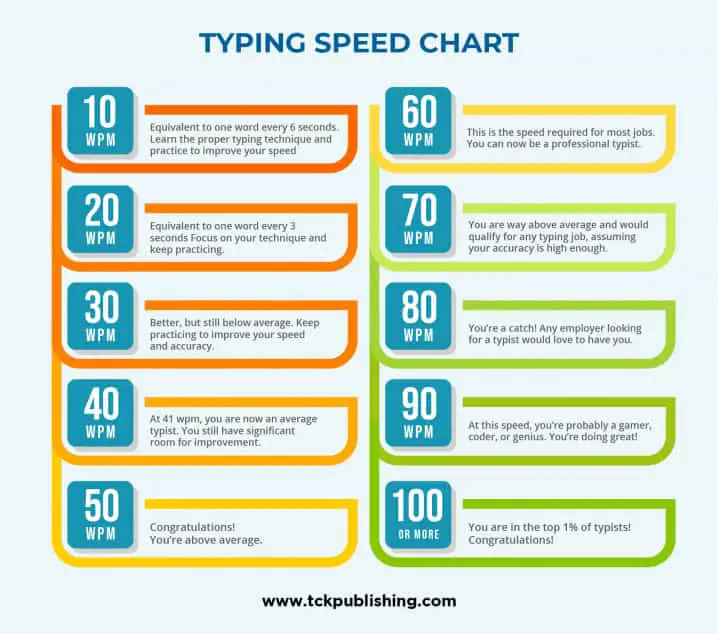
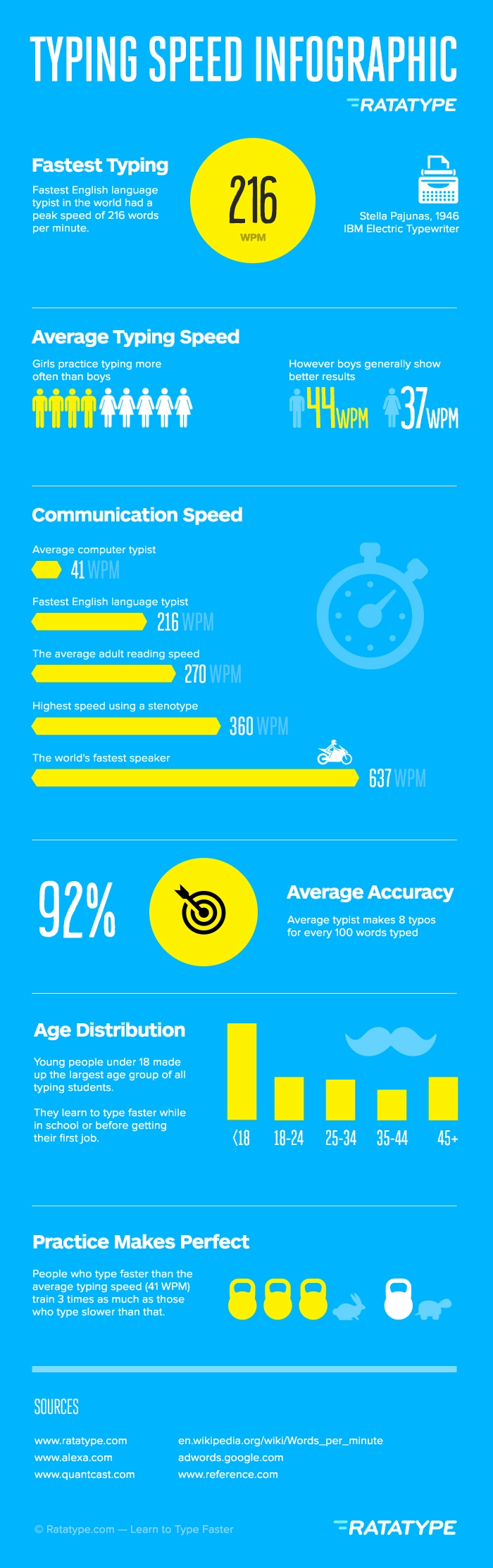
General Public/Casual Users: Most casual computer users, who primarily use computers for browsing, social media, and occasional email, typically type around 30-40 WPM. This speed is sufficient for basic digital interactions but can become a bottleneck for more intensive tasks.
-
Professional Typists/Data Entry: Individuals whose primary job involves extensive typing, such as data entry clerks or administrative assistants, often aim for 60-75 WPM with high accuracy. Some specialized roles might require even higher speeds, exceeding 80 WPM.
-
Gamers: While not their primary focus, gamers involved in multiplayer online games with text-based chat often develop surprisingly high WPMs, in the range of 50-70 WPM, driven by the need for quick communication under pressure.
-
Programmers: For software developers, raw typing speed is less critical than logical thinking and problem-solving. However, a decent WPM (e.g., 40-60 WPM) can significantly speed up the input of code, comments, and documentation. The cognitive load reduction allows them to focus more on the logic and less on the syntax mechanics.
Industry-Specific WPM Standards
Certain industries and roles have more explicit WPM expectations:
-
Administrative Roles: Secretaries, executive assistants, and office administrators often need 50-70 WPM to efficiently handle correspondence, scheduling, and document creation.
-
Transcriptionists: This is one of the most WPM-dependent professions. Medical or legal transcriptionists often need to type at 75-100+ WPM to accurately and quickly convert audio into text, often under tight deadlines.
-
Customer Service (Chat Support): Agents handling multiple chat conversations simultaneously benefit greatly from speeds of 50-70 WPM to provide prompt and helpful responses.
-
Writers/Journalists (Digital Content Creation): Authors, bloggers, and journalists working in digital media find 60-80 WPM to be a comfortable range, allowing them to capture ideas quickly without interrupting their flow of thought.
Factors Influencing a “Good” WPM
Beyond the raw number, several factors determine the effectiveness of your WPM:
-
Accuracy: A high WPM with numerous errors (low accuracy) is counterproductive. Time spent correcting mistakes negates any speed advantage. A “good” WPM implicitly includes high accuracy (e.g., 95% or higher).
-
Context: Typing a casual message to a friend doesn’t require the same speed or precision as drafting a critical business proposal or writing lines of code. The “goodness” is relative to the task.
-
Fatigue: Prolonged typing can lead to fatigue, reducing both speed and accuracy. Ergonomics play a crucial role here.
-
Keyboard Quality: The responsiveness and layout of your keyboard can impact your typing speed and comfort.
-
Typing Method: Touch typing (using all ten fingers without looking at the keyboard) is universally recognized as the most efficient method for achieving high WPM. “Hunt-and-peck” typists, while sometimes surprisingly fast, rarely match the sustained speed and accuracy of touch typists.
In essence, a “good” WPM is one that allows you to complete your digital tasks efficiently, accurately, and without frustration, aligning with the demands of your personal and professional tech interactions. For most tech-savvy individuals aiming for efficiency, a target of 50-70 WPM with high accuracy is a solid benchmark.
The Tech Tools and Techniques for Boosting Your WPM
Improving your WPM is a tangible skill that can be developed and refined with dedicated practice and the right technological aids. In the tech world, there’s no shortage of resources designed to help you type faster and more accurately.
Online Typing Tutors and Games
The internet is a treasure trove of interactive platforms designed to teach and improve typing skills. These tools often employ gamification, structured lessons, and real-time feedback to make learning engaging and effective.
-
TypingClub & Keybr: These platforms offer comprehensive, step-by-step lessons, starting with home row keys and gradually introducing more complex finger movements and words. They provide progress tracking and accuracy reports.
-
10FastFingers & Nitro Type: Ideal for practicing and testing your current speed. 10FastFingers offers quick WPM tests using common words, while Nitro Type transforms typing practice into a competitive racing game, motivating users through leaderboard challenges.
-
Benefits: These tools break down the learning process, provide immediate feedback on speed and accuracy, identify weak spots, and often make practice enjoyable, turning a chore into a game.
Ergonomics and Hardware
Your physical setup and the quality of your input devices play a significant role in both your typing speed and long-term comfort.
-
Keyboard Types:
-
Mechanical Keyboards: Often preferred by serious typists and gamers for their tactile feedback, distinct actuation points, and durability. Different switch types (e.g., Cherry MX Red, Blue, Brown) offer varying levels of resistance and sound, allowing for personalization.
-
Ergonomic Keyboards: Designed to promote a more natural hand and wrist position, reducing strain and the risk of repetitive strain injuries (RSI). While they might initially slow down your WPM as you adapt, they are crucial for sustained, comfortable typing.
-
Laptop Keyboards: Generally less ergonomic due to their flat profile and shallow key travel, which can make sustained high-speed typing less comfortable.
-
-
Proper Posture and Hand Positioning: Maintaining an upright posture, keeping wrists straight, and placing fingers on the home row (ASDF JKL;) are fundamental to efficient and injury-free typing. Using a wrist rest can also help maintain proper alignment.
-
Why Hardware Matters: A comfortable and responsive keyboard, combined with good posture, minimizes physical strain, allowing for longer practice sessions and sustained high performance without discomfort or fatigue.
Software & AI-Assisted Typing
Beyond direct typing improvement, various software solutions and AI tools can augment your text input process, effectively boosting your “output WPM” or reducing the need for manual typing.
-
Autocorrect and Text Expansion Tools: Tools like TextExpander, PhraseExpress, or even built-in OS features allow you to create custom abbreviations that expand into longer phrases, sentences, or even paragraphs. This dramatically reduces the number of keystrokes needed for repetitive text.
-
Voice-to-Text (Dictation Software): With advancements in AI, speech recognition software (e.g., Google Voice Typing, Dragon NaturallySpeaking, built-in macOS/Windows dictation) has become incredibly accurate. For individuals who can speak faster than they type, or those with physical limitations, this is a powerful alternative or supplement, potentially achieving “WPM equivalents” far exceeding manual typing speeds.
-
AI-Powered Writing Assistants: Tools like Grammarly, Jasper, or ChatGPT can generate text, suggest improvements, or even complete sentences, reducing the amount of manual typing and mental effort required. While they don’t directly improve your manual WPM, they drastically increase the speed of content generation and refinement.
Mastering Touch Typing
At the core of achieving a truly “good” WPM is the mastery of touch typing. This technique involves using all ten fingers to type without looking at the keyboard, relying on muscle memory to locate keys.
-
Benefits:
-
Maximized Speed: Utilizes the full range of your fingers, distributing the workload evenly.
-
Improved Accuracy: Muscle memory reduces keying errors.
-
Reduced Cognitive Load: Frees your eyes and mind to focus on the screen and the content, not the keyboard.
-
Ergonomic Advantages: Promotes a more relaxed hand position, reducing strain.
-
-
How to Learn It: Consistent practice with typing tutors is key. Start slow, focus on accuracy over speed, and resist the urge to look at your fingers. The initial learning curve might feel slow, but the long-term benefits are immense for any tech user.
Beyond Raw Speed: Accuracy, Efficiency, and Cognitive Load
While a high WPM score often grabs attention, true mastery of text input in the digital age extends far beyond mere speed. The interplay of accuracy, overall efficiency, and the reduction of cognitive load are equally, if not more, important for tech professionals.
The Interplay of Speed and Accuracy
A WPM score without considering accuracy is misleading. Imagine typing at 100 WPM but making a mistake every other word. The time spent backspacing and correcting errors would quickly negate any speed advantage. This is why many typing tests report a “net WPM” or “adjusted WPM” that penalizes errors.
-
Net WPM: Often calculated by subtracting words corresponding to errors from the gross WPM. For example, if you type 60 words but make 5 errors (each error might count as a full word penalty), your net WPM might be 55.
-
Optimal Balance: The goal is to find an optimal balance where you type as fast as possible without compromising accuracy. For most professional tasks, an accuracy rate of 95% or higher is considered acceptable, with 98-100% being ideal. It’s often better to type slightly slower and more accurately than to rush and make numerous corrections.
Cognitive Load and Fluency
Efficient typing significantly reduces cognitive load. When you are a fluent touch typist, the physical act of typing becomes almost subconscious. Your brain can then allocate its full resources to:
-
Content Generation: Focusing on the ideas, structure, and clarity of your writing, rather than the mechanics of getting words onto the screen. This is crucial for writers, content creators, and marketers.
-
Problem-Solving: For programmers, fluent typing means they can focus on the logic and syntax of their code, translating complex algorithms into commands without the interruption of hunting for keys. This accelerates debugging and development.
-
Rapid Response: In real-time communication settings like chat support or collaborative editing, reduced cognitive load allows for quicker comprehension and more thoughtful responses.
This fluidity between thought and digital expression is a hallmark of truly productive tech interaction. It minimizes interruptions to your flow state, leading to higher quality work and greater job satisfaction.
WPM as a Productivity Metric
Seen through this broader lens, WPM is not just a typing speed; it’s a fundamental productivity metric in the digital age. A higher, more accurate WPM contributes to overall productivity by:
-
Saving Time: The cumulative time saved from faster typing across countless daily tasks adds up significantly.
-
Improving Work Quality: By reducing cognitive friction, you can dedicate more mental energy to the substance of your work.
-
Facilitating Multitasking (Efficiently): While true multitasking is a myth, quickly switching between input-heavy tasks becomes more manageable.
-
Empowering Digital Skill Development: A strong WPM underpins almost all advanced digital skills, making it easier to learn new software, manage complex data, and interact with sophisticated interfaces.
Future of Text Input
While WPM has been the gold standard for text input, the future of human-computer interaction is constantly evolving. AI, voice recognition, and potentially even brain-computer interfaces (BCI) promise to redefine how we input information.
-
Advanced Voice AI: As voice recognition becomes even more accurate and context-aware, dictation could become the primary mode of text input for many, rendering traditional WPM less critical.
-
AI-Powered Content Generation: Tools that can generate entire articles, emails, or code snippets from minimal prompts might reduce the need for extensive manual typing.
-
Brain-Computer Interfaces (BCI): While still largely in experimental stages, BCIs could theoretically allow users to “type” directly from thought, bypassing physical input altogether.
However, even with these advancements, manual text input via keyboards is likely to remain a prevalent and essential skill for the foreseeable future, particularly for creative control, precision, and quick edits. Therefore, improving your WPM remains a valuable investment in your digital dexterity.
In conclusion, “what’s a good words per minute” is a highly contextual question with no single definitive answer. For most engaged tech users, a WPM of 50-70 with high accuracy (95%+) provides a strong foundation for efficient and effective digital interaction. This benchmark allows for seamless communication, enhanced productivity, and reduced cognitive load, empowering you to thrive in an increasingly tech-driven world. By leveraging the abundance of tech tools and embracing consistent practice, anyone can improve their WPM, transforming it from a mere metric into a powerful enabler of digital prowess and professional growth.
aViewFromTheCave is a participant in the Amazon Services LLC Associates Program, an affiliate advertising program designed to provide a means for sites to earn advertising fees by advertising and linking to Amazon.com. Amazon, the Amazon logo, AmazonSupply, and the AmazonSupply logo are trademarks of Amazon.com, Inc. or its affiliates. As an Amazon Associate we earn affiliate commissions from qualifying purchases.