
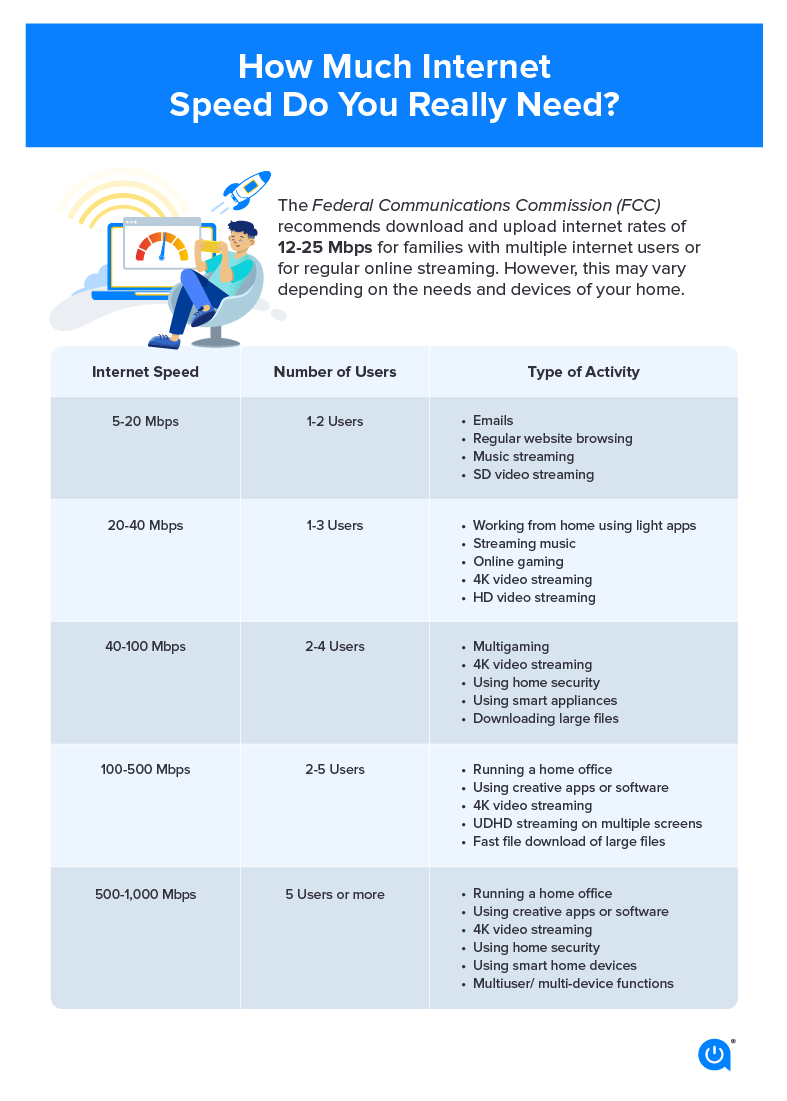
In the modern digital landscape, streaming has transitioned from a niche luxury to the primary method of media consumption. Whether you are binge-watching high-definition series, participating in professional video conferences, or broadcasting your own gameplay to a global audience, the stability and speed of your internet connection are the most critical factors in your user experience. However, the answer to “how much speed do I need” is rarely a single number. It is a nuanced calculation based on resolution, bitrate, hardware efficiency, and network overhead.
To optimize your digital setup, you must look beyond the marketing jargon of Internet Service Providers (ISPs) and understand the technical requirements that govern seamless data transmission.
Understanding the Fundamentals of Bandwidth and Data Transmission
Before diving into specific numbers, it is essential to distinguish between the various technical components that define your connection quality. Most users conflate “speed” with “bandwidth,” but in technical terms, bandwidth represents the maximum capacity of your connection—the width of the pipe—while speed refers to the rate at which data packets travel through that pipe.
Bits vs. Bytes: Decoding the Terminology
One of the most common points of confusion in the tech world is the difference between Megabits per second (Mbps) and Megabytes per second (MBps). ISPs almost exclusively advertise speeds in Megabits (Mbps). However, file sizes and data usage are typically measured in Megabytes (MB). Since there are eight bits in one byte, a 100 Mbps connection actually transfers data at a theoretical maximum of 12.5 MB per second. Understanding this 8:1 ratio is vital when calculating how long a high-resolution stream will take to buffer or how much data a 4K movie will consume.
Download vs. Upload Speeds
For the average consumer watching Netflix or YouTube, download speed is the primary metric. This is the rate at which data is pulled from a remote server to your local device. However, for interactive streaming—such as Zoom calls or Twitch broadcasting—upload speed becomes equally important. Upload speed is the rate at which your device sends data to the internet. Asymmetric Digital Subscriber Lines (ADSL) often offer high download speeds but abysmal upload speeds, which can lead to “lag” or dropped frames during live interactions even if your movie-watching experience is perfect.
The Role of Data Compression and Codecs
The “speed” you need is also dictated by the efficiency of the codecs used by the streaming platform. Codecs like H.264 (AVC), H.265 (HEVC), and the newer AV1 are designed to compress massive video files into manageable streams without significant loss of quality. A 4K stream using the highly efficient HEVC codec may require only 15 Mbps, whereas an older codec might require 30 Mbps for the same visual fidelity. When evaluating your internet needs, consider that as technology advances, software optimization often reduces the raw bandwidth required for high-quality visuals.
Resolution-Specific Requirements for Modern Media Consumption
Streaming quality is categorized by resolution, which refers to the number of pixels on the screen. The more pixels there are, the more data must be transmitted every second.
Standard Definition (SD) and High Definition (HD)
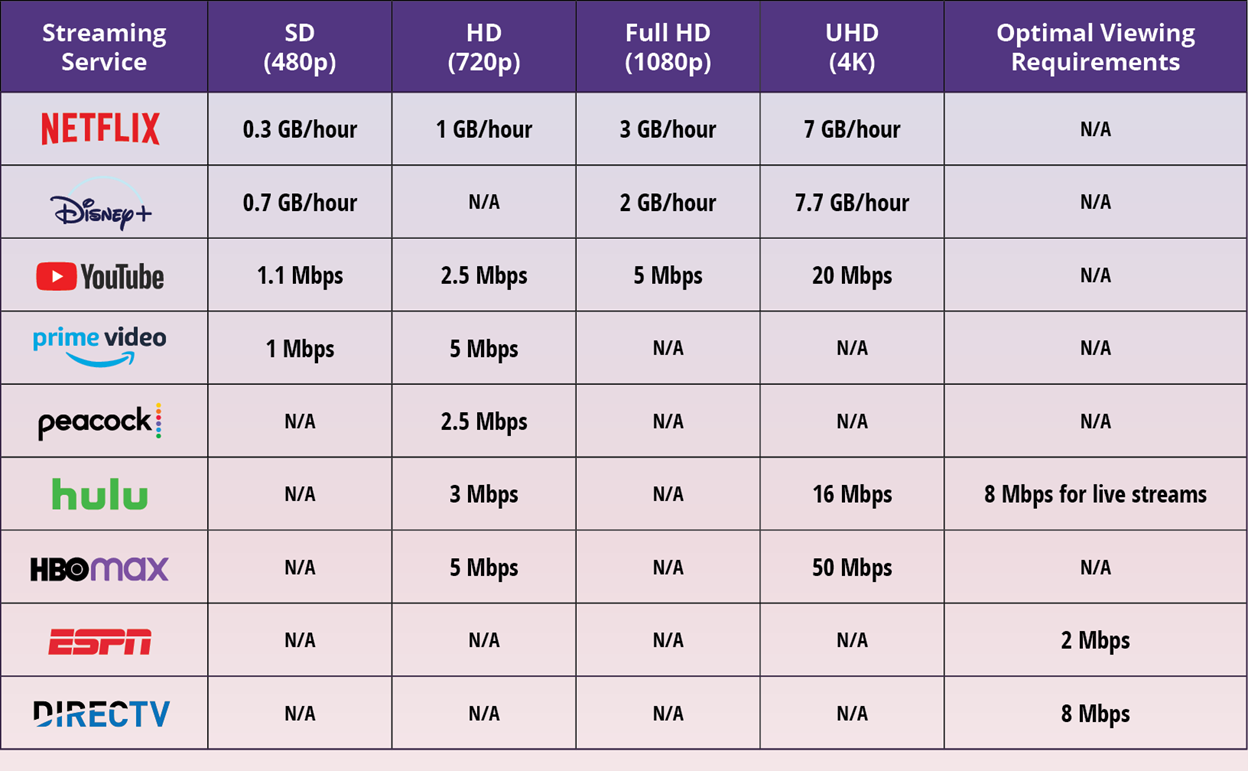
For basic streaming in Standard Definition (480p), the requirements are minimal. Most platforms suggest a consistent speed of at least 3 Mbps. While this is easily achievable on most mobile networks and basic home plans, it is rarely the target for modern tech enthusiasts.
Moving into High Definition (720p or 1080p), the demand increases. For 1080p “Full HD” streaming, a minimum of 5 Mbps is typically recommended. However, to account for “overhead”—the extra data used for network signaling and error correction—a stable 10 Mbps connection is preferred to ensure that the stream does not drop to a lower resolution during peak usage times.
4K Ultra HD and HDR
The jump to 4K (2160p) represents a fourfold increase in pixel count over 1080p. To maintain a 4K stream, platforms like Netflix and Disney+ recommend a minimum of 25 Mbps. If you are also using High Dynamic Range (HDR) or Dolby Vision, which adds more metadata for color and brightness, you should aim for a dedicated 30-35 Mbps just for that single stream.
Audio Streaming and High-Fidelity Sound
While video consumes the lion’s share of bandwidth, audio streaming also has specific requirements. Compressed audio (Spotify or Apple Music) typically requires less than 1 Mbps. However, if you are an audiophile using platforms like Tidal or Qobuz for “Lossless” or “Master Quality Authenticated” (MQA) audio, you may require 5-10 Mbps to ensure the high-bitrate audio files stream without interruption.
The Critical Role of Latency and Upload Speed in Interactive Streaming

For many users, “streaming” isn’t just about consuming content; it’s about creating it. This shift from passive consumption to active participation introduces two new technical variables: latency and upload bandwidth.
Latency, Ping, and Jitter
In live streaming and online gaming, raw speed is often less important than latency. Latency (measured as “ping” in milliseconds) is the time it takes for a data packet to travel from your device to the server and back.
- Ping: Ideally, for a seamless interactive experience, you want a ping under 50ms.
- Jitter: This refers to the variation in latency over time. If your ping jumps from 20ms to 200ms repeatedly, you will experience “stuttering,” even if your total Mbps is high. This is often caused by network congestion or poor-quality routing hardware.
Requirements for Broadcasting (Twitch and YouTube Live)
If you are a content creator streaming to Twitch, your upload speed is your most important asset. Most streamers broadcast at 1080p at 60 frames per second (fps). This requires a consistent “bitrate” of about 6 Mbps. Because upload speeds are often unstable, technical experts recommend having an upload capacity that is at least double your target bitrate. Therefore, if you want to stream at 6 Mbps, you should have a plan that offers at least 12-15 Mbps of upload speed.
Cloud Gaming: The Ultimate Bandwidth Test
Services like Xbox Cloud Gaming, NVIDIA GeForce Now, and PlayStation Plus Premium represent the pinnacle of streaming technology. These services stream a high-resolution video feed to you while simultaneously sending your controller inputs back to a server. This requires high download speeds (at least 25-50 Mbps for 4K) and extremely low latency (under 30ms). Without this technical synergy, the “input lag” makes the gaming experience unplayable.
Technical Bottlenecks: Hardware and Environmental Factors
Even if you pay for a Gigabit (1,000 Mbps) connection, you may find your streaming experience lacking. This is often due to hardware bottlenecks or local interference rather than a fault with the ISP.
Router Capacity and Wi-Fi Standards
Your router is the brain of your home network. Older routers using the Wi-Fi 4 (802.11n) or Wi-Fi 5 (802.11ac) standards may struggle to handle multiple high-bandwidth streams simultaneously. Wi-Fi 6 (802.11ax) is the current gold standard for home users, offering better “Orthogonal Frequency-Division Multiple Access” (OFDMA), which allows the router to communicate with multiple devices more efficiently. If you are streaming 4K in one room while someone else is gaming in another, a Wi-Fi 6 router is essential to prevent packet loss.
The Ethernet Advantage
For the most stable streaming experience, a wired Ethernet connection (Cat6 or Cat6a) is always superior to Wi-Fi. Wireless signals are subject to interference from walls, furniture, and other electronic devices (like microwaves and baby monitors). If your smart TV or gaming console is stationary, hardwiring it ensures you get the full speed of your plan with the lowest possible latency.
The Impact of Connected Devices
In a modern “Smart Home,” your internet bandwidth is shared among dozens of devices. Smart bulbs, security cameras, tablets, and smartphones all consume a small portion of your “data pie.” Security cameras, in particular, are “upload-heavy” devices that can significantly degrade the quality of your video calls or live streams if they are constantly uploading footage to the cloud.
Future-Proofing Your Home Network for Next-Generation Content
As we look toward the future, the bandwidth requirements for streaming are only going to increase. The emergence of 8K video, Virtual Reality (VR) streaming, and Augmented Reality (AR) applications will demand speeds that current infrastructure is only just beginning to support.
8K Streaming and Beyond
An 8K stream has four times the pixels of 4K. Early technical tests suggest that 8K streaming will require a minimum of 50-100 Mbps of dedicated bandwidth. While 8K content is currently scarce, those building high-end home theaters should look toward Fiber-to-the-Home (FTTH) connections to ensure they are ready for the next shift in media standards.
The Move to Fiber Optics
Traditional cable internet (DOCSIS) is limited by the physical properties of copper wiring, which often leads to “throttling” during peak evening hours when everyone in the neighborhood is streaming. Fiber-optic technology uses light pulses to transmit data, offering symmetrical speeds (the same speed for both download and upload) and significantly higher reliability. For a household of “power users,” a fiber plan is the most effective way to eliminate streaming issues.
Software Optimization and Network Management
Advanced users can also utilize Quality of Service (QoS) settings within their router’s software. QoS allows you to prioritize specific types of traffic. For example, you can tell your router to prioritize data packets for your streaming box or work laptop over your smartphone’s background updates. This ensures that even if the network is under heavy load, your primary stream remains uninterrupted.
In conclusion, the speed of internet you need for streaming is a moving target. While 25 Mbps might be the “magic number” for a single 4K stream, a modern household with multiple users and smart devices should realistically aim for a plan offering at least 100-200 Mbps to ensure a buffer-free environment. By understanding the interplay between bandwidth, latency, and hardware, you can build a robust tech stack that delivers a premium digital experience.
aViewFromTheCave is a participant in the Amazon Services LLC Associates Program, an affiliate advertising program designed to provide a means for sites to earn advertising fees by advertising and linking to Amazon.com. Amazon, the Amazon logo, AmazonSupply, and the AmazonSupply logo are trademarks of Amazon.com, Inc. or its affiliates. As an Amazon Associate we earn affiliate commissions from qualifying purchases.