
In the early days of enterprise computing, the “one server, one application” model was the industry standard. If a company needed to run a new database, a web server, and an internal mail system, they would purchase three separate physical machines. This led to “server sprawl,” where data centers were packed with underutilized hardware, consuming massive amounts of electricity and requiring intensive manual maintenance.
The advent of virtualized computing fundamentally changed this landscape. By decoupling the software from the physical hardware it runs on, virtualization has become the backbone of modern technology trends, enabling the scalability of the cloud and the agility of modern software development. To understand virtualized computing is to understand the very foundation upon which the modern digital world is built.

The Fundamentals of Virtualization Technology
At its core, virtualized computing is the process of creating a software-based (virtual) representation of something, such as virtual applications, servers, storage, and networks. It is the single most effective way to reduce IT expenses while boosting efficiency and agility for all size businesses.
The Role of the Hypervisor
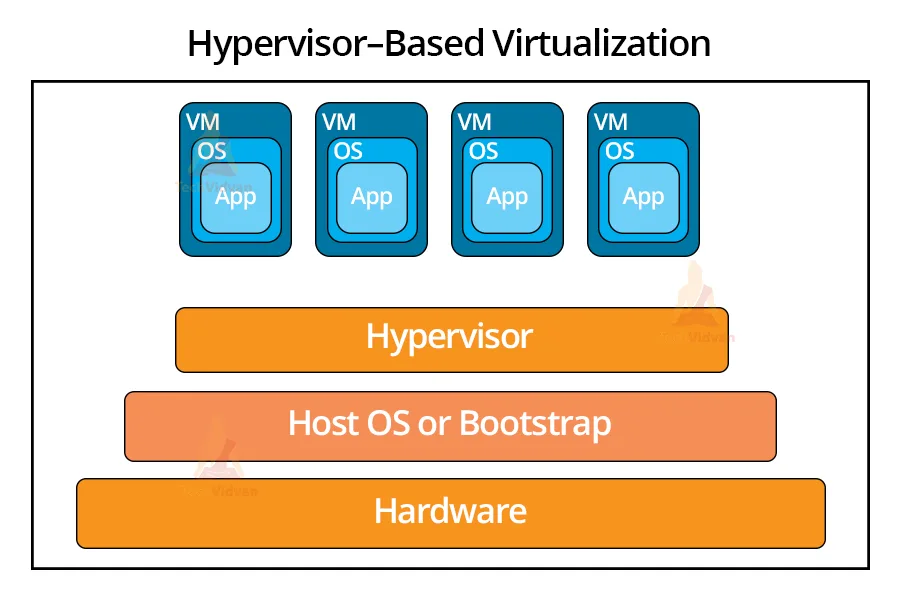
The magic of virtualization happens through a thin layer of software known as a hypervisor. Also called a Virtual Machine Monitor (VMM), the hypervisor sits between the physical hardware and the operating systems. Its primary job is to intercept the requests from the virtual machines (VMs) to the hardware and ensure that physical resources like CPU cycles, memory, and storage are allocated fairly and efficiently.
There are two primary types of hypervisors:
-
Type 1 (Bare-Metal): These run directly on the system’s hardware. They are highly secure and efficient, making them the standard for enterprise data centers (e.g., VMware ESXi, Microsoft Hyper-V).
-
Type 2 (Hosted): These run as an application on top of an existing operating system. They are popular for software testing and personal use (e.g., Oracle VirtualBox, VMware Workstation).
From Physical to Logical Resources
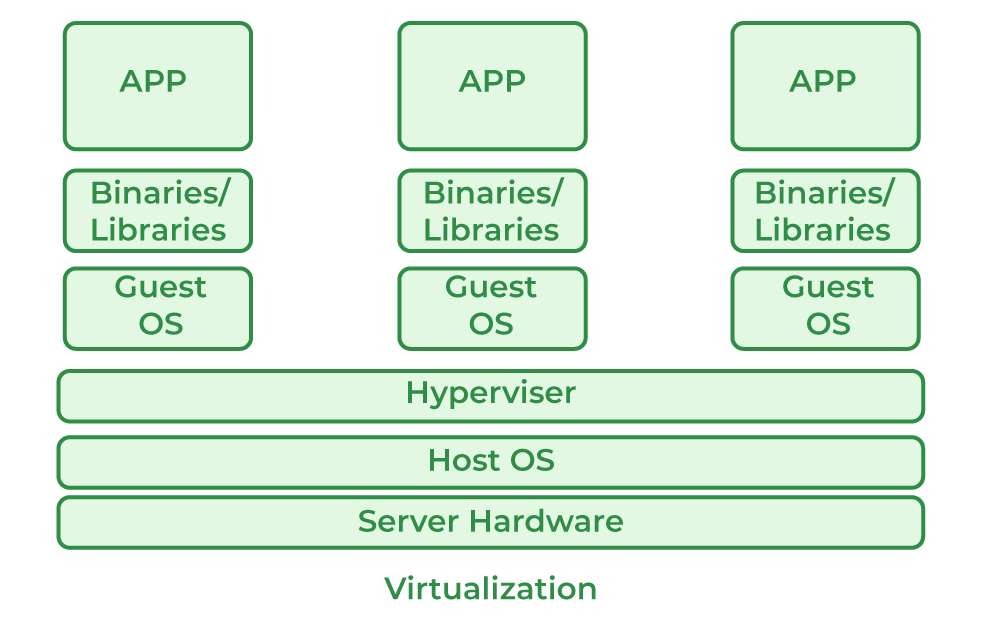
Virtualization transforms physical resources into logical ones. In a traditional setup, an operating system “owns” the hardware. In a virtualized environment, the hardware is “pooled.” The hypervisor carves out specific amounts of processing power and RAM to create a Virtual Machine. This VM perceives itself as a complete computer with its own hardware, even though it is merely a file or a set of processes running on a larger host. This abstraction allows multiple, diverse operating systems—such as Linux and Windows—to run side-by-side on the same physical processor without interference.
Diverse Types of Virtualization in the Tech Ecosystem
While many associate virtualization strictly with servers, the technology has branched out into nearly every corner of the IT stack. Each type serves a specific purpose in streamlining digital operations and enhancing security.
Server Virtualization
Server virtualization remains the most common application of the technology. By allowing multiple server instances to run on a single physical machine, organizations can move from 15% hardware utilization to over 80%. This consolidation reduces the physical footprint of data centers, lowers cooling costs, and simplifies hardware management. If a physical server requires maintenance, the virtual servers running on it can often be “live-migrated” to another host with zero downtime for the users.
Desktop Virtualization (VDI)
Virtual Desktop Infrastructure (VDI) allows a user’s desktop environment to be hosted on a central server. Instead of a powerful PC under every desk, employees use “thin clients” or even personal tablets to access their work desktop via the network. This provides significant security advantages; because the data stays in the data center rather than on the local device, the risk of data theft from a lost laptop is virtually eliminated. It also allows IT departments to deploy software updates to thousands of users simultaneously.
Network and Storage Virtualization
Software-Defined Networking (SDN) and storage virtualization abstract these physical components into logical entities. Network virtualization allows for the creation of virtual switches, firewalls, and load balancers that can be configured through software rather than manual cabling. Similarly, storage virtualization pools multiple physical storage devices into what appears to be a single, massive storage unit. This allows for more flexible capacity management and better data redundancy.
The Business and Technical Benefits of Virtualized Environments
The shift toward virtualization wasn’t just a trend; it was a necessity driven by the demand for faster, more reliable, and more secure computing. The benefits span across the entire lifecycle of software and hardware management.
Resource Optimization and Cost Efficiency
The most immediate benefit is the reduction in capital expenditure (CAPEX). Fewer physical servers mean less money spent on hardware, less space required in the data center, and a significant reduction in power and cooling costs. From a technical perspective, it eliminates “zombie servers”—machines that sit idle but still consume power. By maximizing the utility of every CPU core and every gigabyte of RAM, virtualization provides a much higher return on infrastructure investment.
Enhanced Disaster Recovery and Business Continuity
In a non-virtualized environment, recovering from a hardware failure is a nightmare. You have to find an identical piece of hardware, reinstall the OS, and restore data from backups. In a virtualized environment, a VM is essentially a collection of files. To back up a server, you simply take a “snapshot.” If the underlying hardware fails, that snapshot can be booted up on any other compatible host in minutes. This level of resilience is what allows modern digital services to maintain “five nines” (99.999%) of uptime.
Isolated Environments for Security and Testing
Virtualization provides an inherent layer of security through isolation. If one virtual machine is compromised by malware or a cyberattack, the hypervisor prevents the threat from “leaking” into the host or other VMs. This makes virtualization a gold standard for software development. Developers can create a “sandbox” environment to test new code or open suspicious files without risking the integrity of the primary network. If something goes wrong, they simply delete the VM and start over with a fresh image.
Virtualization vs. Cloud Computing: Clearing the Confusion
A common misconception in the tech world is that virtualization and cloud computing are the same thing. While they are inextricably linked, they represent different layers of the technology stack.
Is Virtualization the Same as the Cloud?
In short: no. Virtualization is the software that makes cloud computing possible. Cloud computing is a service or a business model that delivers computing resources (often virtualized) over the internet on a pay-per-use basis. You can have virtualization without a cloud (an on-premise data center running VMware), but you cannot have a modern cloud without virtualization. The cloud adds an orchestration layer on top of virtualization, providing self-service portals, automated billing, and rapid scaling.
Private vs. Public Cloud Infrastructure
The distinction becomes clearer when looking at infrastructure models. A Private Cloud uses virtualization within a company’s own firewall to give internal users cloud-like flexibility. A Public Cloud (like AWS, Azure, or Google Cloud) uses massive-scale virtualization to rent out “slices” of their hardware to thousands of different customers simultaneously. In both cases, virtualization is the engine, but the cloud is the vehicle that delivers the service to the end user.
The Future Landscape: Containers, Microservices, and Beyond
As we move further into the decade, the concept of virtualization is evolving into even more granular forms. The focus is shifting from virtualizing entire machines to virtualizing individual applications.
Virtual Machines vs. Containers
While Virtual Machines (VMs) virtualize the hardware, Containers (like Docker) virtualize the Operating System. Containers are much lighter than VMs because they don’t need to include a full guest OS; they share the host’s OS kernel. This allows them to start up in milliseconds and utilize even fewer resources. This technology has given rise to “microservices,” where a single application is broken down into dozens of small, independent containers that work together. This is the tech trend currently dominating DevOps and modern software architecture.
Edge Computing and Virtualization
As the Internet of Things (IoT) grows, we are seeing the rise of Edge Computing. This involves moving virtualized workloads away from centralized data centers and closer to the “edge” of the network—near the sensors, cameras, and devices generating the data. Virtualization allows these edge devices to run complex AI models or data processing tasks locally, reducing latency and bandwidth usage.
In conclusion, virtualized computing is no longer an optional luxury for the tech-savvy; it is the fundamental framework of the digital age. By breaking the chains between software and hardware, it has enabled an era of unprecedented efficiency, security, and innovation. Whether it is through traditional VMs or the latest containerized microservices, virtualization remains the most critical tool in a technologist’s arsenal for building a scalable and resilient future.
aViewFromTheCave is a participant in the Amazon Services LLC Associates Program, an affiliate advertising program designed to provide a means for sites to earn advertising fees by advertising and linking to Amazon.com. Amazon, the Amazon logo, AmazonSupply, and the AmazonSupply logo are trademarks of Amazon.com, Inc. or its affiliates. As an Amazon Associate we earn affiliate commissions from qualifying purchases.