
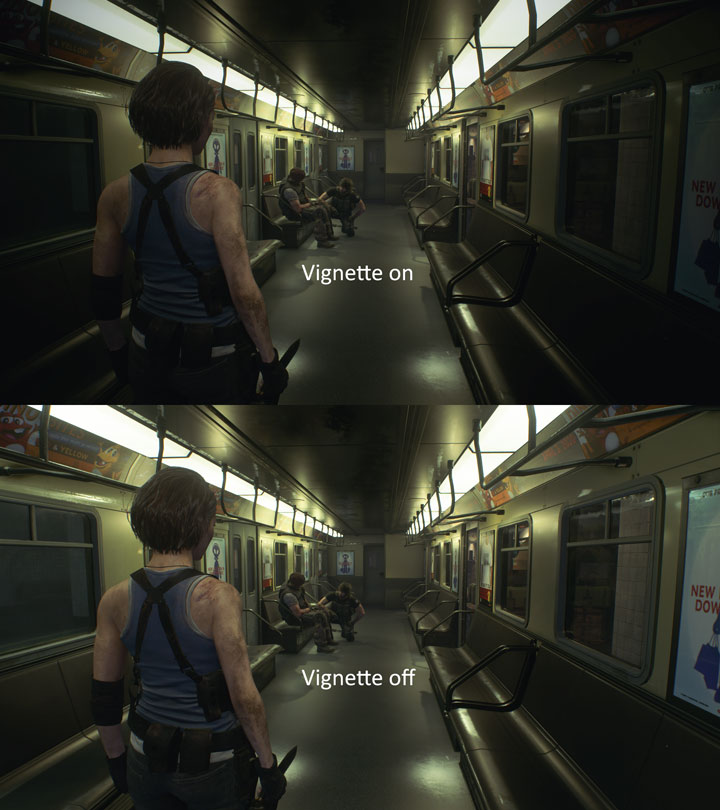
In the world of game development and graphical rendering, the term “vignette” refers to a post-processing visual effect characterized by a reduction in an image’s brightness or saturation toward the periphery compared to the center. While the term originated in photography and cinematography—referring to the physical darkening of corners caused by lens limitations—it has become a staple of digital game engine pipelines. When implemented correctly, a vignette serves as a subtle yet powerful tool for directing player attention, establishing atmosphere, and enhancing the overall immersion of a digital environment.
The Technical Mechanics of Vignetting
At its core, a vignette is a screen-space shader effect. Unlike geometry-based rendering, which calculates the position of polygons in 3D space, post-processing effects are applied after the scene has been rendered to a frame buffer. The vignette shader maps a gradient mask over the final image, typically using a radial or elliptical falloff pattern.
How the Shader Operates
The shader functions by calculating the distance of each pixel from the center of the screen. As the distance increases toward the edges, the shader applies a mathematical function—often a power or smooth-step function—to decrease the alpha (transparency) or RGB values of the pixel. The developer controls the intensity, the radius (how far toward the center the darkening begins), and the softness (how gradual the transition is). By adjusting these variables, developers can create anything from a barely perceptible darkening that mimics high-end camera optics to a heavy “tunnel vision” effect that signals to the player that their character is injured or disoriented.
Performance Considerations in Game Engines
Because vignette is a post-processing effect, it is relatively inexpensive in terms of GPU overhead. In modern game engines like Unreal Engine or Unity, the vignette is often bundled into a “Color Grading” or “Post-Processing Volume” stack. Since it only requires a single pass over the final rendered frame, it rarely impacts the frame rate significantly. However, when layering multiple post-processing effects—such as bloom, motion blur, depth of field, and film grain—the cumulative cost of these screen-space operations must be monitored, especially for target platforms with lower hardware specifications like mobile devices or older consoles.
Aesthetic and Narrative Utility
Beyond the technical implementation, the vignette is a narrative device. It acts as a visual “framer,” isolating the action within the center of the screen and removing the distractions of the far periphery. This is particularly useful in games with highly detailed environments where the player might otherwise be overwhelmed by clutter.
Focusing the Player’s Gaze
Human eyes naturally gravitate toward the brightest, most contrasted areas of a scene. By darkening the corners, a vignette creates a subtle, subconscious focus toward the center of the screen. This is a common technique in open-world titles or horror games where the player needs to focus on specific environmental clues or crosshairs. It reduces the visual “noise” at the screen’s edges, effectively narrowing the player’s field of vision to the primary gameplay area.
Atmospheric Storytelling and Immersion
Vignetting is frequently used to evoke specific moods. In horror games, a heavy, high-contrast vignette contributes to a sense of claustrophobia, making the player feel as though they are peering through a cramped peephole. Conversely, in adventure or role-playing games, a very soft, light vignette can mimic the look of traditional film photography, providing a “cinematic” quality that makes the game feel more like a movie. When paired with color grading (LUTs) and film grain, the vignette helps bridge the gap between the rigid, sterile look of raw 3D rendering and the softer, organic aesthetic of classic cinema.

Functional Gameplay Feedback
Vignetting is not merely a stylistic choice; it is often a critical piece of the user interface (UI) and user experience (UX) design. Game designers use the effect to communicate information to the player without cluttering the screen with icons, health bars, or text pop-ups.
Dynamic Health and Status Indicators
The most common functional use of the vignette is as a dynamic status indicator. When a player’s health drops below a certain threshold, many games will trigger a “blood vignette”—a red-tinted, pulsating darkening of the screen edges. This provides immediate, intuitive feedback regarding the character’s physical state. Because this effect occupies the peripheral vision, it stays in the player’s consciousness even while they are focusing on threats in the center of the screen.
Signalizing Environmental Hazards
Beyond health, vignettes can be used to warn players of specific environmental conditions. For instance, in a stealth game, a specific vignette hue might indicate that the player is currently hidden in shadows or, conversely, that they are being observed by an enemy. In a sci-fi game, a digital-looking vignette might appear when the player is inside an electromagnetic field or suffering from technical “corruption.” By utilizing different colors and pulse patterns, the vignette acts as a non-diegetic HUD element that feels integrated into the game world, rather than pasted on top of it.
Best Practices and Common Pitfalls
While the vignette is a versatile tool, its implementation requires restraint. Because it directly alters the player’s view of the game world, overusing it can lead to visual fatigue and frustration.
The Problem of Over-Vignetting
The most frequent mistake in game design is applying a “one-size-fits-all” vignette that is too strong. When a vignette is too dark or has an overly sharp transition, it makes the game feel as though the player is looking through a soda straw. This can be nauseating, particularly in high-motion games, as it restricts the peripheral vision that players rely on for spatial awareness. A good rule of thumb is that the player should not consciously notice the vignette under normal gameplay conditions. It should be a silent contributor to the aesthetic, not a competitor for the player’s attention.
Accessibility and Options
Recognizing that some players find vignette effects distracting or even motion-sickness inducing, modern accessibility standards dictate that this effect should be toggleable. Many AAA titles now include a “Vignette Intensity” slider in the video or accessibility settings. Allowing the player to turn the effect off entirely or reduce its strength ensures that the visual design does not interfere with the game’s playability. For developers, providing this option is a best practice that demonstrates a commitment to inclusive design.

Integration with Other Post-Processing
Finally, the vignette must be balanced against the rest of the post-processing pipeline. If a game has a strong chromatic aberration effect (where colors separate at the edges of the screen) and a heavy vignette, the edges of the image can become muddy and unpleasant to look at. Testing the vignette in various lighting scenarios—both in dark interior scenes and bright exterior environments—is essential to ensure the effect remains subtle. In high-contrast, bright scenes, a dark vignette can feel jarring, so some developers choose to link the vignette’s intensity to the ambient light levels of the scene.
Ultimately, the vignette is a testament to how small, seemingly minor technical tweaks can have a massive impact on the feel of a game. By understanding the balance between its narrative, aesthetic, and functional roles, developers can use this effect to deepen immersion and provide essential feedback, ensuring that the player’s focus remains exactly where it needs to be.
aViewFromTheCave is a participant in the Amazon Services LLC Associates Program, an affiliate advertising program designed to provide a means for sites to earn advertising fees by advertising and linking to Amazon.com. Amazon, the Amazon logo, AmazonSupply, and the AmazonSupply logo are trademarks of Amazon.com, Inc. or its affiliates. As an Amazon Associate we earn affiliate commissions from qualifying purchases.