
In the vast ecosystem of digital technology, where software interfaces with hardware to perform countless tasks, certain foundational standards often operate unseen, yet are critical to our daily operations. One such standard, particularly prevalent in the realm of document imaging, is TWAIN. Far from being a mere acronym, TWAIN represents a robust, enduring bridge between software applications and image acquisition devices, primarily scanners and digital cameras. Understanding TWAIN is essential for anyone dealing with digital document management, enterprise content solutions, or even advanced personal scanning setups.
Decoding TWAIN: A Standard for Imaging Device Communication
The name “TWAIN” itself is an intriguing tale, an acronym that humorously stands for “Technology Without An Interesting Name.” Originating from a line in Rudyard Kipling’s “The Ballad of East and West” – “Oh, East is East, and West is West, and never the twain shall meet” – it was chosen by the founding members to signify the challenge of connecting scanners and computers seamlessly. Before TWAIN’s inception, each scanner manufacturer often required its own proprietary software and drivers, leading to significant compatibility headaches and limiting user choices.
The Genesis of a Standard
TWAIN was established in 1992 by a consortium of industry leaders including Aldus (now Adobe), Eastman Kodak, Hewlett-Packard, and Logitech. Their collective goal was to create a universal interface that would allow any TWAIN-compliant software application to communicate with any TWAIN-compliant imaging device. This initiative sought to liberate users from vendor lock-in and foster a more open and integrated environment for document capture and digital imaging.
Bridging Software and Hardware
At its core, TWAIN is an application programming interface (API) and a communication protocol. It defines a standard set of functions, messages, and data structures that applications use to control imaging devices and receive data from them. This standardization means that a developer writing an imaging application doesn’t need to write custom code for every scanner model; they just need to implement the TWAIN standard. Similarly, a scanner manufacturer only needs to write a single TWAIN-compliant driver for their device, ensuring it works with a multitude of software applications. This elegant separation of concerns forms the backbone of its utility.
The Mechanics Behind the Scan: How TWAIN Operates
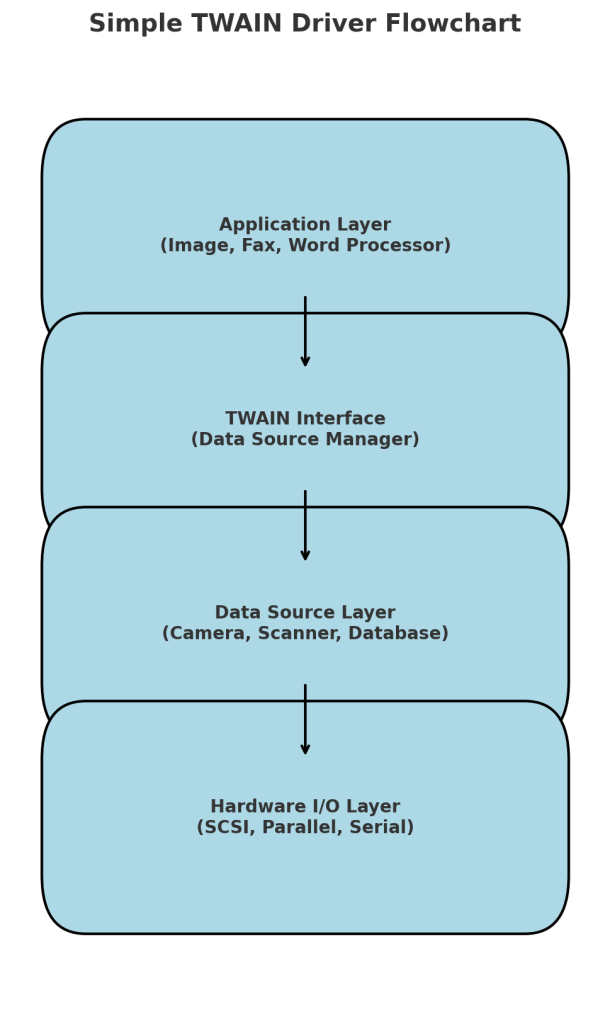
To truly appreciate TWAIN’s impact, it’s necessary to understand the underlying mechanisms that facilitate its seamless interaction between software and hardware. The process involves several key components working in concert, orchestrated by a central manager.
The Role of the Data Source Manager (DSM)
At the heart of the TWAIN architecture is the Data Source Manager (DSM). This piece of software acts as an intermediary, facilitating communication between the application (known as the “Application”) and the device driver (known as the “Data Source”). When an application wants to acquire an image, it first communicates with the DSM. The DSM then presents the user with a list of available TWAIN-compliant imaging devices installed on the system. Once a device is selected, the DSM loads the corresponding Data Source (driver) and routes commands and data between the Application and the Data Source. This central manager ensures that applications don’t need direct knowledge of the specific hardware, adhering to the principle of abstraction.
The TWAIN Driver: The Device’s Voice
The Data Source, or more commonly, the TWAIN driver, is the software component supplied by the imaging device manufacturer. This driver is specifically tailored for a particular scanner or camera model. Its primary responsibility is to translate the generic TWAIN commands from the DSM into specific instructions that the hardware can understand and execute. Conversely, it translates the raw image data and status information from the device back into the standardized TWAIN format, which is then passed through the DSM to the Application. This driver also typically handles the device’s user interface, allowing users to configure scanning parameters such as resolution, color depth, brightness, contrast, and scan area directly from within the application that initiated the scan.
The User Experience Flow
Consider a common scenario: a user opens a document management application and clicks a “Scan Document” button.
- Application Initiates: The application sends a request to the TWAIN DSM.
- Device Selection: The DSM presents a dialog showing all installed TWAIN devices. The user selects their scanner.
- Driver Loading: The DSM loads the chosen scanner’s TWAIN driver (Data Source).
- User Interface: The TWAIN driver displays its native user interface, allowing the user to configure scan settings (e.g., color, DPI, paper size, simplex/duplex).
- Image Acquisition: The user initiates the scan from the driver’s interface. The driver commands the scanner hardware to capture the image.
- Data Transfer: Raw image data is sent from the scanner to the TWAIN driver. The driver then processes this data (e.g., applies any selected filters) and transfers it through the DSM back to the original application.
- Application Processing: The application receives the image data and can then display it, save it, or process it further.
This seamless flow, orchestrated by TWAIN, demonstrates its efficacy in bridging diverse hardware and software.
Why TWAIN Matters: Key Benefits and Capabilities
TWAIN’s longevity and continued relevance are testaments to its significant advantages in the imaging landscape. It has standardized capabilities that were once complex and proprietary, bringing broad compatibility and advanced features to a wide range of users and industries.
Device Agnosticism and Application Integration
One of TWAIN’s most profound benefits is its device agnosticism. An application written to the TWAIN standard can theoretically work with any scanner that has a TWAIN driver. This flexibility means users aren’t tied to specific hardware brands for their software solutions, and vice versa. For businesses, this translates to greater interoperability, easier upgrades, and reduced costs associated with software development and hardware procurement. Imaging software developers benefit immensely, as they can focus on application features rather than spending resources on writing drivers for countless devices.
Advanced Imaging Features
TWAIN supports a rich set of features that go beyond basic image capture. These include:
- Duplex Scanning: Capturing both sides of a document in a single pass.
- Automatic Document Feeder (ADF) Support: Handling multiple pages without manual intervention.
- Image Enhancement: Built-in capabilities for deskewing, autocropping, blank page detection, and color dropout directly at the driver level.
- Barcode and Patch Code Recognition: Often integrated into professional TWAIN drivers to automate document indexing.
- Various Data Transfer Modes: TWAIN supports different methods for transferring image data, such as Native (pixel data directly in memory), Buffered Memory (image data transferred in blocks), and File (saving directly to a specified file). These options allow for optimization based on application needs and system resources.
Cross-Platform Versatility
While most commonly associated with Windows environments, TWAIN is designed to be platform-independent. The TWAIN Working Group provides specifications for various operating systems, though its adoption has been most pervasive on Windows and macOS. This cross-platform potential further underscores its commitment to universal connectivity, allowing developers to target a broader user base with a unified imaging solution.
TWAIN’s Enduring Legacy in Professional Environments
Despite the emergence of newer imaging standards, TWAIN continues to hold a significant and often indispensable role, particularly in professional and enterprise settings where robust document capture is paramount.
Coexistence with Newer Standards (WIA, SANE)
In the Windows ecosystem, Microsoft introduced Windows Image Acquisition (WIA) as an alternative to TWAIN. WIA offers a simpler programming interface, often preferred for consumer-grade applications and basic scanning tasks. Similarly, on Linux and Unix-like systems, SANE (Scanner Access Now Easy) provides a universal API for accessing scanning devices. While WIA and SANE serve their respective purposes, TWAIN often remains the standard of choice for high-volume, professional-grade scanning applications. Its comprehensive feature set, fine-grained control over scanner hardware, and established presence in document management systems often outweigh the simplicity offered by its counterparts for complex workflows. Many professional scanners and multi-function devices will provide both a TWAIN and a WIA driver, allowing users to choose based on their application’s requirements.
Niche Applications and Specialized Workflows
TWAIN truly shines in environments demanding precise control and advanced features. This includes:
- Document Management Systems (DMS) and Enterprise Content Management (ECM): TWAIN is the backbone for integrating high-speed production scanners directly into these systems, allowing for bulk capture, indexing, and archival of documents.
- Medical Imaging: In healthcare, TWAIN is widely used for scanning patient records, insurance cards, and other critical documents into Electronic Health Record (EHR) systems, often requiring high fidelity and specific regulatory compliance features.
- Financial Services: Banks and financial institutions use TWAIN for processing checks, loan applications, and other sensitive paperwork, leveraging its reliability and robust feature set for compliance and data integrity.
- Legal Departments: For digitizing legal documents, contracts, and case files, TWAIN’s ability to handle large volumes and ensure consistent image quality is invaluable.
In these specialized workflows, the granular control over scanner settings (e.g., bit depth, gamma correction, specific error handling) that TWAIN drivers provide is often crucial and superior to simpler interfaces.
Optimizing Imaging Workflows with TWAIN
Maximizing the efficiency and reliability of TWAIN-based imaging systems involves understanding best practices for its deployment and integration. This ensures that the powerful capabilities of TWAIN are fully leveraged for optimal performance.
Best Practices for Driver Management
Proper management of TWAIN drivers is fundamental to a stable imaging environment. Always use the latest TWAIN driver provided by the scanner manufacturer, as these often contain bug fixes, performance improvements, and support for new operating system features. Ensure that drivers are correctly installed and updated, especially after operating system upgrades. In enterprise settings, centralized driver deployment and management can prevent compatibility issues and streamline maintenance across multiple workstations. Verifying driver compatibility with the specific version of the TWAIN Data Source Manager (DSM) and the application itself is also critical to avoid unexpected behavior.
Understanding TWAIN Data Transfer Modes
As mentioned, TWAIN supports several data transfer modes, and choosing the appropriate one can significantly impact performance.
- Native Transfer: This is generally the fastest for smaller images but requires the application to allocate a buffer large enough for the entire image. This can be memory-intensive for very large documents or high-resolution images.
- Buffered Memory Transfer: Transfers image data in smaller blocks, which is more memory-efficient and suitable for larger images, albeit potentially slightly slower than Native. Most modern applications and drivers use this mode by default.
- File Transfer: The driver saves the image directly to a specified file (e.g., TIFF, JPEG) on the disk, and then the application opens the file. This mode is useful for applications that prefer to work with file paths rather than raw image data and can be beneficial when memory is constrained. Understanding these modes allows developers and IT professionals to configure their systems for maximum efficiency based on the volume, size, and nature of the documents being scanned.

Integrating TWAIN into Custom Software
For developers building custom imaging applications, leveraging TWAIN provides a powerful, standardized pathway to hardware interaction. Modern SDKs (Software Development Kits) and libraries exist that abstract much of the complexity of the TWAIN specification, making integration more straightforward. These tools often provide higher-level functions for common scanning tasks while still allowing access to the granular control that TWAIN offers. When integrating, it’s crucial to handle error conditions gracefully, manage memory effectively, and ensure that the application correctly initializes, negotiates capabilities with the TWAIN driver, and closes the connection properly to prevent resource leaks. Robust integration ensures a seamless and reliable scanning experience within the custom application, extending its functionality and utility.
In conclusion, TWAIN, though often operating behind the scenes, remains a cornerstone of digital imaging technology. Its pioneering vision for hardware-software interoperability has not only endured but continues to be a critical component in complex document management and specialized imaging workflows across various industries. Its continued evolution and robust feature set ensure its relevance for the foreseeable future, making it an essential concept for anyone navigating the technical intricacies of digital document acquisition.
aViewFromTheCave is a participant in the Amazon Services LLC Associates Program, an affiliate advertising program designed to provide a means for sites to earn advertising fees by advertising and linking to Amazon.com. Amazon, the Amazon logo, AmazonSupply, and the AmazonSupply logo are trademarks of Amazon.com, Inc. or its affiliates. As an Amazon Associate we earn affiliate commissions from qualifying purchases.