
In the rapidly evolving landscape of social media, Instagram remains a titan of visual communication. However, for developers, digital creators, and tech enthusiasts, the platform is more than just a gallery; it is a complex software environment with specific technical requirements that shift as the app’s UI/UX evolves. Keeping up with the “new size” of an Instagram post is not merely about aesthetic preference—it is about understanding the software’s compression algorithms, aspect ratio constraints, and display logic to ensure that high-fidelity content remains crisp across a multitude of device resolutions.

As Instagram continues its pivot toward a video-first, full-screen experience, the technical specifications for static posts, Reels, and Stories have undergone significant refinement. This guide delves into the precise dimensions, bitrates, and file formats required to master the platform in 2024 and beyond.
The Standardized Dimensions: Understanding Modern Aspect Ratios
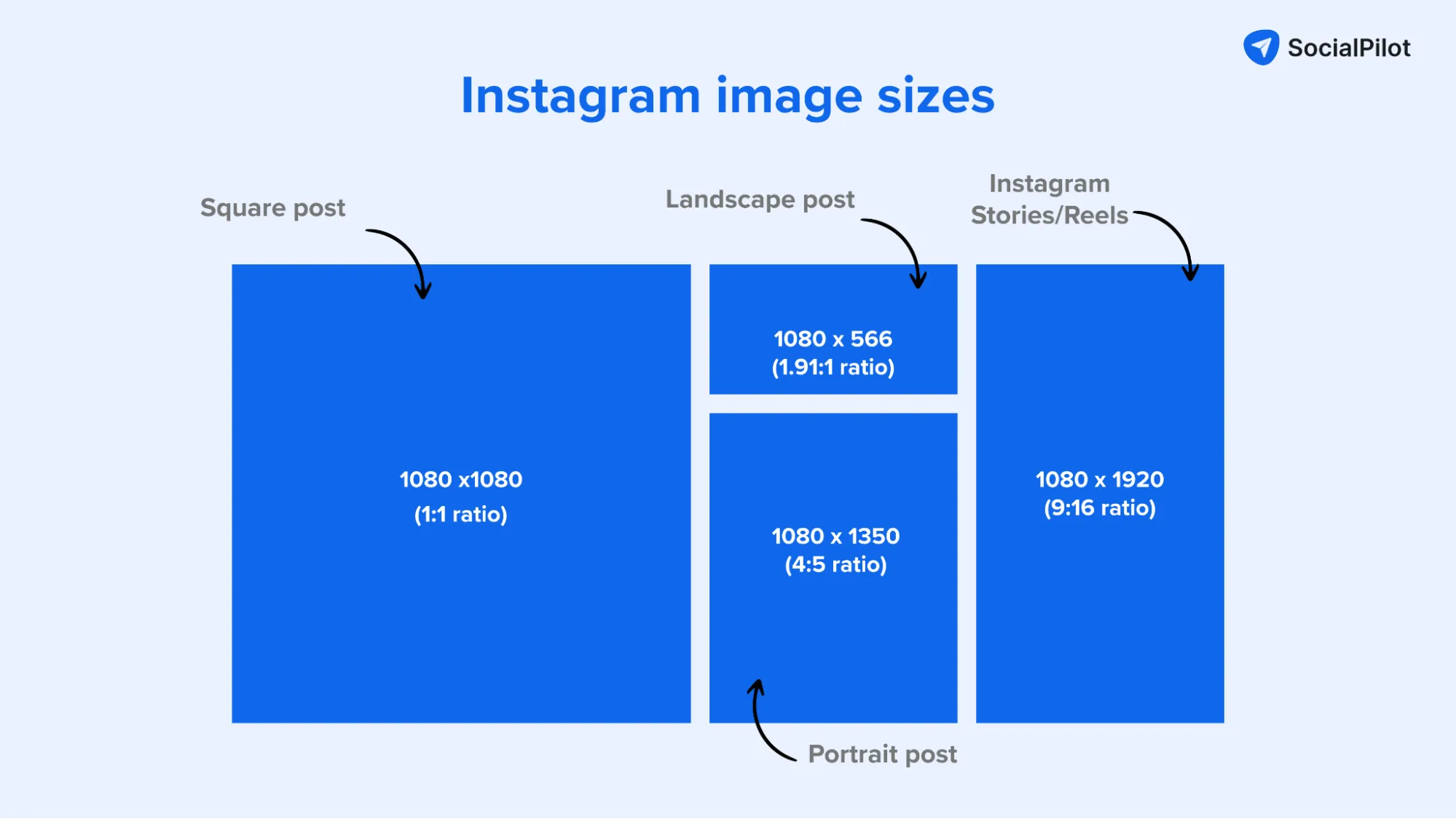
The architecture of the Instagram feed is built upon three primary aspect ratios. While the platform was originally built on the rigid 1:1 square format, the software has expanded to accommodate more vertical real estate, reflecting the industry-wide move toward “mobile-first” vertical consumption.
The 4:5 Portrait: The New Gold Standard
Technically speaking, the 4:5 aspect ratio (1080 x 1350 pixels) is the most efficient format for the Instagram feed. From a software display perspective, this format occupies the maximum amount of vertical screen real estate before the UI begins to overlay critical content. When a user scrolls, a 4:5 post fills more of the smartphone’s viewport compared to a square post, leading to higher engagement metrics and better visibility of fine details.
The 1:1 Square: Legacy Compatibility
The classic 1080 x 1080 pixel square remains the default for the profile grid. Even if you upload a portrait or landscape photo, Instagram’s software will automatically generate a 1:1 thumbnail for your profile. For developers and automated posting tools, maintaining a 1080px width is the constant variable across almost all static post types.
The 1.91:1 Landscape: Cinematic Constraints
Landscape posts (1080 x 566 pixels) are increasingly rare but still supported. However, they are technically disadvantageous in the current UI. Because Instagram’s interface is designed for vertical scrolling, landscape images leave significant “dead space” above and below the post, often resulting in the algorithm deprioritizing the content due to lower dwell times.
The Technical Requirements for Optimized Media Uploads
Uploading a file that is too large or uses an unsupported codec triggers Instagram’s aggressive server-side compression. To maintain high resolution, creators must align their exports with the platform’s backend specifications.
Resolution and File Size Limits
While modern smartphone cameras can capture 48MP images and 8K video, Instagram’s CDN (Content Delivery Network) does not support these resolutions.
- Maximum Width: 1080 pixels. If you upload an image at 4000 pixels wide, the app’s software will downscale it, often introducing aliasing and artifacts.
- Minimum Width: 320 pixels. Anything lower will be upscaled, resulting in significant blurring.
- File Types: For static images, JPEG and PNG are standard, though JPEG is preferred for its balance of quality and compression. For video, the H.264 MP4 format is the requirement.
Video Bitrates and Frame Rates for Reels
Instagram Reels have become the cornerstone of the platform’s “full-screen” push. The technical “new size” for Reels is 1080 x 1920 pixels (9:16 aspect ratio). However, the technical execution goes deeper than dimensions:
- Frame Rate: 30 FPS (frames per second) is the standard. While 60 FPS is supported, it can sometimes lead to playback stuttering on older hardware.
- Bitrate: Aim for a bitrate of 3,500 to 5,000 kbps. Exceeding this often causes the Instagram server to re-encode the video harshly, leaving the final product looking worse than a lower-bitrate original.
- Codec: H.264 is mandatory. High-Efficiency Video Coding (HEVC/H.265) is gaining support but H.264 remains the most stable for cross-device compatibility.
The “High-Quality Upload” Toggle
A common technical hurdle is the default data-saving setting within the Instagram app. Users must navigate to Settings and Privacy > Media Quality and ensure “Upload at highest quality” is toggled on. Without this, the software will compress uploads based on current network conditions (3G/4G/5G), often resulting in a 720p cap regardless of the original file’s dimensions.
The Evolution of Instagram’s UI and Display Algorithms
The shift in “post size” is not an arbitrary design choice; it is a response to how the underlying AI recommendation engine and UI interact. Instagram is moving toward a “unified video player” and an integrated feed that blurs the lines between a static post and a Reel.
The 9:16 Full-Screen Feed Integration
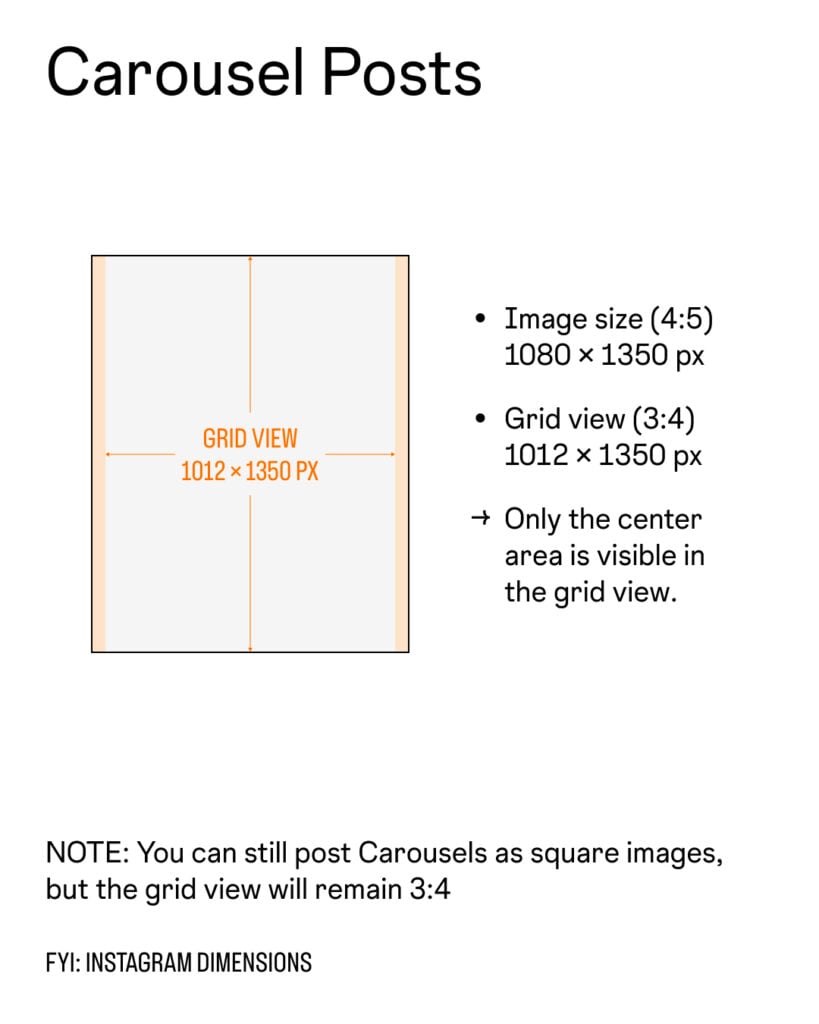
Testing has shown that Instagram is moving toward an “Ultra-Tall” feed where every post, including static images, may eventually be displayed in a 9:16 format. Currently, if you upload a 9:16 image as a standard post, the software will often crop it to 4:5 in the main feed. Understanding this “Safe Zone” is critical. Technical creators must keep essential information (text, faces) within the center 4:5 area of a 9:16 canvas to ensure compatibility across all viewing modes.
Impact of Display PPI on Content Sharpness
Modern OLED and Retina displays have incredibly high PPI (pixels per inch). When Instagram displays a 1080px image on a device that effectively has a 1440p or 4K screen, the software must perform “interpolation.” To combat the softness that occurs during this process, technical editors often apply a slight “Unsharp Mask” in post-processing—typically a radius of 0.5 to 1.0 pixels—to ensure the edges remain crisp when rendered by the app’s mobile browser or native code.
Tooling and Software for Precise Content Scaling
To achieve the “perfect” size, relying on the in-app camera is often insufficient. Professional-grade software allows for the precision required to bypass the worst of Instagram’s automated processing.
Professional Editing and Exporting
For those using Adobe Creative Cloud or DaVinci Resolve, export presets are the key to technical consistency.
- Adobe Lightroom: When exporting for Instagram, set the “Long Edge” to 1080 pixels and the resolution to 72 pixels per inch (PPI). The “Quality” slider should be set between 76% and 85%; interestingly, setting it to 100% often creates a file size so large that Instagram’s compression engine triggers a more aggressive (and uglier) down-sampling.
- Canva and Web-Based Tools: These tools are excellent for maintaining the 1080 x 1350 (4:5) ratio. They automatically handle the metadata stripping that can sometimes cause orientation bugs in the Instagram upload pipeline.
Mobile-First Optimization Apps
Apps like “InShot” or “CapCut” have become technical staples because they are optimized for the mobile GPU. They allow users to visualize the “Safe Zones”—areas where the Instagram UI elements (like the ‘Like’ button, description, and music attribution) overlap the content. Technically, the bottom 20% and the top 10% of a 9:16 video are “dead zones” where text should never be placed, as the app’s software overlays will render it unreadable.
Future Outlook: The Convergence of Formats
As we look at the trajectory of Instagram’s software updates, the “size” of a post is trending toward total verticality. The technical distinction between a “Photo,” a “Story,” and a “Reel” is evaporating. We are entering an era of “Fluid Content,” where a single asset must be able to scale across different UI views—from the square grid to the 4:5 feed and the 9:16 full-screen immersive view.
For those operating in the tech and digital space, the takeaway is clear: the 1080-pixel width remains the anchor, but the vertical height is the variable to watch. By adhering to the 4:5 ratio for engagement and 9:16 for immersion, and by respecting the H.264 bitrate limits, you ensure that your technical execution matches your creative vision. In the world of social media software, precision in pixels is the difference between a professional digital presence and a blurred, compressed afterthought.
aViewFromTheCave is a participant in the Amazon Services LLC Associates Program, an affiliate advertising program designed to provide a means for sites to earn advertising fees by advertising and linking to Amazon.com. Amazon, the Amazon logo, AmazonSupply, and the AmazonSupply logo are trademarks of Amazon.com, Inc. or its affiliates. As an Amazon Associate we earn affiliate commissions from qualifying purchases.